
We built a Google Workspace demo for Rabbi Eliezer Kashtiel that qualifies lesson requests, checks availability, requires human approval, writes an event to Calendar, and only issues a payment request after the lesson is marked completed. It is built for instructors who need flexible pricing and pay-after-service billing without creating legal tax documents during testing. This post shows the working demo and the exact path to production.
Lesson scheduling and pay-after-service automation is: a workflow that captures a booking request, confirms time and details, records the lesson, then triggers a compliant payment request only when the service is complete.
The problem it solves
Manual scheduling and billing for one-to-one lessons forces context switching: reading form replies, checking a calendar, emailing confirmations, updating a sheet, and remembering to ask for payment at the right time. Missed follow-ups create awkward conversations. Early tests against a live invoicing system can also create real tax documents, which is unacceptable when prices vary or many lessons are free.
| Process | Manual: what you do now | Automated: what the system does |
|---|---|---|
| Intake | Read form replies and forward emails | Captures form data to a Sheet and normalizes fields |
| Availability | Open Calendar, scan times, reply back and forth | Checks a dedicated Calendar and proposes only valid slots |
| Approval | Decide yes or no in email threads | One-click approve or decline from a review tab |
| Record | Create events and update Sheets by hand | Two-way sync: event created and row state updated |
| Billing | Remember to invoice after the lesson | Adds a queued payment when marked completed and sends the request |
| Safety | Risk of creating real tax docs in tests | Uses a payment sandbox and test keys until go-live |
How the automation works
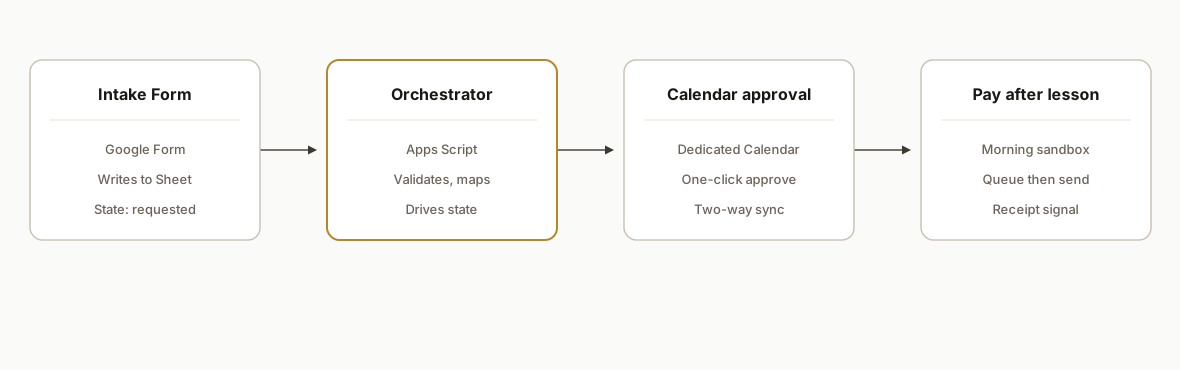
The system lives inside Google Workspace: a Google Form feeds a Sheet, an Apps Script orchestrates state and scheduling, Calendar holds the canonical schedule, and a payment connector talks to Morning in a sandbox first, then production after sign-off. The rule: no payment attempt until a human marks the lesson as completed.
- Intake Form: Parents or students submit a simple request. We collect name, contact, preferred times, language, and any special notes.
- Orchestrator (Apps Script): Validates the request, checks the dedicated Calendar for conflicts, and writes a normalized row to the Sheet with a state machine: requested, approved, scheduled, completed, billed.
- Human approval: An assistant approves requests inside the Sheet via a custom menu. Approval creates the Calendar event and sends a confirmation email.
- Two-way sync: If a time shifts on the Calendar, the row updates. If the row is changed to rescheduled, the Calendar event is updated.
- Pay-after-service: When a lesson is marked completed, the script enqueues a payment request with Morning. In demo it uses a sandbox configuration so no legal tax documents are created. In production it flips to live credentials after a dry run.
Step-by-step: how to build it
1) Normalize intake into a single Sheet
Create a Google Form and bind an Apps Script project to the response Sheet. Use a simple schema: submitted_at, student_name, email, phone, preferred_time, language, notes, state, calendar_event_id, price.
// Code.gs
function onFormSubmit(e) {
  const sheet = SpreadsheetApp.getActive().getSheetByName('Requests');
  const row = e.range.getRow();
  const values = sheet.getRange(row, 1, 1, sheet.getLastColumn()).getValues()[0];
  const record = normalize(values); // sanitize strings, parse dates
  sheet.getRange(row, 1, 1, sheet.getLastColumn()).setValues([record]);
  sheet.getRange(row, getCol('state')).setValue('requested');
}

function normalize(values) {
  // Keep this deterministic: trim, standardize locale, avoid free-text booleans
  return values.map(v => typeof v === 'string' ? v.trim() : v);
}

function getCol(name) {
  const map = PropertiesService.getScriptProperties();
  return Number(map.getProperty(`COL_${name.toUpperCase()}`));
}
Key gotcha: never let column indices drift silently. Store header to index mappings in Script Properties and update them only when you intentionally change the sheet.
2) Check availability against a dedicated Calendar
Use a single Google Calendar dedicated to lessons. Never scan a personal calendar. Conflicts become deterministic and testable.
function findAvailability(preferredStart, durationMin) {
  const cal = CalendarApp.getCalendarById(getConfig().LESSON_CALENDAR_ID);
  const start = new Date(preferredStart);
  const end = new Date(start.getTime() + durationMin * 60000);
  const events = cal.getEvents(start, end);
  return events.length === 0; // free if no conflicts
}

function getConfig() {
  return JSON.parse(PropertiesService.getScriptProperties().getProperty('CONFIG_JSON'));
}
Key gotcha: store a dedicated calendar ID in config. Do not infer from the current user. Many assistants and instructors collaborate here.
3) Build an approval action in a custom menu
Create a custom menu so an assistant can click Approve or Decline on the selected row. Approval creates an event and sets state to scheduled.
function onOpen() {
  SpreadsheetApp.getUi()
    .createMenu('Lessons')
    .addItem('Approve selected', 'approveSelected')
    .addItem('Decline selected', 'declineSelected')
    .addToUi();
}

function approveSelected() {
  const sheet = SpreadsheetApp.getActive().getSheetByName('Requests');
  const row = sheet.getActiveRange().getRow();
  const start = sheet.getRange(row, getCol('preferred_time')).getValue();
  const duration = 60; // minutes
  if (!findAvailability(start, duration)) throw new Error('Slot not available');

  const cal = CalendarApp.getCalendarById(getConfig().LESSON_CALENDAR_ID);
  const ev = cal.createEvent('Lesson', new Date(start), new Date(new Date(start).getTime() + duration*60000), {
    description: sheet.getRange(row, getCol('notes')).getValue(),
    guests: sheet.getRange(row, getCol('email')).getValue(),
    sendInvites: true
  });
  sheet.getRange(row, getCol('calendar_event_id')).setValue(ev.getId());
  sheet.getRange(row, getCol('state')).setValue('scheduled');
}
Key gotcha: use event IDs, not titles, for sync. Titles change, IDs do not.
4) Keep Calendar and Sheet in two-way sync
Listen for edits to key columns. When time or status changes in the Sheet, update the Calendar event. When the Calendar event moves, a time-based job reconciles rows nightly.
function onEdit(e) {
  const sheet = e.range.getSheet();
  if (sheet.getName() !== 'Requests') return;
  const row = e.range.getRow();
  const col = e.range.getColumn();
  if (col === getCol('preferred_time')) updateEventFromRow(row);
  if (col === getCol('state') && e.value === 'completed') queuePayment(row);
}

function updateEventFromRow(row) {
  const evId = getCell(row, 'calendar_event_id');
  if (!evId) return;
  const cal = CalendarApp.getCalendarById(getConfig().LESSON_CALENDAR_ID);
  const ev = cal.getEventById(evId);
  const start = getCell(row, 'preferred_time');
  const duration = 60;
  ev.setTime(new Date(start), new Date(new Date(start).getTime() + duration*60000));
}

function getCell(row, name) {
  const s = SpreadsheetApp.getActive().getSheetByName('Requests');
  return s.getRange(row, getCol(name)).getValue();
}
Key gotcha: add a unique constraint in code: one row per event ID. Never let two rows point to the same Calendar event.
5) Enqueue and send a pay-after-service request
Marry a clean state change to billing. When the assistant marks a row completed, the system enqueues a payment request. Demo runs against a sandbox. Production flips to live credentials after sign-off.
function queuePayment(row) {
  const s = SpreadsheetApp.getActive().getSheetByName('Requests');
  const price = Number(s.getRange(row, getCol('price')).getValue() || 0);
  if (price <= 0) return; // many lessons are free
  const q = SpreadsheetApp.getActive().getSheetByName('PaymentQueue');
  q.appendRow([new Date(), getCell(row, 'student_name'), getCell(row, 'email'), price, getCell(row, 'calendar_event_id'), 'queued']);
}

function processPaymentQueue() {
  const q = SpreadsheetApp.getActive().getSheetByName('PaymentQueue');
  const rows = q.getRange(2,1,q.getLastRow()-1,6).getValues();
  rows.forEach((r, idx) => {
    if (r[5] === 'queued') {
      const ok = sendPaymentRequest({name:r[1], email:r[2], amount:r[3]});
      q.getRange(idx+2, 6).setValue(ok ? 'sent' : 'error');
    }
  });
}

function sendPaymentRequest({name, email, amount}) {
  const cfg = getConfig();
  const url = cfg.PAYMENT_API_URL; // sandbox in demo, live in prod
  const body = { customer: { name, email }, amount_cents: Math.round(amount*100) };
  const resp = UrlFetchApp.fetch(url, { method: 'post', contentType: 'application/json', payload: JSON.stringify(body), headers: { Authorization: `Bearer ${cfg.PAYMENT_API_KEY}` }});
  return resp.getResponseCode() >= 200 && resp.getResponseCode() < 300;
}
Key gotcha: do not hit live payment systems in development. Use a sandbox configuration until lesson completion and pricing rules are validated.
6) Wire the receipt signal and Hebrew text handling
Confirm payment using a webhook or a scheduled poll. For Hebrew receipts and names viewed on Windows consoles, force UTF-8 when logging to avoid mojibake during tests.
function handlePaymentWebhook(e) {
  // Validate secret, parse body, then set PaymentQueue row to paid and write a receipt URL
}

function logUtf8(s) {
  console.log(Utilities.newBlob(s, 'text/plain', 'log.txt').getDataAsString('UTF-8'));
}
Key gotcha: never store national ID numbers or sensitive fields in clear text. If policy requires temporary verification, encrypt at rest and apply a TTL.
Where it gets complicated
- Sandbox vs production documents: Some invoicing providers create legal tax documents on every write. Always use a sandbox during development and confirm plan tier and document sequencing rules before a single production write.
- Reschedules must be idempotent: Users move events. Re-running an approval or reschedule routine should update the same Calendar event and not create a duplicate. Use event IDs and a unique constraint on booking_uid + step in your queue sheets.
- Human-in-the-loop on pricing: Per-student pricing is a real requirement here. Keep pricing entry in the approval flow and never let an LLM compute amounts. Deterministic math only.
- Encodings and language: Hebrew names and receipts should render correctly across operating systems. In dev tooling, force UTF-8 and test the full path end to end.
- Receipt signal routing: Prefer a receipt webhook so you do not poll. When a webhook is unavailable, add a backoff schedule and a reconciliation view so staff can resolve exceptions quickly.
What this actually changes
For a private instructor with variable pricing and many free lessons, the demo let us approve requests faster, keep a clean calendar, and avoid accidental legal invoices during testing. The structural win: assistants mark completion and the system handles the payment step reliably every time. As a broad benchmark for why this matters, McKinsey estimated that about 30 percent of the activities in 60 percent of occupations could be automated with existing technologies, freeing time for higher value work (source: https://www.mckinsey.com/featured-insights/future-of-work/a-future-that-works-automation-employment-and-productivity).
In this build, we kept everything inside Google Workspace the client already used and deferred payment writes to a safe sandbox until the approval and completion gates were exercised in real life. The path to production is a controlled credential flip, receipt webhooks, and one dry run with a nominal amount.
Frequently asked questions
Can Morning be integrated for pay-after-service billing?
Yes. In our demo we connected a payment provider in sandbox, then designed a flip to live credentials once the approval and completion gates were verified. We do not write live invoices during testing. Production connects the same flow to a live account after a dry run.
How do you prevent accidental invoices during development?
We default all payment requests to a sandbox environment and keep a visible PaymentQueue sheet. No live write occurs until a go-live checklist is signed: pricing confirmed, completion gate exercised, and one nominal-amount test verified with the client.
What happens when a lesson is rescheduled?
The state machine updates the Calendar event by ID and recomputes any queued steps. Previously sent confirmations are replaced. No duplicate events or duplicate payment requests are created because we enforce unique booking identifiers per row.
Can we support free lessons and variable pricing?
Yes. The approval step includes a deterministic price field. Many lessons are free, which skips billing entirely. When a price exists, the system enqueues a payment only after completion is marked.
Do we need a developer to maintain this?
The workflow runs inside a Google Sheet with custom menu actions. Day to day, an assistant can approve, reschedule, and mark completed. We handle the initial build, the credentials, and the flip from sandbox to live.
How long does it take to go live?
The demo took a few days. Moving to production depends on the payment account setup, the webhook endpoint, and a dry run. Typical timeline: one week after credentials and calendar logistics are in place.
If you want pay-after-service billing that never creates accidental invoices during testing and a clean assistant approval flow inside Google Workspace, we already built and verified this path. See our related guide on Stripe failed payment automation and our workflow automation services. When you are ready, book a 20 minute call.
Sources
Want us to build this for you?
Nine questions, about 90 seconds. You see the revenue it is costing you, then pick a time. No pitch.
See your options