
HubSpot ticket automation from Fathom works by capturing post-call summaries, extracting action items and participants, then creating a HubSpot ticket via the CRM API and associating it to the correct contact and company using Associations v4. In production it removes copy-paste triage and keeps ownership clear.
This is for sales, customer success, and support teams that run follow-ups from recorded calls. We cover the exact build we shipped: the data path, HubSpot API calls, idempotency, and the gotchas that matter.
Definition: HubSpot ticket automation is a system that programmatically creates and links support or follow-up tickets in HubSpot from another system's events or summaries.
The problem it solves
Manual triage after calls looks like this: someone reads the Fathom summary, decides whether it needs action, opens HubSpot, creates a ticket, guesses the right contact and company, pastes notes, and assigns an owner. Repeat dozens of times per week. It is slow and error-prone. Context goes missing and duplicate tickets appear when multiple people act on the same call.
| Step | Manual workflow | Automated workflow |
|---|---|---|
| Intake | Read Fathom summary in email, Slack, or a doc | Webhook catches a new Fathom-tagged summary event |
| Decide | Human interprets next steps | Rules parse action items and urgency from the summary |
| Create | Manually add a ticket in HubSpot | API: POST to create a HubSpot ticket |
| Link | Search and associate contact and company | API: Associations v4 to link contact and company |
| Assign | Pick an owner and due date | Routing rules set owner and SLA dates |
| Log | Paste notes and links | Summary and source link stored on the ticket |
What keeping your systems in sync is worth
Move the sliders to your own numbers. The defaults are only an example business, not client data.
Revenue from deals that stop slipping each year
$100,800
80 a month × 12 × 5% × 70% × $3000
- Deals kept a year
- 34
- 80 × 12 × 5% × 70%
- Staff cost of doing it by hand each year
- $9,100
- 5 hrs a week × $35/hr × 52 weeks
- Hours handed to the system each month
- 22 hrs
- 5 hrs a week × 52 ÷ 12
How the automation works
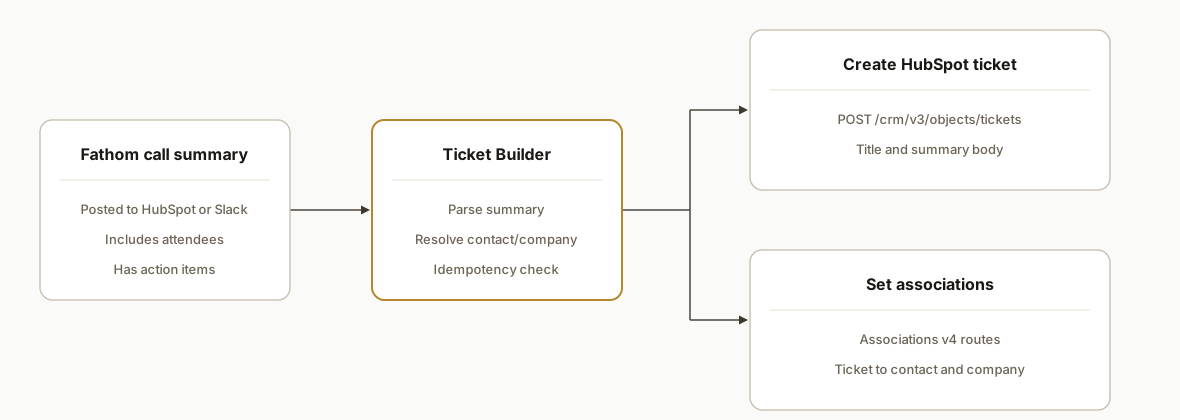
We built a small service with one job: turn Fathom call summaries into correctly associated HubSpot tickets in near real time.
- Event source: we subscribe to a reliable signal that marks a call as ready for follow-up (for example a Fathom-tagged note in HubSpot, an emailed summary to a unique inbox we parse, or a Slack post). If the source is HubSpot already, we use HubSpot webhooks to react as soon as the note appears.
- Ticket builder: a Node service extracts participants, action items, subject, and any deadlines from the summary. It computes an idempotency key so the same call never creates two tickets.
- HubSpot creation: we call POST /crm/v3/objects/tickets on api.hubapi.com with a Private App token and a minimal property set: a title, body, and any internal fields we route on.
- Associations: we attach the ticket to the right contact and company with Associations v4. This is what keeps reporting accurate and ownership clear.
- Monitoring: we log the source event ID, created ticket ID, and association IDs for support and replays.
Step-by-step: how to build it
1) Set up a reliable event source
Use whatever Fathom output your team already trusts: a Slack channel, an emailed summary, or a note that Fathom posts into HubSpot. We prefer using HubSpot as the source of truth when possible and subscribe to CRM events.
- HubSpot exposes webhooks to app developers so you can trigger on new notes. If you are not building a developer app, polling a mailbox or Slack is fine and simpler.
Key gotcha: rely on a unique identifier from the source event so you can enforce idempotency later.
2) Authenticate to HubSpot safely
Use a Private App access token or OAuth 2.0 for server-to-server calls. API keys are deprecated in HubSpot, so older tutorials will mislead you.
// .env: HUBSPOT_TOKEN=pat-xxxxxxxx
const HUBSPOT = 'https://api.hubapi.com';
const hdrs = {
  'Authorization': `Bearer ${process.env.HUBSPOT_TOKEN}`,
  'Content-Type': 'application/json'
};
Keep tokens server-side. Never put them in client bundles.
3) Create the HubSpot ticket
Call the tickets endpoint with a concise title and a body that links back to the call recording or summary.
import fetch from 'node-fetch';

async function createTicket({ title, body }) {
  const res = await fetch(`${HUBSPOT}/crm/v3/objects/tickets`, {
    method: 'POST', headers: hdrs,
    body: JSON.stringify({ properties: { subject: title, content: body } })
  });
  if (!res.ok) throw new Error(`Ticket create failed: ${res.status}`);
  const data = await res.json();
  return data.id; // HubSpot internal ticket ID
}
Answer-first: POST /crm/v3/objects/tickets is the route to create tickets on api.hubapi.com.
4) Resolve or create the right contact
Resolve a HubSpot contact by email from the summary participants. If no match exists, decide whether to create a new contact or route to a review queue.
async function findContactIdByEmail(email) {
  const q = new URLSearchParams({ q: email }).toString();
  const res = await fetch(`${HUBSPOT}/crm/v3/objects/contacts/search?${q}`, { headers: hdrs });
  if (!res.ok) return null;
  const data = await res.json();
  return data?.results?.[0]?.id || null;
}
Gotcha: pick one participant as the ticket's primary contact. If several customers attended, use your account logic to choose.
5) Associate the ticket to contact and company
Use Associations v4 to set relationships. Mixing v3 object routes with v4 associations is a common source of label confusion.
async function associate(fromType, fromId, toType, toId) {
  const url = `${HUBSPOT}/crm/v4/objects/${fromType}/${fromId}/associations/${toType}/${toId}`;
  const res = await fetch(url, { method: 'PUT', headers: hdrs, body: JSON.stringify({}) });
  if (!res.ok) throw new Error(`Associate ${fromType}->${toType} failed: ${res.status}`);
}

// Example: link ticket -> contact and ticket -> company
// await associate('tickets', ticketId, 'contacts', contactId)
// await associate('tickets', ticketId, 'companies', companyId)
Answer-first: Associations v4 is the supported way to attach records and labels across objects.
6) Enforce idempotency to prevent duplicates
Compute a deterministic key from the source call ID and the action item text. Store it and skip if seen before.
import crypto from 'crypto';

function ticketKey(sourceId, actionText) {
  return crypto.createHash('sha256').update(`${sourceId}:${actionText}`).digest('hex');
}

// In your handler
// if (await seen(key)) return 'duplicate-skip'; else await markSeen(key)
Gotcha: do not rely on free text alone. Always combine a stable source identifier with content.
7) Route ownership and SLAs
Use simple rules: map customer domain to a team, set due dates by severity from the summary, and assign an owner accordingly. Keep these rules in config, not code, so operators can adjust without a deploy.
Where it gets complicated
- Associations v4 vs v3. Reading or setting labels with the wrong family of routes causes silent misses. Keep object CRUD on v3 and associations on v4.
- Auth migration. HubSpot API keys are removed. Use OAuth or Private App tokens. Cleaning up legacy tutorials in your runbooks avoids future outages.
- Instant vs polling. Make.com can create tickets, but its instant Watch notifications needs a developer app setup. If you do not need sub-minute latency, polling your event source is simpler.
- Entity resolution. Calls often include partners and internal staff. Filter internal domains and prefer the invited customer emails when selecting the primary contact.
- Duplicates from multi-channel posts. The same Fathom summary may land in Slack and HubSpot. Your idempotency key must be source-agnostic.
What this actually changes
For a B2B team running customer calls, after we shipped this, follow-ups landed as tickets with the correct contact and company, owner set, and a due date based on the action. Manual triage disappeared and reporting improved because every conversation with an action turned into a consistent ticket.
A cited benchmark: context switching wastes real time. The American Psychological Association notes that multitasking can reduce productivity by as much as 40 percent. Source: https://www.apa.org/research/action/multitask
The structural win: actions captured at the source, deterministic associations, and no duplicate tickets even when multiple people see the same call.
Frequently asked questions
Does HubSpot have an API to create tickets?
Yes. HubSpot exposes a tickets objects API on api.hubapi.com. You create tickets with POST to the crm v3 objects tickets endpoint. Authentication is via OAuth 2.0 or a Private App access token.
How do you associate the ticket to a contact and company?
Use Associations v4. After creating the ticket you call the v4 associations route to attach the ticket to the correct contact and company. Keeping associations on v4 avoids label and batch-operation confusion.
Can this be done with Zapier or Make?
Yes. Both have official HubSpot apps that support creating tickets. For instant triggers in Make you need a developer app with webhooks. Otherwise, polling or email parsing is a simpler setup for many teams.
How do you prevent duplicate tickets from the same call?
Compute an idempotency key from a stable source ID plus action text, store it, and skip when seen again. This handles duplicates even if the same summary appears in Slack and HubSpot.
Will it run in real time?
With webhooks it is near real time. If you use polling of an email inbox or Slack, expect a short delay at the polling interval. Tickets still arrive fast enough to protect next-step follow-ups.
What does this cost to run monthly?
The HubSpot API itself does not add a separate fee. Your cost is the small server that runs the bridge and any automation platform charges if you use Zapier or Make. The primary cost is the initial build.
If you want this wired into your stack, we already built and shipped it. See our CRM automation services at /services#crm-automation, and for a task-oriented variant read /blog/fathom-to-hubspot-create-tasks-from-calls. When you are ready to scope, book a 20 minute call at /book.
Sources
Want us to build this for you?
Nine questions, about 90 seconds. You see the revenue it is costing you, then pick a time. No pitch.
See your options