
AppFolio API access in 2026 works like this: AppFolio offers APIs, but access is plan and program gated. Core has no API. Plus includes read access, and Max adds read and write. Buyers on Core can still integrate today by scheduling report exports to a secure ingestion inbox while their upgrade or partner approval is in motion. We run the API path in production for Iron Age Investments, where a weekly Apps Script pulls AppFolio v1 REST reports and turns them into per-investor meeting notes; the CSV bridge is the pattern we use when a plan has no API access yet.
AppFolio API integration is: connecting AppFolio's Stack and AppFolio API surfaces when your plan allows, or running a reliable CSV pipeline when it does not. This guide answers who gets access, how to request it, pricing and limits, supported objects, and the buyer-ready paths we build.
The problem it solves
Property managers ask one question when they want a data warehouse, CRM sync, or automated investor notes: does AppFolio have an API and how do we get our data out safely? The blocker is access. API access is gated by plan and partner status. Teams on Core end up exporting reports manually, emailing files, and copy pasting into other systems.
Definition: AppFolio API integration is the process of programmatically reading or writing AppFolio data through its plan-gated APIs, or using scheduled report exports as a bridge until API access is enabled.
| Workflow | Manual path | Automated path |
|---|---|---|
| Weekly reporting | Staff downloads multiple reports and merges in Excel | API pull or scheduled CSV to an ingestion endpoint writes to a warehouse every morning |
| CRM updates | Team copies new leads or guest cards into a CRM | API read of supported objects or a daily CSV import job updates the CRM |
| Investor notes | Analyst formats data into emails | Scheduled pipeline composes notes from warehouse tables and sends |
| Error handling | Ad hoc checks after failures | Monitored jobs with retries, idempotent upserts, and logs |
What it is worth: your AppFolio data working for you, not trapped in exports
Most AppFolio teams already have the data they need. It is just stuck behind exports someone has to run by hand. Connecting AppFolio to the rest of your stack gives those hours back, and hours back is how a property manager adds doors without adding payroll.
- Growth on the same team: the hours spent exporting go to owners and new doors instead.
- Current numbers: reports pull live data instead of last week's CSV.
- One source of truth: every tool reads the same AppFolio data.
We run this pattern on live AppFolio data for Iron Age Investments, a real estate investment firm, where a weekly Apps Script composes each investor's notes from AppFolio reports with no exports. Their founder: "Jacky shipped exactly what was scoped, on time, and then proactively suggested the next three things we should automate."
What automating your AppFolio reporting is worth
Move the sliders to your own numbers. The defaults are only an example portfolio, not client data.
Management fees from the doors the same team could take on
$62,400
(6 hrs × 52 ÷ 12) ÷ 0.5 hrs per door × $100 × 12 months
- Doors the freed hours could cover
- 52
- 26 hrs a month ÷ 0.5 hrs per door
- Staff cost of doing it by hand each year
- $10,920
- 6 hrs a week × $35/hr × 52 weeks
- Hours handed to the system each month
- 26 hrs
- 6 hrs a week × 52 ÷ 12
How the automation works
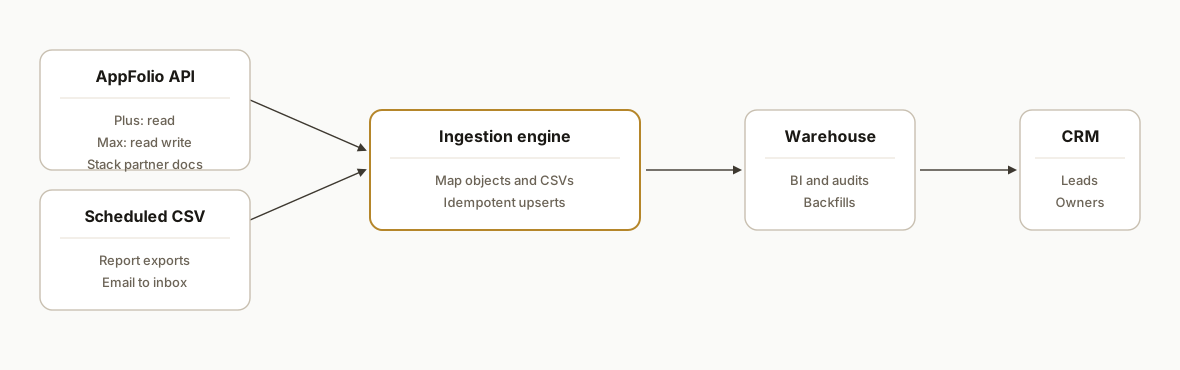
We build two patterns. The API path is used when you are on Plus or Max, or you are an ISV in the Stack partner program. The CSV path is used when you are on Core or in an approval queue. Both end at the same sinks: a warehouse, a CRM, or a downstream document system.
- API path: Available to AppFolio customers on Plus or Max and to approved Stack partners. Plus is read only. Max is read write. Full developer docs and sandbox access are provided through the Stack partner program. Pricing is plan tied. Some Stack integrations require a Stack Premium add on that AppFolio lists at $0.50 per unit per month with a $100 minimum. Source: AppFolio pricing and Stack pages.
- CSV path: In app reports export to CSV or Excel. Many teams schedule report emails from Report Builder to a dedicated inbox, which we watch and ingest. This is the safest bridge while you wait for API access. Source: AppFolio help and third party scheduled export guidance.
- Objects and events: AppFolio's public Stack pages enumerate common objects such as Bills, Bank Accounts, Leads, Listings, Journal Entries, GL Accounts, Owners, Work Orders, and Attachments. Source: AppFolio Stack partner API page.
- Zapier and Make: AppFolio Investment Manager Premier advertises a Zapier integration. For AppFolio Property Manager, no official Zapier or Make apps are documented publicly. We design around this by using the API or the CSV path.
Who actually gets AppFolio API access and how to enable it
You have three options. This section answers the near miss queries for appfolio api and appfolio api access in one place.
- Core: no API. Use scheduled reports by email to a dedicated inbox. Build your CSV bridge now.
- Plus: read API. Work with Sales to enable API access for your tenant. Start migrating high value reads.
- Max: read and write API. Plan workflows that write back where it makes business sense.
- ISV partners: apply to the AppFolio Stack partner program for developer docs and sandbox.
If you are searching for App Folio API access, the path is the same: confirm your plan, request enablement, and build against the official docs provided to you. For limits and decision criteria, see our detailed notes in AppFolio API integration guide and limits.
Where to find the AppFolio API documentation
The AppFolio API documentation is not a public self serve portal. Customers on Plus or Max receive access details through their account. Partners receive developer docs and a sandbox through the Stack partner program. Until you have access, treat specifics like auth, pagination, and webhooks as unknowns and design your pipeline to tolerate change.
When docs arrive, verify these items before cutting over any feed:
- Auth: confirm token type and rotation process. Store secrets safely.
- Pagination and cursors: identify the official next page pattern and max page size.
- Objects and fields: compare API payloads to your CSV models. Map deltas.
- Webhooks: confirm topics, retries, and signatures if your tenant supports them.
- Rate handling: implement exponential backoff and idempotent writes by default.
If you need a working bridge while access is pending, follow our step by step in AppFolio workflow integration guide and Sync AppFolio to Google Sheets.
What to integrate first: practical starting points
We prioritize feeds that unblock reporting and communications fast, then expand. Common first steps we prioritize:
- Reporting warehouse: land scheduled reports, then migrate to API reads when available. See How to Sync AppFolio Reports to BigQuery.
- Power BI or Looker dashboards: model the warehouse tables that stakeholders already trust. See AppFolio to Power BI integration automation.
- Database sink for apps: write normalized tables to Postgres for downstream apps and services. See AppFolio to Postgres database sync.
Step-by-step: how to build it
1) Pick your access path and request enablement
Answer first: if you are an AppFolio customer, Plus provides read access and Max provides read write. You request access through Sales or the pricing page flow. If you are a vendor, apply to the AppFolio Stack partner program to receive developer docs and sandbox access. Some integrations require Stack Premium at $0.50 per unit per month with a $100 minimum. If you are on Core, plan the CSV path immediately.
Decision tree
- On Core today: set up scheduled report exports to a dedicated inbox. Build ingestion now.
- On Plus: implement API reads where needed. Keep the CSV bridge for objects not yet migrated.
- On Max: implement read write integrations per business need. Keep a backstop CSV feed for continuity.
- ISV: apply to Stack partner program to receive docs and sandbox.
Key gotcha: AppFolio does not publish API auth details or rate limits publicly. Treat the API as a black box until your account or partner access is approved, then follow the official docs provided to you.
2) Stand up the CSV bridge with a dedicated inbox
When API access is pending, we start with scheduled exports. Create a dedicated inbox for report delivery and a Drive folder for attachments. Use strict subject and sender filters so only AppFolio reports reach the ingestion label.
Gmail filters
Matches: from:(no-reply@your-appfolio-domain) subject:(Report) has:attachment
Do: Apply label "AppFolio/Reports", Never send to Spam
Now add a lightweight Apps Script to save attachments and POST them to your ingestion API.
// Code.gs: save report attachments and forward to ingestion
function processAppFolioReports() {
  const label = GmailApp.getUserLabelByName('AppFolio/Reports');
  const threads = label.getThreads(0, 20);
  const driveFolder = DriveApp.getFolderById(PropertiesService.getScriptProperties().getProperty('DRIVE_FOLDER_ID'));
  threads.forEach(t => t.getMessages().forEach(m => {
    m.getAttachments({ includeInlineImages: false, includeAttachments: true })
      .filter(a => a.getContentType().includes('csv'))
      .forEach(a => {
        const file = driveFolder.createFile(a.copyBlob()).setName(a.getName());
        const resp = UrlFetchApp.fetch(PropertiesService.getScriptProperties().getProperty('INGEST_URL'), {
          method: 'post',
          muteHttpExceptions: true,
          payload: { filename: file.getName(), url: file.getUrl() },
          headers: { 'X-Source': 'appfolio-csv' }
        });
        Logger.log(resp.getResponseCode());
      });
  }));
}
Gotcha: Gmail and Apps Script quotas exist, so keep batches small and run the trigger every 5 to 15 minutes during business hours.
3) Map each report to a warehouse table and upsert
Use a deterministic schema and a composite dedupe key. We prefer dbt models for transforms and a Python loader for idempotent upserts.
# ingest_appfolio_csv.py
import os, sys
import pandas as pd
import psycopg2
from psycopg2.extras import execute_batch

TABLE = os.environ['TABLE']  # e.g., appfolio_delinquency
CSV = sys.argv[1]

df = pd.read_csv(CSV)
# normalize headers
cols = {c: c.strip().lower().replace(' ', '_') for c in df.columns}
df = df.rename(columns=cols)
# add dedupe key
if {'property_id','unit','resident_id','as_of_date'}.issubset(df.columns):
    df['dupe_key'] = df['property_id'].astype(str) + '|' + df['unit'].astype(str) + '|' + df['resident_id'].astype(str) + '|' + df['as_of_date'].astype(str)
else:
    df['dupe_key'] = df.apply(lambda r: '|'.join(str(v) for v in r.values), axis=1)

conn = psycopg2.connect(os.environ['PG_DSN'])
cur = conn.cursor()
cur.execute(f"""
CREATE TABLE IF NOT EXISTS {TABLE} (
  id bigserial primary key,
  dupe_key text unique,
  payload jsonb not null,
  loaded_at timestamptz not null default now()
)
""")
rows = [(r['dupe_key'], r.to_json()) for _, r in df.to_dict(orient='records')]
execute_batch(cur, f"INSERT INTO {TABLE} (dupe_key,payload) VALUES (%s,%s) ON CONFLICT (dupe_key) DO NOTHING", rows, page_size=500)
conn.commit(); cur.close(); conn.close()
print(f"loaded {len(rows)} rows to {TABLE}")
Gotcha: CSV headers change as AppFolio adds fields. Keep transforms header name tolerant and avoid position based parsing.
4) Introduce the API path when Plus or Max is enabled
Once your plan or partner access is active, begin migrating high value feeds to the API. Treat credentials and auth as confidential and follow the official docs in your tenant or partner portal. Start with a small, read only slice and compare API payloads to your CSV tables before cutting over.
// api_client.ts: placeholder structure only. Fill from official docs once enabled.
import fetch from 'node-fetch';

export async function fetchObject(objectName: string, params: Record<string,string>) {
  const base = process.env.APPFOLIO_API_BASE; // set from your tenant docs
  const token = process.env.APPFOLIO_API_TOKEN; // or the method provided to you
  const qs = new URLSearchParams(params).toString();
  const url = `${base}/${objectName}?${qs}`;
  const resp = await fetch(url, { headers: { Authorization: `Bearer ${token}` } });
  if (!resp.ok) throw new Error(`API error ${resp.status}`);
  return resp.json();
}
Important: AppFolio does not publish auth details or rate limits publicly. Do not guess. Use the documentation provided with your plan or partner account and add backoffs and retries around every call.
5) Add monitoring, replay, and drift detection
You need job success metrics, payload diff checks, and a replay switch. We keep a simple state table of file names and API cursors and alert on gaps.
-- state table for jobs
create table if not exists job_state (
  job_name text primary key,
  last_run_at timestamptz,
  last_cursor text,
  notes text
);
Gotcha: CSV scheduled emails can stall if a preset is renamed. Alert on zero row deltas. For APIs, alert on HTTP 401 and 429 clusters.
6) Surface to sinks: BI, CRM, and documents
Once data lands reliably, connect your warehouse to BI, push lead objects into your CRM, and generate downstream documents. Keep human review in the loop for investor facing communications.
# dbt snapshot example: stabilize a resident ledger view
snapshots:
  - name: resident_ledger_snapshot
    target_database: analytics
    target_schema: wh
    strategy: timestamp
    updated_at: updated_at
    unique_key: dupe_key
    source:
      name: resident_ledger_staging
Where it gets complicated
- Plan gated API: Core has no API. Plus is read only. Max is read write. This drives architecture. Source: AppFolio pricing.
- Partner gated docs: Full developer docs and sandbox are provided through the Stack partner program, not a self serve public portal. Plan partner early if you are an ISV. Source: AppFolio Stack partner pages.
- Stack Premium fees: Some integrations require Stack Premium priced at $0.50 per unit per month with a $100 minimum. Budget for it up front. Source: AppFolio pricing and services pages.
- Zapier confusion: AppFolio Investment Manager Premier lists Zapier integration. AppFolio Property Manager does not document an official Zapier or Make app. We do not design on assumptions here.
- Webhooks: AppFolio mentions webhooks for Stack, but topics and setup steps are not publicly documented. We treat webhooks as an optimization, not a dependency, until your tenant docs confirm availability.
- Rate limits: No public limits are documented. We implement conservative concurrency, exponential backoff, and idempotent writes by default.
Frequently asked questions
Does AppFolio have an API?
Yes. AppFolio exposes APIs that are gated by plan and program. Core has no API. Plus includes read access. Max includes read and write. ISVs can apply to the AppFolio Stack partner program for developer docs and sandbox access. Source: AppFolio pricing and Stack pages.
How do I get AppFolio API access for my company?
If you are an AppFolio customer, upgrade to Plus for read or Max for read write by working with Sales via the pricing page. If you are a vendor, apply to the Stack partner program. Some integrations require Stack Premium at $0.50 per unit per month with a $100 minimum. Sources: AppFolio pricing and services pages.
Where can I find AppFolio API documentation?
Documentation is provided inside your AppFolio tenant for Plus and Max customers or in the Stack partner portal for ISVs. AppFolio does not publish full API docs publicly. Use the official docs you receive for auth, pagination, and webhooks.
Is there an AppFolio Zapier or Make connector?
AppFolio Investment Manager Premier lists a Zapier integration. For AppFolio Property Manager, no official Zapier or Make app is documented publicly. In our builds we use the AppFolio API when available or a scheduled CSV bridge when it is not.
What are the AppFolio API rate limits and auth details?
AppFolio does not publish auth specifics or rate limits publicly. Those details are provided inside customer or partner documentation. Design for retries, backoff, and idempotent writes regardless of the published limits once you have them.
What if we are on Core and cannot upgrade yet?
Use scheduled report exports as a bridge. Send CSVs to a dedicated inbox, ingest them into your warehouse, and wire BI, CRM, and documents off those tables. When Plus or Max is enabled, migrate high value feeds to the API without breaking downstream reports.
Do AppFolio webhooks exist?
Webhooks are mentioned for Stack, but topics and setup steps are not publicly documented. We treat them as optional and design polling based or scheduled pipelines first, then add webhooks if your tenant documentation confirms availability.
If you are planning an AppFolio integration, the API path described here is the one running for Iron Age Investments, and the CSV bridge is our standard fallback when a plan has no API access. See our related write up on the CSV bridge in How to Sync AppFolio Reports to BigQuery. For broader options and limits, read our AppFolio API integration guide and limits. If you want us to spec a build that fits your plan, start at custom AI integration or go straight to book a call.
Integration we have built
AppFolio to Google Workspace: the build at a glance
Want us to build this for you?
Nine questions, about 90 seconds. You see the revenue it is costing you, then pick a time. No pitch.
See your options