
We built and shipped an automation that takes AppFolio delinquency report CSVs sent by email, parses them into a normalized table, groups by owner or entity, and pushes concise daily or weekly summaries and alerts to the right recipients. It is for property managers who want per-owner visibility without logging into AppFolio or re-keying data. This guide shows the exact architecture, the build steps, and the real gotchas.
Delinquency automation: the process of ingesting AppFolio delinquency report exports on a schedule, transforming rows into owner or entity level summaries, and delivering notifications to stakeholders.
The problem it solves
Delinquency tracking in AppFolio is straightforward in the UI. The work around it is not. Someone has to export the report, sort tenants by owner or entity, total balances and days-late buckets, flag move-outs and payment plans, and send an email to each investor or internal team. That loop repeats on every cycle.
Answer first: Automating the loop means AppFolio emails a scheduled CSV, a parser ingests it, and owner-specific rollups with exceptions are sent without anyone touching the report. When statements are not yet published or the CSV is missing fields, the run flags itself and retries later.
| Task | Manual | Automated |
|---|---|---|
| Getting data | Log into AppFolio, click the delinquency report, export CSV | Scheduled CSV emails land in a parsing inbox and are processed automatically |
| Grouping by owner | Filter, copy to separate sheets or files | Owner mapping table drives automatic grouping and routing |
| Totals and buckets | Rebuild SUMIFs and pivot tables each send | Deterministic rollups and 30, 60, 90 plus buckets computed in code |
| Exceptions | Manually scan for move-outs, payment plans, disputes | Rules flag exceptions and include a short rationale in alerts |
| Delivery | Write one email per owner, attach or paste | Per-owner summaries and a manager digest sent automatically |
According to the NMHC Rent Payment Tracker, the share of households paying rent by month end typically sits in the low 90 percent range, leaving a material minority requiring follow-up each cycle. Source: https://www.nmhc.org/research-insight/nmhc-rent-payment-tracker/
How the automation works
Answer first: The system uses AppFolio's native scheduled report emails as the data feed. A small Apps Script service watches a dedicated Gmail label, validates the CSV, normalizes headers, computes owner rollups, stores a copy in Sheets, then sends per-owner alerts and a manager digest. If your account is on AppFolio's Max plan with Database API access, we can swap the source, but scheduled CSVs are the reliable default.
- AppFolio scheduled CSV export: AppFolio supports exporting reports to CSV and emailing them on a schedule. We configure Delinquency to send to a controlled inbox, which becomes the single source of truth for the automation.
- Ingestion service: Google Apps Script watches a Gmail label, deduplicates by message ID and file hash, and rejects runs that arrive outside the send window or without the expected columns.
- Normalizer and owner map: A header map reconciles small column-name drifts. An Owner Map sheet ties property or owner identifiers to routing rules and recipient emails.
- Rollup and rules: Code totals balances, computes days-late buckets, and flags exceptions like move-outs or disputes for a short explanation in the alert.
- Notifications and archive: Per-owner emails go to investors or AMs. A manager digest summarizes totals and exceptions. The raw and cleaned CSVs are archived to Drive with run logs.
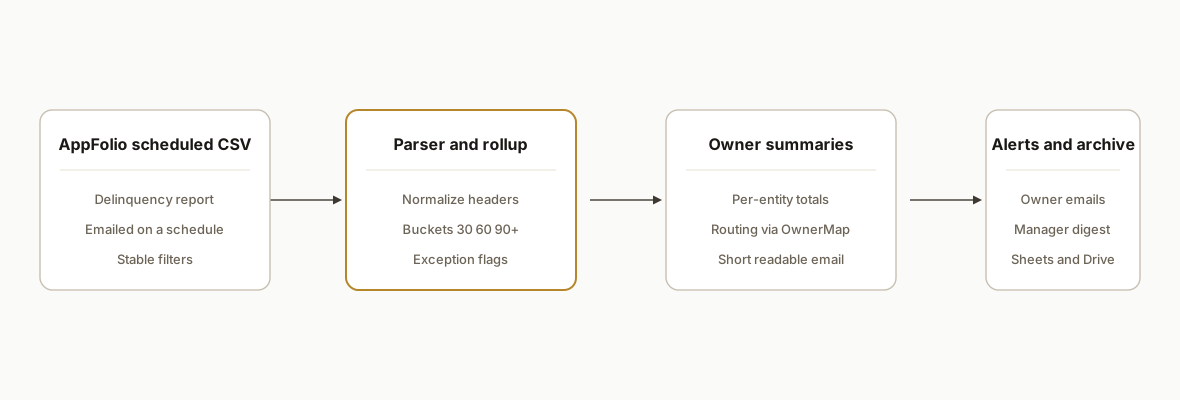
Step-by-step: how to build it
Step 1: Configure AppFolio scheduled delinquency CSV emails
Answer first: Set the delinquency report to email a CSV to a dedicated inbox at the cadence you need, and keep it stable. That inbox becomes the feed the parser relies on.
- In AppFolio Report Builder, use the Export to CSV or email options for the delinquency report, and schedule it to a controlled address you own. Partners commonly rely on scheduled CSV emails for integrations. Sources: support.meetelise.com and support.swiftlane.com articles referenced in the brief.
- Keep filters consistent so column headers and row shapes stay predictable across runs.
Step 2: Create the processing Sheet and a bound Apps Script
Answer first: Use one Google Sheet as your control plane: Config, OwnerMap, Runs, and a Data tab. Bind an Apps Script to it for ingestion and processing.
- Tabs: Config (runtime settings and expected headers), OwnerMap (owner or property key to recipients), Runs (one row per ingestion), Data (normalized rows).
- Store secrets as Script Properties, not cells. Create a Gmail filter to auto-label incoming AppFolio messages, for example label: AppFolio_Delinquency.
// Code.gs
function getConfig() {
  const props = PropertiesService.getScriptProperties().getProperties();
  const ss = SpreadsheetApp.getActive();
  const cfg = ss.getSheetByName('Config').getDataRange().getValues();
  return { label: cfg[1][1], tz: cfg[2][1], expected: JSON.parse(cfg[3][1] || '[]'), ...props };
}
Key gotcha: keep the OwnerMap keyed to a stable field that exists in every CSV, such as an owner or property identifier, not a display name that can change.
Step 3: Ingest and deduplicate CSV attachments from Gmail
Answer first: Pull labeled messages, extract CSV attachments, and dedupe by Gmail message ID and file hash so retried emails do not double-post.
function ingestEmails() {
  const { label } = getConfig();
  const lab = GmailApp.getUserLabelByName(label) || GmailApp.createLabel(label);
  const threads = lab.getThreads(0, 20);
  const runs = SpreadsheetApp.getActive().getSheetByName('Runs');
  threads.forEach(thread => {
    thread.getMessages().forEach(msg => {
      const id = msg.getId();
      if (seen(id)) return;
      msg.getAttachments({includeInlineImages: false, includeAttachments: true})
        .filter(a => \/\.csv$\/i.test(a.getName()))
        .forEach(a => processCsv(id, a));
      markSeen(id);
    });
    thread.moveToArchive();
  });
}
function seen(id){
  const s = PropertiesService.getScriptProperties();
  return s.getProperty('seen:'+id) === '1';
}
function markSeen(id){
  PropertiesService.getScriptProperties().setProperty('seen:'+id,'1');
}
Gotcha: AppFolio scheduled emails may occasionally re-send the same file. Hash the attachment bytes and record the hash in Runs to prevent duplicate processing.
Step 4: Normalize headers and write clean rows
Answer first: Reconcile small header differences and coerce types before any rollups. Consistency here prevents quiet math errors later.
function processCsv(msgId, blob) {
  const raw = Utilities.parseCsv(blob.getDataAsString());
  const [head, ...rows] = raw;
  const map = buildHeaderMap(head); // e.g., { "Unit": "unit", "Balance": "balance" }
  const data = rows.map(r => normalizeRow(map, r)).filter(r => r);
  const dataSh = SpreadsheetApp.getActive().getSheetByName('Data');
  dataSh.getRange(dataSh.getLastRow()+1, 1, data.length, Object.keys(data[0]).length)
        .setValues(data.map(o => Object.values(o)));
  logRun(msgId, blob.getName(), data.length);
}
function buildHeaderMap(head){
  const canon = {
    'Unit': 'unit',
    'Property': 'property',
    'Owner': 'owner',
    'Resident Name': 'resident',
    'Current Balance': 'balance',
    'Days Delinquent': 'days',
    'Move Out Date': 'moveout',
    'Payment Plan?': 'plan'
  };
  const map = {};
  head.forEach(h => {
    const key = (h || '').trim();
    const found = Object.keys(canon).find(k => k.toLowerCase() === key.toLowerCase());
    if (found) map[found] = canon[found];
  });
  return map;
}
function normalizeRow(map, r){
  const idx = Object.keys(map).map(k => ({ k, i: Object.keys(map).indexOf(k) }));
  const o = {};
  for (let k in map){
    const v = r[idx.find(x => x.k === k).i];
    o[map[k]] = v;
  }
  if (!o.owner || !o.balance) return null;
  o.balance = parseFloat(String(o.balance).replace(/[^0-9.-]/g,'')) || 0;
  o.days = parseInt(o.days, 10) || 0;
  return o;
}
Gotcha: Locale changes can swap decimal separators. Always strip currency symbols and coerce with a regex rather than relying on parseFloat on raw strings.
Step 5: Compute owner rollups and exception flags
Answer first: Group rows by owner or entity, compute total balance and 30, 60, 90 plus buckets, and attach human-readable exceptions for attention.
function buildOwnerSummaries() {
  const sh = SpreadsheetApp.getActive().getSheetByName('Data');
  const vals = sh.getDataRange().getValues();
  const head = vals[0];
  const rows = vals.slice(1).map(r => Object.fromEntries(head.map((h,i)=>[h,r[i]])));
  const byOwner = {};
  for (const r of rows){
    const o = r.owner; byOwner[o] = byOwner[o] || { total:0, b30:0, b60:0, b90:0, items:[], flags:[] };
    const days = r.days || 0;
    const amt = r.balance || 0;
    byOwner[o].total += amt;
    if (days >= 90) byOwner[o].b90 += amt; else if (days >= 60) byOwner[o].b60 += amt; else if (days >= 30) byOwner[o].b30 += amt;
    if (r.moveout) byOwner[o].flags.push(`Move-out present: ${r.resident} ${r.unit}`);
    if ((r.plan||'').toString().toLowerCase()==='yes') byOwner[o].flags.push(`Payment plan: ${r.resident} ${r.unit}`);
    byOwner[o].items.push(r);
  }
  return byOwner;
}
Gotcha: Use inclusive bucket rules that match your finance policy, and keep them constant. Small changes ripple into year-over-year comparisons if you are not careful.
Step 6: Route per-owner emails and the manager digest
Answer first: Use the OwnerMap to decide who gets what. Send owner-facing summaries and a manager digest that aggregates totals and flags across the portfolio.
function sendAlerts() {
  const owners = buildOwnerSummaries();
  const map = getOwnerMap(); // { ownerKey: { recipients: [..], name: 'Holding A' } }
  let digest = [];
  for (const [key, summary] of Object.entries(owners)){
    const cfg = map[key];
    if (!cfg) continue;
    const subject = `Delinquency: ${cfg.name} Total $${summary.total.toFixed(0)} (30:${summary.b30.toFixed(0)} 60:${summary.b60.toFixed(0)} 90+:${summary.b90.toFixed(0)})`;
    const body = renderOwnerEmail(cfg.name, summary);
    MailApp.sendEmail({ to: cfg.recipients.join(','), subject, htmlBody: body });
    digest.push(`${cfg.name}: $${summary.total.toFixed(0)} flags: ${summary.flags.length}`);
  }
  const mgr = PropertiesService.getScriptProperties().getProperty('MANAGER_EMAIL');
  if (mgr) MailApp.sendEmail({ to: mgr, subject: 'Delinquency Digest', htmlBody: digest.join('<br>') });
}
function renderOwnerEmail(name, s){
  return `Owner: ${name}<br>Total: $${s.total.toFixed(0)}<br>30: $${s.b30.toFixed(0)} 60: $${s.b60.toFixed(0)} 90+: $${s.b90.toFixed(0)}<br><br>` +
         (s.flags.length ? `<b>Exceptions</b><br>${s.flags.join('<br>')}<br><br>` : '') +
         '<i>Automated summary from AppFolio CSV</i>';
}
Gotcha: Keep owner emails short. Long tables belong in the manager digest or an attached CSV, not in investor-facing email bodies.
Step 7: Schedule and monitor
Answer first: Install a time-based trigger to run ingestion after the AppFolio send window. Log run status and hashes so you can prove delivery and detect gaps.
- Time your Apps Script trigger to fire after the scheduled AppFolio email is expected to arrive. Add a second catch-up run later in the day.
- Write a row to Runs for every attempt: message ID, filename hash, row count, status, and error if any. Alert ops on repeated failures.
function daily() {
  try { ingestEmails(); sendAlerts(); }
  catch (e) { notifyOps(e); }
}
function notifyOps(e){
  const ops = PropertiesService.getScriptProperties().getProperty('OPS_EMAIL');
  if (ops) MailApp.sendEmail(ops, 'Delinquency job error', String(e && e.stack || e));
}
Gotcha: When statements or reports are not yet published in AppFolio, partner imports can fail. Treat missing or empty CSVs as a soft failure and retry later rather than sending blank alerts. Source: support.stessa.com article referenced in the brief.
AppFolio data automation and reporting: how this extends
Answer first: this control-plane pattern is not limited to delinquency. The same ingestion, normalization, and delivery stack powers broader AppFolio data automation and reporting.
- One pipeline, many reports: reuse the flow for Income Statement, Balance Sheet, Vacancy and GPR, rent roll, and owner statements. See our Vacancy and GPR reporting automation for a portfolio view that complements delinquency.
- One destination of truth: push normalized rows to Sheets or a warehouse for cross-report pivots. We outline the mechanics in our AppFolio to Google Sheets automation post.
- One delivery surface: investor-ready emails, a manager digest, and optional Slack posts use the same summaries.
Related builds:
- AppFolio to Google Sheets automation: /blog/appfolio-to-google-sheets-automation
- Vacancy and GPR reporting automation: /blog/automate-appfolio-vacancy-gpr-reporting
GmailLabel.getThreads(start, max): how we used it and what to watch
If you searched for gmaillabel getthreads(start max), here is the practical usage that runs this job in production.
- Signature: GmailLabel.getThreads(start, max) returns an array of GmailThread objects under that label. start is the offset. max is the page size.
- We process newest threads first in pages, then archive each processed thread. Archiving does not remove your custom label, so reruns stay idempotent with message level dedupe.
- New mail during a run can shift page boundaries. Dedupe by message ID and you remain safe even if pagination drifts.
Example paging pattern we shipped:
function processLabelInPages(labelName, pageSize) {
  const lab = GmailApp.getUserLabelByName(labelName);
  if (!lab) return;
  let start = 0, page = [];
  do {
    page = lab.getThreads(start, pageSize);
    for (const thread of page) {
      const msgs = thread.getMessages();
      for (const msg of msgs) {
        const id = msg.getId();
        if (seen(id)) continue;
        const atts = msg.getAttachments({includeInlineImages: false, includeAttachments: true})
          .filter(a => \/\.csv$\/i.test(a.getName()));
        atts.forEach(a => processCsv(id, a));
        markSeen(id);
      }
      thread.moveToArchive();
    }
    start += page.length;
  } while (page.length === pageSize);
}
Production notes:
- Keep page sizes modest to avoid long executions on large labels. We have used 20 to 100 safely depending on attachment sizes.
- Dedupe at message level, not thread level. AppFolio sometimes re-sends the same CSV inside a new message on an existing thread.
Where it gets complicated
AppFolio API access is gated. AppFolio advertises a Database API tied to the Max plan with add-on terms. Public developer docs and concrete auth details are not published. We default to scheduled CSV emails for reliability and only swap to an API connector when your account has access and terms are in place. Sources: appfolio.com/about and appfolio.com/terms/add-ons.
Column drift in emailed CSVs. Small header changes or added columns break naive index-based parsers. Always normalize by header name and keep a tested header map in code.
Duplicate attachments and partial sends. Partners note scheduled emails as the most common external feed. They sometimes re-send. Hash files per run and de-dupe. When an expected attachment is missing, do not send owner alerts, only a manager warning.
Owner routing keys. Some delinquency exports include owner names while others rely on property-level identifiers. Your Owner Map must key on a stable field present in every export. Names are human friendly but are not stable keys.
Monthly vs weekly cadence. Delinquency alerts that run too frequently train recipients to ignore them. We implement a weekly owner alert plus a daily internal digest, and we suppress duplicate alerts when totals have not changed meaningfully since the last send.
What this actually changes
For a mid-sized property manager, this shipped as a daily ingestion with a weekly investor send and a manager digest. The practical change was structural: no one logged into AppFolio to prep delinquency summaries, and investors received a consistent, owner-scoped view. That time saved was not a one-off. It removed a recurring reporting loop from the team's week.
A persistent minority of residents pay late each cycle, which creates the operational burden this automation addresses. NMHC's Rent Payment Tracker typically shows low 90 percent of households paying by month end. The remainder drives the collections work that benefits most from automation. Source: https://www.nmhc.org/research-insight/nmhc-rent-payment-tracker/
If you also run investor meeting notes or owner statement packets, this slots beside those flows. We have already built AppFolio investor reporting with the same guardrails, so the delinquency rollup reuses the same control plane and delivery logic.
Frequently asked questions
Does AppFolio have an official API for delinquency data?
AppFolio advertises a Database API tied to the Max plan with add-on terms. Public developer docs and concrete auth details are not published. Many customers use scheduled CSV report emails as the integration path for delinquency and other reports.
Can I use Zapier or Make for AppFolio delinquency integrations?
We have not found an official AppFolio app in Zapier or Make directories. Some teams use generic Webhooks or email parsing as a workaround. In practice, scheduled CSV email ingestion is the most reliable starting point for delinquency rollups.
How do you prevent duplicate alerts if AppFolio re-sends the file?
We dedupe on two layers: the Gmail message ID and a SHA hash of the attachment bytes. A run log stores both. If either repeats, the record is marked as a duplicate and skipped.
Can this produce per-owner and an internal portfolio digest at the same time?
Yes. The same rollup produces per-owner emails routed by the Owner Map and a manager digest showing portfolio totals and exception counts. Owner emails stay short. The digest carries the details.
What happens if the scheduled CSV arrives empty or before statements are published?
We treat it as a soft failure. The run logs a warning and retries on the next pass. No owner-facing emails are sent on incomplete inputs. When your cadence depends on statements, we set send windows that align with publication.
If I upgrade to AppFolio Max later, can this switch to the Database API?
Yes. We designed the source as a swappable module. When your account has API access and terms in place, we replace the email ingestion with an API connector and keep the downstream rollup and delivery unchanged.
If you need owner or investor visibility on delinquency without adding another weekly task, we have already built this in production. See our AppFolio investor reporting post for the sibling pattern in action at scale, then read our AppFolio API guide for plan and access nuances. For adjacent work, see our services under document automation. When you are ready to scope your setup, book a 15 minute call.
- Services: /services#document-automation
- Related post: /blog/automate-appfolio-investor-reporting
- Related post: /blog/appfolio-api-integration-guide-and-limits
- Book a call: /book
Want us to build this for you?
Nine questions, about 90 seconds. You see the hours it is costing you, then pick a time. No pitch.
Get your free assessment