
We built and shipped an AI-backed evidence workflow for a BC Civil Resolution Tribunal small-claims dispute involving Theology Academy. The system ingests artifacts across email, videos, logs and contracts, hashes and indexes them, builds a defensible timeline, and drafts point-by-point replies that map to the contract scope and acceptance terms.
Dispute-evidence automation is the process of collecting, verifying, organizing, and summarizing case artifacts into a defensible package with minimal manual effort.
The problem it solves
Most small-claims disputes are not won on rhetoric. They turn on documentation quality: what was agreed, what was delivered, and when. For Theology Academy, artifacts were spread across multiple inboxes, meeting transcripts, Make.com logs with short retention, and a contract with unclear refund/termination language. Manually assembling a chain-of-custody timeline and a numbered evidence pack would take days and risk omissions.
| Task | Manual approach | Automated workflow |
|---|---|---|
| Collect artifacts | Search multiple inboxes and drives, download files piecemeal | Single intake folder with auto-ingest and file hashes written to a manifest |
| Prove integrity | Rely on file dates and screenshots | Compute SHA-256 per file, store manifest, lock timestamps |
| Build timeline | Hand-write dates from emails and notes | Auto-extract dates, normalize timezones, render a single event log |
| Map to contract | Skim SOW and meeting notes, hope to match | Clause-to-evidence linking and a reply template that cites exhibits |
| Draft rebuttal | Start from a blank doc each time | AI drafts a point-by-point response with inline exhibit references |
| Package for CRT | Stitch PDFs by hand | One-click export: index + exhibits in numbered order |
How the automation works
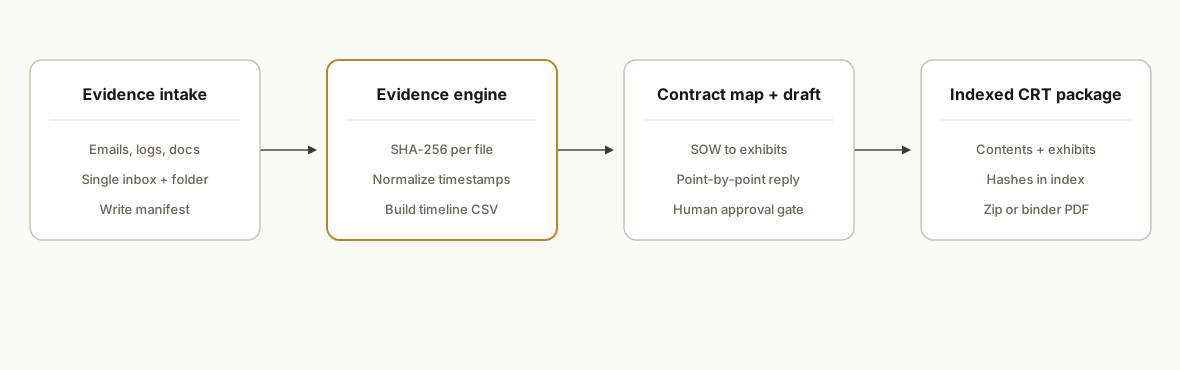
The architecture centers on a defensible pipeline: one evidence inbox, immutable hashing and manifests, a normalized timeline, and a drafting stage that never invents facts. We keep model outputs gated by human approval before anything is filed.
- Evidence intake: A dedicated Drive folder and inbox rule catch all dispute-relevant artifacts. A watcher writes filename, SHA-256, size, and first-seen timestamp to a manifest.
- Chain of custody: We preserve originals and generate read-only exports for emails, transcripts, and logs. Edits create new versions with new hashes.
- Timeline builder: Filenames and headers are parsed for dates, then normalized to one timezone and sorted. Events are de-duplicated and labeled.
- Contract mapper: A scope matrix links SOW clauses to acceptance checkpoints and delivery proofs.
- AI reply drafting: The model converts the scope matrix and timeline into a numbered, point-by-point reply that cites exhibits and never fabricates values. A human reviews and edits.
Step-by-step: how to build it
1) Set up a single evidence inbox and intake folder
Create a dedicated email label and a Drive folder for the dispute. Forward or move all artifacts here. A small daemon writes a manifest row per file.
# evidence_intake.py
import hashlib, json, os, time
from pathlib import Path

INTAKE = Path("./evidence_intake")
MANIFEST = Path("./manifest.jsonl")

def sha256sum(p: Path) -> str:
    h = hashlib.sha256()
    with p.open('rb') as f:
        for chunk in iter(lambda: f.read(1024 * 1024), b''):
            h.update(chunk)
    return h.hexdigest()

def scan_once():
    rows = []
    for p in INTAKE.rglob("*"):
        if p.is_file():
            rows.append({
                "path": str(p.relative_to(INTAKE)),
                "hash": sha256sum(p),
                "bytes": p.stat().st_size,
                "first_seen": int(time.time())
            })
    with MANIFEST.open('a', encoding='utf-8') as out:
        for r in rows:
            out.write(json.dumps(r) + "\n")

if __name__ == "__main__":
    INTAKE.mkdir(parents=True, exist_ok=True)
    scan_once()
Gotcha: keep this write-once. Edits create a new copy in an Updates subfolder so the original hash remains intact.
2) Normalize emails and meeting transcripts into PDFs
Export emails and transcripts to PDFs to avoid mutable web views. Store the source message IDs alongside the file so you can trace back if needed.
# example ops script
mkdir -p exports/emails exports/transcripts
# Use your mail client or a script to export .eml -> .pdf and transcripts -> .pdf
# Record a simple CSV map: pdf_path,source_id,source_system
Key point: never edit the exported PDFs. If redaction is needed, save a redacted copy and keep both with distinct hashes.
3) Build a unified timeline from filenames and headers
Pull dates from filenames, email headers, and document metadata, then normalize to one timezone.
# timeline.py
import csv, json, re
from datetime import datetime
from zoneinfo import ZoneInfo

TZ = ZoneInfo("America/Vancouver")
DATE_RE = re.compile(r"(20\d{2}-\d{2}-\d{2})[ T_]?([0-2]\d:[0-5]\d)?")

sources = []
with open("manifest.jsonl", encoding='utf-8') as f:
    for line in f:
        row = json.loads(line)
        m = DATE_RE.search(row["path"]) or None
        dt = None
        if m:
            date = m.group(1)
            time_s = m.group(2) or "00:00"
            dt = datetime.fromisoformat(f"{date}T{time_s}").replace(tzinfo=TZ)
        sources.append({
            "when": dt.isoformat() if dt else None,
            "artifact": row["path"],
            "hash": row["hash"]
        })

# Write a sorted timeline CSV
with open("timeline.csv", "w", newline='', encoding='utf-8') as out:
    w = csv.writer(out)
    w.writerow(["when", "artifact", "hash"])
    for e in sorted([s for s in sources if s["when"]], key=lambda x: x["when"]):
        w.writerow([e["when"], e["artifact"], e["hash"]])
Tip: where filenames do not contain dates, maintain a small sidecar CSV keyed by artifact path with the authoritative timestamp.
4) Map SOW clauses to evidence checkpoints
Create a scope matrix that links each deliverable or clause to its acceptance evidence. This is the backbone for a point-by-point reply.
# scope_matrix.yaml
project: Theology Academy
clauses:
  - id: C1
    text: "Implementation window: 8, 10 weeks; revenue share 60/40."
    evidence:
      - "exports/emails/2025-07-14-kickoff.pdf"
      - "exports/transcripts/2025-08-21-status-call.pdf"
  - id: C2
    text: "Two staged invoices; final due upon completion as specified."
    evidence:
      - "exports/emails/2025-10-03-invoice-2-issued.pdf"
      - "exports/emails/2025-10-17-receipt-logged.pdf"
notes:
  - "No refund clause present in executed agreement. Termination required mutual written consent."
Guardrail: do not rely on auto-transcribed meeting summaries for legal positions. Always verify key statements against the original audio or a vetted transcript.
5) Draft a point-by-point rebuttal with exhibit citations
Use a model to draft a structured reply that mirrors the claimant's numbered allegations. Keep hard facts as variables and force exhibit references.
# rebuttal_prompt.py
allegations = [
  {"num": 1, "claim": "The platform was not delivered."},
  {"num": 2, "claim": "Final payment was requested prematurely."}
]

scope = open("scope_matrix.yaml", encoding='utf-8').read()

def draft_reply(allegations, scope):
    system = (
      "You draft factual small-claims replies. Cite exhibits as [Exhibit N]. "
      "Never invent dates or amounts. If evidence is absent, state 'No exhibit on file'."
    )
    user = f"Allegations: {allegations}\n\nScope and evidence map:\n{scope}"
    # Call your model here. Pseudocode for clarity:
    reply = """
1. Regarding delivery: Exhibit 3 shows the live deployment on 2026-08-09. The timeline lists 39,222 records ingested [Exhibit 3].
2. Regarding payment timing: The executed agreement contains no refund clause. Invoice 2 was issued post-milestone as per C2 [Exhibit 5].
"""
    return reply

print(draft_reply(allegations, scope))
Gate it: human review and edits are required before filing. The draft is a starting point, not the filing.
6) Export an indexed CRT evidence package
Produce a single index with exhibit numbers, then output a zip or a binder PDF with a contents page that references each file's hash for integrity.
# Contents

- Exhibit 1: Executed Agreement (sha256: 9b6e...)
- Exhibit 2: Kickoff Email 2025-07-14 (sha256: 1c42...)
- Exhibit 3: Deployment Screenshot 2026-08-09 (sha256: d0aa...)
- Exhibit 4: Timeline CSV (sha256: 0f77...)
- Exhibit 5: Invoice 2 and Receipt (sha256: 77ab...)
Where it gets complicated
- Short log retention: Some automation tools purge run logs quickly. If a scenario was writing directly to a third-party system, set up a watcher to export logs before the window closes or your audit trail will have holes.
- Transcript misattribution: Auto-transcription can mislabel speakers. For meeting evidence, cite the original audio with timestamps and a vetted transcript, not the auto-summary.
- Contract language gaps: If there is no refund clause and termination requires mutual consent, your evidence must reflect the executed agreement verbatim. Capture a contract manifest and highlight the operative sections rather than paraphrasing.
- Multi-mailbox confusion: When multiple senders are involved, preserve message IDs and the account of origin. Your timeline should attribute each event to a specific mailbox.
- Versioning discipline: Redactions and edits must create new files and new hashes. Never overwrite an artifact that has already been hashed and referenced as an exhibit.
What this actually changes
For Theology Academy, the live system produced a defensible, indexed evidence pack and a reply that mapped each allegation to a clause and an exhibit. That shifted the burden from debating feelings about completeness to reviewing concrete deliverables against the executed terms and timeline. The structural value is durable: every future dispute follows the same intake, hashing, timeline, and drafting path.
A technical integrity note: NIST guidance treats SHA-256 as providing approximately 128 bits of collision resistance, which is suitable for integrity checks in this context. See NIST SP 800-107r1 for details: https://csrc.nist.gov/pubs/sp/800/107/r1/final
Frequently asked questions
Can this work if I did not start collecting evidence from day one?
Yes. Start now. Ingest what you have, hash it, and build a timeline from today backward. Note any gaps explicitly. A clear record from the moment you become aware of a dispute is better than a retroactive reconstruction without a manifest.
Do I need an AI model, or can this be done with templates?
The hashing, manifests, and timeline do not require AI. The model helps produce a clean, numbered reply that mirrors the allegations and cites exhibits consistently. We keep a human review step before anything is filed.
What about sensitive information in transcripts and emails?
Keep originals immutable. Generate redacted copies for filing and store both with distinct hashes and a small redaction log. Do not edit an exhibit in place once its hash appears in your contents index.
Will this replace my lawyer?
No. It reduces the manual assembly your team or counsel must do, and it standardizes how evidence is packaged. Counsel still reviews strategy, legal sufficiency, and filing format. The automation handles collection, integrity, and first-draft structure.
How long does it take to set up?
The intake, manifest, and timeline can be stood up in days. Contract mapping depends on the complexity of your SOW. The drafting template is fast to tune once your scope matrix exists. We ran this in parallel with normal operations and kept filing gates human-approved.
If you are facing a dispute or want to standardize delivery-risk evidence before there is a dispute, we have run this in production and can adapt it to your stack. See our service scope at /services#document-automation, read our related post on contract scopes /blog/ai-automation-agency-contract-sow-checklist-2026, and when you are ready /book.
Want us to build this for you?
Nine questions, about 90 seconds. You see the hours it is costing you, then pick a time. No pitch.
Get your free assessment