
Towbook does not publish a public developer API, but it does provide a built-in QuickBooks integration that syncs invoices and payments to QuickBooks Online and QuickBooks Desktop. Our standard pattern relies on the native Towbook:QuickBooks sync for creates and updates, then adds a lightweight reconciliation so accounting closes on time with no surprises.
This guide is for towing operators and back-office leads who want an accurate, low-maintenance Towbook to QuickBooks pipeline. We cover what works out of the box, the limits, and what to hire for when you want it bulletproof.
Towbook:QuickBooks invoice sync is the process of connecting Towbook's accounting settings to QuickBooks so invoices and payments you record in Towbook appear in QuickBooks without manual re-entry.
The problem it solves
Most towing companies start with manual double entry: invoice in Towbook, re-type it in QuickBooks, hope taxes and items line up, then chase inconsistencies at month-end. Timing gaps and mapping drift create mismatched AR and aging.
Here is the difference we see after go-live.
| Step | Manual entry | Automated with Towbook + recon |
|---|---|---|
| Invoice capture | Dispatcher closes call, office types it again in QuickBooks | Dispatcher closes call. Towbook pushes to QuickBooks on your chosen cadence |
| Item and tax mapping | Human remembers which item and tax code to use | One mapping table is enforced. Towbook uses it every time |
| Timing | Batch at day end or week end | Immediate, manual, or after 24 hours from Towbook settings |
| Month-end checks | Diff by hand across reports | Daily CSV diff flags missing or mismatched invoices |
| Errors found | Late, after statements go out | Same day, before close |
What closing the dispatch to billing gap is worth
Move the sliders to your own numbers. The defaults are only an example business, not client data.
Your own estimate. A job that creates its own invoice cannot be forgotten, but a wrong rate can still slip through.
Revenue billed each year that slips through today
$28,800
300 a month × $250 × 4% leaked × 80% closed × 12 months
- Staff cost of doing it by hand each year
- $10,920
- 6 hrs a week × $35/hr × 52 weeks
- Hours handed to the system each month
- 26 hrs
- 6 hrs a week × 52 ÷ 12
How the automation works
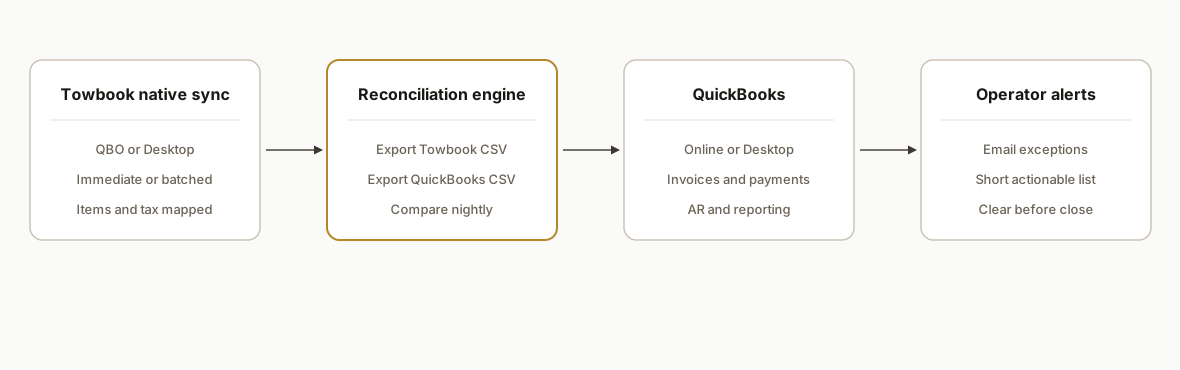
We let Towbook's native QuickBooks integration do the heavy lifting. Then we wrap it with one safety layer: a daily reconciliation that compares Towbook exports to QuickBooks reports and emails a short exception list.
- Towbook native QuickBooks sync: Towbook integrates with QuickBooks Online and QuickBooks Desktop. Online lets you choose timing: immediate, manual, or after 24 hours. Desktop requires the Towbook Agent installed on the same private server as the QuickBooks file. Feature availability sits on the Pro plan and above. Item and tax names must match between systems to avoid sync errors.
- Mapping table enforcement: We create or validate a single source of truth for Items and tax codes so Towbook and QuickBooks speak the same language. This eliminates most reject reasons.
- Reconciliation job: Once nightly, we export invoices from Towbook and a matching report from QuickBooks, then compare by invoice number, amount, and tax. Differences trigger an alert for a human to fix the mapping or re-push.
- Operator alerts: Exceptions route to an email list or channel so accounting can clear them before statements or payroll dependencies.
Step-by-step: how to build it
1) Confirm plan and QuickBooks edition
Enable Towbook's QuickBooks integration on a Pro plan or higher. Pick your QuickBooks edition and push timing.
- Online: choose immediate, manual, or after 24 hours based on how you batch work.
- Desktop: plan to install the Towbook Agent where the QuickBooks file runs. Hosted third-party servers are not supported.
Create a short runbook describing who owns the push button if you choose manual cadence.
Towbook QuickBooks settings
- Plan: Pro or above
- Edition: QBO or QBD
- Push timing: immediate | manual | after 24 hours
- Owner: Accounting Lead (daily review 4 pm)
Key gotcha: QuickBooks Desktop requires the Towbook Agent on the same private server as the QuickBooks file. Hosted third-party servers are not supported.
2) Build the item and tax mapping table
Create a single mapping file that lists exactly which Towbook line items map to which QuickBooks Items and which tax code applies. Keep names identical where possible.
{
  "items": {
    "Tow: Hook & Mileage": "Service:Tow Hook+Miles",
    "Tow: Storage": "Service:Storage",
    "Tow: Admin Fee": "Service:Admin Fee"
  },
  "taxCodes": {
    "Standard": "TAX",
    "Out of jurisdiction": "NON"
  }
}
Key gotcha: mapping drift creates silent rejects. Lock changes behind a simple change-control note and one approver.
3) Desktop only: install the Towbook Agent where QuickBooks runs
If you use QuickBooks Desktop, install the Towbook Agent on the same machine that hosts your company file. Coordinate with whoever maintains that server so the service stays running and can reach Towbook and QuickBooks.
# Basic service health check on Windows Task Scheduler
$svc = Get-Service -Name "TowbookAgent" -ErrorAction SilentlyContinue
if (!$svc -or $svc.Status -ne 'Running') {
  Restart-Service -Name "TowbookAgent" -ErrorAction SilentlyContinue
}
Key gotcha: do not plan to run this on a hosted third-party server. Towbook Desktop integration does not support that environment.
4) Turn on the Towbook:QuickBooks sync and validate mappings
In Towbook's accounting settings, enable the QuickBooks integration and map each Towbook item to the correct QuickBooks Item. Match tax names exactly. Push a small sample of invoices across and spot-check amounts, tax, and account posting.
Validation checklist
- 3 test invoices: taxable, non-taxable, multi-line
- Amounts match to the cent
- Tax code lands correctly in QuickBooks
- AR aging increases as expected
- Reversals: void one test invoice in Towbook and confirm QuickBooks reflects it per your policy
Key gotcha: mismatched tax item names are the most common error. Fix the name, not the data, when possible.
5) Add a daily reconciliation job using exports
Schedule one export from Towbook and one from QuickBooks each evening. Compare by invoice number and totals. Alert on any missing or mismatched records.
# reconcile_invoices.py
import csv
from collections import defaultdict

def read_csv(path, num_col, total_col):
    rows = {}
    with open(path, newline='') as f:
        for r in csv.DictReader(f):
            num = r[num_col].strip()
            total = round(float(r[total_col]), 2)
            rows[num] = total
    return rows

tb = read_csv('towbook_invoices.csv', 'InvoiceNumber', 'Total')
qb = read_csv('quickbooks_invoices.csv', 'InvoiceNumber', 'Total')

missing_in_qb = [n for n in tb if n not in qb]
missing_in_tb = [n for n in qb if n not in tb]
amount_mismatch = [n for n in tb if n in qb and tb[n] != qb[n]]

with open('recon_report.txt', 'w') as out:
    out.write(f"Missing in QuickBooks: {missing_in_qb}\n")
    out.write(f"Missing in Towbook: {missing_in_tb}\n")
    out.write(f"Amount mismatch: {amount_mismatch}\n")

print('Recon complete. See recon_report.txt')
Key gotcha: align date windows for both exports. Use invoice date or last-modified consistently.
6) Wire a simple alert so humans clear exceptions daily
Send the reconciliation output to email so accounting clears it before statements or payroll dependencies.
# send_mail.py
import smtplib
from email.message import EmailMessage

msg = EmailMessage()
msg['From'] = 'noreply@yourdomain.com'
msg['To'] = 'accounting@yourdomain.com'
msg['Subject'] = 'Towbook to QuickBooks reconciliation exceptions'
msg.set_content(open('recon_report.txt').read())

with smtplib.SMTP('smtp.yourdomain.com', 587) as s:
    s.starttls()
    s.login('smtp-user', 'smtp-pass')
    s.send_message(msg)
Key gotcha: keep the exception list short and actionable. If it is noisy, it will be ignored. Tune filters before adding more destinations.
7) Add a month-end sanity check
At close, export AR aging from both systems and compare roll-up totals. If totals match and the daily recon was clear, your close should be uneventful.
Month-end AR tie-out
- AR aging Towbook total vs QuickBooks total
- Random sample: 10 invoices agree line-by-line
- Any open exceptions cleared or documented
Key gotcha: treat credits, voids, and refunds as first-class cases in your validation. Decide where they originate and how they flow.
Where it gets complicated
QuickBooks Desktop environment constraints. The Towbook Agent must run on the same private server as the QuickBooks file. Hosted third-party servers are not supported, so plan for local access and service monitoring.
Item and tax mapping drift. If names or codes change in either system, sync breaks. Keep a controlled mapping table and one approver for changes. Name parity is your best defense.
Push cadence vs operational batching. Immediate pushes are convenient but can surface unreviewed errors mid-day. Some teams prefer manual or after 24 hours to batch review.
Voids, credits, and refunds policy. Decide the source of truth. If you void in Towbook, ensure your QuickBooks policy mirrors it. Reconciliation should include these cases explicitly.
Exports and scheduling. Towbook offers Excel and PDF exports in parts of the product. If you need scheduled emails or outbound webhooks, plan a manual or scheduler-driven export workflow. Public webhook scheduling is not confirmed.
What if you need a Towbook API?
Towbook invoice data still moves even without a public API. We ship three reliable bridges:
- Use QuickBooks as the event source: let Towbook post invoices to QuickBooks, then consume QuickBooks reports or webhooks to fan out to CRM or BI. This keeps Towbook untouched and gives you a supported surface.
- Nightly Towbook export to a staging sheet: schedule a Towbook invoice CSV export and ingest it to Google Sheets or a database. From there, route to analytics, CRM, or billing checks. See our Towbook to Google Sheets automation pattern: /blog/towbook-to-google-sheets-automation.
- Webhooks when available: some accounts support event notifications into Slack or a CRM. If your tenant has this enabled, use it for near real-time dispatch or AR alerts. We wrote up patterns in Towbook webhooks to Slack and CRM: /blog/towbook-webhooks-to-slack-and-crm.
If you are comparing no-code routers, we also outlined vendor paths in Towbook API integration options without Zapier: /blog/towbook-api-integration-zapier-alternatives.
Example: ingest a nightly CSV export emailed to a shared inbox into Google Sheets with Apps Script.
function importTowbookInvoices() {
  const label = GmailApp.getUserLabelByName('towbook/invoices');
  const threads = label.getThreads(0, 5);
  const ss = SpreadsheetApp.openById('YOUR_SHEET_ID');
  const sh = ss.getSheetByName('invoices');
  for (const t of threads) {
    for (const m of t.getMessages()) {
      const atts = m.getAttachments({includeAttachments: true});
      for (const a of atts) {
        if (a.getContentType().match(/csv/i)) {
          const rows = Utilities.parseCsv(a.getDataAsString());
          sh.getRange(sh.getLastRow() + 1, 1, rows.length, rows[0].length).setValues(rows);
        }
      }
    }
    t.removeLabel(label);
  }
}
How to fix Towbook invoice sync errors fast
Most Towbook invoice failures trace back to mapping or environment, not data corruption. A short triage you can run daily:
- Item or tax name mismatch: align the exact names in both systems. Re-run the sync after you fix the mapping.
- Missing customer or item in QuickBooks: create it in QuickBooks, then retry the push.
- Duplicate invoice number: keep invoice numbers unique in Towbook. If you must reuse, decide which system owns numbering and follow it everywhere.
- Desktop agent offline: confirm the Towbook Agent service is running on the QuickBooks server and the machine is online.
- Partial payments or credits: decide the source of truth. Post adjustments in the same system that originates the invoice or build a clear rule set, then test the flow with one example.
When in doubt, clear the exception, perform a small test push, then verify with the reconciliation report before you continue. For a deeper walkthrough of Towbook invoice flows, see our Towbook to QuickBooks invoicing sync deep dive: /blog/towbook-to-quickbooks-invoicing-sync.
What this actually changes
What this design changes for a towing operator is double entry: Towbook's native QuickBooks sync removes it, and exception chasing shrinks to a short, daily checklist. The reconciliation layer prevents month end surprises by catching mapping drift the same day it appears.
One external benchmark illustrates why this matters: industry research often pegs the average cost to process a single invoice around ten dollars in manual environments. Reducing re-keying and back-and-forth lowers that cost materially and shortens cycle time. Source: Ardent Partners, AP Metrics that Matter 2023.
Frequently asked questions
Does Towbook have a public API for invoices?
We have not found public developer documentation for a Towbook API. In practice we use Towbook's native QuickBooks integration for invoice and payment sync, then reconcile using Towbook and QuickBooks exports. If you need custom downstream workflows, export-driven bridges are reliable.
Does Towbook sync to both QuickBooks Online and Desktop?
Yes, Towbook integrates with QuickBooks Online and Desktop. Online lets you choose immediate, manual, or after 24 hours timing. Desktop requires the Towbook Agent installed on the same private server as your QuickBooks file. The integration is available on Pro plan and above.
How do you prevent duplicates and bad data?
Enforce unique invoice numbers in Towbook, keep item and tax names identical across systems, and add a daily reconciliation that flags mismatches by invoice number and amount. Most exceptions trace back to mapping drift, not data corruption.
Can the sync run in real time?
QuickBooks Online supports immediate pushes. Many teams choose manual or after 24 hours to align with daily review. The right cadence is an operations choice: speed vs batch control.
What does this cost to implement?
Most of the work is one-time: confirm plan and edition, lock a mapping table, validate pushes, and add the reconciliation job with email alerts. Ongoing cost is minimal if exceptions stay low. We typically handle setup and hand off the runbook to your accounting lead.
Does AppFolio have an API?
Yes. AppFolio exposes a REST API on higher-tier plans. If you came here with that question, see our detailed guide: How to use the AppFolio API and its limits. This page focuses on Towbook to QuickBooks.
If you want a Towbook to QuickBooks pipeline that stays accurate without more back-office hours, this is the pattern we scope and build, and we can implement it for your team. See our write-up on Towbook to QuickBooks invoicing: /blog/towbook-to-quickbooks-invoicing-sync, our workflow automation services: /services#workflow-automation, and book a quick call at /book.
Want us to build this for you?
Nine questions, about 90 seconds. You see the revenue it is costing you, then pick a time. No pitch.
See your options