
We shipped a Fathom to HubSpot automation that: creates or updates HubSpot contacts from meeting participants, associates the call summary to the correct company and deal, and drops the AI recap on the right records. It runs from Fathom webhooks and the external API, so reps stop copy pasting and every call lands on the pipeline where it belongs.
Definition: Fathom to HubSpot association automation is a webhook driven sync that reads Fathom meeting payloads and programmatically upserts CRM records and associations so calls, notes, and action items attach to the right contacts, companies, and deals.
The problem it solves
Getting call notes into HubSpot by hand is slow and error prone. Reps had to find the right company, create missing contacts, decide which open deal to attach, then paste the summary. Miss one step and search later turns up an empty timeline or an orphan note.
| Workflow | Manual: what happens | Automated: what happens |
|---|---|---|
| Capture participants | Reps scan attendee list and guess emails | Webhook reads calendar_invitees emails and names |
| Create contacts | Reps add contacts one by one | Service upserts contacts by email with company mapping |
| Find company | Reps type company names and risk duplicates | Domain mapping selects or creates the company |
| Attach to deal | Reps hunt the active deal thread | Engine picks the most relevant open deal or creates one scoped by rules |
| Post call note | Reps paste a recap into the record | Summary posts to contact, company, and deal in one pass |
What keeping your systems in sync is worth
Move the sliders to your own numbers. The defaults are only an example business, not client data.
Revenue from deals that stop slipping each year
$100,800
80 a month × 12 × 5% × 70% × $3000
- Deals kept a year
- 34
- 80 × 12 × 5% × 70%
- Staff cost of doing it by hand each year
- $9,100
- 5 hrs a week × $35/hr × 52 weeks
- Hours handed to the system each month
- 22 hrs
- 5 hrs a week × 52 ÷ 12
How the automation works
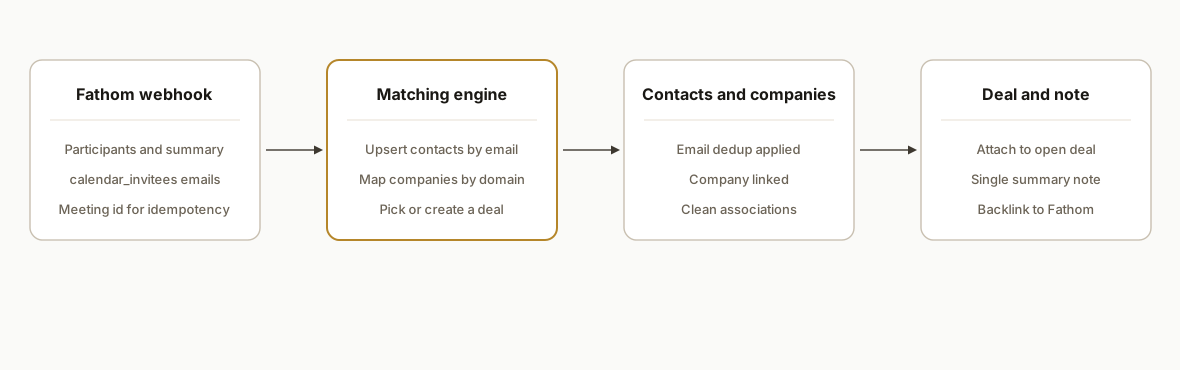
We receive Fathom webhooks with meeting participants and AI artifacts, normalize them, and call HubSpot to upsert contacts, map companies by domain, select the best matching open deal, and write the summary once with the correct associations.
- Fathom webhooks: First class in Fathom. We create a webhook that includes participants, summaries, and action items. Auth uses an X Api Key on Fathom's external API for management and a token on our endpoint for ingress control.
- Record resolution: Emails from calendar_invitees drive contact dedup. We derive company domains from emails for a deterministic company match or create.
- Deal selection: We prefer the most recent open deal for the matched company. If no deal meets rules, we create a net new with a standard name and stage.
- Summary posting: The AI summary from Fathom becomes a single CRM note associated to contact, company, and deal to keep one source of truth.
- Backfill: We use the Fathom external API to page historic meetings and re run the same resolver so older calls get attached.
Fathom OAuth vs API key: how we authenticate
We ran this in production with Fathom's external API key for webhook management and backfills. For orgs that prefer user level consent or easier revocation, we support OAuth. Two practical points from our build:
- Include flags with OAuth: when you move to OAuth, do not rely on include_transcript or include_summary on fetches. Fetch artifacts from their dedicated endpoints after you have a valid token.
- Token handling: store tokens per tenant and refresh on expiry. Keep CRM writes resilient if a token refresh fails and retry after rotation.
Example pattern we used for safe token rotation without tying to any vendor endpoint names:
async function withToken(client, accountId, fn) {
  let t = await loadToken(accountId); // access, refresh, expiresAt
  if (Date.now() > t.expiresAt - 60_000) {
    t = await rotateToken(t); // use your OAuth client lib
    await saveToken(accountId, t);
  }
  return fn({ ...client, token: t.access });
}
If your security team prefers key rotation at the service layer, run with X Api Key and rotate the secret on a fixed cadence.
Fathom webhooks: payload handling, retries, and security
We treat deliveries as at least once, acknowledge quickly, and process asynchronously. What worked in production:
- Fast 2xx then queue: parse, verify the shared token, enqueue with an idempotency key, respond 202, then fan out to HubSpot.
- Store the raw JSON: keep the payload for audit and replay. It accelerates debugging when a CRM write fails.
- Idempotency by meeting id: key the job by meeting id so retries never create duplicate contacts or notes.
Example ingress that acks fast and pushes to a worker:
app.post("/api/fathom-webhook", async (req, res) => {
  if (req.query.token !== INCOMING_TOKEN) return res.status(401).end();
  const evt = req.body;
  const meetingId = evt?.meeting?.id || evt?.id;
  if (!meetingId) return res.status(400).send("missing meeting id");
  await rawStore.put(meetingId, JSON.stringify(evt));
  await queueJob({ key: `mtg:${meetingId}`, payload: evt });
  res.status(202).end();
});
HubSpot meetings recorder vs Fathom in HubSpot
If you already record calls with HubSpot's recorder, your notes and transcripts live natively in HubSpot. If your team prefers Fathom for cross platform capture and AI recaps, this integration keeps HubSpot as the source of truth by attaching Fathom summaries to the right contacts, companies, and deals. We have seen teams keep HubSpot for dialer and run Fathom for meetings, with this association layer bridging them cleanly.
Step-by-step: how to build it
1) Create a Fathom webhook for meetings
Create a webhook in Fathom and include participants and summaries. Fathom exposes webhooks in Settings or via API. The external API base is https://api.fathom.ai/external/v1 and uses an X Api Key header for auth.
# Example: create a Fathom webhook via API
# Auth: X-Api-Key header (see developers.fathom.ai)
curl -X POST \
  https://api.fathom.ai/external/v1/webhooks \
  -H "Content-Type: application/json" \
  -H "X-Api-Key: $FATHOM_API_KEY" \
  -d '{
    "url": "https://your-domain.com/api/fathom-webhook?token='$INCOMING_TOKEN'",
    "events": ["meeting.completed"],
    "include_summary": true,
    "include_transcript": false
  }'
Gotcha: if you later switch to OAuth, Fathom notes that include flags are not supported on OAuth fetches. Fetch transcripts and summaries via their dedicated endpoints instead.
2) Receive and validate the webhook payload
Stand up a minimal Express endpoint. We validate a shared token on ingress to avoid random posts and log the meeting id for idempotency.
import express from "express";
import crypto from "crypto";

const app = express();
app.use(express.json());

const INCOMING_TOKEN = process.env.INCOMING_TOKEN;

app.post("/api/fathom-webhook", async (req, res) => {
  if (req.query.token !== INCOMING_TOKEN) return res.status(401).end();

  const evt = req.body; // Fathom meeting payload
  const meetingId = evt?.meeting?.id || evt?.id;
  if (!meetingId) return res.status(400).send("missing meeting id");

  // idempotency key for safe replays
  const key = crypto.createHash("sha1").update(String(meetingId)).digest("hex");

  queueJob({ key, payload: evt });
  res.status(202).end();
});

app.listen(3000);
Key point: treat deliveries as at least once. Push to a queue with an idempotency key before doing CRM writes.
3) Normalize participants from calendar_invitees
Fathom exposes participants via calendar_invitees in its API. We defensively filter for valid emails and extract company domains.
function extractParticipants(meeting) {
  const raw = meeting?.calendar_invitees || [];
  return raw
    .map(p => ({ name: p.name || "", email: (p.email || "").toLowerCase().trim() }))
    .filter(p => /.+@.+\..+/.test(p.email));
}

function companyDomainFromEmail(email) {
  return email.split("@")[1] || "";
}
If a participant lacks an email due to a calendar limitation, we fall back to the Fathom API to pull the summary or transcript and recover likely emails from embedded CRM matches when available.
4) Upsert HubSpot contacts and companies
We upsert contacts keyed by email and map companies by domain rules. Our contact upsert also attaches the company so later deal selection has a reliable parent.
async function upsertCrmContactAndCompany(hs, person) {
  const domain = companyDomainFromEmail(person.email);
  const companyId = await ensureCompanyByDomain(hs, domain);
  const contactId = await ensureContactByEmail(hs, {
    email: person.email,
    firstname: person.name.split(" ")[0] || "",
    lastname: person.name.split(" ").slice(1).join(" ") || "",
    companyId
  });
  return { contactId, companyId };
}
We avoid naming specific HubSpot endpoints here. In our production service we use the official HubSpot SDK to perform these upserts and associations.
5) Choose the correct open deal or create one
We select the most relevant open deal for the company using recency and stage rules. If none exist, we create a new deal with a standardized naming pattern and target stage.
async function resolveDealForCompany(hs, companyId) {
  const open = await listOpenDealsForCompany(hs, companyId);
  if (open.length) return pickMostRecent(open).id;
  return await createNewDeal(hs, companyId, {
    name: "Discovery Call",
    amount: null,
    pipeline: process.env.DEFAULT_PIPELINE,
    stage: process.env.DEFAULT_STAGE
  });
}
Keep the creation rules conservative. You do not want to spam new deals for every internal meeting.
6) Post the AI summary as one note with associations
We write one CRM note and associate it to the contact, company, and chosen deal. Fathom's AI summary text is provided in the webhook payload or retrievable from the API.
async function writeAssociatedNote(hs, { contactId, companyId, dealId, title, body }) {
  const noteId = await createNote(hs, { title, body });
  await associateNote(hs, noteId, { contactId, companyId, dealId });
  return noteId;
}
In production we include a backlink to the original Fathom meeting and a short Action Items list under the summary for quick scanning.
7) Backfill recent meetings with the Fathom API
For teams with months of prior calls we backfill. The Fathom external API supports listing meetings and fetching summaries with an X Api Key header.
async function backfillRecent(fathom, sinceIso) {
  for await (const meeting of fathom.listMeetings({ since: sinceIso })) {
    const summary = await fathom.getSummary(meeting.id);
    await processMeeting({ ...meeting, summary });
  }
}
If your OAuth app flow is used, follow Fathom's guidance to fetch transcripts and summaries via their dedicated endpoints rather than include flags.
Where it gets complicated
- Google Meet primary calendar only: Fathom's Google Meet coverage notes only meetings on the Primary Calendar are supported. We saw missing participants when organizers scheduled from a secondary calendar. Our mitigation: communicate the constraint and add a transcript driven fallback to recover emails when possible.
- Zapier is triggers only: The Zapier app for Fathom fires events but does not perform actions back in Fathom. For complex association logic we favored a webhook to our service or a Make.com scenario that can branch and call HubSpot programmatically.
- OAuth include flags: Fathom documents that OAuth apps cannot use include_transcript or include_summary flags on fetches. Fetch artifacts from the dedicated endpoints when you move to OAuth.
- Deal explosion risk: Without careful rules you can create duplicate or low quality deals. We constrain to one new deal per company per 24 hours and prefer attaching to the most recent open deal.
- Idempotency and replays: Treat webhook deliveries as at least once. We use meeting id as the idempotency key so retries never double post notes or create duplicate contacts.
What this actually changes
For a B2B sales team using HubSpot, this removed manual logging and made every Fathom recorded call show up on the correct timeline automatically. New stakeholders were created as contacts on first touch and associated to the right company and deal, so follow ups landed in the correct thread without rep effort. Gartner reports B2B buying groups typically include 6 to 10 decision makers, which makes automatic stakeholder capture especially valuable. Source: https://www.gartner.com/en/insights/sales/b2b-buying-journey
Frequently asked questions
Does Fathom have a public API for this?
Yes. Fathom exposes an external API at https://api.fathom.ai/external/v1 with X Api Key authentication. It includes meetings, participants, summaries, transcripts, and webhooks, which is enough to drive contact upserts and note posting in HubSpot.
Can Fathom auto create HubSpot contacts by itself?
Fathom's native HubSpot app syncs AI artifacts into HubSpot. Whether it creates net new contacts automatically is not confirmed. We implement auto creation via Fathom webhooks or Zapier or Make using participant emails from calendar_invitees.
Do I need Zapier or Make for this?
Not strictly. We run a webhook service so the association logic is centralized. If you are non technical, Zapier triggers or Make modules can forward payloads and perform CRM actions. Zapier is triggers only for Fathom, so branching logic belongs in your downstream app or service.
What about meetings without emails in the payload?
We saw gaps when organizers used non primary calendars. Our service falls back to fetching the meeting summary or transcript from the Fathom API and attempts to recover emails from CRM matches. We also recommend training organizers to schedule from the primary calendar.
How long does this take to implement?
Our production deployment pattern is measured in days, not weeks. Webhook ingress, contact and company upserts, conservative deal rules, and one note writer are the core pieces. Backfill and edge case handling add another day or two.
We have built this exact pattern for sales teams that want call summaries and attendees to land on the right HubSpot records without manual effort. If you want us to scope yours, see our CRM automation services at /services#crm-automation, read how we handle meeting notes end to end in /blog/automate-fathom-meeting-notes, see how we auto-create HubSpot tasks from Fathom calls, and how we create HubSpot tickets from Fathom calls. Book a working session at /book.
Sources
- 1.B2b buying journeygartner.com
Want us to build this for you?
Nine questions, about 90 seconds. You see the revenue it is costing you, then pick a time. No pitch.
See your options