
Here is how I build a Fathom to Salesforce automation that listens for completed calls and AI action items, then creates Salesforce Tasks, Notes, and next steps automatically. It is for sales and success teams that want every follow-up captured without manual CRM logging. This guide shows how it works, how to build it, and the gotchas we hit in production.
Definition: Fathom to Salesforce automation is a webhook and API pipeline that turns meeting summaries and action items into CRM records on Contacts, Accounts, or Opportunities without manual copy paste.
The problem it solves
Answer first: the integration removes the copy paste step after every call and guarantees a Task exists for every action item with the right owner and due date.
Teams told us the post-call workflow was brittle: someone downloads a summary, writes a few bullets into Salesforce, promises a follow-up, then forgets to create a Task. Two days later the thread is cold. Fathom already has the summary and action items, but native CRM syncs are constrained by object coverage and mapping. We bridged that gap so every call ends with structured Tasks and searchable Notes in Salesforce.
| Manual process | Automated with Fathom to Salesforce |
|---|---|
| Skim Fathom recap and rewrite in CRM | Fathom webhook triggers, API pulls details, Task and Note are created |
| Decide who owns each follow-up | Owner routed by attendee and calendar rules |
| Pick a due date from memory | Dates derived from phrase parsing and meeting time windows |
| Paste bullets into a long Note | AI summary preserved, truncated safely to Salesforce limits |
| Forget to create a Task | Idempotent guard prevents duplicates and enforces one Task per action item |
What keeping your systems in sync is worth
Move the sliders to your own numbers. The defaults are only an example business, not client data.
Revenue from deals that stop slipping each year
$100,800
80 a month × 12 × 5% × 70% × $3000
- Deals kept a year
- 34
- 80 × 12 × 5% × 70%
- Staff cost of doing it by hand each year
- $9,100
- 5 hrs a week × $35/hr × 52 weeks
- Hours handed to the system each month
- 22 hrs
- 5 hrs a week × 52 ÷ 12
How the automation works
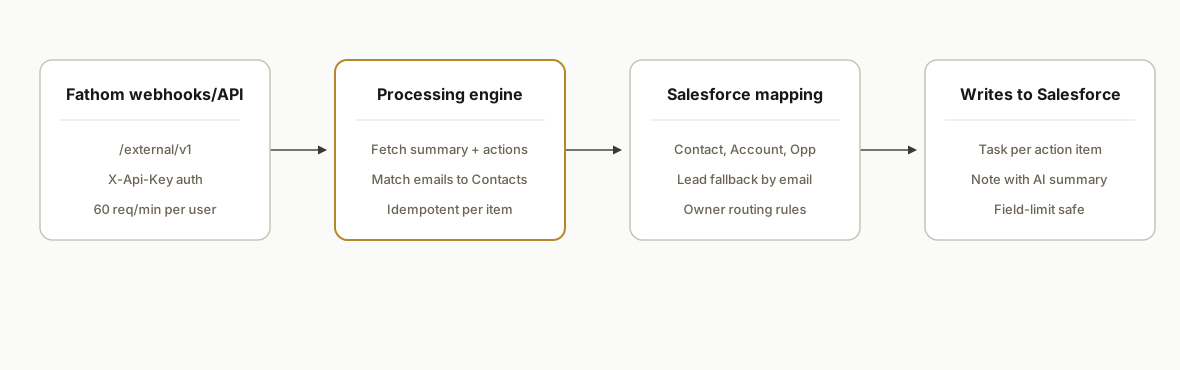
Answer first: Fathom sends a webhook on meeting completion. Our service fetches details via the Fathom API, resolves the attendee email to a Salesforce Contact and related Account or open Opportunity, then creates a Task and a Note. Rate limits and field limits are respected.
- Fathom webhooks and API: Fathom exposes a public REST API at https://api.fathom.ai/external/v1 with X-Api-Key auth and webhooks you can create and list. We receive the event, then fetch meeting details. Fathom's rate limit is 60 calls per minute per user across keys.
- Matching and routing: We match attendee primary emails to Salesforce Contacts. When an open Opportunity exists with an OpportunityContactRole link, we relate the Task to that deal. Else we attach to the Contact or Account.
- Task creation: One Task per action item: Subject, Due Date, Priority, Status, and the WhoId or WhatId get set. We attach the full context in a Note so the Task stays readable.
- Idempotency: We hash per-action-item content and store it so replays or edits do not create duplicates.
- Zapier or Make fallback: Zapier has instant triggers for new recordings and summaries but no actions. Make includes Watch New Recordings and Get Summary. We use webhooks for production and keep a Make scenario as a backup watcher.
Step-by-step: how to build it
1) Register a Fathom webhook
Answer first: create a webhook in Fathom that points to your secure endpoint. Authenticate with X-Api-Key.
# Create a webhook (see Fathom docs for exact body fields and event types)
curl -X POST \
  -H "Content-Type: application/json" \
  -H "X-Api-Key: $FATHOM_API_KEY" \
  https://api.fathom.ai/external/v1/webhooks \
  -d '{
    "target_url": "https://yourdomain.com/webhooks/fathom",
    "description": "Meeting completed handler"
  }'
Gotcha: do not assume payload shape. We store the raw body, verify the signature if configured, then call the API to pull authoritative meeting details.
2) Receive the webhook and fetch meeting details
Answer first: handle the POST, then retrieve the meeting and summary via Fathom's API before writing anything to Salesforce.
// server/webhooks.js
import express from "express";
import fetch from "node-fetch";

const router = express.Router();

router.post("/webhooks/fathom", async (req, res) => {
  # Acknowledge quickly
  res.status(202).end();

  try {
    const event = req.body; # store raw for audit
    const meetingId = event?.meeting_id || event?.id; # do not rely on one field

    # Fetch latest meetings then find the one we care about
    const resp = await fetch("https://api.fathom.ai/external/v1/meetings", {
      headers: { "X-Api-Key": process.env.FATHOM_API_KEY }
    });
    const data = await resp.json();
    const meeting = Array.isArray(data?.results)
      ? data.results.find(m => m.id === meetingId)
      : null;

    if (!meeting) return;

    # Extract safely: attendees, summary text, action items
    const attendees = meeting.attendees || [];
    const summary = meeting.summary || "";
    const actions = meeting.action_items || [];

    # Hand off to the Salesforce writer
    await queueForSalesforce({ meetingId, attendees, summary, actions });
  } catch (e) {
    console.error("fathom webhook error", e);
  }
});

export default router;
Gotcha: Fathom rate limit is 60 calls per minute per user. Batch reads and cache per meeting ID to avoid refetch storms under retries.
3) Resolve attendees to Salesforce records
Answer first: match the primary attendee email to a Contact, then prefer an open Opportunity with an OpportunityContactRole.
// lib/salesforce.js
import fetch from "node-fetch";

export async function findSfContext(email, sf) {
  # 1: contact by email
  const q1 = `SELECT Id, AccountId FROM Contact WHERE Email = '${email.replace(/'/g, "\\'")}' LIMIT 1`;
  const c = await sf.query(q1);
  if (!c.records?.length) return {};
  const contactId = c.records[0].Id;
  const accountId = c.records[0].AccountId;

  # 2: open opp linked to this contact
  const q2 = `SELECT Opportunity.Id FROM OpportunityContactRole WHERE ContactId='${contactId}' AND Opportunity.IsClosed=false LIMIT 1`;
  const o = await sf.query(q2);
  const oppId = o.records?.[0]?.Opportunity?.Id;

  return { contactId, accountId, oppId };
}
Gotcha: Fathom's native Salesforce sync does not write to Leads. Our custom integration can create Tasks under Leads by resolving Lead email to WhoId when Contact is missing.
4) Create Salesforce Tasks for each action item
Answer first: one Task per action item with an idempotency key to prevent duplicates.
// lib/write-task.js
import crypto from "crypto";

export async function createTaskForAction({ action, context, sf, ownerId }) {
  const key = crypto.createHash("sha1").update(action.text).digest("hex");

  const dupCheck = await sf.query(
    `SELECT Id FROM Task WHERE Description LIKE '%${key}%' LIMIT 1`
  );
  if (dupCheck.records?.length) return;

  const body = {
    Subject: `Call follow-up: ${action.title || action.text.slice(0, 60)}`,
    Status: "Not Started",
    Priority: "Normal",
    ActivityDate: action.dueDate || new Date().toISOString().slice(0, 10),
    OwnerId: ownerId,
    WhoId: context.contactId, # can be a Lead Id as well
    WhatId: context.oppId || context.accountId || null,
    Description: `${action.text}\n\nRef: ${key}`
  };

  await sf.post("/services/data/v59.0/sobjects/Task", body);
}
Gotcha: store a short hash in Description or a custom field so replays do not duplicate Tasks.
5) Attach the full AI summary as a Note
Answer first: write a Note related to the same record and truncate to Salesforce field limits.
export async function createNote({ summary, context, sf }) {
  const max = 32000; # soft guard below Salesforce long-text limits
  const body = {
    Title: "Fathom call summary",
    Body: summary.slice(0, max),
    ParentId: context.oppId || context.contactId || context.accountId
  };
  await sf.post("/services/data/v59.0/sobjects/Note", body);
}
Gotcha: Fathom supports one click bulk export of all transcripts via TranscriptExporter. For this integration, keep the Note short and store the canonical transcript URL in a custom field or Description if you need deep context.
6) Handle owners, calendars, and edge cases
Answer first: derive OwnerId from the host calendar, fall back to round robin, and skip internal only events.
function resolveOwnerId({ meeting, fallbacks }) {
  const hostEmail = meeting?.host_email;
  return fallbacks.map[hostEmail] || fallbacks.roundRobin()
}
Gotcha: Internal only meetings and events from secondary calendars may not sync. We skip internal only by default and allow an allowlist per team.
Fathom Salesforce integration: native vs webhook build
Answer first: use Fathom webhooks when you need Leads, custom fields, health score updates, or objection workflows. Use the native sync when Contact or Account notes are enough and mapping constraints are acceptable.
- Native Fathom to Salesforce: writes on Contact, Account, and open Opportunity. Lead objects are out of scope. Field mapping is constrained. It is quick to turn on but limited for routing and custom updates.
- Webhook plus API build: supports Leads, custom Task logic, Account level Notes, and related Opportunity targeting when an OpportunityContactRole exists. Idempotency and truncation guards keep data clean under retries and limits.
If you also run HubSpot or Pipedrive in parts of the org, our standard pattern applies there: see how we associate Fathom calls to HubSpot deals and how we create tasks from Fathom in Pipedrive. For SOW and long-form deliverables, we also generate Google Docs from Fathom notes.
How to set up Fathom webhooks correctly
Answer first: register a webhook, acknowledge fast, fetch authoritative details via API, and make writes idempotent.
- Choose scope: point the webhook at a dedicated HTTPS endpoint. Keep the event filter scoped to completed meetings if configurable.
- Acknowledge first: return a 2xx quickly, then process asynchronously so Fathom does not retry on timeouts.
- Fetch details: do not trust the webhook body alone. Call the Fathom API to pull the meeting, attendees, summary, and action items.
- Verify authenticity: store the raw body and verify the signature if your webhook is configured with one. Reject mismatches.
- Idempotency: compute a stable hash per action item and query before write. This prevents dupes during retries or replays.
- Test safely: test with a staging target using a tunnel or webhook capture tool, then rotate to production keys.
For teams that also open tickets from calls, see our ClickUp pattern: create ClickUp tasks from Fathom calls.
Fathom webhooks: event scope and test plan
Answer first: listen for completed meeting events, confirm your service can replay safely, and prove the full path from webhook to Salesforce records in a sandbox.
- Event scope: subscribe to completion style events so summaries and action items are available when your handler runs.
- Replay safety: design the pipeline to accept the same event more than once without creating duplicate Tasks or Notes.
- Sandbox first: point to a Salesforce sandbox. Validate Contact, Account, and Opportunity associations on test records.
- Failure alerts: add simple logging and a dead letter queue or spreadsheet log so missed writes are visible to ops.
Tip: if your team uses a lead management playbook, wire this pipeline to your lead follow-up engine. We often pair it with our pattern to automate CRM lead follow-up so every action item turns into a dated task with an owner.
Fathom Salesforce data sync: what lands where
Answer first: Contacts and Accounts always receive context, Opportunities receive context when a contact role exists, and Leads are supported in the webhook build by resolving email.
- Contacts: every matched attendee email gets Tasks written to the Contact when no deal context exists.
- Accounts: we attach a concise Note at the Account level when the Contact belongs to an Account.
- Opportunities: if there is an open Opportunity with an OpportunityContactRole for the Contact, we relate Tasks and Notes to that deal.
- Leads: native Fathom sync does not cover Leads. Our webhook pipeline can create Tasks related to a Lead by email match.
This is a controlled data sync: we only write what improves follow-up and searchability. If you need long-form outputs for onboarding or proposals, see how we turn Fathom notes into SOW docs.
Customer success: sync transcripts to Accounts and update health scores
Answer first: attach a Note with the call summary to the Account, then adjust a Health Score field based on keywords or action patterns. Open Tasks when objections or risks appear in the summary.
Implementation pattern we ship in production:
- Account Note: if a Contact maps to an Account, write a concise Note titled Fathom call summary. Trim long text to stay below Salesforce limits and include the transcript URL or reference.
- Health Score update: define a light rules engine that increments or decrements an Account Health Score. Inputs: presence of action items, next meeting booked, renewal language, or risk keywords in the summary. Write the net score to your custom Health Score field.
- Objection Tasks: scan the action items or summary for common objections you track. Create one Task per objection with clear Subjects, owners, and due dates. Use the same idempotency keying so an objection does not spawn duplicates.
Example rules stub:
export async function updateHealthAndObjections({ summary, context, sf }) {
  const hasNextMeeting = /next meeting|follow up call/i.test(summary);
  const risk = /(budget|timing|competitor|no decision)/i.test(summary);
  const objections = [
    { key: "budget", rx: /budget/i },
    { key: "timing", rx: /timing|timeline/i },
    { key: "competitor", rx: /competitor|alternative/i }
  ];

  # Score movement
  let delta = 0;
  if (hasNextMeeting) delta += 1;
  if (risk) delta -= 1;

  # Write your custom health score field
  await sf.patch(`/services/data/v59.0/sobjects/Account/${context.accountId}`, {
    YOUR_HEALTH_SCORE_FIELD: sf.expr("existing + delta") # read-modify-write in your code
  });

  # Create objection tasks
  for (const o of objections) {
    if (o.rx.test(summary)) {
      await createTaskForAction({
        action: { text: `Handle ${o.key} objection`, title: `Objection: ${o.key}` },
        context,
        sf,
        ownerId: context.ownerId
      });
    }
  }
}
If you want to push objection handling into CX tooling as well, we also built a flow that creates HubSpot tickets from Fathom calls using the same webhook and mapping rules.
Does Fathom integrate with Salesforce Leads
Answer first: native Fathom sync does not cover Leads. The webhook build can. Match by email, then write the Task against the Lead WhoId.
Implementation sketch:
// lib/lead-match.js
export async function findLeadByEmail(email, sf) {
  const q = `SELECT Id FROM Lead WHERE Email='${email.replace(/'/g, "\\'")}' AND IsConverted=false LIMIT 1`;
  const r = await sf.query(q);
  return r.records?.[0]?.Id || null;
}

export async function writeLeadTask({ action, leadId, sf, ownerId }) {
  await sf.post("/services/data/v59.0/sobjects/Task", {
    Subject: `Call follow-up: ${action.title || action.text.slice(0, 60)}`,
    Status: "Not Started",
    Priority: "Normal",
    ActivityDate: action.dueDate || new Date().toISOString().slice(0, 10),
    OwnerId: ownerId,
    WhoId: leadId,
    Description: action.text
  });
}
Routing tip: if a Lead converts later, future calls will attach to the new Contact or Opportunity once email mapping and an OpportunityContactRole exist. Tie this to your SLA engine so nothing stalls. For downstream outreach, see how we automate CRM lead follow-up.
Troubleshooting: Fathom to Salesforce not creating Tasks
Answer first: validate webhook delivery, auth, and object matching before you debug code.
- Webhook reachability: confirm your endpoint returns 2xx quickly. Check logs for received payloads and your subsequent API fetch call. Timeouts cause retries and dup risk.
- Fathom auth: verify the X-Api-Key is valid and that your meeting fetch succeeds. Cache by meeting ID to reduce refetch loops under retries.
- Email match: ensure at least one external attendee email exists in Salesforce. If you expect a Lead, run a Lead by email query. If none, create a test Lead or Contact.
- Deal linking: if you expect deal level Tasks, confirm an OpportunityContactRole exists on an open Opportunity for that Contact.
- Salesforce permissions: the integration user must create Task and Note and read Contact, Account, Opportunity, Lead. Profile and field level security must allow writes to your custom fields.
- Field limits: long text truncates. Keep Task.Description compact and push context to a Note. Verify your Note write path.
- Idempotency collisions: if your duplicate check keys off text only, small edits can bypass it. Include a stable meeting identifier in the key.
- Fallback watcher: if webhooks are paused, keep a Make watcher for new recordings as a safety net. If you are choosing a toolchain, read our comparison of Make vs n8n vs Apps Script. If you operate many scenarios, see how we patch Make scenarios safely at scale.
Security and data handling: what we store and why
Answer first: store the minimum needed to create Tasks and Notes. Keep hashes for idempotency, not raw transcripts, unless your policy requires it.
- Data minimization: we keep attendee emails, summary text for the Note, action item text for Task.Subject and Description, and a short hash for idempotency.
- Transcript storage: we do not persist full transcripts by default. We include a transcript URL or reference in the Note when needed for context.
- Secrets: Fathom and Salesforce secrets live in your secret store. Rotate keys and restrict the Salesforce integration user to required objects and fields only.
- Auditability: we log raw webhook bodies to a secure bucket with retention policy for replay and incident review.
- Ownership of data: your CRM remains the system of record. For broader governance questions, see our guide on making AI decisions on your own data.
Where it gets complicated
- No Leads in native sync: Fathom's Salesforce integration writes to Contact, Account, and open Opportunity. Lead objects are not supported. Our pipeline resolves Leads by email and writes Tasks against the Lead WhoId when a Contact is missing.
- Matching dependency: Deal level writes require an explicit OpportunityContactRole link to an open Opportunity. If that link does not exist, your Task should still land on the Contact or Account so the follow-up is not lost.
- Field mapping and length: Long text is auto truncated by Salesforce limits and some native mappings only consider certain heading levels. We trim body text proactively and push the full text to a Note instead of overloading Task.Description.
- Scope and timing: Historical backfill is manual per call. Disconnect or reconnect does not re-sync history. Use Fathom webhooks for forward events and design a one time backfill job if you need history.
- Rate limits and batching: Fathom is 60 calls per minute per user. Batch calls and cache meetings by ID when retries hit. Salesforce has its own API limits per org and per user, so compact your writes.
What this actually changes
In the systems I build, this removes the post-call logging step and makes every action item visible in the pipeline the same day. Reps stopped retyping summaries. Managers saw Tasks attached to the right Opportunities without chasing notes.
One useful benchmark: McKinsey reported sellers spend less than one third of their time on selling activities, with the rest on admin and other tasks. Shifting post-call admin into an automated flow structurally returns time to selling. Source: https://www.mckinsey.com/capabilities/growth-marketing-and-sales/our-insights/revving-up-the-sales-engine-in-your-organization
Frequently asked questions
Does Fathom have an API and webhooks for this?
Yes. Fathom exposes a public API at https://api.fathom.ai/external/v1 with X-Api-Key auth and supports creating and listing webhooks. The published rate limit is 60 calls per minute per user across keys.
Can this write Tasks on Salesforce Leads as well as Contacts?
Fathom's native Salesforce sync does not support Leads. Our custom build uses the Salesforce API, so we can resolve a Lead by email and create Tasks against that Lead's WhoId when no Contact match exists.
Do I need Zapier or Make for this integration?
No. We run it as a small service using Fathom webhooks and API. Zapier has instant triggers but no actions for Fathom. Make includes Watch New Recordings and Get Summary. We keep a Make scenario as a fallback watcher if webhooks are paused.
How do you prevent duplicate Tasks from the same action item?
We compute a stable hash of each action item and store it in the Task Description or a custom field. Before writing we query for that hash. This makes the write idempotent even under webhook retries or manual replays.
Will every meeting sync to Salesforce?
We scope to external calls where an attendee email matches a Salesforce record. Internal only meetings and secondary calendars are excluded by default. Backfill is not automatic: if you need history, run a one time backfill script.
Is this a Fathom Salesforce data sync or a webhook pipeline?
It is a webhook driven data sync. We subscribe to Fathom events, fetch authoritative details, then write Tasks and Notes to the right Salesforce objects with routing and idempotency guards.
What happens if there is no open Opportunity?
We attach the Task and Note to the Contact. If there is an Account, we relate the Note there as well. When a new Opportunity opens later, future calls will attach at the deal level once an OpportunityContactRole is present.
If you want every call to end with a Salesforce Task and a readable Note without anyone retyping, this pattern is proven. We have also shipped related Fathom workflows like automate Fathom meeting notes, create HubSpot tasks from Fathom calls, and create HubSpot tickets from Fathom calls. See our CRM automation services or book a 20 minute call to scope your exact mapping and routing.
Sources
- 1.Revving up the sales engine in your organizationmckinsey.com
Want us to build this for you?
Nine questions, about 90 seconds. You see the revenue it is costing you, then pick a time. No pitch.
See your options