
We built and shipped a HawkSoft Partner API integration that schedules policy renewal reminders and sends post-renewal review requests. It writes log notes back to HawkSoft so staff see the touches on the client record. For agencies where native workflows could not trigger external sends, this closed the loop without changing the AMS.
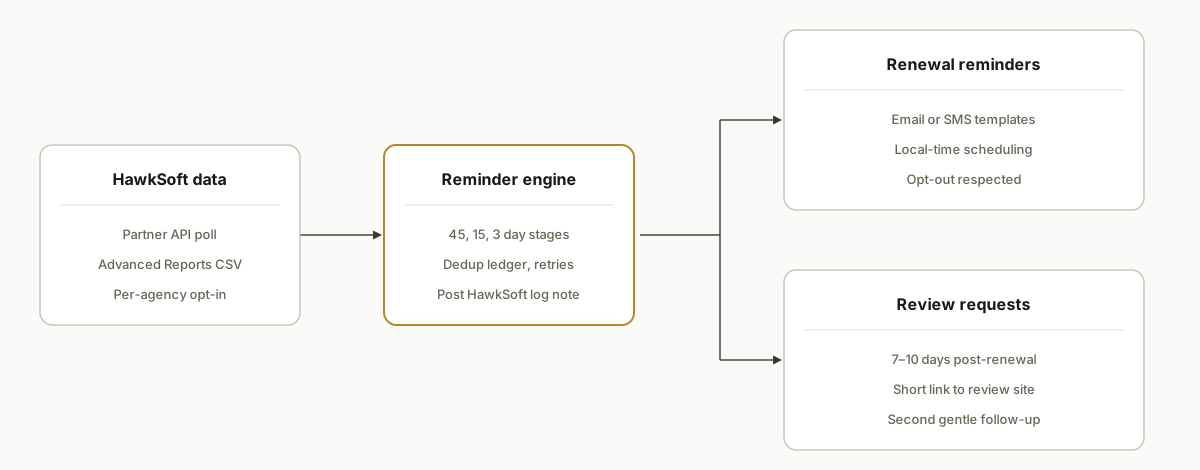
HawkSoft renewal automation: a scheduled engine that pulls expiring policies from HawkSoft, sends staged reminder emails or SMS, then posts a log note back to the client in HawkSoft for audit and follow-up.
The problem it solves
Agencies were pulling Advanced Reports weekly, filtering for upcoming expirations, copy-pasting contacts into a mailer, and writing a manual note on the client to record that the reminder went out. After renewals landed, nobody consistently asked for a Google review because the task fell through the cracks.
| Process | Manual | Automated |
|---|---|---|
| Find upcoming renewals | Run Advanced Reports. Export CSV. Filter by date windows. | Scheduled poll from HawkSoft Partner API (or CSV import fallback). |
| Send reminders | Copy-paste emails. Risk duplicate sends. | Templated email or SMS at 45, 15, 3 days before expiration with opt-out and throttles. |
| Record activity | Type a log note after sending, when remembered. | POST a log note to HawkSoft for each outbound touch. |
| Ask for reviews | Ad hoc after renewal, often forgotten. | Timed review request 7, 10 days post-renewal with one gentle follow-up. |
| Avoid duplicates | Spreadsheet hacks. | Idempotent keys and a send ledger keyed by policy and window. |
A single reliable flow matters for revenue and reputation. Reviews are a public signal and future lead source: BrightLocal reports that 98 percent of consumers read online reviews for local businesses at least occasionally (2023 Local Consumer Review Survey: https://www.brightlocal.com/research/local-consumer-review-survey/).
How the automation works
The system connects to HawkSoft's Partner API for approved agencies. It polls for policies approaching expiration, schedules reminder messages, and posts a client log note back to HawkSoft. If API access is not yet enabled, it accepts an Advanced Reports CSV export as a fallback input until the partner opt-in is complete.
- HawkSoft Partner API connector: Authenticates with HTTP Basic using a Client Id and Secret against integration.hawksoft.app. We validate per-agency opt-in through the License Management Portal and respect endpoint coverage differences noted in the docs.
- Reminder engine (accent): A rules layer decides who gets which touch and when: 45, 15, 3 days before expiration, plus a post-renewal review request. It enforces throttles and opt-out logic and creates a unique send key per policy and window.
- Outbound channels: Email via your chosen ESP and SMS via your preferred gateway. Messages are templatized with client and policy fields.
- Audit and write-back: After each send, the service POSTs a log note to the HawkSoft client so the activity is visible in the AMS. Some writes are acknowledged with 202 and applied when the agency next connects to the cloud; retries and idempotency protect against duplicates.
- CSV fallback: If Partner API access is pending, staff export Advanced Reports to CSV. The same engine parses the file and runs the identical schedule.
Step-by-step: how to build it
1) How do you authenticate to the HawkSoft Partner API?
Use HTTP Basic with your Client Id and Secret against the Partner API base URL. Store credentials securely and inject them at runtime.
// node: hawksoftClient.js
import fetch from "node-fetch";

const BASE_URL = process.env.HAWKSOFT_BASE_URL || "https://integration.hawksoft.app"; // per docs
const CLIENT_ID = process.env.HAWKSOFT_CLIENT_ID;
const CLIENT_SECRET = process.env.HAWKSOFT_CLIENT_SECRET;

function authHeader() {
  const token = Buffer.from(`${CLIENT_ID}:${CLIENT_SECRET}`).toString("base64");
  return { Authorization: `Basic ${token}` };
}

export async function hsGet(path) {
  const res = await fetch(`${BASE_URL}${path}`, { headers: authHeader() });
  if (!res.ok) throw new Error(`HawkSoft GET ${path} failed: ${res.status}`);
  return res.json();
}

export async function hsPost(path, body) {
  const res = await fetch(`${BASE_URL}${path}`, {
    method: "POST",
    headers: { ...authHeader(), "Content-Type": "application/json" },
    body: JSON.stringify(body)
  });
  // Writes may be queued with 202 Accepted depending on connectivity per docs
  if (![200, 201, 202].includes(res.status)) throw new Error(`HawkSoft POST ${path} failed: ${res.status}`);
  return res.status;
}
Key gotcha: access is not open self-serve. Partner approval and per-agency opt-in are required before data flows.
2) How do you detect upcoming renewals without webhooks?
Design for polling. Query the relevant Partner API resources for policies or clients that include expiry metadata. If a given endpoint is unavailable for the agency's version, swap to the CSV input until coverage is confirmed.
// renewalWindow.js
import { addDays, isWithinInterval } from "date-fns";

export function inWindow(expiryIso, daysBefore) {
  const expiry = new Date(expiryIso);
  const start = addDays(expiry, -daysBefore);
  const now = new Date();
  return isWithinInterval(now, { start, end: addDays(start, 1) });
}

export function nextTouches(expiryIso) {
  const plan = [45, 15, 3];
  return plan.filter(d => inWindow(expiryIso, d));
}
The absence of webhooks means cadence is your control. We use short interval polls in business hours and a longer interval off-hours.
3) How do you prevent duplicates and retried sends?
Use a ledger keyed by policy plus window plus channel. Enforce uniqueness at the database level and rely on upserts in code.
-- postgres schema
create table sends (
  id uuid primary key default gen_random_uuid(),
  policy_number text not null,
  contact_id text not null,
  channel text not null,      -- email or sms
  window_days int not null,   -- 45, 15, 3, -7 for post-renewal
  sent_at timestamptz not null default now(),
  unique(policy_number, channel, window_days)
);
// ledger.js
export async function recordSend(db, { policyNumber, contactId, channel, windowDays }) {
await db.query(
`insert into sends(policy_number, contact_id, channel, window_days)
values($1,$2,$3,$4)
on conflict(policy_number, channel, window_days) do nothing`,
[policyNumber, contactId, channel, windowDays]
);
}This also protects against HawkSoft write calls that return 202 and later re-play.
4) How do you send the reminder and capture an audit trail?
Send via your ESP or SMS provider, then post a log note back to HawkSoft so staff see it on the client record. The exact Partner API paths are in the vendor docs. We parameterize them to avoid hardcoding and to accommodate endpoint coverage differences.
// sendAndLog.js
import { hsPost } from "./hawksoftClient.js";

export async function sendEmail(esp, to, subject, html) {
  await esp.send({ to, subject, html });
}

export async function postHawkSoftLog(clientId, text) {
  const LOG_ENDPOINT = process.env.HS_LOG_ENDPOINT_PATH; // set from docs, for client log notes
  const body = { clientId, text };
  const status = await hsPost(LOG_ENDPOINT, body);
  return status; // 200, 201, or 202 per docs
}
We keep the body minimal and factual: channel, template, window, and a link to the message ID in the ESP for deep troubleshooting.
5) How do you request reviews after a renewal is in place?
Queue a delayed job keyed to the same policy. Seven to ten days after a successful renewal event is a good default. A gentle follow-up after another week can be added if no click is recorded.
// reviewQueue.js
export function buildReviewMessage(name, shortLink) {
  return `Hi ${name}, thanks for renewing with us. If we handled things well, would you mind leaving a quick review? ${shortLink}`;
}
Consumers rely on reviews when choosing local services. In BrightLocal's 2023 study, 98 percent of consumers read online reviews at least occasionally (source: https://www.brightlocal.com/research/local-consumer-review-survey/).
6) How do you bridge agencies waiting on Partner API approval?
Use Advanced Reports CSV export as the temporary source. The blog and reference sheet note that reports can be exported to CSV, then processed externally.
// csvFallback.js
import fs from "fs";
import { parse } from "csv-parse/sync";

export function loadAdvancedReportCsv(path) {
  const text = fs.readFileSync(path, "utf8");
  const rows = parse(text, { columns: true, skip_empty_lines: true });
  // Map report columns to the fields your engine expects
  return rows.map(r => ({
    policyNumber: r.PolicyNumber,
    contactEmail: r.Email,
    contactPhone: r.Phone,
    expiryDate: r.ExpirationDate
  }));
}
When Partner API opt-in lands, flip the source to API and keep CSV as a fallback for resilience.
7) How do you operate around queued writes and coverage differences?
Build for retries and idempotency. Some POSTs return 202 and are applied when the agency reconnects to the cloud. Keep your sends ledger authoritative and reconcile HawkSoft log notes on the next poll.
// retry.js
export async function retry(fn, attempts = 4) {
  let lastErr;
  for (let i = 0; i < attempts; i++) {
    try { return await fn(); } catch (e) { lastErr = e; await new Promise(r => setTimeout(r, 500 * (i + 1))); }
  }
  throw lastErr;
}
We validate endpoint availability per agency and version. If a specific resource is in development for that tenant, we feature-flag that step off until coverage is present.
Where it gets complicated
Partner approval and per-agency opt-in. The Partner API is gated. Plan lead time for onboarding and capture explicit consent in your SOW and runbook.
No public Zapier or Make app listed. There is no official HawkSoft app in the Zapier or Make directories at the time we built this, so the bridge is the Partner API or CSV export. We bake both so operations do not pause while waiting on partner access.
Queued writes and offline windows. Some POSTs are accepted with 202 and applied later. Your system must treat 202 as success, reconcile on the next poll, and never assume immediate consistency.
Coverage varies by agency and version. Certain endpoints are HS6-only or in development. We feature-flag each step and validate coverage before turning it on in production.
Time zones and compliance. Schedule sends in the client's local time, include opt-out language, and avoid contacting after hours. Review requests should exclude clients with unresolved service tickets.
Idempotency everywhere. Without webhooks, polling can surface the same policy multiple times. Unique keys and database constraints keep sends single-shot.
What this actually changes
For an independent insurance agency, this removed weekly report exports, manual mail merges, and after-the-fact log entries. In production it handled staged touches at 45, 15, and 3 days before expiration and a post-renewal review ask, with each touch recorded on the HawkSoft client for audit. The structural win: every expiring policy is contacted on time, and every happy renewal gets a chance to turn into a public review without adding admin work.
One external data point underscores the review value: 98 percent of consumers read online reviews for local businesses at least occasionally (BrightLocal 2023: https://www.brightlocal.com/research/local-consumer-review-survey/). Automating the ask increases the odds those renewals show up as visible proof for the next prospect.
Frequently asked questions
Does HawkSoft have an official API?
Yes. HawkSoft exposes a Partner API for approved vendors and agencies with customer opt-in via the License Management Portal. Authentication uses HTTP Basic with a Client Id and Secret against integration.hawksoft.app.
Can I use Zapier or Make with HawkSoft?
There is no official HawkSoft app listed in the Zapier or Make public directories at the time we built this. We bridge the gap with the Partner API when approved, or with Advanced Reports CSV exports as a fallback.
Can this run in real time without webhooks?
The Partner API docs do not advertise outbound webhooks. We run scheduled polls and tune frequency by business hours. The ledger prevents duplicates if the same record appears across polls.
What plan or setup do I need for API access?
Partner onboarding and per-agency opt-in are required. We coordinate via the HawkSoft License Management Portal, then enable the integration once the agency has approved data sharing.
What does this cost monthly?
Infrastructure is modest. The main cost is the build and light ongoing maintenance. Partner API access terms are set by HawkSoft and the agency. Email and SMS costs depend on your ESP and gateway.
How long does it take to implement?
We have shipped similar builds in one to two weeks once partner access is ready, with CSV fallback available sooner. Timeline depends on API approval lead time and any template or compliance reviews.
If you want renewal reminders and review requests running from HawkSoft with audit trails in the AMS, we have shipped this flow end to end. See our insurance integration work, including how we bridge gaps when platforms lack native connectors, in our post on the EZLynx integration gap. Then visit our services page for CRM automation and book a call to scope your build.
- Services: /services#crm-automation
- Related: /blog/ezlynx-zapier-integration-gap-bridge
- Book a call: /book
Want us to build this for you?
Nine questions, about 90 seconds. You see the hours it is costing you, then pick a time. No pitch.
Get your free assessment