
If you want to hire someone to automate your business workflows with AI, the simplest reliable path looks like this: define one outcome, inventory the systems and access, ship a thin slice in shadow mode, and only then go live with a monitored, swappable engine. This post is the playbook we use when we are the team you hire.
Automation hiring definition: hiring for automation is engaging an integrator to deliver a specific, measurable outcome by connecting your systems, not to just install a tool.
We built and shipped this pattern across real deployments: a real estate AI dialer that paused itself on TTS overages, an HVAC dashboard that dual-wrote through cutover, a nonprofit grant pipeline that moved to async to stop timeouts, and an e-commerce order filter that launched before a custom app was approved. The steps are consistent even when the platforms change.
The problem it solves
Hiring the wrong way creates slideware and side effects. You end up with a prompt demo that breaks on your data, automations that double-send, or browser scripts that look clever but lock you into a maintainer. The right hire runs a discovery-to-deployment path with guardrails: idempotency, comparison logs, pause controls, and a clean handoff.
| Manual hiring path | Automated hiring path |
|---|---|
| Pick a vendor on a cool demo. Hope it fits your stack. | Start from one business outcome and the systems that hold the data. |
| Build big. Ship late. Pray it works end to end. | Ship a thin slice in shadow mode. Compare against human output first. |
| No logging or dedup. Fixes happen after damage. | Idempotency ledger, audit log, and pause/resume from day one. |
| Tool locked. New model or API breaks the build. | Model and provider are swappable components behind one contract. |
| Knowledge stuck with the builder. | Runbook, ownership of keys, and an exit plan baked into scope. |
A useful external benchmark: McKinsey estimated that about 45 percent of activities people are paid to perform could be automated with current technology. Source: https://www.mckinsey.com/capabilities/mckinsey-digital/our-insights/a-future-that-works-automation-employment-and-productivity
What keeping your systems in sync is worth
Move the sliders to your own numbers. The defaults are only an example business, not client data.
Revenue from deals that stop slipping each year
$100,800
80 a month × 12 × 5% × 70% × $3000
- Deals kept a year
- 34
- 80 × 12 × 5% × 70%
- Staff cost of doing it by hand each year
- $9,100
- 5 hrs a week × $35/hr × 52 weeks
- Hours handed to the system each month
- 22 hrs
- 5 hrs a week × 52 ÷ 12
How does a good automation engagement work?
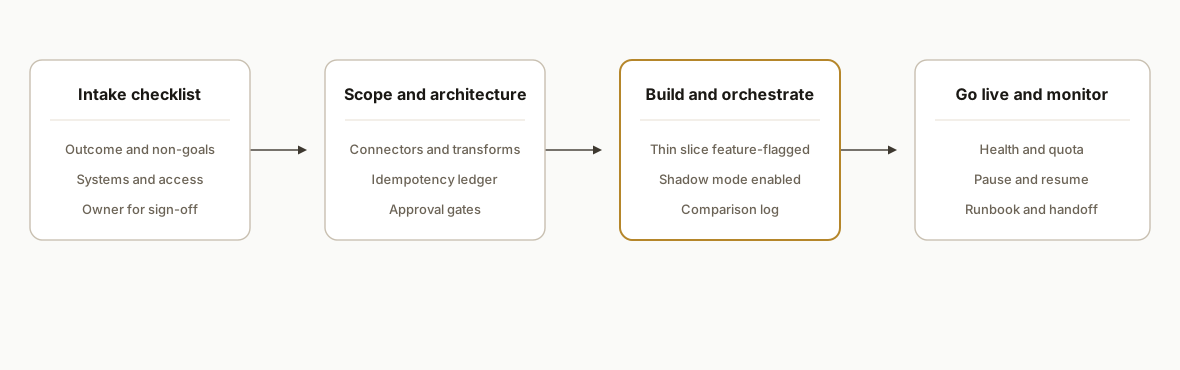
A good engagement runs in four phases: scope the outcome, design the architecture, build and run in shadow mode, then go live with observability and a handoff. Each phase has artifacts that reduce risk.
- Outcome and constraints: a one-page spec naming the success state, non-goals, and systems in scope.
- Architecture and plan: connectors, transforms, idempotency ledger, and approval gates.
- Build and shadow: a thin slice that runs against real data, writes a comparison log, and is easy to pause.
- Go live and handoff: monitoring, controls, ownership transfer, and a runbook.
Step-by-step: how to build it with the team you hire
1) Write a one-page outcome spec
State the business goal, the non-goals, and how success is measured. Keep the tool names out of it. This is what we ask clients to approve before any code.
project: "Trial follow-up automation"
why: "Reduce manual follow-ups so staff focus on closing warm leads"
success:
  - "All new trials appear in CRM within 15 minutes"
  - "No duplicate contacts created during backfill"
  - "Shadow-mode accuracy >= 95% vs human for 7 days"
non_goals:
  - "No Facebook Ads changes"
  - "No pricing logic changes"
systems:
  source: "Booking app export (CSV or UI export)"
  sink: "CRM contacts + pipeline + tags"
  mail: "Drafts only until approved"
owner: "Ops lead signs off on go-live"
Key gotcha: without non-goals, scope creep consumes the budget before you touch the real problem.
2) Inventory systems and access early
List every source, sink, and permission. Secure keys on your side and grant least-privilege. This prevents a mid-build stall.
{
  "systems": [
    { "name": "Booking", "access": "report-export", "owner": "ops@company.com" },
    { "name": "CRM", "access": "contacts:write, tags:write", "owner": "sales@company.com" },
    { "name": "Email", "access": "drafts:write", "owner": "it@company.com" }
  ],
  "secrets": {
    "stored_in": "your vault",
    "rotation_policy_days": 90
  }
}
Key gotcha: trigger ownership matters. In Google Apps Script the installer owns the trigger. In serverless, the project that holds the env vars owns the behavior.
3) Create a safe idempotency ledger and audit log
Idempotency stops double-sends and duplicate records. The audit log gives you a forensic trail. We always add these tables, even for small builds.
-- Idempotency ledger: prevents reprocessing the same business key
CREATE TABLE IF NOT EXISTS state_ledger (
  key_hash TEXT PRIMARY KEY,
  first_seen_at TIMESTAMP NOT NULL DEFAULT NOW(),
  last_processed_at TIMESTAMP,
  status TEXT NOT NULL,            -- pending, processed, error
  opaque JSONB                     -- source identifiers, notes
);

-- Append-only audit log: immutable event history
CREATE TABLE IF NOT EXISTS audit_log (
  id BIGSERIAL PRIMARY KEY,
  occurred_at TIMESTAMP NOT NULL DEFAULT NOW(),
  actor TEXT NOT NULL,             -- system, human, vendor
  event TEXT NOT NULL,             -- created_contact, skipped_duplicate, paused_on_quota
  details JSONB NOT NULL
);
Key gotcha: do not overload the ledger with business data. Keep it to keys and timestamps so you can rebuild transforms without corrupting history.
4) Ship a thin slice behind a feature flag
Release the smallest unit that exercises the full path end to end. Gate live actions with flags so you can safely test in production.
# .env
APP_ENV=production
FEATURE_SEND_EMAILS=false
FEATURE_WRITE_TO_CRM=true
MAX_PER_RUN=50
PAUSE_REASON="initial shadow-mode"
Key gotcha: a dry run that never persists sent-state creates a backlog. Seed sent-state on a tiny live batch before turning off dry-run, or you will fan-out on day one.
5) Run in shadow mode with a comparison log
Shadow mode means the automation runs and writes what it would have done, but holds actions for review. A comparison log makes accuracy visible.
run_id,entity_key,expected_action,ai_action,match,notes
2026-07-25,a1b2c3,"Tag: WATCH","Tag: WATCH",true,
2026-07-25,d4e5f6,"Create draft reply","Create draft reply",true,
2026-07-25,g7h8i9,"Skip: duplicate","Create + Tag",false,"detected stale record"
Key gotcha: do not accept a pass rate on a toy set. Use real inputs for at least a week of normal volume.
6) Go live with observability and controls
Expose simple health, quota, and pause endpoints so operators can act without a developer.
# Health and quota
curl -s https://automation.example.com/api/health
curl -s https://automation.example.com/api/quota

# Pause and resume with reason
curl -X POST https://automation.example.com/api/pause  -d '{"reason":"vendor quota"}'
curl -X POST https://automation.example.com/api/resume -d '{"ticket":"OPS-142"}'
Key gotcha: vendor quotas are real. We built a dialer that auto-paused itself when a TTS provider crossed plan limits, then resumed on reset. Add the guard before you need it.
7) Handoff: give the team an exit plan
Your future self wants a clean handoff: keys in your vault, deploy steps, rollback notes, and who to call. We close every build with a runbook.
# Runbook
- Ownership: keys, hosting, vendor accounts
- Deploy: step-by-step with screenshots
- Rollback: how to revert last deploy safely
- Monitoring: dashboards, alerts, thresholds
- Controls: how to pause, resume, drain queues
- Escalation: on-call matrix and SLAs
Key gotcha: if the builder disappears, you should still be able to pause the system and rotate a key in minutes.
Where it gets complicated
-
API gaps and no-API tools: some core systems have no API. In one live gym deployment, iClassPro required browser automation for exports. The fix: slow cadence, human-like timing, and a seeded live batch to prevent backlogged fan-out.
-
HTML sanitizers and render quirks: an outreach platform stripped lines when bodies used bare line breaks. Wrapping lines and re-fetching the stored body after a patch solved silent truncation.
-
Dedup and stale data: a voice campaign created false bookings before we tightened the classifier and added server-side guards. The bigger fix was an evict-on-sync strategy so stale CRM rows stopped getting called.
-
Trigger and deploy ownership: Apps Script deployments run as the installer. We have seen weekly jobs stall when the installer left the company. Decide ownership and document redeploy steps.
-
Compliance boundaries: in a credit-bureau intake we encrypted sensitive fields at rest and rendered consent PDFs server-side. Store only what you must. Log with redaction.
-
Quotas and billing overages: providers sometimes allow overuse. Our dialer accrued overage fees before we shipped an automated quota check and pause. Design the guardrails first.
What this actually changes
Across real clients, these patterns replaced recurring manual work with reliable outcomes: an HVAC firm moved from a spreadsheet-run SMS process to a dashboard while the legacy script kept sending during cutover. A nonprofit turned 26-minute grant packet runs from a blocked browser job into an async pipeline that finished unattended. An e-commerce brand routed local orders instantly while waiting on a custom app approval. A credit reseller went from brittle email parsing to an audited, multi-tenant intake with consent files and a self-healing proxy.
One market datapoint: IBM's 2023 Global AI Adoption Index reported that 42 percent of enterprises had deployed AI solutions and another 40 percent were exploring them, a sign that the talent to ship these systems exists and the adoption curve is real. Source: IBM
The value is structural: idempotency prevents brand damage, shadow mode prevents bad surprises, and pause controls turn incidents into routine operations instead of emergencies.
Frequently asked questions
How much does it cost to hire for automation?
Most projects scope to a fixed build with an optional support retainer. The driver is complexity: number of systems, no-API work, compliance needs, and whether copy or prompts are in scope. A good proposal prices a thin slice first and gates anything heavy behind evidence from shadow mode.
How long does a first automation take to ship?
A thin slice usually ships in 5 to 15 business days when access is ready. That covers the outcome spec, architecture, a shadow run against real data, and go-live with monitoring. Multi-system builds or compliance reviews extend timelines. The key is shipping one result before expanding scope.
What do I need to provide to get started?
System access, a named owner for approvals, and one clear outcome. We provide a checklist for credentials, sample files, and test cases. You keep ownership of keys and vendor accounts so nothing is hostage to a contractor.
Will this replace my team?
No. It removes the repetitive 80 percent so your team handles the exceptions, approvals, and customer conversations. We design for human-in-the-loop where it matters, with drafts and gates, not full autonomy by default.
How do you prevent duplicates and mistakes?
We implement an idempotency ledger and append-only audit log, run new systems in shadow mode against a comparison log, and add deterministic guards where models can be wrong. Pause and resume controls let operators intervene safely.
Can a non-technical owner manage it after go-live?
Yes, if the build comes with a runbook, a simple dashboard, and clear controls. We hand off monitoring, pause, and key rotation steps. You call us for changes or upgrades, not for day-to-day operation.
If you need someone to scope and ship one high-impact workflow safely, this is the work we do. See our service menu under workflow automation and how we avoid avoidable failures in Why 90 Percent of Automation Projects Fail. When you are ready, book a 20-minute call and we will map your first thin slice in the first five minutes.
Sources
Want us to build this for you?
Nine questions, about 90 seconds. You see the revenue it is costing you, then pick a time. No pitch.
See your options