
We ship Jackrabbit Class to Mailchimp in two proven patterns: a Zapier path that listens for Jackrabbit changes and updates Mailchimp, or a scheduled CSV export path that produces a clean, deduped, tagged audience ready for waitlist, re-enrollment, and review campaigns. This is for class studios that want reliable email without re-keying or list drift.
Jackrabbit to Mailchimp automation is: a repeatable process that turns Families and Students from Jackrabbit into a segmented, deduped Mailchimp audience you can safely email by segment: Enrolled, Waitlist, Dropped, by program, by location.
According to Litmus, email marketing returns an estimated 36 dollars for every 1 dollar spent (source: https://www.litmus.com/blog/email-marketing-roi). When your audience stays in sync, those campaigns compound instead of decay.
The problem it solves
Studios export Jackrabbit lists, paste them into Mailchimp, and hope segments stay current. Manual steps cause stale lists, duplicates, and missed consent flags. Jackrabbit provides CSV exports, including an Email Listing Report suited for marketing lists, but repeating that export and segmentation weekly is grind work you will forget on a busy week.
| Manual process | Automated process |
|---|---|
| Run Jackrabbit Email Listing Report, export CSV, clean columns in Excel, import to Mailchimp, label by hand. | Scheduled export or Zap-based capture feeds a normalization step that dedupes and tags contacts. Mailchimp audience updates automatically. |
| Forget to exclude Dropped or past-due statuses. | Rules map Family and Student statuses into safe segments every run. |
| Duplicate parents across siblings and programs. | Deterministic keys collapse duplicates and keep multi-program tags. |
| Waitlists not promoted when spots open. | Segments and tags keep waitlist ready for targeted nudges. |
Jackrabbit confirms you can export to CSV across many reports, and that the Email Listing Report is designed for marketing lists (sources: Reports in Jackrabbit, Email Listing Report).
What keeping your systems in sync is worth
Move the sliders to your own numbers. The defaults are only an example business, not client data.
Revenue from deals that stop slipping each year
$100,800
80 a month × 12 × 5% × 70% × $3000
- Deals kept a year
- 34
- 80 × 12 × 5% × 70%
- Staff cost of doing it by hand each year
- $9,100
- 5 hrs a week × $35/hr × 52 weeks
- Hours handed to the system each month
- 22 hrs
- 5 hrs a week × 52 ÷ 12
How the automation works
We implement one of two topologies depending on your volume and tools. Both end in the same place: an up-to-date Mailchimp audience segmented by enrollment state, program, and location.
- Zapier capture: Jackrabbit's official Zapier app provides polling-based triggers. We transform each event into a normalized contact and update Mailchimp. Polling on lower Zapier plans introduces delay, so this is best for small to medium volumes (sources: Zapier integrations, Jackrabbit on Zapier).
- Scheduled CSV export: We schedule the Jackrabbit Email Listing Report to CSV, load it into a small normalization service, dedupe, map tags, and push the audience into Mailchimp via standard import features. This is steady and plan-agnostic. Jackrabbit's help center confirms CSV exports across reports and on cancellation you can request a full export if needed (sources: Reports, Email Listing Report, FAQ).
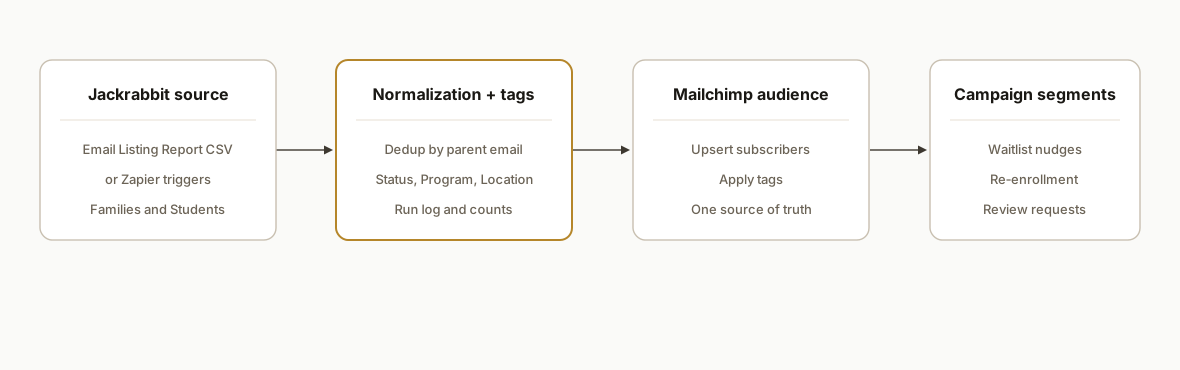
Components we use in production:
- Jackrabbit source: either Zapier triggers or scheduled CSVs. Jackrabbit also references a JSON class feed for websites, but the exact JSON endpoint and authentication are not publicly documented, so we do not rely on it for audience sync (sources: Online class listings, PDF reference).
- Normalization service: a small Node or Apps Script worker that dedupes by email, merges siblings into one parent record, and assigns consistent tags: Program, Location, Status.
- Mailchimp destination: one audience with segments built off tags and status fields. We use standard import and tagging features rather than tool-specific hacks so staff can see and manage lists.
- Scheduler and logs: time-based triggers and a simple run log that records counts added, updated, skipped. This prevents silent drift.
Step-by-step: how to build it
Step 1: Pick the connector pattern
Decide between Zapier and a scheduled CSV job. If you have Zapier and lower volume, Zapier's Jackrabbit app is the fastest path. If you need strict timing or larger batches, plan on scheduled CSV. Zapier triggers are polling-based which can introduce delay on lower plans (sources: Zapier integrations).
Step 2: Stage the CSV and normalize columns
Set up a Google Sheet or a small worker to load the latest CSV from Drive and map columns to a canonical shape.
// Google Apps Script: load latest CSV from a Drive folder and normalize
function loadJackrabbitCsv(folderId) {
  const folder = DriveApp.getFolderById(folderId);
  const files = folder.getFilesByType(MimeType.CSV);
  let latest = null, latestDate = 0;
  while (files.hasNext()) {
    const f = files.next();
    if (f.getLastUpdated().getTime() > latestDate) {
      latest = f; latestDate = f.getLastUpdated().getTime();
    }
  }
  if (!latest) throw new Error('No CSV found');
  const rows = Utilities.parseCsv(latest.getBlob().getDataAsString());
  const [header, ...data] = rows;
  const idx = (name) => header.indexOf(name);
  return data.map(r => ({
    email: r[idx('Email')].trim().toLowerCase(),
    parentFirst: r[idx('Primary Guardian First Name')],
    parentLast: r[idx('Primary Guardian Last Name')],
    student: r[idx('Student')],
    status: r[idx('Enrollment Status')], // Enrolled, Waitlist, Dropped
    program: r[idx('Class Program')],
    location: r[idx('Location')]
  })).filter(c => /.+@.+\..+/.test(c.email));
}
Tip: Jackrabbit report headers can vary by customization. Keep the header mapping in one place so you can fix drift centrally.
Step 3: Build a deterministic dedup key
Collapse family duplicates by using the email address as the primary key and merging sibling data into tags.
// Node.js: collapse multiple rows per email and keep distinct tags
function collapseContacts(records) {
  const byEmail = new Map();
  for (const r of records) {
    const key = r.email;
    if (!byEmail.has(key)) {
      byEmail.set(key, {
        email: key,
        firstName: r.parentFirst,
        lastName: r.parentLast,
        statuses: new Set(),
        programs: new Set(),
        locations: new Set(),
      });
    }
    const c = byEmail.get(key);
    c.statuses.add(r.status);
    if (r.program) c.programs.add(r.program);
    if (r.location) c.locations.add(r.location);
  }
  return Array.from(byEmail.values()).map(c => ({
    email: c.email,
    firstName: c.firstName,
    lastName: c.lastName,
    tags: [
      ...Array.from(c.statuses).map(s => `Status:${s}`),
      ...Array.from(c.programs).map(p => `Program:${p}`),
      ...Array.from(c.locations).map(l => `Location:${l}`)
    ]
  }));
}
Step 4: Create a safe import file for Mailchimp
Mailchimp supports standard CSV import. Create a CSV with columns you will recognize in the UI: Email Address, First Name, Last Name, Tags.
// Node.js: write an import-ready CSV
import fs from 'node:fs';
function toCsvRow(v) {
  const esc = s => '"' + String(s ?? '').replaceAll('"', '""') + '"';
  return [v.email, v.firstName, v.lastName, v.tags.join('; ')].map(esc).join(',');
}
function writeMailchimpCsv(contacts, outPath) {
  const header = 'Email Address,First Name,Last Name,Tags\n';
  const body = contacts.map(toCsvRow).join('\n') + '\n';
  fs.writeFileSync(outPath, header + body, 'utf8');
}
Importing a clean CSV lets non-technical staff verify counts and tag distribution in Mailchimp before campaigns run.
Step 5: Optional: wire Zapier for near-continuous updates
If you choose Zapier, use the Jackrabbit app as the trigger, add a Code step to normalize fields, then a Mailchimp step to add or update the subscriber with tags. Keep the normalization consistent with your CSV pipeline so both paths converge on the same tag taxonomy.
// Zapier Code step: normalize a Jackrabbit trigger payload
function normalize(input) {
  const email = (input.email || '').trim().toLowerCase();
  const tags = [];
  if (input.enrollment_status) tags.push(`Status:${input.enrollment_status}`);
  if (input.program) tags.push(`Program:${input.program}`);
  if (input.location) tags.push(`Location:${input.location}`);
  return {
    email,
    firstName: input.primary_guardian_first_name || '',
    lastName: input.primary_guardian_last_name || '',
    tags: tags.join('; ')
  };
}
output = normalize(inputData);
Zapier's polling model can introduce delay on lower plans, so time-sensitive promos should consider the CSV run cadence or a higher polling tier (sources: Zapier integrations).
Step 6: Schedule and log every run
A simple time-based trigger and a run log prevent silent drift.
// Google Apps Script: daily trigger and run log
function schedule() {
  ScriptApp.newTrigger('runSync').timeBased().everyDays(1).atHour(6).create();
}
function runSync() {
  const t0 = Date.now();
  const rows = loadJackrabbitCsv('YOUR_FOLDER_ID');
  const contacts = collapseContacts(rows);
  writeMailchimpCsv(contacts, '/tmp/mailchimp-import.csv');
  // Hand-off step: upload CSV via UI or your standard import routine
  const sheet = SpreadsheetApp.getActive().getSheetByName('RunLog');
  sheet.appendRow([new Date(), rows.length, contacts.length, `${Math.round((Date.now()-t0)/1000)}s`, 'OK']);
}
Where it gets complicated
- No Events API for campaigns. Jackrabbit notes there is no API or web service for Events, so do not plan a real-time event-driven sync on that surface. Use Zapier or CSV for the supported entities instead (source: Online class listings).
- JSON class feed is not a list source. Jackrabbit references a JSON class feed for websites, but the exact endpoint and authentication are not public. We avoid it for contact sync and stick to reports or Zapier (sources: PDF reference, Online class listings).
- Zapier is polling-based. Lower plans can delay updates. Plan time-sensitive pushes around that or use a scheduled CSV cadence that meets your SLA (sources: Zapier integrations).
- Header and status drift. Report columns and status labels can vary by account. Centralize your header map and normalize statuses to a fixed set before tagging.
- Family vs student duplication. The Email Listing Report can surface multiple rows per family when multiple students are enrolled. Always collapse by parent email and roll up program and location tags.
What this actually changes
For a kids activity studio, this replaced weekly export-clean-import loops with a predictable audience that stayed current. Waitlist, re-enrollment, and review campaigns ran from reliable segments, and duplicates stopped inflating send counts. Email remains one of the highest ROI channels, with an estimated 36 to 1 return when executed well (source: https://www.litmus.com/blog/email-marketing-roi). The structural value here: your email machine compiles itself.
Frequently asked questions
Does Jackrabbit have a native Mailchimp integration?
There is no direct native connector inside Jackrabbit. You have two practical paths: use the official Jackrabbit app on Zapier for polling-based triggers, or export CSVs from Jackrabbit reports and run a scheduled import into Mailchimp. Both are supported by Jackrabbit documentation for reports and by Zapier's app directory.
Can this sync run in real time?
Zapier triggers are polling-based, which introduces delay on lower plans. Scheduled CSV runs are batch by design. If you need near-real-time for specific offers, combine a faster Zapier polling tier for changes with a nightly CSV reconciliation to keep segments accurate.
What data can I safely use for marketing?
Use the Email Listing Report to build compliant marketing lists. Normalize Family and Student status labels into segments so Dropped or similar statuses do not receive promos. Keep program and location as tags for precise targeting and accurate re-enrollment nudges.
How do you prevent duplicates across siblings and programs?
Use the parent email address as the primary key and roll up program and location into tags. A deterministic collapse step keeps one subscriber per parent while preserving multi-program visibility through tags.
What does this cost monthly?
You will pay for Zapier if you choose that path and any light hosting used for scheduled normalization. Mailchimp pricing depends on audience size. The CSV pattern keeps vendor costs low and predictable, and the Zapier path trades higher convenience for polling-based timing.
Can a non-technical owner set this up?
Basic CSV import is approachable. The durable version needs a small amount of scripting to normalize fields, dedupe, and schedule runs. Most studios have us build the normalization once, then own the lists and campaigns in Mailchimp day to day.
If you run Jackrabbit and want your Mailchimp segments to stay current without weekly exports, we have shipped this in production. See our related post on Jackrabbit Class to Klaviyo integration and our CRM automation services. When you are ready to scope your setup, book a 20-minute call.
Sources
- 1.The ROI of Email Marketing [Infographic]litmus.com
- 2.Reports | CLASS Help Centerhelp.jackrabbitclass.com
- 3.Email Listing Reporthelp.jackrabbitclass.com
- 4.Jackrabbit Class integrations on Zapierzapier.com
- 5.Automate Tasks with Zapier and Jackrabbitjackrabbitclass.com
- 6.FAQs - Jackrabbit Classjackrabbitclass.com
- 7.Online Class Listing Tableshelp.jackrabbitclass.com
- 8.Jackrabbit Class help center (PDF)help.jackrabbitclass.com
Want us to build this for you?
Nine questions, about 90 seconds. You see the revenue it is costing you, then pick a time. No pitch.
See your options