
A Jackrabbit Class to Klaviyo integration works by combining Jackrabbit's official Zapier connector with scheduled CSV exports to keep Families, Students, and Enrollments in sync with Klaviyo lists and segments. We built this so kids activity studios can run segmented re-enrollment, waitlist, and win-back flows without manual list work. This guide shows the exact build we shipped and the gotchas to avoid.
Definition: a Jackrabbit Klaviyo integration is a data bridge that turns Jackrabbit Families, Students, and Enrollment states into Klaviyo profiles, lists, and segments that trigger email flows for re-enrollment, upsells, and win-backs.
The problem it solves
Studios live inside Jackrabbit, but lifecycle email lives in Klaviyo. Without a bridge, staff export a report, clean it, upload to Klaviyo, and repeat for every session change and campaign. Enrollments change daily. Class names drift. Families re-enroll late, and win-backs arrive after the session starts.
| Task | Manual workflow | Automated workflow |
|---|---|---|
| New family welcome | Export Families CSV. Upload to Klaviyo. Tag by hand. | Zapier trigger maps Family to profile with tags. Welcome flow fires. |
| Re-enrollment nudge | Filter Enrollments report by next session. Export. Upload. | Nightly CSV export syncs a segment for families expiring in N days. |
| Waitlist updates | Staff reads Openings page. Emails ad hoc. | Class feed fields map to "waitlist open" flag. Segment auto-updates. |
| Win-back | Filter lapsed families. Build a list. | Weekly job builds "lapsed 90 days" segment for a win-back flow. |
Answer first: the integration removes exports and uploads. Profiles and segments update on their own, so flows run on the right day without a person touching a CSV.
What keeping your systems in sync is worth
Move the sliders to your own numbers. The defaults are only an example business, not client data.
Revenue from deals that stop slipping each year
$100,800
80 a month × 12 × 5% × 70% × $3000
- Deals kept a year
- 34
- 80 × 12 × 5% × 70%
- Staff cost of doing it by hand each year
- $9,100
- 5 hrs a week × $35/hr × 52 weeks
- Hours handed to the system each month
- 22 hrs
- 5 hrs a week × 52 ÷ 12
How the automation works
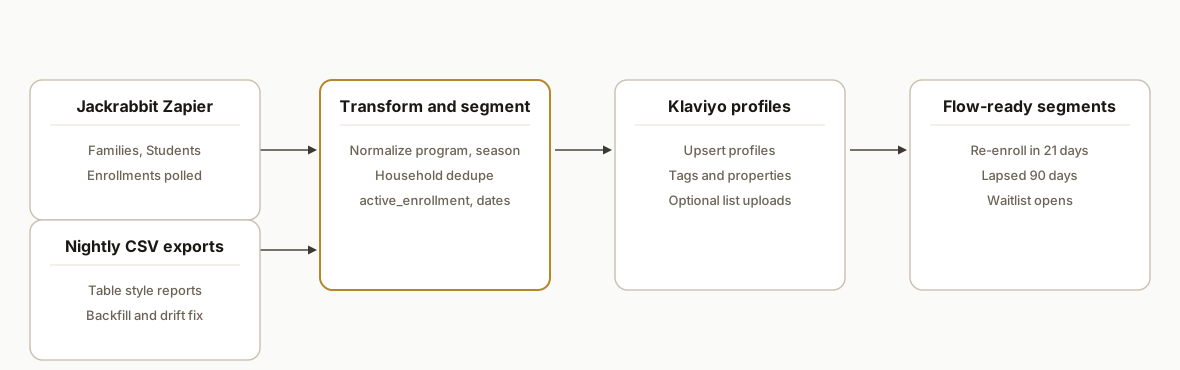
We combine two reliable sources Jackrabbit exposes: the official Zapier connector for near real-time creates and updates, and "table style" report exports for bulk and backfill. A small transform service normalizes names and flags. Klaviyo receives a clean profile with stable tags and dates to drive segments and flows.
- Jackrabbit Zapier app: The official Jackrabbit Class Zapier connector authenticates with an API key created in Jackrabbit settings. It polls for new or updated Families, Contacts, Students and Enrollments. Polling is not instant, so we pair it with scheduled exports.
- Scheduled CSV exports: Jackrabbit's table style reports export CSVs. We schedule the key ones nightly: Families, Students, Enrollments with date bounds. These handle backfills and catch field drift.
- Transform and segment rules: A lightweight mapper turns rows into stable fields: season_code, last_enroll_end, active_enrollment, and household email resolution.
- Klaviyo list and segment sync: Profiles are updated and tagged. Static lists are used for backfills, while dynamic segments reference date flags and tags for always-on flows.
- Class feed enrichment: Where the Class listings feed is available, we read it to tag programs and age bands for better targeting. Jackrabbit notes JSON support is not generally exposed, so we use whatever listing surface your account provides.
Step-by-step: how to build it
1) Connect Jackrabbit in Zapier and choose stable triggers
Answer first: use Jackrabbit's official Zapier app and pick triggers for Family created/updated and Enrollment created/updated. Polling is used, so treat it as near real-time.
Key gotcha: field coverage varies by object. If a field you need is not in the trigger payload, rely on the nightly CSV to fill it.
{
  "zap": "jackrabbit -> transform webhook",
  "triggers": [
    { "app": "Jackrabbit Class", "event": "New Family" },
    { "app": "Jackrabbit Class", "event": "New or Updated Enrollment" }
  ],
  "action": { "app": "Webhooks by Zapier", "event": "POST", "url": "https://your-transform.example.com/hook/jr" }
}
2) Schedule table style CSV exports for backfill and drift control
Answer first: export Families, Students, Enrollments on a nightly cadence. These exports become the source of truth when class names or custom fields drift.
Key gotcha: Jackrabbit provides CSV from table style reports. There is no general public REST API. Use the scheduler and store files with a date stamp.
# Pseudo-cron for a nightly pull handled by your ops runner
jr_export Families > ./ingest/jr_families_$(date +%F).csv
jr_export Students > ./ingest/jr_students_$(date +%F).csv
jr_export Enrollments --from=$(date -d 'yesterday' +%F) > ./ingest/jr_enrollments_$(date +%F).csv
3) Normalize household and enrollment state into flow keys
Answer first: build stable keys the email tool can segment on: last_enroll_end, active_enrollment, program, age_band, season_code.
Key gotcha: multiple students per family means dedup at the household level for Klaviyo profiles while keeping student scoped fields for personalization.
# transform.py
from datetime import date

def map_row(row):
    # row from Enrollments CSV joined to Family/Student rows
    end = row.get('Enrollment End Date') or ''
    active = row.get('Enrollment Status') == 'Active'
    program = (row.get('Class Category') or '').strip()
    age = int(row.get('Student Age') or 0)
    return {
        'email': row.get('Primary Email') or row.get('Family Email'),
        'first_name': row.get('First Name'),
        'last_name': row.get('Last Name'),
        'active_enrollment': active,
        'last_enroll_end': end,
        'program': program,
        'age_band': '3-5' if 3 <= age <= 5 else '6-8' if 6 <= age <= 8 else '9+',
        'season_code': f"{date.today().year}FALL"  # or your rules
    }
4) Push profiles to Klaviyo via your chosen sink
Answer first: either upload a CSV to a list or call your Klaviyo integration path to upsert profiles with tags. Keep the model abstract so you can swap sinks later.
Key gotcha: do not rely on class names for automation logic. Use normalized fields and tags so flows survive naming changes.
Email,First Name,Last Name,Tags,last_enroll_end,age_band,program
alex@example.com,Alex,Ng,active_enrollment:true;season:2026FALL,2026-08-23,6-8,Gymnastics 1
5) Build dynamic segments and flows keyed on dates and tags
Answer first: use dynamic rules like active_enrollment:false AND last_enroll_end within next 21 days to trigger re-enrollment nudges. Keep one list, many segments.
Key gotcha: a single source of truth for tags and date fields prevents segment duplication across campaigns.
Segment rule example:
- Condition 1: tag equals active_enrollment:false
- Condition 2: last_enroll_end between today and today+21 days
Flow:
- Email 1: 21 days before end
- Email 2: 7 days before end
- Email 3: 1 day before end
6) Backfill and reconcile on first run
Answer first: run the exports for the last session, load them, and let dynamic segments populate before enabling flows.
Key gotcha: verify consent flags and suppressions are honored. Backfills can re-add archived contacts if you skip suppression logic.
python load_csv.py ingest/jr_families_2026-07-22.csv \
  --dedupe-key email --suppress-file ./suppressed_emails.csv
Where it gets complicated
- No public REST API for general data: Jackrabbit does not offer a general public REST API. We rely on its official Zapier app for triggers and on table style CSV exports for scheduled syncs. Any JSON class feed requires coordination with Jackrabbit's integration team.
- Polling latency and event coverage: Zapier triggers poll on a schedule. Treat them as near real-time. Some fields are not exposed in triggers. The nightly CSV closes the gap.
- Families vs students vs contacts: Households often have multiple students. Decide whether Klaviyo profiles represent households or individuals and keep that choice consistent across flows.
- Season rollover and naming drift: Class and category names change between sessions. Use normalized program and season_code fields, not raw names, in segment logic.
- Consent, suppression, and reply routing: Respect opt-in state when backfilling. Keep a suppression list and do not re-activate archived addresses during loads.
What this actually changes
Studios that lived in exports and uploads moved to always-on lifecycle email: welcomes on signup, re-enrollment nudges before the end date, and win-backs after a cooling period. Staff stopped rebuilding lists and could focus on offers and creative instead of data massaging. One external benchmark supports the shift: McKinsey reports companies that get personalization right can lift revenues by 5 to 15 percent compared with peers (source: https://www.mckinsey.com/capabilities/growth-marketing-and-sales/our-insights/the-value-of-getting-personalization-right).
Frequently asked questions
Does Jackrabbit have an API for this?
Jackrabbit does not offer a general public REST API. The supported integration path is the official Jackrabbit Class Zapier connector, plus CSV exports from table style reports. A JSON class feed exists for listings but requires contacting Jackrabbit's integration team and is not a general data API.
How real-time is the sync?
Zapier triggers poll on a schedule, so changes are near real-time, not instant. For accuracy and completeness we pair Zapier events with a nightly CSV export that corrects field drift and fills any missing fields the triggers do not provide.
Can I build this in Make.com instead of Zapier?
Make.com does not list a native Jackrabbit app. You can still build around scheduled CSVs with HTTP modules for downstream steps. For event triggers we use the supported Zapier connector because it authenticates against Jackrabbit with an API key created in settings.
How do you prevent duplicate profiles in Klaviyo?
We dedupe at the household or person level using a stable key like primary email and a Jackrabbit identifier where available. The transform stage enforces a single source of truth for tags and date fields so segments do not fragment across similar values.
What about program and age targeting when class names change?
We compute normalized fields such as program and age_band and avoid using raw class names in segment logic. That way a rename in Jackrabbit does not break your re-enrollment or waitlist segments.
If you are on Jackrabbit and want Klaviyo to run re-enrollment and win-backs without manual exports, we have shipped this exact pattern. See our related write-up on the Jackrabbit to GoHighLevel integration and our broader CRM automation services. When you are ready to scope your studio's version, book a 20-minute call.
Sources
- 1.The value of getting personalization rightmckinsey.com
Want us to build this for you?
Nine questions, about 90 seconds. You see the revenue it is costing you, then pick a time. No pitch.
See your options