
We run Unlimited Creator Ops for Make Abs Great Again: Lou Hendrix's fitness brand. In production we handle request intake, editing and creative, publishing ops, and light automations under a single-queue, one-active-request model. This post shows exactly how we operate the system, what tripped us up, and how you can adopt the same pattern.
Unlimited creator ops is a managed back-office where a creator can submit unlimited requests but only one is active at a time, with service-level rules that keep work flowing without revision paralysis.
The problem it solves
Creators do not fail on ideas. They fail on the admin: scattered assets, stalled edits, missed publishing steps, broken websites, and billing friction. Lou hated admin and editing, which meant good footage piled up while posts slipped.
| Manual way | Automated way |
|---|---|
| Ad hoc DMs and email threads to request work | One intake portal with a trackable queue and status |
| Too many edits and stalled approvals | One-active-request rule with explicit acceptance timeouts |
| Shared-password vendor logins and mystery bills | Client-owned vendor accounts, delegated access, documented handoff |
| Broken site blocks trust and conversions | First-week triage checklist and quick fixes |
| Billing surprises and wrong currency | Stripe product with correct currency and renewal safeguards |
How the automation works
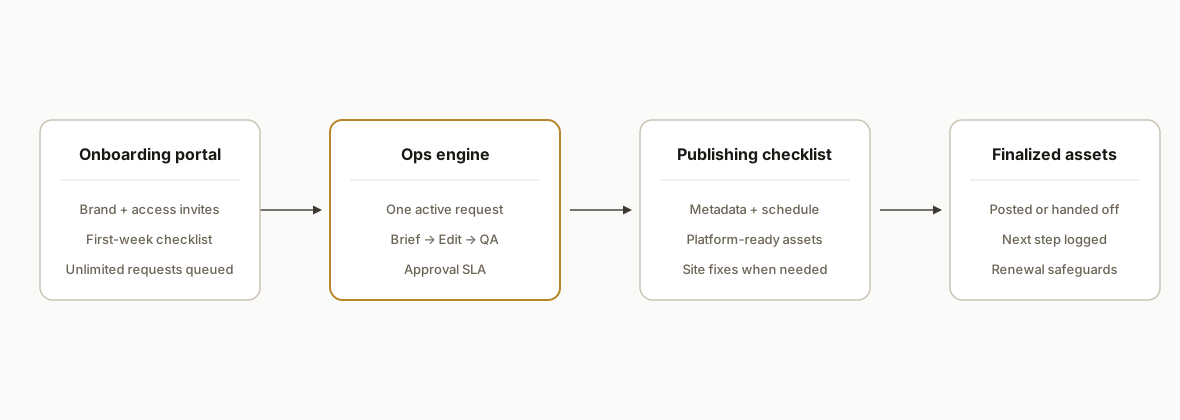
The operating model is simple: a branded portal feeds a single request queue. We enforce one active request per brand, keep all tooling client-owned, and run a publishing checklist that makes each deliverable shippable without us being gatekeepers.
- Onboarding portal: Collects brand details, access invitations, clip style, domains, and a prioritized first-week checklist. Tenant is created immediately, not after a long discovery.
- Delegated access, not shared passwords: The client grants us manager roles on YouTube and Meta, partner access on Business Manager, and connects Buffer for TikTok. All software lives on the client's accounts.
- Single queue with one-active-request concurrency: Unlimited submissions. Exactly one active request at any time. Acceptance timeouts prevent endless loop edits.
- Content pipeline: Standard steps from intake to publish-ready: brief, edit, captions, thumbnail, QA, and approvals. We surface drafts where the client already works.
- Publishing and reporting: We publish or hand back assets per brand rules, then log completion and next actions. Website fixes run as discrete requests.
- Billing and safeguards: Stripe subscription for the monthly plan. Currency handled deliberately. Renewal checks watch for third-party payer edge cases.
Step-by-step: how to build it
1) Create a tenant and a one-active request queue
Answer: enforce one active request per tenant at the database level so the rule is structural, not a policy.
-- tenants
create table tenants (
  id uuid primary key default gen_random_uuid(),
  slug text unique not null,
  name text not null,
  created_at timestamptz not null default now()
);

-- requests
create table requests (
  id uuid primary key default gen_random_uuid(),
  tenant_id uuid not null references tenants(id) on delete cascade,
  title text not null,
  status text not null check (status in ('queued','active','needs_review','done','cancelled')),
  created_at timestamptz not null default now(),
  updated_at timestamptz not null default now()
);

-- one-active-request concurrency per tenant
create unique index one_active_per_tenant
on requests (tenant_id)
where status = 'active';
Gotcha: do not try to "remember" the rule in app code only. The partial unique index is what kept us honest under load.
2) Define the pipeline once, then reference it per request
Answer: keep stage names and checklists declarative so the UI and ops can evolve without a deploy.
# ops/pipeline.yaml
pipeline:
  - key: brief
    name: Creative brief
    checklist:
      - Confirm goal and hook
      - Confirm call-to-action
  - key: edit
    name: Edit + captions
    checklist:
      - Cut A-roll
      - Add B-roll
      - Burn captions
  - key: thumbnail
    name: Thumbnail
    checklist:
      - Two variants
  - key: qa
    name: QA
    checklist:
      - No typos in captions
      - Audio levels normalized
  - key: approval
    name: Client approval
    checklist:
      - Accept or request one batch of edits
  - key: publish
    name: Publish
    checklist:
      - Platform metadata
      - Schedule per calendar
Gotcha: acceptance timeouts matter. We implemented an SLA window so a request cannot stall forever in approval.
3) Enforce one-active-request in service code
Answer: gate activations behind a single transaction that checks the partial-unique rule before promoting a queued request.
// services/requests.ts
export async function activateNext(db, tenantId: string) {
  await db.tx(async (sql) => {
    const hasActive = await sql`
      select 1 from requests where tenant_id = ${tenantId} and status = 'active' limit 1
    `;
    if (hasActive.length) return { ok: false, reason: 'active-exists' };
    const next = await sql`
      update requests
      set status = 'active', updated_at = now()
      where id in (
        select id from requests
        where tenant_id = ${tenantId} and status = 'queued'
        order by created_at asc
        limit 1
      )
      returning *
    `;
    return { ok: !!next.length, request: next[0] };
  });
}
Gotcha: do not catch and ignore unique-violation errors. If two activations race, let the DB throw and surface a clear message.
4) Handle Stripe currency and price up-front
Answer: create a dedicated product and price with the intended currency. Document it in config to avoid account-default surprises.
# billing/config.toml
[plan.founding_member]
product_name = "Founding Member"
price_id = "price_live_xyz"   # created in the right currency
currency = "usd"              # do not inherit account default
interval = "month"
Gotcha: our Stripe account defaulted to CAD. We created a USD price explicitly to avoid silent CAD billing on a US client.
5) Verify delegated access, do not trust portal checkboxes
Answer: we treat each invite as a tracked item that must be verified by round-trip tests before marking complete.
# access/verification.yaml
checks:
  - key: youtube_manager
    verify: "can list channel + upload to a test playlist"
  - key: meta_partner
    verify: "can see Page in Business Manager + view Insights"
  - key: buffer_tiktok
    verify: "can create a draft post on correct workspace"
  - key: cloudflare
    verify: "has Zone DNS read for target domains"
Gotcha: two invites were "sent" but never arrived. We changed the rule: step is only green after we verify access by action, not by form claim.
6) Triage the website first as a trust win
Answer: put a small, fixed request at the top of the queue to fix the visibly broken surface.
# Request: Fix website
- Diagnose WordPress 500 error
- Disable culprit plugin or revert theme
- Add uptime monitor and daily backup
- Confirm contact form deliverability
Gotcha: one brand domain had no A record, the other threw a WordPress fatal error. We fix these before pushing content volume.
Where it gets complicated
- Stripe default currency traps: Our Stripe account defaulted to CAD. If you do not pin the plan currency, you can bill in the wrong currency without noticing. We created a USD price and documented the price ID in config.
- Third-party payer risk: Month one was paid by a friend. We flagged the subscription for a gentle renewal check because the payer and beneficiary differed. This avoids accidental churn at renewal.
- Invite verification: Portal forms are not proof. We now verify by action: upload a private test, view Insights, list DNS zones. Only then do we mark access complete.
- Website before workflow: A WordPress fatal error and an unpointed domain break trust and conversions. We fixed the site first, then scaled posting.
- Environment mix-ups: A local .env pointed at a test DB created a false "tenant missing" error. We pinned CLI helpers to prod to avoid accidental test-mode reads.
- Client-owned vendors: All tools live on the client's accounts. It prevents billing friction and protects creator ownership, but it also means you must be excellent at delegated-access setup.
What this actually changes
We moved Lou from ad hoc editing and admin fatigue to a single, predictable request pipeline where work ships. The branded portal and one-active-request rule prevented stalled edits, the first-week fixes restored trust in owned surfaces, and delegated access removed shared-password risk. We onboarded the tenant and completed portal setup within 48 hours. For context on why web triage matters, WordPress powers over 40 percent of the web, so site reliability problems are common and worth fixing before scaling content (source: https://w3techs.com/technologies/details/cm-wordpress).
Frequently asked questions
What do I need to start an unlimited creator ops plan?
A brand email, delegated access invites for your channels, a payment method, and one prioritized request. We begin by verifying access, fixing any visible site issues, then pulling your first request into the active slot. All software stays on your accounts.
How long does setup take?
We onboarded this fitness brand in 48 hours. Typical setups take 2 to 5 days depending on how fast access invites are accepted and whether your website needs quick triage before content volume.
What is included in the one-active-request model?
Unlimited queued requests, one active at a time, with an acceptance timeout to avoid revision loops. Each request runs a standard pipeline: brief, edit, captions, thumbnail, QA, approval, and publish or handoff. Larger projects are split into discrete requests.
How do you handle billing and currency?
We create a plan price in the intended currency and attach it to your subscription. We do not rely on account defaults. If a third party pays month one, we add a renewal safeguard so you are not surprised at the next billing cycle.
Can a non-technical creator use this?
Yes. The portal is form-based. You submit requests and approve drafts. We handle the pipeline, access verification, and publishing. You keep ownership of all vendor accounts and assets.
What if my site is broken or my invites do not arrive?
We put a website fix at the top of the queue and verify access by action, not by checkbox. If an invite fails, we guide you through re-sending and confirm access by completing a harmless, reversible test.
If you want the same operating model for your brand, we already built it. See our broader workflow automation services, and read how we automate short-form video. When you are ready, book a 20-minute call and we will map your first week of requests on the call.
Want us to build this for you?
Nine questions, about 90 seconds. You see the hours it is costing you, then pick a time. No pitch.
Get your free assessment