
PracticePanther intake automation works by capturing new contacts and matters, mapping them to CRM fields, and triggering on-brand follow-ups and reminders in HubSpot or GoHighLevel. We built this for a boutique business law firm so every new inquiry received a fast response, tasks were created automatically, and no lead slipped.
Definition: PracticePanther intake automation is the process of syncing case and contact data from PracticePanther into a CRM to trigger instant follow-ups, reminders, and pipeline movement without manual copy-paste.
The problem it solves
Most firms retype intake details from PracticePanther into a CRM to run email or SMS follow-up. That manual bridge causes slow replies, duplicate contacts, and missed reminders. Harvard Business Review found companies that attempted contact within an hour were nearly seven times more likely to qualify a lead than those one hour later, and more than 60 times more likely than 24 hours later (https://hbr.org/2011/03/the-short-life-of-online-sales-leads).
| Manual intake and follow-up | Automated PracticePanther → CRM |
|---|---|
| Re-enter contact and matter into CRM | Mapped fields flow automatically into CRM |
| No consistent timing, replies drift to hours or days | Instant sequences and tasks fire within minutes |
| Duplicates across systems | Deterministic dedup using PracticePanther IDs |
| Ad hoc reminders in someone's inbox | Scheduled reminders with CRM tasks and SLAs |
| No audit trail | Centralized CRM timeline with notes and activity |
How the automation works
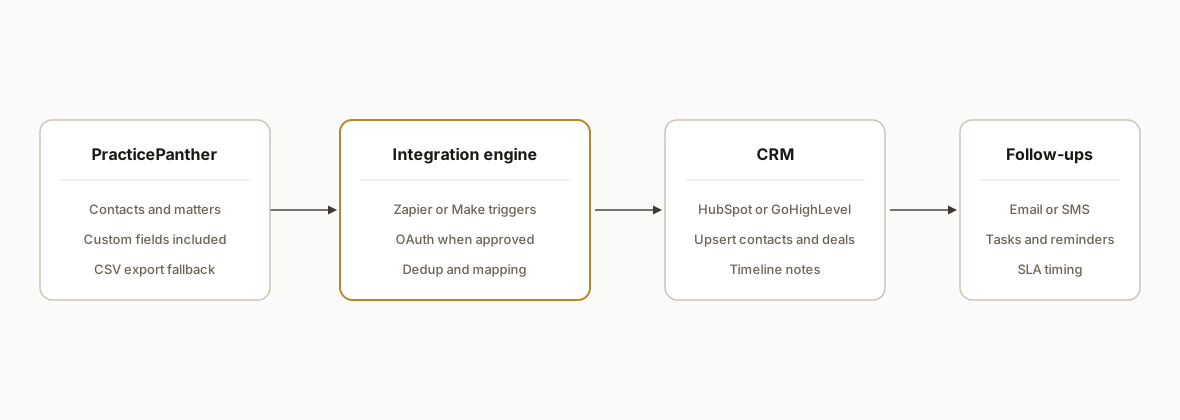
The architecture listens for new or updated PracticePanther contacts and matters, normalizes the payload, and upserts into HubSpot or GoHighLevel. It then starts the correct sequence and creates tasks with due dates tied to intake SLAs. We used Zapier or Make as the trigger surface when API approval was pending, and switched to OAuth once credentials were granted.
- PracticePanther API and app surface: OAuth 2.0 authorize and token endpoints exist at app.practicepanther.com. API access is approved case by case, so we plan for a Zapier or Make path first, then move to OAuth when approved.
- Integration engine: Zapier and Make both have official PracticePanther connectors. We use their triggers/actions or Make's Make an API call module, then normalize to our CRM model.
- CRM upsert: Contacts are matched by email and phone, then stamped with a PracticePanther external ID to prevent duplicates. We add a timeline note with matter summary.
- Sequencer: HubSpot workflows or GoHighLevel campaigns start based on practice area and source. Tasks and reminders are scheduled from T-plus offsets.
- Audit and retries: We log each handoff, retry soft failures, and keep an idempotency key so replays do not create duplicates.
Step-by-step: how to build it
1) Choose the first integration path you can ship
Answer-first: start with Zapier or Make triggers, then migrate to OAuth once PracticePanther approves API access. This avoids waiting weeks for credentials.
Paths:
- Zapier: PracticePanther Legal Software triggers → HubSpot/GoHighLevel actions.
- Make: PracticePanther modules → Router → HubSpot/HTTP Webhook.
- Direct API: OAuth 2.0 at https://app.practicepanther.com/oauth/authorize and /oauth/token.
Key gotcha: API approval is case by case, so plan a no-wait path.
2) Set up OAuth once you are greenlit
Answer-first: obtain client ID/secret from PracticePanther support, complete the code exchange at the documented token endpoint, and store refresh tokens securely.
# Authorization redirect (user login/consent)
GET https://app.practicepanther.com/oauth/authorize \
  ?response_type=code \
  &client_id=YOUR_CLIENT_ID \
  &redirect_uri=https://yourapp.com/oauth/callback \
  &scope=read write

# Token exchange
curl -X POST https://app.practicepanther.com/oauth/token \
  -H "Content-Type: application/x-www-form-urlencoded" \
  -d "grant_type=authorization_code" \
  -d "code=AUTH_CODE" \
  -d "client_id=YOUR_CLIENT_ID" \
  -d "client_secret=YOUR_CLIENT_SECRET" \
  -d "redirect_uri=https://yourapp.com/oauth/callback"
Key gotcha: do not hardcode tokens. Use a secure store and implement refresh.
3) Map PracticePanther objects to CRM fields
Answer-first: normalize name, email, phone, matter name, practice area, and source to your CRM schema and carry a stable external ID for dedup.
mapping:
  contact:
    external_id: practicepanther.contact.id
    firstName: practicepanther.contact.first_name
    lastName: practicepanther.contact.last_name
    email: practicepanther.contact.email
    phone: practicepanther.contact.phone
    source: practicepanther.contact.lead_source
  matter:
    external_id: practicepanther.matter.id
    title: practicepanther.matter.name
    practice_area: practicepanther.matter.practice_area
    status: practicepanther.matter.status
crm:
  externalIdProperty: "pp_external_id"
Key gotcha: Zapier may not expose all fields. Use Make's API call or direct API where needed.
4) Upsert into HubSpot or GoHighLevel and stamp timeline notes
Answer-first: upsert by email or phone and attach the PracticePanther external ID. Add a timeline note summarizing the intake.
// Pseudocode-quality Node.js, real pattern
async function upsertContact(crm, mapped) {
  const existing = await crm.findByEmailOrPhone(mapped.email, mapped.phone);
  const base = { ...mapped, pp_external_id: mapped.external_id };
  const contact = existing ? await crm.update(existing.id, base)
                           : await crm.create(base);
  await crm.addNote(contact.id, `Matter: ${mapped.matter.title}\nArea: ${mapped.matter.practice_area}`);
  return contact.id;
}
Key gotcha: keep the PracticePanther ID in the CRM so later updates merge, not duplicate.
5) Start follow-ups and reminders with safe offsets
Answer-first: trigger the correct workflow and schedule tasks at T-plus offsets from intake time, not a fixed date.
{
  "sequence_key": "intake-new-business",
  "start_at": "{{ intake_timestamp }}",
  "tasks": [
    { "title": "Call back new lead", "due_in_minutes": 30 },
    { "title": "Send retainer info", "due_in_minutes": 120 },
    { "title": "Second-attempt call", "due_in_minutes": 1440 }
  ]
}
Key gotcha: reschedules should recompute pending steps, not duplicate them.
6) Add idempotency and retry logging
Answer-first: use a deterministic key per contact or matter and store delivery logs so replays are safe.
create table sync_log (
  id serial primary key,
  external_id text not null,
  sink text not null,
  status text not null,
  payload jsonb not null,
  created_at timestamptz default now(),
  unique(external_id, sink)
);
Key gotcha: without a unique constraint you will double-create on retries.
Where it gets complicated
- API approval timing: PracticePanther API access is granted case by case. We shipped with Zapier or Make first, then moved to OAuth when approved. Plan for both paths.
- Connector coverage: Zapier only exposes listed triggers and actions. If you need a field not in Zapier, use Make's Make an API call or the direct API path.
- Support boundaries: Make's app is maintained by Make, not PracticePanther. Deep edge-case debugging may require both vendors.
- No guaranteed outbound push: Webhooks for outbound push are not documented publicly. We design polling watches or connector triggers rather than assuming webhooks.
- Export fallbacks: UI grids export CSV and PDF. We keep a CSV export plan only as a last resort when live access is delayed.
What this actually changes
For a boutique business law firm, replies no longer waited on manual re-entry. New PracticePanther intake created or updated the CRM contact, added a note with matter details, and started the correct sequence with time-based reminders. Clio's Legal Trends reports have shown for years that client responsiveness is decisive; one edition reported that 79 percent of consumers expect a response within 24 hours (https://www.clio.com/resources/legal-trends/). Coupled with the HBR finding on hour-zero outreach, automating the bridge materially improves speed-to-lead and consistency.
Frequently asked questions
Does PracticePanther have an official API?
Yes. PracticePanther offers an OAuth 2.0 developer API with documented authorize and token endpoints at app.practicepanther.com. Access is approved case by case via support. We often ship via Zapier or Make first, then migrate to OAuth once credentials are granted.
Can Zapier or Make do everything without custom code?
Zapier and Make cover common objects and actions. If a field or object is missing in Zapier, Make's Make an API call module or a direct API step fills the gap. We pick the lowest-friction path for day one, then harden where needed.
Can it run in real time?
We design for near real time using connector triggers or short polling intervals. Because public documentation does not confirm outbound webhooks, we do not assume push delivery. When OAuth is approved, we keep the same near-real-time patterns.
How do you prevent duplicate contacts and matters?
We upsert by email or phone and stamp a PracticePanther external ID property in the CRM. We also store a unique idempotency key per sync in a log table so retries do not create additional records.
What does this cost monthly?
There are platform fees for Zapier or Make, plus your CRM subscription. Our build costs depend on scope, and we quote after a short discovery. There is no ongoing runtime fee for OAuth beyond your standard vendors.
Can a small firm set this up without a developer?
You can assemble a basic flow in Zapier or Make. A production build that handles OAuth, idempotency, retries, and field drift is engineering work. We ship the quick version first, then move to the hardened version once approved.
If you want intake sync and follow-ups running without manual re-entry, we have shipped this exact pattern. See our related post on Clio API integration for intake and matter setup, explore our CRM automation services, and if your situation maps to this, book a 20-minute call. We will map the lowest-friction path and quote the work.
Sources
- 1.The Short Life of Online Sales Leadshbr.org
- 2.Legal trendsclio.com
Want us to build this for you?
Nine questions, about 90 seconds. You see the revenue it is costing you, then pick a time. No pitch.
See your options