
We built a bidirectional sync that keeps Gmail conversations, tasks, notes, and Intercom messages aligned across HubSpot, GoHighLevel, and Pipedrive. In production it prevents double outreach, keeps timelines complete, and lets sales see the same truth in every system.
Bidirectional CRM sync is the process of capturing activities in one system and reflecting them consistently in the others while preventing duplicates and loops.
If you run sales or support across multiple tools, this guide shows how the engine works, the exact steps to build it, and the snags we hit shipping it live.
The problem it solves
A typical team juggles a CRM, Gmail, sometimes a second CRM, and Intercom for chat. Without a unifying layer, people blind-send follow-ups, miss handoffs, or spend hours logging emails by hand. Native connectors help within one ecosystem, but they rarely keep multiple CRMs and helpdesk channels in step.
| Manual workflow | Automated sync |
|---|---|
| Reps BCC a logging address, remember to tag deals, and paste threads into notes. | Events are captured from Gmail, CRMs, and Intercom, normalized, and written everywhere they belong. |
| Activities fragment across tools. No single timeline. | A single timeline view in each tool because all systems receive the same activity with shared IDs. |
| Duplicates and loops when two tools both auto-log the same email. | An idempotency ledger and source-of-truth rules block duplicates and suppress loops. |
| Backfills require CSV exports and long weekends. | A backfill job paginates recent history and reconciles gaps safely. |
Two external facts set the stakes. Harvard Business Review found companies that contacted potential customers within an hour were seven times more likely to qualify them than those that waited over an hour and 60 times more likely than those that waited 24 hours or longer (https://hbr.org/2011/03/the-short-life-of-online-sales-leads). Salesforce reports sellers spend only about 28 percent of their week actually selling, with admin work and logging taking the rest (https://www.salesforce.com/resources/research-reports/state-of-sales/). A reliable sync reduces the logging burden and accelerates first response.
What keeping your systems in sync is worth
Move the sliders to your own numbers. The defaults are only an example business, not client data.
Revenue from deals that stop slipping each year
$100,800
80 a month × 12 × 5% × 70% × $3000
- Deals kept a year
- 34
- 80 × 12 × 5% × 70%
- Staff cost of doing it by hand each year
- $9,100
- 5 hrs a week × $35/hr × 52 weeks
- Hours handed to the system each month
- 22 hrs
- 5 hrs a week × 52 ÷ 12
How does the Gmail to CRM and Intercom sync work?
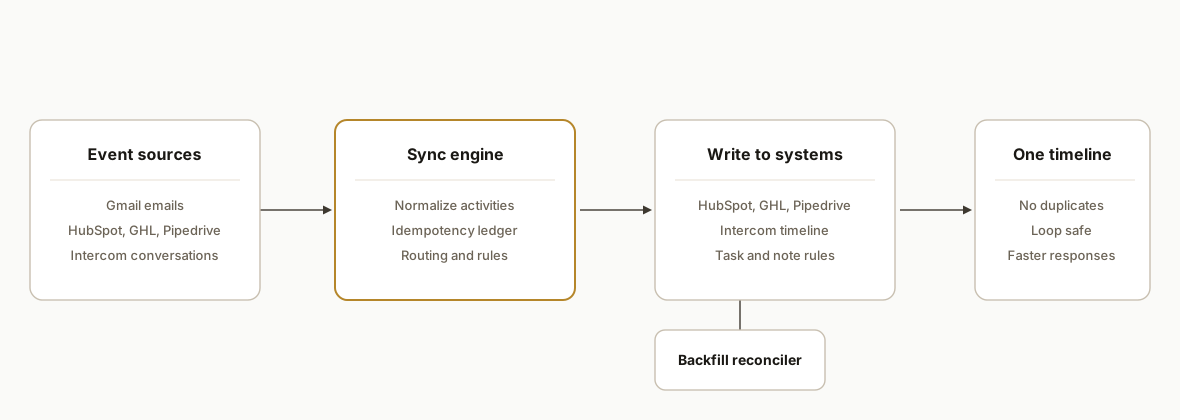
Answer first: we ingest events from Gmail, CRMs, and Intercom. We normalize each event to a common shape, check a dedup ledger, then route it to the other systems with conflict rules and user mapping. A reconciler backfills gaps, and a monitor keeps retries safe.
- Event ingestion: We listen for new emails, CRM activities, and Intercom conversation events. Where a webhook is unavailable, we poll on a short interval. Each payload is stamped with its origin and a stable fingerprint.
- Normalizer: Every incoming activity is transformed to a common shape: actor, recipients, subject, body summary, timestamps, thread key, contact and company hints, attachments flag.
- Idempotency ledger: We compute a deterministic hash per activity and store cross-system IDs. If we have seen the hash, we skip writing again. This is what keeps the system loop free.
- Router: Based on routing rules and user mappings, we write the activity to the other systems: log to CRM A and B, append to the Intercom timeline, create tasks if keywords or stages match.
- Conflict resolver: We merge or suppress when tools already logged the same email. Source precedence and windowed de-dup prevent double posts.
- Backfill and monitor: A scheduled job reconciles the last N days. A small dashboard shows lag, retry counts, and last-seen checkpoints.
Step-by-step: how to build it
1) Capture events from Gmail, CRMs, and Intercom
Answer first: subscribe where you can, poll where you must, and tag each activity with a stable origin and fingerprint before it hits your queue.
// server/events.js
import express from "express";
import crypto from "crypto";

const app = express();
app.use(express.json({ limit: "2mb" }));

function fingerprint(evt) {
  const basis = [evt.origin, evt.threadKey, evt.messageId || "", evt.subject || "", evt.timestamp].join("|");
  return crypto.createHash("sha256").update(basis).digest("hex");
}

app.post("/ingest", async (req, res) => {
  const raw = req.body; // from Gmail, CRM, or Intercom webhook or poller
  const evt = {
    origin: raw.origin, // "gmail" | "hubspot" | "gohighlevel" | "pipedrive" | "intercom"
    payload: raw,
    threadKey: raw.threadKey,
    subject: raw.subject,
    messageId: raw.messageId,
    timestamp: raw.timestamp
  };
  evt.fp = fingerprint(evt);
  await queue.add("incoming", evt); // push to your worker queue
  res.sendStatus(202);
});

app.listen(8080);
Key gotcha: if a platform does not support push, set a sane polling cadence and store a high-water mark so you do not re-ingest history.
2) Normalize activities to one internal shape
Answer first: convert heterogeneous payloads into a schema your router understands, and enrich with contact and user mappings before writing anywhere.
// server/normalize.js
export function normalize(evt, maps) {
  const p = evt.payload;
  return {
    fp: evt.fp,
    origin: evt.origin,
    at: new Date(evt.timestamp),
    actorEmail: maps.userByPlatformId(p.actorId)?.email || p.from,
    to: p.to || [],
    cc: p.cc || [],
    subject: p.subject || "",
    snippet: (p.text || p.snippet || "").slice(0, 500),
    threadKey: p.threadKey || p.conversationId || p.dealId,
    contactHint: p.contactEmail || p.leadEmail || p.userEmail,
    companyHint: p.companyDomain || p.accountName || null,
    hasAttachments: Boolean(p.attachments && p.attachments.length)
  };
}
Key gotcha: decide early whether you key people by email or by a cross-system contact map. We map emails to contact IDs per system and cache them.
3) Guard with an idempotency ledger
Answer first: compute a deterministic hash and store it with cross-system IDs. If the hash exists, skip. If it exists with partial writes, complete the missing targets.
-- db/ledger.sql
CREATE TABLE IF NOT EXISTS activity_ledger (
  fp TEXT PRIMARY KEY,
  first_seen TIMESTAMP NOT NULL,
  last_seen TIMESTAMP NOT NULL,
  src TEXT NOT NULL,
  hubspot_id TEXT,
  gohighlevel_id TEXT,
  pipedrive_id TEXT,
  intercom_id TEXT
);
// server/ledger.js
import db from "./db.js";
export async function remember(fp, src) {
await db.run(
`INSERT INTO activity_ledger(fp, first_seen, last_seen, src) VALUES(?, CURRENT_TIMESTAMP, CURRENT_TIMESTAMP, ?)
ON CONFLICT(fp) DO UPDATE SET last_seen = CURRENT_TIMESTAMP`,
[fp, src]
);
}
export async function seen(fp) {
const row = await db.get(`SELECT * FROM activity_ledger WHERE fp = ?`, [fp]);
return row || null;
}
export async function mark(fp, system, id) {
await db.run(`UPDATE activity_ledger SET ${system}_id = ? WHERE fp = ?`, [id, fp]);
}Key gotcha: never hash only the body text. Include origin, thread key, and timestamps so near-identical follow-ups do not collapse into one.
4) Route and write to the other systems
Answer first: write to every other target that does not already have the activity, using user and contact mappings to attribute correctly.
// server/router.js
import { seen, mark } from "./ledger.js";
import { normalize } from "./normalize.js";
import * as targets from "./targets.js"; // wrappers around HubSpot, GHL, Pipedrive, Intercom SDKs/APIs

export async function handle(evt, maps) {
  const prior = await seen(evt.fp);
  const a = normalize(evt, maps);

  const targetsToWrite = ["hubspot", "gohighlevel", "pipedrive", "intercom"].filter(t => t !== evt.origin);

  for (const t of targetsToWrite) {
    if (prior && prior[`${t}_id"]) continue; // already written
    const resId = await targets[t].logActivity(a, maps);
    await mark(evt.fp, t, resId);
  }
}
Key gotcha: attribute by the right user. Map Gmail senders to CRM owners so timelines read as the correct rep.
5) Reconcile with a safe backfill
Answer first: build a job that looks back over a window, fingerprints activities, and fills missing targets. Keep it idempotent.
// server/reconcile.js
export async function reconcileSince(sinceTs, sources, maps) {
  for (const s of sources) {
    const items = await s.fetchSince(sinceTs);
    for (const raw of items) {
      const evt = { origin: s.name, payload: raw, threadKey: raw.threadKey, subject: raw.subject, messageId: raw.messageId, timestamp: raw.timestamp };
      evt.fp = fingerprint(evt);
      await remember(evt.fp, evt.origin);
      await handle(evt, maps);
    }
  }
}
Key gotcha: choose a window that balances coverage and rate limits. We use rolling 30 days for history and 24 hours on frequent cycles.
6) Add suppression and human-in-the-loop rules
Answer first: avoid loops and spam. Respect do-not-sync labels, skip internal domains, and promote keywords to tasks only when useful.
// server/policy.js
export function shouldSync(a) {
  const internal = ["@yourcompany.com"]; // org domains
  if (internal.some(d => (a.actorEmail || "").endsWith(d))) return false; // skip internal chatter
  if (/\bdo not sync\b/i.test(a.subject || "")) return false; // manual override
  if (a.snippet && a.snippet.length < 3) return false; // noise
  return true;
}
Key gotcha: loops happen when a CRM sends a notification email that your Gmail listener ingests. Filter those by sender and subject patterns.
Where it gets complicated
GoHighLevel merges and deal duplication. When two systems both try to create a contact or opportunity, you can end up with parallel records. We solved this by resolving contact IDs first, then logging only activities unless a pipeline stage explicitly requires an upsert.
Gmail threads vs atomic CRM activities. Gmail treats a thread as one conversation while CRMs often store each message as a distinct activity. Our fingerprint uses both a thread key and per-message markers so replies log as separate but grouped events.
Intercom conversations vs CRM emails. Intercom events are not emails. They are messages in a conversation. We store the Intercom conversation ID on the ledger and write CRM notes that reference it rather than pretending they are emails.
User attribution across tools. A rep's Gmail address may not match their CRM user key. We maintain a user map in a small table and fail closed: if we cannot attribute, we log as the system user and raise a mapping warning.
Native auto-logging collisions. Some CRMs auto-log emails already. If you also ingest Gmail, you can double post. Our origin precedence prefers native logs where present and suppresses our own write for the same fingerprint.
Retries and backoff. Bursty inboxes create retry storms. We queue writes per system and apply exponential backoff with jitter. We also checkpoint last-seen cursors so retries do not re-pull history.
What this actually changes
For a sales and support team running Gmail, Intercom, and more than one CRM, the system removed the manual logging burden and eliminated double outreach from partial timelines. The win is structural: a single source of truth written into each tool you already live in. Harvard Business Review's lead-response study quantifies the payoff: replying inside an hour raises qualification odds sevenfold, and speed depends on having the signal in the right place without delay (https://hbr.org/2011/03/the-short-life-of-online-sales-leads). Pair that with Salesforce's finding that sellers spend only about 28 percent of their week on selling tasks (https://www.salesforce.com/resources/research-reports/state-of-sales/). Cutting manual logging returns real selling time and brings first responses forward.
Frequently asked questions
Can native connectors do this without a custom build?
Native connectors are useful but usually tie one tool to one destination. The gaps appear when you need two CRMs, Intercom, Gmail, and custom routing with loop prevention. Our engine bridges multiple systems at once and applies your rules and mappings.
Is this real time or batched?
Inbound events post near real time when a platform supports webhooks. For tools without push, we poll on a short cadence and reconcile on a scheduled job. The ledger keeps both paths consistent and prevents duplicates.
How do you prevent duplicates and loops?
We compute a deterministic fingerprint per activity and store cross-system IDs in a ledger. Before writing, we check that ledger and apply origin precedence so a platform's own auto-logged activity wins and our router skips it.
What does this cost to run monthly?
Infrastructure is modest: a small container or serverless functions, a lightweight database for the ledger, and vendor API usage within normal limits. The primary investment is the build and onboarding of user and contact mappings.
How long does it take to implement?
A first tenant usually stands up quickly once access and mappings are in hand. Complexity comes from contact hygiene and user attribution, not the core engine. We stage a shadow run, reconcile gaps, then turn on writes.
Can a non-developer configure this?
Daily operations do not require code. A small admin panel can handle user and contact mappings, suppression rules, and routing. The initial build and integrations require engineering.
We have shipped this pattern in production for multi-CRM environments. If you need one timeline across Gmail, HubSpot, GoHighLevel, Pipedrive, and Intercom, we can scope your version quickly. See our service details at /services#crm-automation, and read how we handle email logging in /blog/gmail-to-crm-auto-sync-leads-and-emails. When you are ready to map your stack, book a call at /book.
Sources
- 1.The Short Life of Online Sales Leadshbr.org
- 2.State of Sales Reportsalesforce.com
Want us to build this for you?
Nine questions, about 90 seconds. You see the revenue it is costing you, then pick a time. No pitch.
See your options