
We built an owner dashboard for a mid-size carrier on top of ProTransport without a published API: scheduled report downloads feed an ingestion service that normalizes loads, invoices, and payments, then joins them with QuickBooks Online revenue to power daily KPIs the owner trusts. If you run ProTransport and want owner visibility without rekeying, this walks through the architecture and the build steps.
Definition: a ProTransport owner dashboard integration is a file and ledger driven pipeline that turns ProTransport report exports and QuickBooks revenue into daily, auto-refreshed KPIs for owners without a direct ProTransport API.
The problem it solves
Owners want one place to see loads, AR, DSO, and margin, but ProTransport does not publish public API docs. Teams end up exporting reports by hand and pasting into spreadsheets. Data gets stale, column names drift, and nobody is sure which spreadsheet is the truth.
Answer first: we automate ProTransport report exports into a normalized store, join with QuickBooks revenue, and render an owner dashboard that updates on a schedule with duplicate protection and audit logs.
| Manual process | Automated pipeline |
|---|---|
| Staff exports multiple reports, renames files, drags them into a shared drive, and pastes values into a spreadsheet. | A watcher ingests emailed or dropped report files, parses and normalizes them, and upserts into Postgres with idempotent keys. |
| AR and payments are reconciled monthly, so DSO and aging are always behind. | Payments and invoices from QuickBooks Online are pulled on a schedule and joined to ProTransport load data for daily AR and DSO. |
| Columns drift across report versions and break formulas. | A versioned schema map pins column meanings and runs tests before each load. |
| The owner asks for margin by customer and lane and waits days. | The dashboard computes margin, DSO, RPM and on-time delivery daily with drilldowns by customer and lane. |
How the automation works
We do not rely on a ProTransport public API. We lean on what the vendor confirms: exportable reports, invoice and payment downloads, and QuickBooks Online export for accounting. The pipeline ingests those exports reliably and computes the metrics owners ask about.
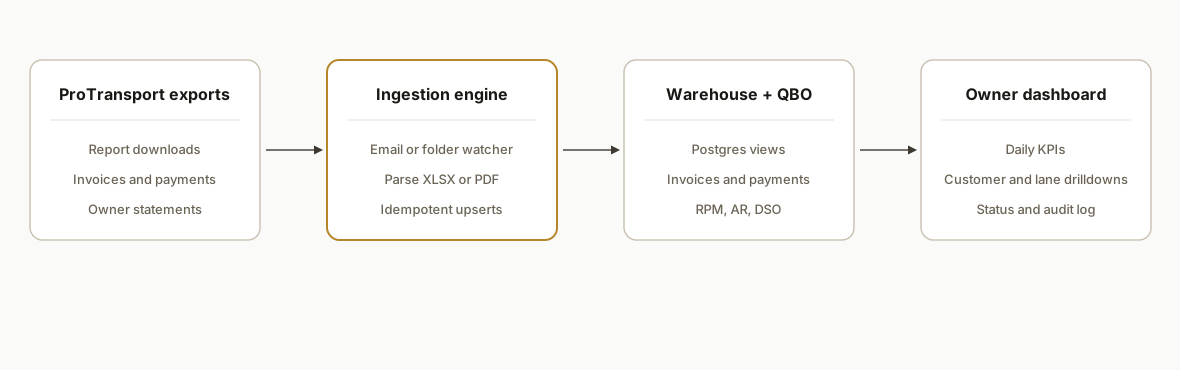
Answer first: exports or emails from ProTransport land in a watched inbox or folder. A small service parses them, loads a warehouse table set, enriches with QuickBooks revenue, then renders a dashboard.
- ProTransport report exports: the data source. We accept the formats operations can produce from ProTransport downloads or mailouts. We standardize loader logic around XLSX and PDF tables.
- Ingestion service: a Python worker polls a dedicated inbox or a drop folder, validates the files, parses them, and writes to Postgres with idempotent keys per report period and primary business keys.
- QuickBooks Online layer: the accounting ground truth for invoices and payments. We reconcile revenue, AR and DSO against QBO and leave ProTransport to operational facts like loads and miles.
- Metrics engine: SQL views and a thin Python layer compute RPM, DSO, on-time delivery, margin by customer, and weekly trend lines.
- Owner dashboard: a Next.js front end reads pre-aggregated views and renders KPIs, trends, and drilldowns. Access is role-scoped. PII like full customer addresses stays out of the UI.
Step-by-step: how to build it
1) Set up a safe handoff for ProTransport reports
Answer first: pick one reliable path the team can own today: scheduled email to a dedicated inbox or a shared folder drop. We used an email inbox named reports@yourdomain configured with filters and labels.
# email_ingest.py
import email, imaplib, os, pathlib
from datetime import datetime

IMAP_HOST = "imap.yourmail.com"
IMAP_USER = os.environ["INGEST_IMAP_USER"]
IMAP_PASS = os.environ["INGEST_IMAP_PASS"]
SAVE_DIR  = pathlib.Path("/data/inbox")

ALLOWED_MIMES = {"application/pdf", "application/vnd.openxmlformats-officedocument.spreadsheetml.sheet"}

def fetch_new_attachments():
    m = imaplib.IMAP4_SSL(IMAP_HOST)
    m.login(IMAP_USER, IMAP_PASS)
    m.select("INBOX")
    typ, data = m.search(None, '(UNSEEN SUBJECT "ProTransport Report")')
    for num in data[0].split():
        typ, raw = m.fetch(num, '(RFC822)')
        msg = email.message_from_bytes(raw[0][1])
        for part in msg.walk():
            ctype = part.get_content_type()
            if part.get_filename() and ctype in ALLOWED_MIMES:
                fname = f"{datetime.utcnow().strftime('%Y%m%d_%H%M%S')}_{part.get_filename()}"
                (SAVE_DIR / fname).write_bytes(part.get_payload(decode=True))
        m.store(num, '+FLAGS', '\\Seen')
    m.logout()

if __name__ == "__main__":
    fetch_new_attachments()
Key gotcha: lock the subject filter to a unique phrase your team can standardize in ProTransport's email export. Attachments can be PDF or XLSX. We accept both and branch parse logic later.
2) Parse XLSX and PDF tables into normalized rows
Answer first: treat each report like a versioned contract. Pin the header map and write parser tests so a renamed column does not silently corrupt your data.
# parse_reports.py
import pandas as pd
import pdfplumber
from pathlib import Path
from typing import List

SCHEMA_V1 = {
  'Load #': 'load_number',
  'Customer': 'customer_name',
  'Pickup Date': 'pickup_date',
  'Delivery Date': 'delivery_date',
  'Miles': 'miles',
  'Driver': 'driver_name',
  'Amount': 'billed_amount'
}

def parse_xlsx(path: Path) -> pd.DataFrame:
    df = pd.read_excel(path)
    missing = [c for c in SCHEMA_V1.keys() if c not in df.columns]
    if missing:
        raise ValueError(f"Missing columns: {missing}")
    return df[list(SCHEMA_V1.keys())].rename(columns=SCHEMA_V1)

def parse_pdf(path: Path) -> pd.DataFrame:
    rows: List[dict] = []
    with pdfplumber.open(path) as pdf:
        for page in pdf.pages:
            for table in page.extract_tables() or []:
                headers = table[0]
                for r in table[1:]:
                    row = dict(zip(headers, r))
                    if all(k in row for k in SCHEMA_V1):
                        rows.append({SCHEMA_V1[k]: row[k] for k in SCHEMA_V1})
    return pd.DataFrame(rows)
Key gotcha: PDF exports sometimes merge columns in cells. Always validate required headers and write a row count sanity check per import.
3) Upsert into Postgres with idempotent keys
Answer first: prevent duplicates by computing a deterministic key: report_period plus load_number is a safe default for a load summary. Use upserts.
# load_to_db.py
import os
import pandas as pd
from sqlalchemy import create_engine, text

ENGINE = create_engine(os.environ["DATABASE_URL"])  # e.g., postgres://...

UPSERT_SQL = """
INSERT INTO loads (
  load_key, load_number, customer_name, pickup_date, delivery_date, miles, driver_name, billed_amount, report_period
) VALUES (
  :load_key, :load_number, :customer_name, :pickup_date, :delivery_date, :miles, :driver_name, :billed_amount, :report_period
) ON CONFLICT (load_key) DO UPDATE SET
  customer_name = EXCLUDED.customer_name,
  pickup_date   = EXCLUDED.pickup_date,
  delivery_date = EXCLUDED.delivery_date,
  miles         = EXCLUDED.miles,
  driver_name   = EXCLUDED.driver_name,
  billed_amount = EXCLUDED.billed_amount
"""

def upsert_loads(df: pd.DataFrame, period: str):
    df = df.copy()
    df["report_period"] = period
    df["load_key"] = df["load_number"].astype(str) + ":" + period
    with ENGINE.begin() as cxn:
        for _, r in df.iterrows():
            cxn.execute(text(UPSERT_SQL), r.to_dict())
Key gotcha: persist a loader log with filename, hash, detected period, row count, and status. This is your audit trail when someone asks why a number changed.
4) Reconcile AR and DSO with QuickBooks Online
Answer first: use QuickBooks as the source of truth for invoices and payments. We pull new and changed items on a schedule and compute AR aging and DSO alongside ProTransport loads.
# qbo_join.py (logic sketch without vendor-specific calls)
import pandas as pd
from sqlalchemy import create_engine

ENGINE = create_engine(os.environ["DATABASE_URL"])

# Assume qbo_invoices and qbo_payments tables are kept current by a separate job
DSO_SQL = """
WITH inv AS (
  SELECT customer_name, invoice_id, invoice_date, due_date, amount_total
  FROM qbo_invoices
), pay AS (
  SELECT invoice_id, SUM(amount_applied) AS paid_total
  FROM qbo_payments GROUP BY invoice_id
)
SELECT i.customer_name,
       AVG(COALESCE(p.paid_total, 0)) AS avg_paid,
       AVG(i.amount_total - COALESCE(p.paid_total, 0)) AS avg_outstanding
FROM inv i
LEFT JOIN pay p USING (invoice_id)
GROUP BY 1
"""

def compute_dso_snapshot():
    with ENGINE.connect() as cxn:
        df = pd.read_sql(DSO_SQL, cxn)
        df.to_sql("kpi_dso_snapshot", cxn, if_exists="replace", index=False)
Key gotcha: vendors note that QuickBooks Online export connections are user scoped. For stable automation, complete the connection under a designated service account and document renewal steps to avoid broken pulls.
5) Materialize the KPIs owners ask for
Answer first: pre-aggregate. Owners want it fast. Compute daily snapshots and store them so the dashboard does not crunch on every page load.
-- kpis.sql
CREATE MATERIALIZED VIEW kpi_owner_daily AS
SELECT
  CURRENT_DATE AS as_of,
  SUM(billed_amount) AS gross_revenue_estimate,
  SUM(miles) AS total_miles,
  SUM(billed_amount) / NULLIF(SUM(miles), 0) AS rpm,
  COUNT(*) FILTER (WHERE delivery_date <= pickup_date + INTERVAL '2 day') AS on_time_estimated,
  COUNT(*) AS total_loads
FROM loads
WHERE report_period >= to_char(CURRENT_DATE - INTERVAL '30 day', 'YYYY-MM');

-- AR aging example
CREATE MATERIALIZED VIEW kpi_ar_aging AS
SELECT
  CASE
    WHEN days_overdue <= 0 THEN 'Current'
    WHEN days_overdue BETWEEN 1 AND 30 THEN '1-30'
    WHEN days_overdue BETWEEN 31 AND 60 THEN '31-60'
    WHEN days_overdue BETWEEN 61 AND 90 THEN '61-90'
    ELSE '90+'
  END AS bucket,
  SUM(balance) AS amount
FROM qbo_ar_open
GROUP BY 1;
Key gotcha: align ProTransport periods and QuickBooks calendar dates. We stamp every loaded row with a report_period string and convert to true dates for KPI math.
6) Serve a small JSON API to your dashboard
Answer first: keep the front end thin. Pre-aggregated, role-scoped JSON endpoints keep load times sub-second.
# api.py
from fastapi import FastAPI, Depends
from sqlalchemy import create_engine
import pandas as pd
import os

app = FastAPI()
ENGINE = create_engine(os.environ["DATABASE_URL"])

@app.get("/api/kpis")
def kpis():
    with ENGINE.connect() as cxn:
        df = pd.read_sql("SELECT * FROM kpi_owner_daily", cxn)
        return df.to_dict(orient="records")[0]

@app.get("/api/ar")
def ar():
    with ENGINE.connect() as cxn:
        df = pd.read_sql("SELECT * FROM kpi_ar_aging", cxn)
        return df.to_dict(orient="records")
Key gotcha: treat PII carefully. You do not need full invoice line details on an owner panel. Keep drilldowns to lane, customer, and period unless there is a strong reason to expose more.
7) Schedule and observe
Answer first: run ingestion and reconciliation on a cadence the business accepts. We set 06:00 local for file ingest and 06:15 for QuickBooks join, then refresh materialized views.
# crontab excerpt
SHELL=/bin/bash
MAILTO=""

# ProTransport email ingest
5 6 * * * /usr/bin/python3 /srv/email_ingest.py >> /var/log/ingest.log 2>&1
# Parse and load
10 6 * * * /usr/bin/python3 /srv/parse_and_load.py >> /var/log/load.log 2>&1
# QBO reconciliation job (separate service account)
15 6 * * * /usr/bin/python3 /srv/qbo_sync.py && /usr/bin/python3 /srv/qbo_join.py
# KPI refresh
20 6 * * * psql "$DATABASE_URL" -f /srv/kpis.sql
Key gotcha: put a lightweight status strip on the dashboard that surfaces last successful ingest time, file counts, and any schema drift detected. This prevents support tickets.
Where it gets complicated
- No public API documentation: vendor pages do not publish a developer API. Plan for export-driven ingestion or vendor assisted integration. Headless scraping is a last resort and should be avoided unless the vendor approves it.
- Export formats drift: a renamed header in an XLSX or a tweaked PDF layout can corrupt joins. Pin a schema per report version, write tests, and fail the load loudly when columns move.
- User-scoped accounting connections: QuickBooks Online export flows require each user to connect individually. Use a designated service account for automation and document renewal steps to avoid brittle, person-tied connections.
- Period alignment: ProTransport reports are often period labeled while QuickBooks is date based. Stamp report_period, convert to dates, and reconcile across both conventions before computing KPIs.
- Duplicate prevention: re-sent files and re-runs happen. Use a deterministic key per report type and a loader ledger with filename hash to make upserts idempotent.
What this actually changes
For the carrier we implemented this for, the owner stopped waiting on end-of-month spreadsheets. They had daily RPM, AR aging, DSO trend, margin by customer, and on-time delivery at 8am, sourced from the same reports operations already knew how to export plus QuickBooks revenue. The back office stopped rekeying and started validating.
A single external stat to frame why this matters: the American Transportation Research Institute's 2023 update reported total marginal costs at 2.251 dollars per mile in 2022 for motor carriers. Small shifts in revenue per mile or days sales outstanding can move margins materially when costs sit at that level. Source: https://truckingresearch.org/2023/08/10/atri-releases-2023-update-to-operational-costs-of-trucking/
Frequently asked questions
Does ProTransport have an official API for dashboards?
Vendor pages do not publish public API documentation. We plan integrations around exportable reports and QuickBooks Online data. If you have vendor assisted access, we can adapt the pipeline to use it, but our production build did not depend on a ProTransport API.
Can this run in real time or only daily?
Without a published API, we recommend daily or intra-day cadence tied to report availability. If your team can schedule more frequent exports or you obtain vendor assisted access, we can tighten the interval. Most owners are well served by a daily 6, 7am refresh.
What formats do you parse from ProTransport?
We accept the downloadable reports operations can produce. In production we handled XLSX and PDF tables and validated headers per version. CSV and webhooks were not required. The parser fails fast when a layout changes so we do not load bad data.
How do you prevent duplicates and bad loads?
We compute deterministic keys per report type and maintain a loader ledger with filename hash and period. Inserts are upserts. If a file repeats, the upsert is a no-op. Schema tests run before load so a renamed header raises an error and the dashboard shows a warning.
What does this cost monthly to run?
The running stack is light: a small VM or container service for the worker, Postgres for storage, and a static front end. Typical cloud costs are modest. The main investment is the initial build and wiring. Ongoing costs scale with volume, not seats.
Can a non-technical owner manage it after handoff?
Yes for operations. The dashboard has a status strip, and ingest runs on a schedule. When a report adds a new column, we update the schema map and tests. Staff continue exporting the same reports or letting ProTransport email them to the ingest inbox.
If you want owner-level visibility from ProTransport without rekeying, we have built and shipped this export-driven pattern. See our related post on a similar playbook for another TMS in McLeod Software API Integration. If you prefer a vendor-assisted path or need custom KPIs, we cover that under custom AI integration. To scope your setup in 15 minutes, book a call.
Want us to build this for you?
Nine questions, about 90 seconds. You see the hours it is costing you, then pick a time. No pitch.
Get your free assessment