
We automated owner and tenant reporting for a multi-site self-storage operator on storEDGE: a live owner dashboard fed by three ingestion paths: API when enabled, Business Intelligence scheduled CSV downloads, and storEDGE FMS webhooks. It respects storEDGE's prior-day report timing and one-week link expiry, then emails each owner a clean daily rollup.
storEDGE reporting integration is the process of pulling facility data from storEDGE's API and scheduled reports, merging it with webhook events, and publishing owner-ready summaries automatically.
The problem it solves
Most storage owners saw yesterday's numbers only when someone remembered to log in, click Download, export a CSV, copy figures into a sheet, and email a summary. Miss one morning and the scheduled report link expired a week later. Mix multiple LLCs and facilities and the copy-paste broke, or totals drifted.
| Task | Manual workflow | Automated workflow |
|---|---|---|
| Daily rollup | Log in, run BI report, export CSV, paste into a sheet | Ingest scheduled email link and parse CSV automatically after it is generated |
| Real-time moves | Wait for next day's report | Capture move-ins and move-outs via webhooks and reflect immediately |
| Owner partitioning | Filter by facility and LLC by hand | Deterministic mapping drives per-owner metrics and emails |
| Timing guards | Remember report windows and link expiry | Scheduler aligned to storEDGE's prior-day window, auto-archive before 7-day expiry |
| Distribution | Compose and send emails | Render templated emails per owner, attach PDF snapshot, link to dashboard |
storEDGE's Business Intelligence supports Downloads and Scheduled delivery by email. Scheduled reports are prior-day and typically run between 9:30 and 10:00 a.m. ET, and the no-login links expire after one week. Sources: Storable Help Center and Innovation Report.
How the automation works
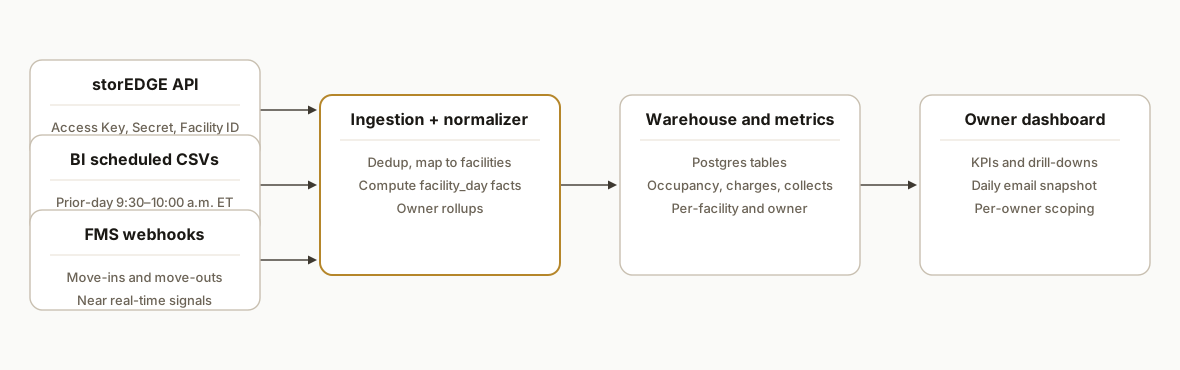
We run a single pipeline with three data sources: storEDGE API, scheduled BI CSVs, and FMS webhooks. A normalizer merges them into facility-day facts, writes aggregates per facility and owner, and serves a Next.js dashboard with scheduled owner emails.
- storEDGE data sources: API access is enabled at the corporate level and uses an API Access Key, Access Secret, and an API Facility ID per approved association. Base URL documented publicly: https://api.storedgefms.com/v1/. We only call the API once the client adds our vendor association for each facility.
- Scheduled BI CSV fetcher: Business Intelligence can Schedule delivery by email. We receive the signed link, fetch the CSV after the prior-day window, and archive it before the one-week expiry.
- FMS webhooks: storEDGE FMS webhooks were released in Q4 2024. We subscribe to move-in, move-out, and payment-adjacent events where available to fill intra-day gaps.
- Normalizer and store: We convert CSV rows and events into facility_day facts in Postgres, compute occupancy, move activity, charges and collections, and roll them up by owner.
- Owner dashboard and emails: A lightweight dashboard surfaces per-owner KPIs and drill-downs. A daily email sends a snapshot with links back to the live view.
Step-by-step: how to build it
1) Enable API associations and store credentials
Ask your storEDGE admin to enable the API at the corporate level and associate our integration to each facility. We store the Access Key, Access Secret, and API Facility IDs as environment variables or secrets.
# .env (do not commit)
STOREDGE_ACCESS_KEY=...
STOREDGE_ACCESS_SECRET=...
# comma-separated per-facility IDs approved for the vendor association
STOREDGE_FACILITY_IDS=123,456,789
STOREDGE_BASE_URL=https://api.storedgefms.com/v1/
Gotcha: auth method details are vendor-controlled. We do not assume a specific scheme beyond the public field names. We only call facilities that have an active association.
2) Ingest scheduled BI CSV links and archive quickly
storEDGE Business Intelligence can Schedule delivery of reports without login. Links expire after one week, so we fetch and archive promptly.
// fetch-csv.ts
import { parse } from "csv-parse/sync";
import fetch from "node-fetch";

export async function fetchAndParseCsv(downloadUrl: string) {
  const res = await fetch(downloadUrl, { redirect: "follow" });
  if (!res.ok) throw new Error(`CSV fetch failed: ${res.status}`);
  const text = await res.text();
  const rows = parse(text, { columns: true, skip_empty_lines: true });
  return rows as Array<Record<string, string>>;
}
Key guard: schedule the job to run after 10:15 a.m. ET to allow the prior-day report window to complete.
3) Receive FMS webhook events for intra-day changes
Webhooks give you immediate move-in or move-out awareness. We keep a thin endpoint and validate the signature if the vendor provides one.
// api/storedge-webhook.ts
import type { NextApiRequest, NextApiResponse } from "next";

export default async function handler(req: NextApiRequest, res: NextApiResponse) {
  if (req.method !== "POST") return res.status(405).end();
  const event = req.body; // store raw body if signature verification is available
  // upsert into an events table keyed by vendor event id to avoid duplicates
  await upsertWebhookEvent(event);
  res.status(200).json({ ok: true });
}
Gotcha: not every metric is available via webhooks. We treat webhooks as additive signals on top of daily facts.
4) Normalize to facility_day facts and map to owners
We map each facility to an owner entity and compute standard KPIs: physical occupancy, economic occupancy, move-ins, move-outs, charges, and collections.
-- schema.sql
create table owners (
  id uuid primary key,
  name text not null
);

create table facilities (
  id uuid primary key,
  storedge_facility_id text unique not null,
  owner_id uuid references owners(id)
);

create table facility_day (
  facility_id uuid references facilities(id),
  day date,
  units_total int,
  units_occupied int,
  charges_cents int,
  collections_cents int,
  primary key (facility_id, day)
);
5) Build the owner dashboard view
We render KPIs and drill-downs per owner. The route enforces owner scoping and shows facility rows with quick filters.
// owner-kpis.ts
export function computeOwnerKpis(rows: Array<{ units_total: number; units_occupied: number; charges_cents: number; collections_cents: number }>) {
  const unitsTotal = rows.reduce((n, r) => n + r.units_total, 0);
  const unitsOcc = rows.reduce((n, r) => n + r.units_occupied, 0);
  const occPct = unitsTotal ? Math.round((unitsOcc / unitsTotal) * 1000) / 10 : 0;
  const charges = rows.reduce((n, r) => n + r.charges_cents, 0) / 100;
  const collections = rows.reduce((n, r) => n + r.collections_cents, 0) / 100;
  return { occPct, charges, collections };
}
6) Schedule jobs around storEDGE's timing windows
We run two schedules: daily ETL after the prior-day window, and a morning email job after aggregates are ready.
# example: GitHub Actions style cron (UTC)
name: storedge-etl
on:
  schedule:
    - cron: "20 15 * * *"  # 10:20 a.m. ET is 15:20 UTC (handles prior-day window)
jobs:
  run:
    runs-on: ubuntu-latest
    steps:
      - uses: actions/checkout@v4
      - run: node scripts/run-etl.mjs
Gotcha: time zones matter. We store all facility_day timestamps in UTC and display owner-local time in the UI.
Where it gets complicated
- API associations per facility: storEDGE requires creating per-vendor API associations and sharing your API Facility ID. Nothing works until each facility is enabled. Source: storEDGE Help Center.
- Prior-day report timing: scheduled BI reports are not real-time and generally run between 9:30 and 10:00 a.m. ET. Schedule ETL after that window to avoid partial data. Source: storEDGE What's New 2025.
- One-week link expiry: scheduled reports without login expire after one week. Fetch and archive immediately, then store a durable copy. Source: Storable Innovation Report Q4 2024.
- No confirmed native Zapier or Make app: we do not rely on a native connector. We use webhooks where available, scheduled report links, and the public API when the vendor association is enabled.
- Multi-entity mapping: owners often hold facilities in multiple LLCs. Keep a clean facilities table with a foreign key to the owner record and never compute cross-owner aggregates by accident.
- Reconciling money: charges and collections roll up differently by operator. Make category mappings explicit to keep economic occupancy and collection ratios consistent with finance.
What this actually changes
For a multi-site operator with multiple ownership entities, this removed daily CSV gymnastics and replaced them with a predictable morning email and a live dashboard. The system respects storEDGE's operational constraints: scheduled BI reports run for prior-day data between 9:30 and 10:00 a.m. ET, and the no-login links expire after one week, so we fetch right after the window and archive. Sources: Storable Help Center and Innovation Report.
The structural win is consistency: one truth across facilities and owners, with webhooks filling intra-day gaps so managers can act on move activity without waiting for tomorrow's exports.
Frequently asked questions
Does storEDGE have an official API?
Yes. Storable documents enabling API access at the corporate level and providing an API Facility ID to approved third parties. Public docs reference an API Access Key, Access Secret, and Facility ID and a base URL at https://api.storedgefms.com/v1. Auth specifics are vendor-controlled and not described publicly.
Can storEDGE schedule reports by email for use in automations?
Yes. Business Intelligence supports Download and Scheduled delivery. Scheduled reports are prior-day, generally generated between 9:30 and 10:00 a.m. ET, and links delivered without login expire after one week. Plan to fetch and archive promptly.
Is there a native Zapier or Make app for storEDGE?
We did not rely on one. A native app listing was not confirmed in vendor marketplaces. We bridged the gap using storEDGE FMS webhooks where available, scheduled report links, and the public API once the vendor association was enabled.
How real-time is this owner dashboard?
Daily KPIs and financial aggregates use prior-day scheduled reports for completeness. Intra-day awareness comes from FMS webhooks for events like move-ins and move-outs, so occupancy and activity tiles update quickly while revenue metrics settle on the daily run.
What does this cost to run monthly?
The infrastructure is lightweight: a serverless endpoint, a Postgres tier, and a scheduler. There is no vendor per-run fee for scheduled report links. Engineering time is in the integration and mapping, not the hosting. Your exact cost profile depends on facility count and email volume.
Can a non-developer set this up?
Not end-to-end. You can enable the API and schedule BI reports from the admin UI, but wiring the fetchers, webhook endpoints, owner mapping, and dashboard safely is real engineering work. We built and shipped this pattern for a storage operator and can adapt it to yours.
If you operate on storEDGE and want a live owner dashboard without CSV rituals, we already built and shipped this pattern. See how we handle similar reporting in property management in our post on automate AppFolio owner statements, read our broader automation services, and book a 15-minute call.
Want us to build this for you?
Nine questions, about 90 seconds. You see the hours it is costing you, then pick a time. No pitch.
Get your free assessment