
We built a proof-of-concept AI sales tablet for Riverview Decks that guided a 6 step in home consult, captured voice plus typed notes, handled price objections in real time, and produced a win probability scorecard with a follow up package. It is designed for home services reps who sell at the kitchen table and need speed, structure, and proof. This write up shows how the demo worked and how you can productionize the same pattern.
Definition: an AI sales tablet is a guided, offline friendly tablet app that captures selections and objections during an in home walkthrough, then generates a quote summary and next steps without leaving the driveway.
The problem it solves
Reps in home services juggle tape measures, photos, homeowner preferences, and pricing talks, then try to reassemble it into a quote later. Without recordings or structured notes, onboarding new reps is slow and the close message varies wildly visit to visit.
| Manual process | Automated with the sales tablet |
|---|---|
| Scribbled notes and phone photos that get re typed back at the office | One guided consult that captures voice, photos, and selections as structured data |
| Price objections handled ad hoc and inconsistently | Live objection handling with on message responses, coached by a rules plus AI layer |
| Gut feel on whether a job is winnable | A transparent win scorecard that flags risks and recommended next steps |
| Follow up drafted the next day | Draft email with selections, next steps, and a bookable link generated before you leave the driveway |
How the automation works
The demo used a Next.js tablet web app deployed to Vercel. It walked a rep through a persona framed consult, recorded voice to text for fast capture, routed price objections to an AI coached response, and produced a win probability scorecard plus a follow up email draft. In production the same pattern stores recordings and scorecards for coaching and proof.
- Guided consult flow: a 6 step flow with persona prompts keeps the conversation on rails and ensures every required selection is captured.
- Voice capture to notes: audio snippets are transcribed to text so reps can talk, not type. Typed edits are supported for corrections.
- Price objection coach: when a homeowner raises a cheaper bid, the tablet suggests on message reframes focused on winning against lower quotes.
- Win probability scorecard: a small model scores deal health from signals like budget fit, timeline, urgency, and competitive pressure.
- Follow up package: the tablet generates a same day recap and next steps draft the rep can send or save to the CRM.
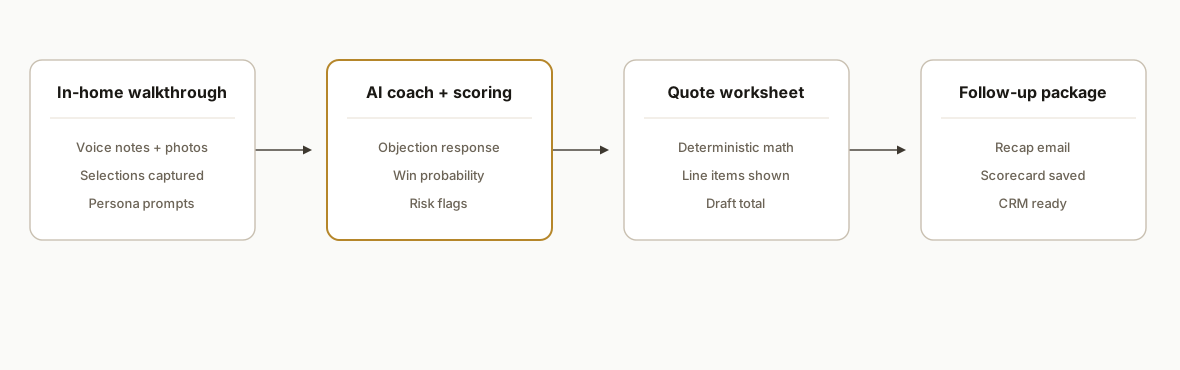
Note: this was a case study demo we built for Riverview Decks, not a live production deployment. We kept SSO off for review, used scoped data deletes, and observed a pre payment policy. Before any wider rollout, add production auth and hardened data hygiene.
Step-by-step: how to build it
1) Scaffold the tablet app and make it resilient offline
Create a Next.js app with a minimal design system and local first storage so reps can keep working without a signal. Add a service worker to cache the shell and queue writes for later sync.
// app/lib/store.ts
export type VisitState = {
  visitId: string
  homeowner: { name: string; address: string }
  steps: Record<string, any>
  audioNotes: { id: string; blobUrl: string; text?: string }[]
  selections: { material: string; railing: string; addOns: string[] }
  price: { base: number; addOns: number; total: number }
}

export const saveLocal = (k: string, v: unknown) => localStorage.setItem(k, JSON.stringify(v))
export const loadLocal = <T>(k: string, d: T): T => {
  try { return JSON.parse(localStorage.getItem(k) || "") as T } catch { return d }
}
Key gotcha: design for eventual sync. Never block the consult if the network drops. Queue background sync and surface a clear synced badge when the tablet reconnects.
2) Structure the 6 step consult with persona framing
Use a small state machine to guide the visit and reduce branch complexity. The persona label keeps messaging on brand.
// app/lib/flow.ts
export type Step = "intro" | "site" | "design" | "materials" | "budget" | "next"
export const steps: Step[] = ["intro", "site", "design", "materials", "budget", "next"]
export const nextStep = (s: Step) => steps[Math.min(steps.indexOf(s) + 1, steps.length - 1)]

export const personas = [
  { id: "karen_dave_farragut", label: "Karen & Dave, Farragut" },
  { id: "empty_nesters", label: "Empty Nesters, Entertaining" },
]
Key gotcha: constrain free text. Use short multiple choice for common decisions and fall back to notes only when needed so follow ups are consistent.
3) Capture audio and transcribe to text for fast note taking
Record short clips and hand them to your STT provider on a background task. Store the blob URL locally so the rep can replay while editing text.
// app/actions/transcribe.ts
export async function transcribeAudio(blob: Blob): Promise<{ text: string }> {
  const form = new FormData()
  form.append("file", blob, "note.webm")
  const res = await fetch("/api/transcribe", { method: "POST", body: form })
  if (!res.ok) throw new Error("transcription failed")
  return res.json()
}
Key gotcha: keep clips under a fixed duration and stream uploads. Long recordings slow consults and cost more to process.
4) Handle price objections and generate a win scorecard
Route objection text and key visit signals to a small model for a response and a simple win score. Keep the scoring rubric deterministic and transparent.
// app/actions/score.ts
export type Signals = { budgetFit: "high"|"med"|"low"; timeline: "urgent"|"flex"; competitor: "cheaper"|"unknown" }
export async function coachAndScore(input: { objection: string; sig: Signals }) {
  const res = await fetch("/api/coach", { method: "POST", headers: { "Content-Type": "application/json" }, body: JSON.stringify(input) })
  if (!res.ok) throw new Error("coach failed")
  return res.json() as Promise<{ rebuttal: string; winScore: number; risks: string[] }>
}
Key gotcha: do not let the model invent numbers. Keep pricing math outside the model and use the model only for language and qualitative risk flags.
5) Compute price with deterministic math, not AI
Separate a clean price calculator that never calls an LLM. Reps trust quotes when the math is obvious.
// app/lib/pricing.ts
export function quote(areaSqFt: number, basePerSqFt: number, addOns: { name: string; unit: number; qty: number }[]) {
  const base = Math.round(areaSqFt * basePerSqFt)
  const extras = addOns.reduce((s, a) => s + Math.round(a.unit * a.qty), 0)
  const total = base + extras
  return { base, extras, total }
}
Key gotcha: show the line items. The fastest way to kill trust is a black box total.
6) Generate the follow up package before you leave
Draft the recap email and save a structured visit summary for the CRM. Keep edits on the tablet and send when the rep has signal.
// app/actions/followup.ts
export function buildRecapEmail(v: VisitState) {
  const lines = [
    `Thanks for the walkthrough at ${v.homeowner.address}.`,
    `Selections: ${v.selections.material} with ${v.selections.railing} railing.`,
    `Add ons: ${v.selections.addOns.join(", ") || "none"}.`,
    `Estimate: $${v.price.total.toLocaleString()}.`,
    `Next step: site drawing + permit check.`,
  ]
  return lines.join("\n\n")
}
Key gotcha: handle offline send. Stage drafts locally and surface a one tap send when the network returns.
7) Store recordings and scorecards for coaching
In production, store audio, transcripts, and scorecards in a secure bucket with expiring links so leads and managers can review without passing raw files around. Tag each asset by visit ID and salesperson for coaching hygiene.
Key gotcha: consent and retention. Get recorded consent before capturing audio and apply data deletion windows that match your privacy policy.
Where it gets complicated
- Offline capture and sync conflicts: two devices updating the same visit can collide. Use visit versioning and last write wins only when the change is safe.
- Pricing and promos: discounts and add ons multiply. Keep rule logic in code with toggles, not in prompts.
- Audio privacy and consent: record an on tablet consent clip and display a consent banner. Redact sensitive details in logs.
- Rep trust and pacing: the tablet must never slow a rep. Keep every heavy call in the background and show spinners only when truly needed.
- Authentication and data hygiene: the Riverview Decks demo left SSO off for review. Add SSO, role based access, and scoped deletes before rollout.
What this actually changes
For a deck builder or any home services contractor, the tablet turns a messy consult into a repeatable path: selections captured, objections handled, math explained, and a recap in the homeowner inbox before you start the truck. The value is structural: faster quotes, consistent messaging, and an auditable trail for coaching. People forget new information quickly: research on the forgetting curve shows large portions can be lost within hours, which makes in visit capture critical for accuracy and follow up quality. University of Waterloo summary
This Riverview Decks build was a case study demo. The owner replied that he would look at it, which signaled interest. There were no live production metrics yet, by design.
Frequently asked questions
Is this Riverview Decks system live in production?
No. This was a case study demo we built for Riverview Decks. It demonstrated the full consult flow, voice capture, objection coaching, and win scorecard, and it kept demo guardrails on. A production rollout would add SSO, retention policies, and client owned keys.
Can the tablet work fully offline during a consult?
Yes. The pattern is local first. Cache the app shell, queue writes locally, and keep transcription and coaching calls in background jobs. If the signal drops, the rep keeps moving and drafts are staged to send when the tablet reconnects.
Do you ever let the AI compute prices?
No. Pricing is deterministic code. The AI is used for language and qualitative guidance only. Reps and homeowners must be able to see and audit the line item math.
How long would it take to productionize this demo?
A thin first deployment usually lands in weeks, not months: app shell, offline capture, price worksheet, email draft, and secure storage. CRM write backs, authentication, and training content for managers add time but do not change the core pattern.
What tools were used in the demo?
The tablet was built on Next.js and deployed to Vercel. Voice to text used a common speech to text model and the coaching layer used a small general model. We kept vendor specifics out of the demo so the stack can be swapped at rollout.
Can we adapt this for other trades beyond decks?
Yes. The same pattern applies to roofing, fencing, kitchens, baths, and exterior remodels. Swap the selections, update the price worksheet, and keep the consult cadence identical so onboarding stays fast.
If you want a guided sales tablet that your reps can actually use in a driveway, we build these systems end to end and keep the pricing math out of the model. See our service outline at /services#ai-sales-outreach, or read how we handle post visit routing in /blog/automate-crm-lead-followup. When you are ready to map your exact flow, /book a 15 minute call.
Want us to build this for you?
Nine questions, about 90 seconds. You see the hours it is costing you, then pick a time. No pitch.
Get your free assessment