
We built a case-study demo for Ricky Zollinger (RZM Media) that reads public Instagram profiles in a logged-in, recordable Chrome, drafts cinematic-video DMs with an LLM, and paces outreach from a warmed account to reduce restriction risk. It gave Ricky a concrete way to see how DM-led prospecting would work without committing to a full build.
Definition: Instagram DM outreach automation is a controlled system that reads lightweight public signals from a target profile, drafts a personalized message, and schedules sends at a human cadence from an authorized account.
This was a demo and proof-of-concept we built, not a live production deployment.
The problem it solves
Manual Zillow hunting and IG DMs are brittle. You context switch, lose track of who you messaged, and the account risks restrictions when volume or timing looks robotic. After a key closer left, outbound momentum dropped. A safe, demonstrable way to personalize and pace outreach was the gap.
| Manual IG prospecting | Automated demo outreach |
|---|---|
| Jump tab to tab, copy handles into notes, write DMs one by one | One targets file feeds a repeatable run with logging |
| Message tone drifts per rep | LLM prompts hold a steady cinematic-video voice |
| Easy to over-send and get flagged | Warmed-account pacing and caps per session |
| No paper trail for what was sent | Self-contained HTML artifact per target and a Loom walk-through |
| Hard to show stakeholders it works | Demo shows live, logged-in sends from visible Chrome |
How the automation works
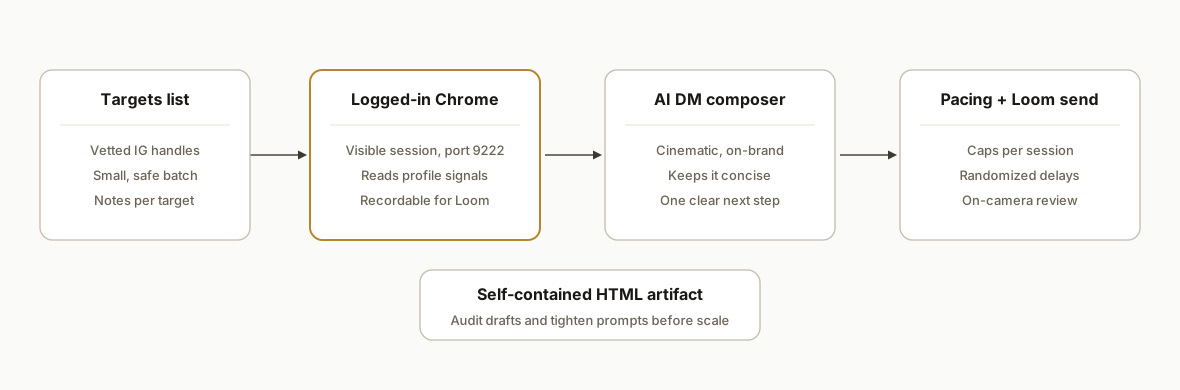
The demo anchored to RZM Media's real workflow. We packaged it so Ricky could watch a live, low-risk session: profile read, personalized DM draft, then a send under strict caps. Components were shipped alongside a Loom shot plan to gate delivery until a clean recording existed.
- ig_prospect.py: Orchestrates a run: connects to a logged-in Chrome on port 9222, opens the target profile, collects basic public signals, calls the LLM for a cinematic DM, and renders a self-contained HTML artifact for review or send.
- bh_scrape.py: The browser-harness reader that pulls lightweight profile cues reliably from a visible session. No brittle endpoint scraping; it reads what a human sees.
- targets.md: A tiny, vetted SoCal agent list for the on-camera run so we control volume during the demo.
- LOOM_SCRIPT.md: Shot framework: open Chrome, narrate profile read, show the drafted DM, and explain pacing caps before the send.
- reply-draft.md: Follow-up copy with a Loom link placeholder so Ricky can reply fast when a DM lands.
Step-by-step: how to build it
1) Prepare a tight targets list
Start with 3 to 5 vetted handles so the demo is safe and recordable. Store as plain text with one handle per line and an optional note.
# targets.md
@agent_one  Encinitas: oceanfront listing on profile hero
@agent_two  Dana Point: reels show multi-million listings
@agent_three  Newport: niche: cinematic brand content
Key gotcha: keep volume tiny for the first on-camera run. The point is proof, not reach.
2) Connect to a recordable, logged-in Chrome
We run a normal Chrome with remote debugging enabled, then attach the harness. The run is visible for Loom and uses a real, warmed account.
# Start Chrome once with a dedicated profile and CDP port
chrome --remote-debugging-port=9222 --user-data-dir="C:\\Profiles\\rzm-automation"
# ig_prospect.py : connect to the existing Chrome via CDP
import requests, json
WD_URL = "http://localhost:9222/json/version"
ws = requests.get(WD_URL).json()["webSocketDebuggerUrl"]
# Use your preferred CDP client; below is a minimal sketch
from websocket import create_connection
cdp = create_connection(ws)
# create a new tab and navigate later in the runKey gotcha: headless agent-browsers can time out when attaching. Use a headed, human Chrome for demos so the Loom captures everything.
3) Read lightweight profile signals safely
Collect only what a human sees: name line, bio, follower rough bucket, latest post tiles labels. The demo labels recent tiles as read live because captions often render as generic strings.
from playwright.sync_api import sync_playwright

def read_profile(handle: str):
    url = f"https://www.instagram.com/{handle.lstrip('@')}/"
    with sync_playwright() as p:
        browser = p.chromium.connect_over_cdp("http://localhost:9222")
        ctx = browser.contexts[0]
        page = ctx.new_page()
        page.goto(url, wait_until="domcontentloaded")
        name = page.locator("header h2, header h1").first.text_content() or ""
        bio = page.locator("header+div :text-matches('.*', 's')").first.text_content() or ""
        tiles = [t.inner_text() or "Photo by X on DATE" for t in page.locator("article a").all()[:6]]
        return {"handle": handle, "name": name.strip(), "bio": bio.strip(), "tiles": tiles}
Key gotcha: selectors shift. Keep them defensive and treat missing fields as empty strings.
4) Draft a cinematic, on-brand DM with an LLM
We pass the minimal signals to the model and keep the prompt tight: short, cinematic-video angle, no hard sell, and a single clear next action.
import os, requests

def compose_dm(profile):
    prompt = f"""
You write concise, cinematic-video DMs to real estate agents. Tone: warm, specific, zero fluff.
Inputs:
- Handle: {profile['handle']}
- Name: {profile['name']}
- Bio: {profile['bio']}
- Recent tiles: {profile['tiles']}
Write 1 DM. 420 chars max. No emojis. End with a soft question.
"""
    # Example with a generic LLM endpoint
    resp = requests.post(
        "https://api.openai.com/v1/chat/completions",
        headers={"Authorization": f"Bearer {os.environ['OPENAI_API_KEY']}"},
        json={
            "model": "gpt-5-mini",
            "messages": [{"role": "user", "content": prompt}],
            "temperature": 0.4
        }
    ).json()
    return resp["choices"][0]["message"]["content"].strip()
Key gotcha: keep the DM under platform length norms and avoid promotional trigger words that read spammy.
5) Pace sends from a warmed account
We gate sends behind session caps and a human-like rhythm. For a demo run we default to review-then-send with visible clicks.
import random, time

MAX_PER_SESSION = 2
MIN_DELAY = 38
MAX_DELAY = 95

sent = 0
for handle in handles:
    if sent >= MAX_PER_SESSION:
        break
    profile = read_profile(handle)
    dm = compose_dm(profile)
    render_html_artifact(profile, dm)  # open in Chrome for on-camera review
    # human click path here in the Loom
    delay = random.randint(MIN_DELAY, MAX_DELAY)
    time.sleep(delay)
    sent += 1
Key gotcha: never batch-fire in demos. Show the pacing and the cap counter so stakeholders see the safety rails.
6) Render a self-contained HTML artifact and record the Loom
We generate a portable HTML panel per target with the signals we read and the drafted message. The Loom script walks through the artifact, then shows the real send from the visible Chrome tab.
from pathlib import Path

def render_html_artifact(profile, dm_text):
    html = f"""
<!doctype html><meta charset="utf-8">
<title>{profile['handle']}</title>
<style>body{font:14px system-ui}.h{font-weight:600}</style>
<div class="h">{profile['handle']} : {profile['name']}</div>
<p>{profile['bio']}</p>
<ul>{''.join(f'<li>{t}</li>' for t in profile['tiles'])}</ul>
<hr>
<p class="h">Draft DM</p>
<pre>{dm_text}</pre>
"""
    out = Path("artifacts")/f"{profile['handle'].lstrip('@')}.html"
    out.parent.mkdir(parents=True, exist_ok=True)
    out.write_text(html, encoding="utf-8")
    return str(out)
Key gotcha: the artifact is your audit trail for later analysis and for tightening the prompt with Ricky's edits.
Where it gets complicated
- Headed Chrome is not optional for demos. Headless agent sessions can fail to attach or look suspicious. We ran a visible, logged-in Chrome on port 9222 so Loom could capture the flow.
- Instagram tiles often surface as generic labels. Recent posts sometimes render as generic strings rather than captions, so we labeled that panel "recent posts read live" in the demo to avoid implying semantic parsing that was not present.
- Account safety beats throughput. We enforced strict per-session caps and randomized delays. Warmed-account pacing reduces restriction risk but never eliminates it.
- Demo against known-good targets. Our standard pattern is to ship targets.md with 4 SoCal handles to avoid surprises during the recording.
- Gate delivery on a clean Loom. The deliverable was contingent on a recording that shows the exact run from Ricky's visible Chrome, not a synthetic replay.
What this actually changes
The demo let Ricky see his tone at scale before buying a full build. The very first response to our demo offer was: "Send it over." That is qualitative, but it is the buying moment a proof-of-concept exists to create.
One context point: Instagram's scale makes DM-led prospecting worth testing when it can be done safely. Statista reports Instagram surpassed two billion monthly active users globally by 2024, making it one of the largest places to reach consumers and professionals alike. Source: https://www.statista.com/statistics/253577/number-of-monthly-active-instagram-users/
Frequently asked questions
Was this a live deployment?
No. This was a case-study demo and proof-of-concept we built for Ricky Zollinger at RZM Media. It showed the workflow live in a recordable, logged-in Chrome session and was intentionally scoped for a safe, low-volume on-camera run.
Did you use an official Instagram API for DMs?
For the demo we used a logged-in browser harness reading what a human sees, then drafted DMs and sent under strict caps from the visible session. Available developer surfaces do not cover the end-to-end DM outreach we scoped for this demo, so we bridged that gap with a recordable browser flow.
How do you reduce the risk of account restrictions?
We keep volume tiny in demos, randomize timing, enforce hard caps per session, and only run from a warmed, authorized account. Those controls reduce risk, but they never drive it to zero. We explain the trade-offs before any scale-up.
Can this scale to dozens or hundreds of agents?
Technically yes, but the risk curve steepens. A safer Phase 2 for Ricky was framed as engagement via an alternate account that comments and drives attention back to the main account, not direct sending. A dashboard-only layer can also sit on top of manual sending for visibility.
What did you actually ship in the repo?
Five core artifacts: ig_prospect.py, bh_scrape.py, targets.md, LOOM_SCRIPT.md, and reply-draft.md. The demo also outputs a self-contained HTML artifact per target to audit drafts and tighten prompts.
How fast can you turn one of these demos around?
In practice: days, not weeks, once the account context and the Loom window are scheduled. We keep first runs tiny and recorded so stakeholders can green-light or redirect quickly.
If you want this kind of outreach proof without committing to a full build, we can scope a demo the same way and record it end to end. See our broader work on AI sales outreach and our related post on Automate Instagram DM Responses. When you are ready to see it on your profiles, book a 20 minute call.
Want us to build this for you?
Nine questions, about 90 seconds. You see the hours it is costing you, then pick a time. No pitch.
Get your free assessment