
Short answer: if you need an insurance CRM that integrates with AMS360 and EZLynx without double entry, we ship HubSpot or Salesforce with a bridge that enforces dedupe keys, idempotent upserts, and an audit log. It starts with the data access you have today and upgrades to partner feeds later, without changing your downstream shape.
Insurance AMS API integration is the practice of extracting policy, account, and activity data from agency management systems and safely syncing it to downstream tools like CRMs and marketing automation without manual re-keying.
The problem it solves
Many agencies want renewals, remarketing, and new-lead follow up to run from what the AMS already knows. In practice you get CSV exports, a vendor partner API that takes weeks to approve, or an email feed. The manual alternative is copy paste into your CRM, one-off spreadsheets for renewal lists, and hand-built broadcasts that miss people or double send.
| Manual process | Automated integration |
|---|---|
| Export CSV from AMS weekly. Clean and load into CRM by hand. | Scheduled export or webhook lands in a processing queue. Leads and accounts are upserted with dedupe and audit. |
| Chase renewal dates from a spreadsheet. | A nightly job computes next 30 and next 60 day renewals and populates CRM tasks and sequences. |
| Sales writes one-off emails for every new form fill. | Speed to lead reply drafts in minutes with suppression, licensing, and state rules applied. |
| No visibility into what synced when. | Append-only audit log and replayable queues with per-record status. |
Which insurance CRMs integrate with AMS360 and EZLynx without duplicate entry?
We have shipped this two ways that avoid double entry from day one:
- HubSpot: Companies and Contacts hold accounts and people. Policies live as Deals or a custom object. We upsert with a compound key like account name plus policy number, then associate records and enroll renewal tasks. It works with scheduled exports or controlled inbox parsing first, then swaps to partner feeds. Deep dive: AMS360 to HubSpot integration and the broader AMS360 CRM and marketing sync.
- Salesforce: Accounts and Contacts mirror the AMS. Policies sit under the Account as a custom object. We use an external ID pattern so upserts are idempotent and replay safe. Same launch pattern: file or email first, partner feed later without changing the object model.
How to choose quickly:
- Must have: upsert by external ID, custom objects or flexible associations, list or flow enrollment from field logic, clear audit of automations.
- Nice to have: playbooks for tasking renewals at 60 or 30 days, list-based suppression, and simple ways to surface owner routing.
We also bridge EZLynx when Zapier coverage misses critical fields. Inbox parsing or file drops feed the same dedupe and audit layer so HubSpot or Salesforce stays clean. See the pattern in EZLynx Zapier gap and bridge.
How the automation works
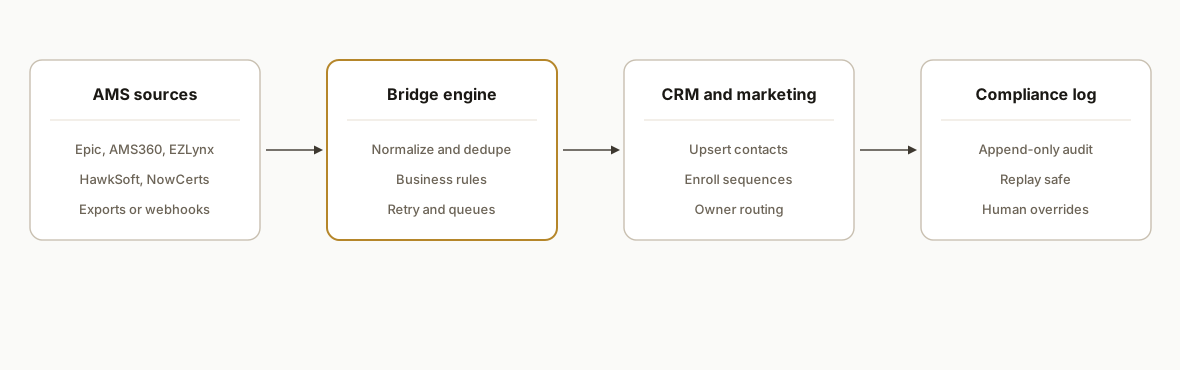
We ship a bridge that sits between your AMS and your CRM or marketing tool. It prefers official data feeds when available, falls back to email parsing or RPA for missing hooks, and always writes an auditable log. Then it applies business rules: licensing and state suppression, carrier or line of business routing, and renewal windows.
- AMS data ingress: Scheduled file exports, vendor webhooks when available, or a controlled inbox that receives notifications and downloads. The bridge normalizes these into a common schema.
- Normalization and dedupe: A mapping layer resolves name, email, phone, and policy identifiers to one contact or account. We keep a keys table so replays do not duplicate.
- Business rules: Licensing and geography filters, product line routing, and renewal windows create tasks, sequences, and owner assignments.
- CRM and marketing sync: Upserts to your CRM and triggers to your email system run with retry and backoff. We keep human-in-the-loop toggles for anything customer facing.
- Audit and recovery: An append-only log plus a queue that can be replayed safely after vendor outages or rule changes.
Step-by-step: how to build it
1. Land the feed safely
Set up one dependable ingress. If your AMS supports scheduled file delivery, point it at an S3-style bucket or a secure inbox dedicated to automation. If email is your only option, parse server side and store the raw body for audit.
// Minimal Express ingress for an email webhook or file drop
import express from "express";
import crypto from "crypto";
const app = express();
app.use(express.json({ limit: "2mb" }));

app.post("/ingest", async (req, res) => {
  const id = crypto.createHash("sha256").update(JSON.stringify(req.body)).digest("hex");
  await saveRaw({ id, payload: req.body, receivedAt: new Date().toISOString() });
  enqueue("normalize", { id });
  res.status(202).json({ status: "queued", id });
});

app.listen(3000);
Key gotcha: do not process in the request thread. Always enqueue and ack, then work asynchronously so vendor timeouts never drop records.
2. Normalize into a common shape
Create a small mapping layer per source. Keep the mappings in code or in a versioned config file, not in spreadsheets.
// mappings/ams360.json
{
  "contact.email": ["InsuredEmail", "PrimaryEmail"],
  "contact.phone": ["InsuredPhone", "PrimaryPhone"],
  "account.name": ["NamedInsured"],
  "policy.number": ["PolicyNo"],
  "policy.effective": ["EffectiveDate"],
  "policy.expiration": ["ExpirationDate"]
}
Key gotcha: always coerce dates to UTC on write. Treat empty strings as nulls early to avoid false changes on every sync.
3. Deduplicate and build idempotency
Write a keys table that records your chosen uniqueness fields and the downstream record ID. Use it before any write.
-- Postgres schema snippet
create table sync_keys (
  source text not null,
  source_key text not null,
  target_system text not null,
  target_id text not null,
  first_seen timestamp with time zone default now(),
  primary key (source, source_key, target_system)
);
Key gotcha: email is not a sufficient unique key in commercial lines. Use a compound of account name plus policy number when available, and fall back cautiously.
4. Apply business rules before you send
Keep routing and suppression in a pure function so it is unit tested and easy to change.
export function route(record) {
  const blockedStates = new Set(["AK", "HI"]);
  if (blockedStates.has(record.address.state)) return { drop: true, reason: "unlicensed" };
  if (daysUntil(record.policy.expiration) <= 60) return { queue: "renewals" };
  if (record.leadSource === "webform") return { queue: "speed_to_lead" };
  return { queue: "backlog" };
}
Key gotcha: never let a marketing sequence start on a record that looks like a bureau pull or a credit application. Respect consent and compliance flags from the source.
5. Upsert to CRM and trigger sequences
Wrap downstream writes with retry, backoff, and a final dead letter route. Keep the CRM call behind one interface so you can swap platforms later.
async function upsertContact(crm, contact) {
  const key = `contact:${contact.accountName}:${contact.email ?? contact.phone ?? "none"}`;
  const existing = await lookupSyncKey(key);
  const payload = buildCrmPayload(contact);
  const targetId = existing ? existing.target_id : await crm.createContact(payload);
  if (existing) await crm.updateContact(targetId, payload);
  await recordSyncKey(key, targetId);
  return targetId;
}
Key gotcha: do not trigger sequences in the same transaction as the upsert. Wait for confirmation of the write, then enqueue a separate job that applies tags or enrolls in a cadence.
6. Log everything and make replays safe
Every processed record should carry status, timestamp, and reason codes. Replays should re-run only failed or changed records.
create table sync_log (
  id uuid default gen_random_uuid() primary key,
  source text,
  source_ref text,
  stage text,
  status text,
  reason text,
  occurred_at timestamp with time zone default now()
);
Key gotcha: if a vendor outage forces you to pause, a safe replay saves the day. If you cannot replay without duplicating, you will hand-repair data for hours.
How to connect Applied Epic to HubSpot
When Epic access is gated or delayed, we launch with the data you can export reliably, then swap to partner access later without changing the downstream shape.
- Start state: export core account, contact, and policy lists on a schedule to a secure bucket or inbox. Keep one source of truth for renewal dates.
- Normalize: map Named Insured, policy number, and expiration into a common schema. Compute next 30 and 60 day renewal windows.
- Dedupe: key on account name plus policy number, not only email.
- Upsert: create or update HubSpot companies and contacts, then associate policies as deals or custom objects. Enroll renewal tasks only after the write confirms.
- Suppress: apply do-not-contact and licensing rules before any sequence.
If renewals are your primary target, our Epic renewal pattern is documented here: see Applied Epic renewal integration.
AMS360 to HubSpot or Salesforce: the fast path
We have shipped AMS360 syncs by starting with scheduled reports while partner access is processed. The build order keeps your CRM clean from day one.
- Ingest: schedule AMS360 exports for accounts, contacts, and policies. Land them in a processing queue.
- Transform: coerce dates to UTC, trim empties, standardize phone and state.
- Idempotency: write a sync keys table keyed by policy number plus account.
- CRM write: upsert companies and contacts. In Salesforce, relate policies under the account. In HubSpot, use associations and lists to power workflows.
- Renewals: generate CRM tasks for 60, 30, and 7 day marks with owner routing.
Deep dive on the mechanics and gotchas: AMS360 CRM and marketing sync.
EZLynx and HawkSoft: Zapier alternatives that work
When Zapier does not cover the fields you need, we bridge with inbox parsing or file drops plus a proper audit trail.
- Inbox pattern: route EZLynx or HawkSoft notifications to a controlled mailbox. Parse server side, attach the raw email to your log, then normalize.
- File pattern: schedule exports to a bucket and process on arrival. Keep schema versioning to survive vendor changes.
- Safe sends: write to CRM first, then enroll a human-reviewed queue before enabling automatic sequences.
For EZLynx specifics see Zapier gap and bridge. For renewal reminders in HawkSoft, our approach is outlined in HawkSoft renewal reminders. If your goal is certificates workflow, see NowCerts certificates automation.
Where it gets complicated
- Vendor gating and partner programs: Some AMS vendors require partner approvals or paid modules before any programmatic access. Expect lead time. We plan bridge launches around the access you actually have on day one.
- Mixed data entry quality: Agency data often mixes personal and commercial conventions. Decision logic that trusts a single field for uniqueness breaks in production. We correlate on multiple keys and keep a manual-merge path.
- Renewal truth and timing: Renewal dates can exist in more than one screen or report. We pick a single source of truth and compute windows in code so sequences do not slip or double fire after a mid-term change.
- State and licensing suppression: Outbound sends must respect producer licensing. We ship suppression layers first and test them with live data before enabling any auto-enrollment.
- Double-send risk with parallel vendors: If you already run a newsletter or a third-party follow up tool, your new sync can collide. We implement global suppression tags and require partner confirmation before we enable sends.
What this actually changes
For a regional independent agency, the bridge turned weekly CSV wrangling into a nightly sync. Renewals now show up as dated tasks with next steps, and speed to lead drafts pre-fill with account context while respecting state and licensing guards. The value is structural: once the bridge is in place, every new lead and renewal passes through the same rules without a spreadsheet detour.
One external benchmark underscores why speed matters. Harvard Business Review reported that companies responding within one hour were nearly seven times more likely to qualify a lead than those taking two hours or longer [The Short Life of Online Sales Leads, hbr.org]. An AMS bridge that places enriched leads into a CRM queue within minutes makes that one hour window realistic.
Frequently asked questions
Which insurance CRM integrates with AMS360 and EZLynx without duplicate data entry?
We deploy HubSpot or Salesforce with a bridge that enforces dedupe on stable keys like account plus policy number, then upserts and associates records idempotently. It works with scheduled exports or inbox parsing first and upgrades to partner feeds later, so you avoid double entry throughout.
Do Applied Epic, AMS360, EZLynx, HawkSoft, or NowCerts have official APIs?
Several of these platforms provide partner or documented APIs, and some expose webhooks or scheduled exports. Access and scope vary by vendor and program. When direct access is gated, we bridge with scheduled files, controlled inbox parsing, or carefully scoped RPA until partner access is available.
Can this sync in real time or only nightly?
Both are possible. We prefer near real time when a vendor webhook exists. When only scheduled exports are available, we run hourly or nightly depending on volume and risk. For customer facing sends, we gate with human approval first, then move to automatic with suppression in place.
How do you prevent duplicates across AMS and CRM?
We maintain a sync keys table keyed on stable identifiers like policy number plus account name, falling back to email or phone only when necessary. All writes check that table first. We also record every downstream ID so replays and retries are idempotent.
What about compliance and consent?
We carry consent and do-not-contact flags through the pipeline and default to suppression when fields are missing or ambiguous. We separate data processing from outbound messaging so a record can sync without enrolling in any sequence until it is cleared.
How long does a first integration take?
A typical first bridge ships in two to four weeks depending on access. When we can start with a scheduled export or inbox parsing, we launch faster, then swap to a partner API when it is approved. We always start in shadow mode before any outbound messaging is enabled.
What does this cost to run monthly?
Infrastructure costs are modest. File storage, a serverless function or small service, and a database for logs are the main items. The primary investment is the initial build and vendor access time. Ongoing cost depends on volume and any premium vendor modules you choose to add later.
If you want renewals, remarketing, and speed to lead running from your AMS data without spreadsheets, we have shipped this bridge for agencies using these platforms. See how we handle renewal sync in our post on Applied Epic renewal integration, or review the Zapier gap pattern in EZLynx integration. For an implementation plan mapped to your stack, see our CRM automation service and book a call.
Curious what this would actually save you?
Put real numbers to it. The ROI calculator estimates the hours and dollars an automation like this returns, in about a minute.
Calculate your automation ROI