
An AI receptionist handles every inbound call 24 by 7, routes warm transfers on intent or risk signals, and books directly to your calendars at a fraction of per-minute human costs. For multi-location lines or after-hours heavy call mixes, the ROI typically tilts to AI. The playbook here shows the math, the architecture, and a hybrid pattern when a live answering service still belongs in the loop.
AI receptionist definition: an automated voice agent that answers, qualifies, routes, and books calls using scripted procedures and a language model, with deterministic checks for accuracy and safe handoff rules to humans.
The problem it solves
Answering services solve coverage but introduce per-minute expense, variable accuracy on complex scripts, and slow warm transfers when queues are busy. You also pay the same minute rate for spam and repeat callers. An AI receptionist removes minute-based labor variability, covers nights and weekends, and routes by location without repeating scripts.
| Manual answering flow | Automated AI receptionist flow |
|---|---|
| Per-minute billing, per-transfer fees, script drift over time | Flat or metered compute, deterministic scripts held in code |
| Agent needs to check which location, which calendar | Caller intent auto-classified, location inferred from spoken cues or DID |
| After-hours: voicemail or overflow vendor pool | 24 by 7 coverage, consistent brand voice, instant callback offers |
| Warm transfer depends on human availability | Policy-based warm transfer when intent or VIP flags present |
| Booking accuracy varies by agent familiarity | Guardrails: slot validation, duplicate detection, required-field checks |
| Notes buried in vendor portal | JSON event log to your CRM, analytics, and QA searches |
How the automation works
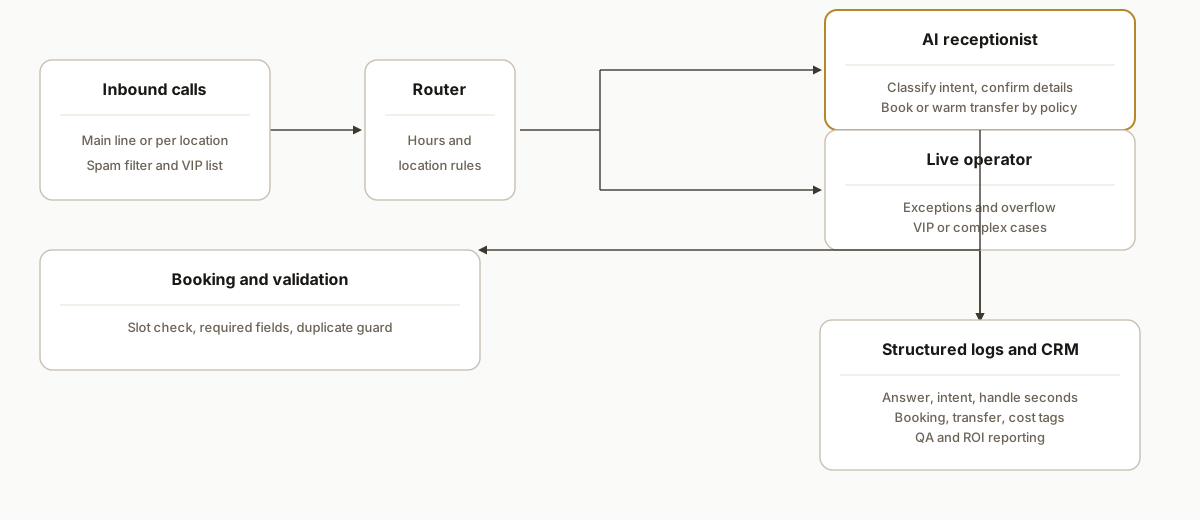
At a high level: calls route into a policy engine that decides whether the AI answers or a live operator takes the call. The AI receptionist greets, classifies intent, applies location rules, books or collects information with deterministic checks, and executes a warm transfer when a policy triggers. Every step emits structured events for QA and ROI.
- Call ingress and router: your telephony provider forwards to the AI entry point. Business hours, location DID maps, spam filters, and VIP lists apply before answering.
- AI receptionist engine: a narrow, procedure-led agent with your scripts. It asks only for what is needed, confirms critical details, and never free-writes prices or policies.
- Booking and validation: writes tentative holds, validates availability and required fields, then confirms the booking or falls back to warm transfer.
- Warm transfer and voicemail safety: when policies hit: intent equals urgent, caller is VIP, or confidence below threshold: the system dials through to humans with whisper and context.
- Event log and CRM: every turn is logged as structured events so you can audit outcomes and compute ROI by hour, campaign, location, and intent.
Step-by-step: how to build it
1) Model your call mix and ROI first
Build a simple calculator that compares live answering service costs against AI run costs under your real call distribution. Include after-hours share, average handle time, warm-transfer rate, and multi-location splits.
# Example math: replace sample values with your own
calls_month = 1200
pct_after_hours = 0.42
avg_handle_min = 3.6
warm_transfer_rate = 0.22

# Cost models
def answering_service_cost(calls, mins, transfer_rate, per_min=1.40, per_transfer=1.00):
    # Use your actual rates; these are placeholders for modeling only
    minutes = calls * mins
    transfers = calls * transfer_rate
    return minutes * per_min + transfers * per_transfer

def ai_receptionist_cost(calls, mins, model_cpm=0.06, infra_fixed=150):
    # model_cpm: cost per minute-equivalent of AI runtime (placeholder)
    runtime_minutes = calls * mins
    return infra_fixed + runtime_minutes * model_cpm

ans = answering_service_cost(calls_month, avg_handle_min, warm_transfer_rate)
ai  = ai_receptionist_cost(calls_month, avg_handle_min)
print({"answering": round(ans,2), "ai": round(ai,2), "delta": round(ans-ai,2)})
Key gotcha: measure your real after-hours share before modeling. After-hours minutes are where AI recovers the most value because human labor rates do not drop at night.
2) Route calls by hours and location
Represent hours and location routing in code so you can audit and change it safely. Map DIDs to locations and business hours, with a fallback to AI for all off-hours traffic.
# routing.yml
locations:
  north:
    did: "+1-222-555-0101"
    hours: { mon_fri: "08:00-17:00", sat: "09:00-12:00", sun: closed }
  south:
    did: "+1-222-555-0102"
    hours: { mon_fri: "08:00-17:00", sat: closed, sun: closed }
router:
  after_hours: ai
  business_hours:
    primary: ai
    overflow: live_operator  # used when queues exceed thresholds
Gotcha: do not hardcode time math in prompts. Keep hours in configuration and use a tested library for timezone rules.
3) Define warm transfer and human-in-the-loop rules
Warm transfers protect revenue moments and edge cases. Use explicit policies rather than probability.
{
  "warm_transfer": {
    "on_intent": ["urgent_issue", "billing_dispute", "high_value_quote"],
    "on_confidence_below": 0.65,
    "vip_numbers": ["+1-222-555-0199", "+1-222-555-0188"],
    "targets": [
      {"queue": "north_team", "whisper": "Urgent North call"},
      {"queue": "fallback_pool", "whisper": "General urgent"}
    ]
  }
}
Gotcha: always send a short context whisper to humans: caller name, location, and one-line intent. Keep it under 10 seconds to avoid drop-offs.
4) Guard booking accuracy with deterministic checks
Never let a model free-write appointments. Validate slots, required fields, and duplicates deterministically before confirmation.
type Booking = { name: string; phone: string; location: string; slotIso: string; type: string };

function validateBooking(b: Booking, openSlots: string[], dupKeys: Set<string>) {
  if (!/^\+?[0-9\-\s()]{7,}$/.test(b.phone)) throw new Error("invalid phone");
  if (!openSlots.includes(b.slotIso)) throw new Error("unavailable slot");
  const key = `${b.phone}:${b.slotIso}:${b.location}`;
  if (dupKeys.has(key)) throw new Error("duplicate booking");
  return true;
}
Gotcha: log declined confirmations by reason. These become your accuracy dashboard and training data for script tweaks.
5) Multi-location mapping and calendar writes
Normalize location inference. Infer from DID first, then caller utterances, then explicit confirmation.
function inferLocation(did: string, transcriptHints: string[]): "north"|"south"|"unknown" {
  if (did.endsWith("0101")) return "north";
  if (did.endsWith("0102")) return "south";
  if (transcriptHints.some(t => /north/i.test(t))) return "north";
  if (transcriptHints.some(t => /south/i.test(t))) return "south";
  return "unknown";
}
Gotcha: when location is unknown, switch to a one-question confirmation before showing slots. Do not guess.
6) Instrument outcomes for QA and ROI
Emit a compact event stream for every call. You can compute connection rate, warm-transfer success, booking accuracy, and cost per outcome directly from these logs.
-- Example read model for weekly ROI by location
select
  location,
  date_trunc('week', occurred_at) as week,
  count(*) filter (where event='call_answered') as calls,
  count(*) filter (where event='booking_confirmed') as bookings,
  count(*) filter (where event='warm_transfer_connected') as warm_transfers,
  avg(metadata->>'handle_seconds')::float as avg_handle_s,
  sum(cost_ai_cents)/100.0 as ai_cost_usd
from call_events
group by 1,2
order by 2 desc, 1;
Gotcha: align cost accounting to events, not vendor invoices. Attribute AI runtime and any human minutes to each call so your ROI view is apples-to-apples.
Where it gets complicated
- Name and entity handling: unusual names, company names, and place names require a small pronunciation dictionary and exact-spelling confirmation. Add a confirm step when the model's confidence is low.
- DTMF menus versus natural language: some upstream telephony flows still require key presses. Offer both, and fall back to a simple menu when regulators or partners require it.
- Spam and silent calls: blocklists, STIR or SHAKEN attestation checks, and a one-question spam trap cut paid minutes spent on junk. Measure it so it is not guesswork.
- Calendar concurrency: double-booking happens when multiple channels share the same resource. Use holds with short TTLs and confirm only after a lock succeeds.
- Compliance and recording consent: if you record, present a short consent line and respect state rules. Follow with a clear opt-out or hangup instruction.
- Brand consistency across locations: centralize scripts and policies. Localize only what truly differs: hours, address, and escalation targets.
What this actually changes
For lines with real after-hours volume, AI shifts the unit economics. Human answering services bill minute-by-minute, so every spam and low-intent call costs you. An AI receptionist answers instantly, applies the same procedure every time, and only involves a human when a policy says to. The hybrid is often the winner: AI on first ring, warm transfer for revenue-critical intents.
One hard number to anchor the stakes: Invoca reports callers are 10 to 15 times more likely to convert than web leads, so speed to answer and accurate routing matter materially to revenue. Source: https://www.invoca.com/blog/phone-calls-are-the-new-clicks
When you add multi-location mapping and structured logs, you also gain visibility your answering vendor cannot give you: booking accuracy by script version, VIP connection times, and after-hours conversion by location. Those are the levers you actually control.
Frequently asked questions
Is an AI receptionist actually cheaper than a live answering service?
For most after-hours or multi-location lines, yes. AI costs scale with compute and telecom, not human minutes. The clearest wins appear when average handle time is short, spam share is non-trivial, and warm transfers are reserved for true revenue moments. The hybrid pattern protects edge cases without paying human rates on every call.
Will an AI receptionist hurt booking accuracy?
Not if you enforce deterministic checks. The model proposes a slot and details, but code validates availability, required fields, and duplicates before confirming. Low-confidence cases route to a warm transfer. Accuracy is measured in your event log, not assumed.
Can it still warm transfer to a real person?
Yes. You set explicit triggers: urgent intents, VIP callers, or low-confidence steps. The system dials through with a short whisper that includes the caller's name, location, and one-line intent so humans pick up with context.
How do we measure ROI against our current answering service?
Instrument every call: answered, intent, handle seconds, booking state, warm-transfer outcome, and costs. Compare cost per booking and speed-to-answer by hour and location. Run both systems in parallel for 2 to 3 weeks and decide on data, not anecdotes.
How long does setup take?
A focused first deployment is usually measured in days, not months: scripts and policies, routing and hours, calendar write with validations, and the event log. Multi-location mappings and warm-transfer trees add a bit more time. Shadow-mode testing comes before flipping traffic.
What do we need to get started?
Your current call mix by hour, business hours per location, booking rules, escalation paths, and a calendar integration point. A short brand voice guide helps. Everything else is standard: routing, scripts, policies, and logging.
If you want a second set of eyes on whether AI or a hybrid will beat your current answering costs, we can model your real call mix and design the guardrails. See our service overview at /services#ai-voice-agents, read the related breakdown in /blog/ai-voice-receptionist-pricing-and-roi, and when you are ready, /book a 15 minute scoping call.
Curious what this would actually save you?
Put real numbers to it. The ROI calculator estimates the hours and dollars an automation like this returns, in about a minute.
Calculate your automation ROI