
An AI voice receptionist replaces or augments call answering by handling greetings, qualification, calendar booking, transfers, and voicemail without missing after-hours calls. We priced, built, and shipped multiple voice agents in production. This post shows AI receptionist ROI in practical terms: the real cost drivers, how to model payback, and what we deploy so you know where the return comes from.
AI voice receptionist definition: an automated phone agent that answers, qualifies, books, and routes calls using speech recognition, a reasoning model, and integrations to calendars, CRM, and phone systems.
The problem it solves
Most businesses either staff a live receptionist, pay an answering service, or let calls hit voicemail after hours. That produces missed leads, uneven qualification, and slow handoffs. A voice AI receptionist runs 24 by 7, responds in under a second, and pushes structured outcomes to calendars and CRM.
| Manual receptionist or answering service | AI voice receptionist |
|---|---|
| Coverage limited to working hours or per-minute answering plan | 24 by 7 coverage with consistent greeting and logic |
| Inconsistent qualification and note-taking | Consistent intake: name, reason, source, urgency, next step |
| Slow speed to lead when lines are busy | Sub-second pickup, instant booking or warm transfer |
| Expensive for low-signal calls and no-shows | Cheap for short or spam calls, caps and rules prevent bill shock |
| Voicemail black hole and delayed callbacks | Voicemail transcript plus auto-follow-up or re-try rules |
Speed to lead matters. A Harvard Business Review study found companies responding within one hour were nearly seven times more likely to qualify a lead than those taking longer than an hour (source: HBR, The Short Life of Online Sales Leads).
How the automation works
Pricing and ROI come from four moving parts: telephony minutes, the AI engine, integrations, and a human failover. In production we keep each part swappable so you can upgrade models, change carriers, and add channels without a rebuild.
- Telephony layer: answers calls, records consent beeps where required, provides dual-channel audio to the AI, and supports warm and cold transfers. We size plans to expected peak concurrent calls and total monthly minutes.
- AI engine: performs speech recognition, call control, and reasoning to collect intent and drive the workflow. We run strict guardrails for names, dates, and booking times.
- Calendars and CRM: books directly into provider calendars, checks availability in real time, and writes structured call summaries to the CRM while preventing duplicates.
- Failover and escalation: if the caller requests a human or confidence drops, we transfer to staff. After-hours we route to voicemail with an email and SMS summary.
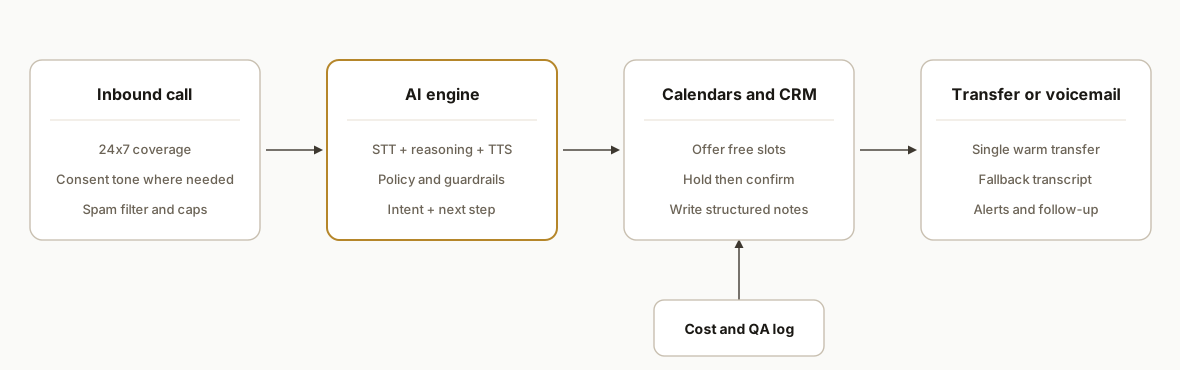
Step-by-step: how to build it
1) Map the call outcomes and pricing levers
Start with the outcomes: book, qualify-and-transfer, take-a-message, or route-to-info. Tie each to cost drivers: minutes, model tokens, transfer minutes, and integration calls.
{
  "outcomes": ["book", "warm_transfer", "voicemail", "info"],
  "costDrivers": {
    "telephony_minutes": {"inbound": true, "transfer": true},
    "ai_tokens": {"stt": true, "reasoning": true, "tts": true},
    "integrations": ["calendar", "crm"],
    "recording_storage": true
  },
  "caps": {"maxCallLengthSec": 600, "maxTransfersPerCall": 1}
}
Key gotcha: cap per-call duration to avoid long rambles consuming minutes. Escalate to a human or voicemail if the cap is approached.
2) Build the receptionist policy and guardrails
Define what the agent can and cannot do. Enforce deterministic checks for names, phone numbers, dates, and times.
// deterministic field checks
const isValidPhone = s => /^\+?[0-9 .\-()]{7,}$/.test(s);
const isBusinessHours = dt => {
  const h = dt.getHours();
  return h >= 8 && h < 18; // local business hours
};

// policy
const policy = {
  never: ["take payments", "give medical or legal advice"],
  alwaysAsk: ["caller name", "callback number"],
  bookingRules: {
    durationMin: 15,
    sameDayCutoffHour: 15,
    bufferMin: 10
  }
};
What tripped us up: names and email spellings over the phone. We added repeat-back confirmation and single-letter NATO spelling only when confidence is low.
3) Wire calendars with conflict checks and buffers
Check availability before offering times, then place the hold and send confirmations. Avoid double-booking by writing a short pending hold before the AI says the slot aloud.
async function proposeSlots(cal, tz, mins=15) {
  const start = new Date();
  const slots = await cal.freeBusy({ windowDays: 7, min: start, durationMin: mins, bufferMin: 10, tz });
  return slots.slice(0, 3); // offer top 3
}

async function bookSlot(cal, slot, caller) {
  // soft hold then confirm
  const hold = await cal.hold(slot, { title: `Call with ${caller.name}`, holdMin: 5 });
  const evt = await cal.confirm(hold.id, { guest: caller.email, phone: caller.phone });
  return evt;
}
Edge case: calendar API latency. We place a five-minute hold before confirmation to survive round-trip delays.
4) Set up warm transfers with a safety net
A warm transfer should either connect a human or fall back gracefully without dropping the caller.
async function warmTransfer(pbx, toExt, context) {
  const ok = await pbx.dial(toExt, { whisper: `Call about ${context.intent}` });
  if (!ok) {
    return { routed: false, action: "voicemail" };
  }
  return { routed: true };
}
We also track transfer minutes separately in reporting so you can see when human time is being spent and by whom.
5) Log every call for ROI and QA
Store per-call fields to evaluate savings and quality. This is the dataset you will use to prove ROI.
create table call_log (
  id uuid primary key,
  started_at timestamptz not null,
  duration_sec int not null,
  outcome text check (outcome in ('book','warm_transfer','voicemail','info')),
  intent text,
  booked_event_id text,
  transferred_to text,
  confidence numeric,
  cost_cents int,
  caller_phone text,
  created_by text default 'ai'
);
We compute cost per call post-hoc, then aggregate by outcome to compare against answering service or in-house staffing alternatives.
6) Add compliance and consent handling
Some states require two-party consent for recording. We gate recording features by caller geography and surface a spoken consent line where appropriate.
const twoPartyStates = new Set(["CA","PA","WA","FL", "IL", "MD", "MA", "MT", "NH"]);
function shouldPlayConsent(stateCode) { return twoPartyStates.has(stateCode); }
We default to consent beeps and a short disclosure when in doubt.
Where it gets complicated
- Names, emails, and addresses: speech recognition struggles on uncommon names or fast spellings. We added repeat-back with NATO letters only when confidence drops below a threshold, and we store the raw audio clip for QA.
- Transfer loops: a failed transfer can loop the caller. We use single-attempt warm transfers with a 20 to 30 second ring budget, then return to the AI to offer voicemail or booking.
- Quota and overage risk: in one production system a text-to-speech vendor allowed overage beyond the plan. We built a pre-call quota check and pause schedule to prevent surprise bills.
- CRM duplicates: inbound calls often come from numbers already in your CRM. We match on phone and email, then attach notes to the existing record instead of creating a new one.
- Calendar race conditions: if two callers grab the same slot, the first hold wins. We announce a fallback slot immediately if confirmation fails and send a text with a direct booking link.
What this actually changes
For home services, clinics, legal intakes, and local retail, the voice receptionist caught after-hours leads and removed hold time. Businesses that respond within one hour are nearly seven times more likely to qualify a lead than those that take longer, which is why sub-second pickup matters (source: Harvard Business Review). For in-house staffing comparisons, run the AI receptionist break-even calculator, and note that the median pay for receptionists and information clerks in the United States was in the mid-to-high teens per hour in recent BLS data, before benefits and coverage gaps are considered (source: U.S. Bureau of Labor Statistics, Occupational Employment and Wage data for Receptionists and Information Clerks).
We price these systems around structural costs: minutes, model usage, and integrations. When spam, short calls, and simple FAQ calls make up a meaningful share, AI absorbs that volume cheaply and routes only real opportunities to people. The result: faster first response, cleaner calendars, and fewer voicemails lost.
What is the ROI of an AI receptionist?
ROI comes from three buckets: captured revenue from faster response, labor saved or reallocated, and replacement of per-minute answering services. Subtract the all-in AI system cost and divide by that cost to get ROI percent.
- Captured revenue: more booked appointments and fewer missed after-hours calls.
- Labor savings: fewer interruptions, less time on spam and simple FAQs, and less manual note entry.
- Answering service replacement: some or all of that spend is avoided.
- System cost: telephony minutes, AI usage, calendar and CRM calls, storage, and monitoring.
A simple payback model you can copy
Use call logs and your conversion math to get to payback, or try our ROI break-even calculator. This runs in a spreadsheet or warehouse.
Inputs:
  Calls_per_month
  After_hours_share
  Avg_call_length_min
  Booking_rate_now vs Booking_rate_with_AI
  Show_rate and Close_rate for booked calls
  Gross_margin_per_job
  Answering_service_spend_now
  AI_system_cost (minutes + AI + integrations + support)

Steps:
  Incremental_bookings = Calls_per_month * (Booking_rate_with_AI - Booking_rate_now)
  Incremental_gross_margin = Incremental_bookings * Show_rate * Close_rate * Gross_margin_per_job
  Labor_savings_value = Time_saved_from_short_FAQ_and_spam * Hourly_loaded_cost
  Replaced_spend = Answering_service_spend_now (full or partial)
  Net_benefit = Incremental_gross_margin + Labor_savings_value + Replaced_spend - AI_system_cost
  Payback_period = Setup_investment / Net_benefit_per_month
Decision rule: when after-hours share is non-trivial and a measurable portion of calls are short or spam, payback tightens because AI absorbs those calls cheaply and books the rest faster.
When the AI receptionist ROI is strongest
- After-hours and weekend volume is material.
- Hold times or missed calls are common during peak hours.
- Many calls are repetitive FAQs, reschedules, or spam.
- You already pay for an answering service or partial receptionist coverage.
- You need consistent intake notes in the CRM without manual entry.
For a deeper framework on calculating automation returns, see our breakdown in Automation ROI explained and the pricing detail in AI automation agency pricing and ROI.
What we would build for you and how we price scoping
Here is the production bundle we deploy:
- Inbound call handling with sub-second pickup, consent, and guardrails.
- Calendar booking with conflict checks, holds, buffers, confirmations, and reminders.
- Warm transfer with a monitored fallback to voicemail or booking to avoid loops. We documented the patterns in our warm transfer routing guide.
- CRM notes with structured summaries and contact deduplication.
- Reporting: per-call cost, outcome, and transfer minutes to prove ROI.
Comparable build: we implemented RingCentral routing and transfers using the same safety net and reporting approach covered in our AI voice receptionist for RingCentral setup. The same design applies to other mainstream cloud phone systems that allow call forwarding or SIP handoff.
First step and scope: we start with a 15-minute fit call to review your call mix and sketch the ROI model. No cost. If you have multi-location routing or unusual compliance needs, we follow with a short paid discovery before build. Pilot runs in shadow mode for one week, then we cut over once booking quality meets the bar.
Frequently asked questions
What does an AI voice receptionist actually cost each month?
Total cost = telephony minutes + AI usage + calendar and CRM calls + storage. In most deployments the bill is driven by minutes and the average call length. We cap call duration, avoid loops, and separate transfer minutes so you see where human time is still needed. We model this before go-live using a week of sample calls.
Is a voice AI receptionist cheaper than an answering service?
It depends on your call mix. Short and spam calls are much cheaper on AI because they end quickly. Longer qualification calls that end in bookings are still less expensive than staffing across all hours. Where AI shines is after-hours coverage and zero wait time. We often keep a human failover for complex situations.
How do you set up an AI receptionist from scratch?
We map outcomes, write the policy and guardrails, connect calendars and CRM, then wire warm transfers and voicemail. We run in shadow mode for a week and compare outcomes against your current process. Once accuracy and booking quality meet the threshold, we turn it on. This is the safest path for how to make or create an AI receptionist.
Can it handle calendars, multi-location routing, and transfers?
Yes when the systems expose booking links or APIs. We check availability before we ever offer a time, hold the slot, then confirm. Multi-location menus route by zip code, city, or stated preference. Transfers are attempted once, then we fall back to voicemail or booking to avoid loops.
What about recording laws and consent?
We gate recording and spoken consent by state. In two-party consent jurisdictions, we play a disclosure or a beep and we allow opt-out by the caller. We also provide a no-recording mode with transcript only when necessary. Your counsel sets the policy. We implement it.
How fast can we launch and what do we need to provide?
Typical build time is measured in days, not months. We need your call flows, calendar access, CRM fields, transfer numbers, and approved disclosures. We supply a pricing and ROI model before go-live so you know exactly what you are paying per outcome.
What is the payback period for an AI receptionist?
Payback varies with after-hours share, average call length, and your current conversion math. We use one week of shadow-mode data to compute net benefit per month and then estimate payback using your setup investment. This removes guesswork and ties the model to your phones, not generic averages.
If you want a concrete plan for your phones, we have shipped this pattern across outbound dialers and inbound receptionists. See whether AI voice agents actually work, read how we handled RingCentral setup, and review warm transfer routing patterns. Then see our broader AI voice agents service. When you are ready, book a 15-minute call and we will scope your call mix and ROI on the spot.
Curious what this would actually save you?
Put real numbers to it. The ROI calculator estimates the hours and dollars an automation like this returns, in about a minute.
Calculate your automation ROI