
AI voice receptionist automation routes calls using intent-based scripts, slot-filling prompts, and policy rules: it answers, triages the reason, captures essentials, and either resolves or warm-transfers to the right person. We built and shipped these flows for real teams that pick up more calls without adding headcount. This guide shares the exact scripts and call flow patterns we use in production and how to implement them safely.
AI voice receptionist scripting: a structured set of prompts, rules, and handoff conditions that guide an automated phone agent to answer, triage, collect information, and transfer or schedule while honoring compliance and business policy.
The problem it solves
An AI voice receptionist replaces brittle phone trees and loose paper scripts with intent-based flows that handle after-hours and peak times without missed calls. It is for owners who want fewer voicemails, faster routing, and consistent information capture without hiring another full-time receptionist.
| Manual receptionist workflow | Automated AI voice receptionist |
|---|---|
| Human answers when available. High variance in greeting, triage, and note-taking. | Always-on answer. Scripted, on-brand greeting and consistent triage. |
| Paper or memory-based prompts cause missed questions and rework. | Slot-filled checklist guarantees name, number, reason, and required facts. |
| Hold music and blind transfers frustrate callers. | Warm transfer with summary and fallback to voicemail-to-text when no one answers. |
| After-hours calls go to voicemail and often get lost. | After-hours flows offer scheduling options and capture full context by SMS or voice. |
| No audit trail beyond scattered notes. | Structured logs and optional recordings for QA, training, and compliance. |
How the automation works
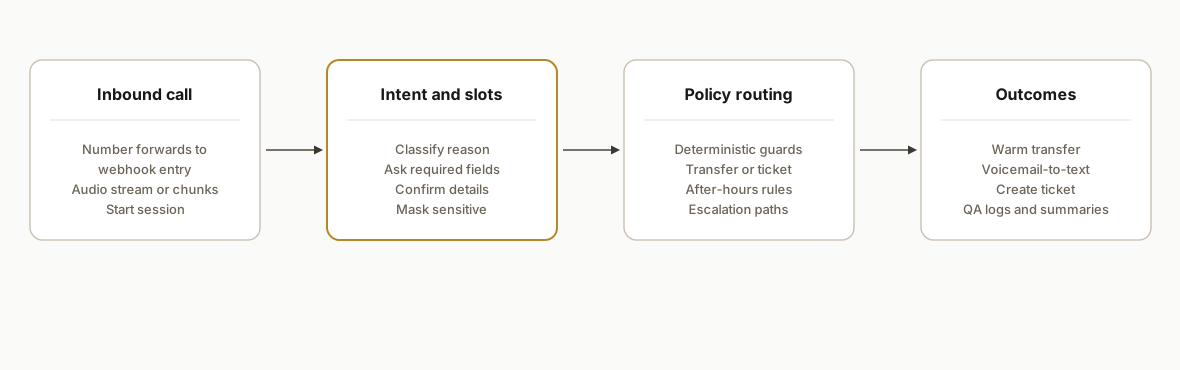
An AI voice receptionist sits between your phone number and your team: calls hit a webhook, audio is transcribed, a small intent router and policy engine decide what to ask or do next, and the agent either resolves the call or warm-transfers with a concise summary. In production we keep the telephony vendor swappable, run a stateless webhook that rehydrates call state from a data store, and gate risky actions behind deterministic guards.
- Inbound telephony webhook: Your number forwards to a cloud entrypoint that starts the session, streams or chunks audio, and emits actions like speak, ask, transfer, or voicemail.
- Speech-to-text and voice: Transcription and synthetic voice are pluggable. We evaluate providers for accuracy and latency per client use case, then lock a default and keep a plan B.
- Intent router: A compact rules layer interprets the last utterance into intents like new inquiry, appointment, billing, emergency, or wrong number and drives the next step.
- Slot filling and confirmation: The agent collects required fields per intent: name, callback, email, booking date, address, or account ID, then reads back a confirmation.
- Policy engine and handoff: Deterministic checks decide when to transfer, take a message, escalate, or decline. Warm transfer includes a short summary; no-answer falls back to a voicemail-to-text path.
- Logging and QA: Every turn writes a call log with state, final disposition, and a secure link to the recording if enabled for QA.
Step-by-step: how to build it
1) Define intents, slots, and talk tracks
Start with a tiny spec: intents, the fields you must collect for each, and the exact words for greeting, confirmations, and transfer summaries. We keep this in a simple YAML so non-engineers can edit it.
# callflows.yaml
brand: "Acme Services"
voice: "friendly, concise, professional"
intents:
  - id: new_inquiry
    when: caller mentions estimate, quote, book, consultation
    slots:
      - key: full_name; prompt: "May I have your full name?"; required: true
      - key: callback; prompt: "What is the best phone number to reach you?"; required: true; validate: phone
      - key: service; prompt: "What service are you looking for?"; required: true
    next: transfer_sales
  - id: existing_appointment
    when: reschedule, change time, confirm
    slots:
      - key: full_name; prompt: "What is the name on the appointment?"; required: true
      - key: date; prompt: "Which date are we talking about?"; required: true
    next: handoff_calendar
  - id: billing
    when: invoice, payment, charge, refund
    slots:
      - key: full_name; prompt: "Your full name?"; required: true
      - key: account_id; prompt: "Do you have an account or invoice number?"; required: false
    next: create_ticket
confirm_template: "Let me confirm: {{summary}}. Is that correct?"
transfer_template: "Transferring you to {{team}}. If they cannot pick up, I will take a message and we will call you back."
Key gotcha: keep the intents few and unambiguous. Add as you observe real calls, not upfront.
2) Implement a small intent and policy router
We keep the router deterministic where possible. Use simple keyword heuristics first, then fall back to an LLM classification only when the heuristics are inconclusive.
// router.js
const intents = [
  { id: "new_inquiry", kw: ["estimate","quote","book","consult"], next: "transfer_sales" },
  { id: "existing_appointment", kw: ["resched","change","confirm"], next: "handoff_calendar" },
  { id: "billing", kw: ["invoice","payment","charge","refund"], next: "create_ticket" }
];

export function routeIntent(utterance) {
  const text = (utterance || "").toLowerCase();
  for (const i of intents) {
    if (i.kw.some(k => text.includes(k))) return { intent: i.id, next: i.next, confidence: 0.95 };
  }
  return { intent: "unknown", next: "clarify", confidence: 0.4 };
}

export function nextAction(state) {
  // state: { intent, slots: {..}, requiredSlots: [..] }
  const missing = (state.requiredSlots || []).filter(s => !state.slots[s]);
  if (missing.length) return { type: "ask", slot: missing[0] };
  if (state.intent === "new_inquiry") return { type: "transfer", team: "sales" };
  if (state.intent === "billing") return { type: "ticket", queue: "billing" };
  if (state.intent === "existing_appointment") return { type: "calendar" };
  return { type: "clarify" };
}
Key gotcha: do not let the LLM decide transfers alone. Always gate handoff on a deterministic rule or a human confirm.
3) Stand up the webhook and session state
Your telephony provider posts call events and audio. Keep your webhook stateless and store session state keyed by a call SID in a datastore.
// server.js
import express from "express";
import bodyParser from "body-parser";
import { routeIntent, nextAction } from "./router.js";
import { getSession, saveSession } from "./store.js";

const app = express();
app.use(bodyParser.json());

app.post("/voice", async (req, res) => {
  const { callId, event, transcriptChunk } = req.body; // shape depends on provider
  const session = await getSession(callId) || { slots: {}, history: [] };

  if (event === "start") {
    session.intent = null;
    session.requiredSlots = [];
    await saveSession(callId, session);
    return res.json({ action: { type: "speak", text: `Thanks for calling Acme Services. How can I help today?` } });
  }

  if (event === "speech") {
    if (!session.intent) {
      const r = routeIntent(transcriptChunk);
      session.intent = r.intent;
      session.requiredSlots = requiredFor(r.intent); // from config
    } else {
      fillSlot(session, transcriptChunk); // naive slot fill, add validators
    }
    const action = nextAction(session);
    await saveSession(callId, session);
    return res.json({ action });
  }

  if (event === "hangup") {
    await saveSession(callId, { ...session, endedAt: Date.now() });
    return res.json({ ok: true });
  }

  return res.status(400).json({ error: "unknown-event" });
});

app.listen(3000);
Key gotcha: do not persist PII beyond what your retention policy allows. Redact or hash sensitive fields in logs.
4) Add slot prompts and confirmation with guardrails
Use a templated confirmation to eliminate misheard details before transfer. Keep sensitive fields masked on read-back.
// prompts.js
export function promptFor(slotKey) {
  const prompts = {
    full_name: "May I have your full name?",
    callback: "What is the best phone number to reach you?",
    service: "What service are you looking for?",
    date: "Which date are we talking about?"
  };
  return prompts[slotKey] || "Could you tell me a bit more?";
}

export function confirm(session) {
  const mask = v => v && v.replace(/(\d{3})\d{4}(\d{3})/, "$1••••$2");
  const parts = [];
  if (session.slots.full_name) parts.push(`name ${session.slots.full_name}`);
  if (session.slots.callback) parts.push(`callback ${mask(session.slots.callback)}`);
  if (session.slots.service) parts.push(`service ${session.slots.service}`);
  if (session.slots.date) parts.push(`date ${session.slots.date}`);
  return `Let me confirm: ${parts.join(", ")}. Is that correct?`;
}
Key gotcha: never speak full account numbers or SSNs back to the caller. Confirm last 4 only when policy allows.
5) Implement warm transfer with fallback
Transfer only after confirmation. If the destination does not answer, route to voicemail-to-text and create a ticket with the captured summary.
// handoff.js
export function buildTransferSummary(session) {
  const s = session.slots;
  return `New ${session.intent}. ${s.full_name} calling about ${s.service || "general"}. Callback ${s.callback}.`;
}

export async function handleTransfer(callId, team, session) {
  const summary = buildTransferSummary(session);
  return {
    action: {
      type: "transfer",
      to: lookupTeamNumber(team),
      whisper: summary, // agent hears this first
      onNoAnswer: {
        type: "voicemail",
        maxSec: 120,
        then: { type: "create_ticket", queue: team, payload: { summary } }
      }
    }
  };
}
Key gotcha: whisper the summary to the human before connecting the caller. It shortens calls and prevents redundant questions.
6) Log outcomes and recordings for QA
Log turn-by-turn state for debugging and capture a compact roll-up row for analytics. Recording is configurable per line and disabled by default in sensitive contexts.
-- schema.sql
create table call_log (
  id uuid primary key,
  call_id text not null,
  started_at timestamptz not null default now(),
  ended_at timestamptz,
  intent text,
  disposition text,
  recording_url text,
  slots jsonb,
  transcript jsonb,
  team text,
  error text
);
Key gotcha: idempotency. If the provider retries a webhook, your write must be safe to repeat based on call_id and turn index.
Where it gets complicated
False positives on bookings. In our outbound dialer and receptionist work, we saw early misclassifications create false calendar bookings. We fixed it with a two-layer guard: a tightened classifier prompt plus a deterministic server-side rule that only books after an explicit, templated confirm.
Usage and overage controls. Voice and transcription vendors can continue operating past plan limits. We shipped a quota check that pauses non-critical transfers and alerts when spend crosses thresholds.
STT accuracy and accents. Speech models vary by domain and accent. We run a short bake-off on client call samples and pick the best default, keeping an alternative ready if quality drifts.
Duplicate contacts and CRM spam. Without a key, every message-create can open a new ticket. We use a dedupe key composed of caller number plus 24-hour window and collapse repeats into one thread.
Compliance and PHI. For healthcare and finance we do not store raw sensitive numbers in logs. We hash identifiers, redact transcripts, and keep call recording off by default until legal reviews are complete.
No-answer loops and voicemail detection. Real phone systems can mis-detect machines. We bias to safety: two short retries, then voicemail-to-text with a human review queue.
What this actually changes
Across home services, healthcare, and real estate, these call flows absorbed after-hours and peak-time calls without adding headcount. The structural win: calls are answered, routed, and summarized the same way every time, and your team only handles work that needs a person. As a reference point on speed-to-response value, contacting a new lead within five minutes increases qualification odds materially compared to waiting 30 minutes. See the Lead Response Management Study by Oldroyd and InsideSales: https://www.insidesales.com/wp-content/uploads/insidesales.com/resources/responseaudits/LeadResponseManagementStudy.pdf
In production we kept vendor choices swappable, built deterministic guards around risky steps like booking and transfers, and gave managers recordings and summaries for QA so the system improves week by week.
Frequently asked questions
How do I write an AI voice receptionist script that works?
Start with three intents: new inquiry, existing appointment, billing. For each, list 2 to 4 required fields, write exact prompts, then a one-sentence transfer summary. Launch with that, log calls for a week, and add intents only when you see real patterns you cannot classify cleanly.
How do I make an AI receptionist from scratch?
You need a telephony webhook, a speech-to-text and voice layer, a small intent router, and a policy engine for transfer and tickets. Keep state in a datastore keyed by call ID. Run in shadow mode on a secondary number first, review logs, then point your main number when accuracy is proven.
Can an AI voice receptionist record calls?
Yes when policy allows. We gate recording behind a per-line toggle, store links in the call log, and mask or redact sensitive content in transcripts. For regulated contexts, keep recording off by default and capture a short pre-transfer summary instead.
How does warm transfer work if no one picks up?
We preface the transfer with a whisper summary for the agent. If the destination does not answer, we route to a voicemail-to-text flow, attach the summary and message to a ticket, and send a callback alert to the right team.
What does AI receptionist setup cost each month?
Costs break into three parts: telephony minutes, speech and voice usage, and AI tokens. The blend depends on call volume and average handle time. We also add a small database and hosting footprint. We quote builds upfront and keep vendors swappable so costs can be tuned later.
Can a non-technical owner set this up?
Editing scripts and adding intents is non-technical once the system exists. The initial build is engineering work: webhook, state, routing, and vendor wiring. We ship a config-first setup so you can update prompts and policies without code.
If you want help moving from a paper script to a production AI receptionist, we already built and run these flows. See our related post on how to set up an AI voice receptionist and our AI voice agents service. When you are ready to scope your call flows, book a 15-minute call.
Want us to build this for you?
Nine questions, about 90 seconds. You see the hours it is costing you, then pick a time. No pitch.
Get your free assessment