
An AI voice receptionist with warm transfer routing answers your calls, qualifies the reason for calling, then introduces the caller to a human before bridging the call. It also handles on-hold and queue logic and fails over to voicemail or SMS when no one answers. We built and shipped these patterns in production for inbound lines as well as blended inbound plus outbound teams.
AI voice receptionist warm transfer routing is the call-control pattern that routes a qualified caller to a human agent with an introduction, places the caller on hold if needed, and falls back to voicemail or SMS when a live handoff fails.
If you searched for ai voice receptionist, voice ai receptionist, ai automated receptionist voice, or how to make an ai receptionist, this is the practical routing guide our setup post did not cover in depth.
The problem it solves
A receptionist is not only about answering. The real work is handing callers to the right person without dead air or endless rings. Manually, that means picking up, gathering context, pinging the right teammate on Slack, dialing them, explaining who is on the line, and either bridging or taking a message. It breaks when the teammate does not answer, when the caller grows impatient on hold, or when numbers are wrong.
| Step | Manual receptionist | AI receptionist with warm transfer |
|---|---|---|
| Intake | Ask name, reason, callback | Same, standardized, logged by intent |
| Routing | Looks up team, tries an extension | Auto-routes by business hours, skills, priority |
| Warm intro | Dials teammate on a second line, explains context | Calls target agent, plays a concise intro, asks if they can take the call |
| Hold/queue | Puts caller on music, checks back | Managed hold with timers, periodic updates, escape to voicemail |
| Failover | Scribbles a note or sends to voicemail | Fallback tree: ring group, then voicemail with transcript, plus SMS confirmation |
| Logging | Sticky notes or CRM later | Structured log with disposition, duration, next action |
Answer-first: warm transfer routing trims handoff time and reduces caller abandonment, while failover to voicemail or SMS ensures no conversation dies when an agent does not pick up. One external proof point on urgency: Harvard Business Review found companies that respond to prospects within 5 minutes are up to 100 times more likely to reach them than those that wait 30 minutes (source: https://hbr.org/2011/03/the-short-life-of-online-sales-leads). The same speed principle applies to live inbound calls.
How does warm transfer routing work in an AI voice receptionist?
At runtime the call flows through a small state machine: answer, qualify, route, warm-handshake, bridge, or fail over. Our production builds keep the voice model separate from call control, so media and decisions remain deterministic.
- Intake and intent: the agent answers, captures name and reason, and tags an intent. Intent drives destination selection and whether a warm handoff is required.
- Destination selection: we select the human endpoint based on business hours, team availability, skills, and priority. If multiple agents qualify, we ring a list in order or in parallel depending on the line.
- Warm handshake: we place the caller on hold, dial the target agent, and play a short recorded or TTS intro that includes the caller name and reason. We ask the agent to press a key to accept or to decline.
- Bridge: on accept, we merge legs and drop the AI to a silent monitor or hang it up. On decline or timeout, we try the next destination or fail over.
- Failover: if no one picks up within a budgeted time, we take voicemail with consent and send an SMS or email confirmation containing a transcript and a ticket link.
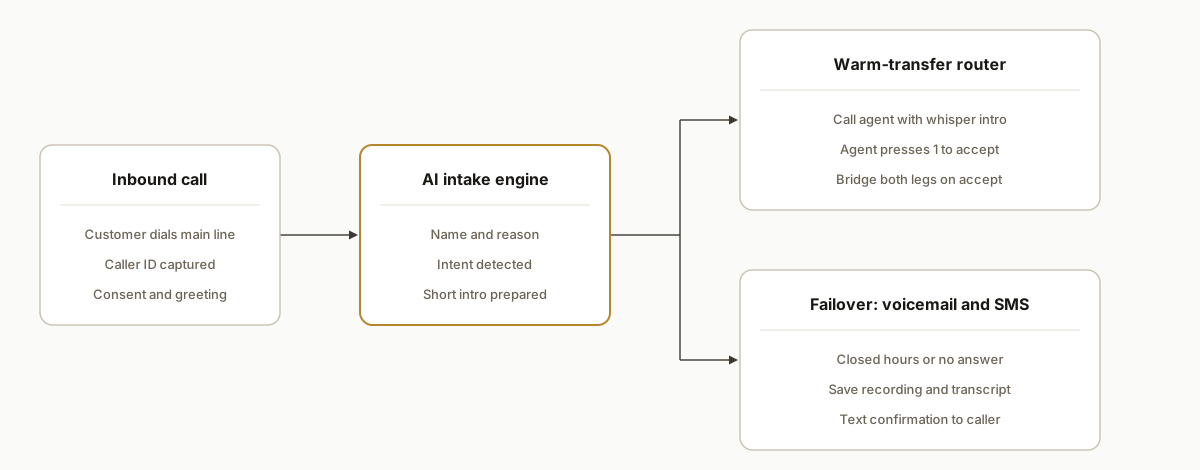
Step-by-step: how to create an AI receptionist with warm transfer
Answer-first: you need three parts: a call-control webhook, a state store for legs and timers, and an AI layer that only does intake and short summaries. Below is the shape we use in production. The code is illustrative and trims vendor specifics on purpose. The control pattern is what matters.
1) Define call states and destinations
Create a small state machine and a routing table. We keep destinations and hours in a database so ops can update them without a redeploy.
// callStates.js
export const STATES = {
  INTAKE: 'INTAKE',
  SELECT_DEST: 'SELECT_DEST',
  CALL_AGENT: 'CALL_AGENT',
  BRIDGE: 'BRIDGE',
  VOICEMAIL: 'VOICEMAIL',
  SMS_FOLLOWUP: 'SMS_FOLLOWUP',
  END: 'END'
};

export function pickDestination(intent, hours, agents) {
  const now = new Date();
  const open = hours.some(h => h.dow === now.getDay() && h.start <= now.toTimeString().slice(0,5) && now.toTimeString().slice(0,5) <= h.end);
  if (!open) return { kind: 'voicemail' };
  const pool = agents.filter(a => a.skills.includes(intent)).sort((a,b) => (a.priority||10) - (b.priority||10));
  if (pool.length === 0) return { kind: 'voicemail' };
  return { kind: 'agent', targets: pool.map(a => a.number) };
}
Key gotcha: do not let the AI pick the destination. Routing remains rules driven so it is auditable and stable.
2) Build the inbound call webhook
Your telephony provider will hit a webhook on answer. Capture the caller ID and start the intake dialog. Keep a server-side call record keyed by the provider call ID.
// server.js
import express from 'express';
import { STATES } from './callStates.js';
import { createCall, updateCall, getCall } from './store.js';
import { say, holdMusic, dialNumber, bridgeLegs, hangup, recordVoicemail, sendSms } from './telephony.js';
import { summarizeIntro } from './ai.js';

const app = express();
app.use(express.json());

app.post('/voice/inbound', async (req, res) => {
  const callId = req.body.callId; // provider call identifier
  await createCall(callId, { state: STATES.INTAKE, from: req.body.from });
  const greet = 'Thanks for calling. I can help route your call. May I have your name and a quick reason for calling?';
  return res.json(say(greet)); // return provider-specific instructions
});
Key gotcha: always respond quickly. If your AI takes time, stream partial audio or prompt the next step only after you return a minimal instruction to avoid timeouts.
3) Capture intake, pick destination, and warm-handshake
When the AI returns name and reason, write them to the state, pick the route, and either dial an agent or go straight to voicemail during closed hours.
app.post('/voice/intakeComplete', async (req, res) => {
  const { callId, name, reason } = req.body;
  const call = await getCall(callId);
  await updateCall(callId, { callerName: name, reason });

  const dest = pickDestination(req.body.intent, req.body.hours, req.body.agents);
  if (dest.kind !== 'agent') {
    await updateCall(callId, { state: STATES.VOICEMAIL });
    return res.json(recordVoicemail('No one is available right now. Please leave your name and number after the tone.'));
  }

  // Put caller on hold while we warm-call the agent
  await updateCall(callId, { state: STATES.CALL_AGENT, targets: dest.targets, targetIdx: 0 });
  const intro = await summarizeIntro({ name, reason }); // short, on-brand intro
  return res.json(holdMusic({ message: 'One moment while I introduce you.' }));
});

app.post('/voice/callAgent', async (req, res) => {
  const call = await getCall(req.body.callId);
  const target = call.targets[call.targetIdx];
  const accepted = await dialNumber(target, {
    whisper: `You have a caller: ${call.callerName}. Reason: ${call.reason}. Press 1 to accept, 2 to decline.`,
    acceptDtmf: ['1','2'],
    timeoutSec: 20
  });

  if (accepted === '1') {
    await updateCall(req.body.callId, { state: STATES.BRIDGE, agentNumber: target });
    return res.json(bridgeLegs(target));
  }

  const nextIdx = call.targetIdx + 1;
  if (nextIdx < call.targets.length) {
    await updateCall(req.body.callId, { targetIdx: nextIdx });
    return res.json({ action: 'retryAgent' });
  }

  await updateCall(req.body.callId, { state: STATES.VOICEMAIL });
  return res.json(recordVoicemail('Sorry we could not reach the team. Please leave a message and we will text you a confirmation.'));
});
Key gotcha: never play the caller's audio to the agent before consent. The whisper intro must not leak caller content that the caller would not expect a machine to share.
4) Bridge the call or fail over cleanly
On accept we merge the legs and drop the AI. On voicemail completion we send an SMS receipt.
app.post('/voice/onBridged', async (req, res) => {
  const { callId } = req.body;
  await updateCall(callId, { state: STATES.END });
  return res.json(hangup());
});

app.post('/voice/onVoicemailSaved', async (req, res) => {
  const { callId, recordingUrl } = req.body;
  const call = await getCall(callId);
  await sendSms(call.from, `Thanks, we received your message. Reference: ${callId}.`);
  await updateCall(callId, { state: STATES.SMS_FOLLOWUP, recordingUrl });
  return res.json(hangup());
});
Key gotcha: watch double billing during hold. When you dial out to an agent while keeping the caller on music, you may incur two concurrent legs. Set short accept timeouts and avoid chaining too many serial attempts.
5) Build a ring group and queue option
For high traffic lines we ring a small parallel group, then drop the remainder into a short queue with periodic updates.
// queue.js
export function ringGroup(numbers) {
  return { action: 'dialParallel', numbers, timeoutSec: 18 };
}

export function queueOptions(minutes) {
  return {
    action: 'queue',
    hold: 'music1',
    maxWaitSec: minutes * 60,
    periodic: ['Thanks for holding. Press 1 to leave a voicemail, 2 to receive a text and we will call you back.']
  };
}
Key gotcha: offer an escape every 30 to 45 seconds. The goal is to keep the caller in control and preserve goodwill even when wait times rise.
6) Log everything deterministically
All call decisions should be logged as structured events. This is how you prove routing rules held and how you trace failures.
// store.js
import { createClient } from 'better-sqlite3';
const db = createClient('calls.db');

db.exec('create table if not exists calls (id text primary key, state text, from text, callerName text, reason text, targets text, targetIdx int, agentNumber text, recordingUrl text, created_at text default current_timestamp)');

export async function createCall(id, data){ db.prepare('insert or ignore into calls (id, state, from) values (?, ?, ?)').run(id, data.state, data.from); }
export async function updateCall(id, patch){ const keys = Object.keys(patch); const set = keys.map(k => `${k} = ?`).join(', '); const vals = keys.map(k => patch[k]); db.prepare(`update calls set ${set} where id = ?`).run(...vals, id); }
export async function getCall(id){ return db.prepare('select * from calls where id = ?').get(id); }
Key gotcha: keep AI transcripts and PII out of logs unless you have explicit consent and a data retention policy. Store only the fields you need for routing and auditing.
Where it gets complicated
-
Warm intro timing: too long and the agent declines because they are already in a task. Too short and they accept without context then ask for it on the live line. We settled on an 8 to 12 second whisper with name, one-line reason, and a press 1 to accept prompt.
-
Double counting and billing: when the caller is on hold and you are trying agents one by one, you run two legs. Keep the accept timeout tight and prefer ring groups for teams that often answer.
-
Barge-in and noise: the AI needs to stop talking the moment a caller interrupts. Background noise can cause false barge-ins. We tuned barge-in thresholds and avoided open-ended questions during intake. Multiple choice beats monologue on noisy lines.
-
Transfer loops: if an agent forwards to a main line and your system calls that line again, you create a loop. We track a per-call visited set of numbers and block re-dials in the same call graph.
-
Recording and consent: if you record calls for quality, you must disclose that before intake. For warm transfers some teams prefer to stop recording after bridge. Make the on or off policy explicit and consistent.
-
Vendor quotas and overage: text to speech and speech to text vendors may continue serving while accruing overage costs. From our outbound voice work we learned to check quota before placing calls and to auto-pause campaigns when nearing limits. The same pattern protects receptionist lines during incident spikes.
-
Failover in outages: if your AI layer is degraded, the receptionist should auto-fallback to a minimal IVR: press 1 for sales, 2 for service, 3 to leave a message. We ship a static menu mode that requires no AI to keep the line useful.
What this actually changes
In production, warm transfer routing cut handoff friction and shortened time to a live human. Because the AI captures name and reason and provides a consistent whisper, the agent starts the conversation ahead. Voicemail plus SMS follow-up closes the loop when no one answers. The value is structural: a predictable handoff script, deterministic routing, and graceful degradation paths mean calls do not die when a person or a tool is unavailable.
One external benchmark reinforces why this matters: responding quickly can be the difference between a conversation and a missed chance. Harvard Business Review reported response within 5 minutes produced dramatically higher contact rates than waiting 30 minutes in its analysis of lead follow-up (https://hbr.org/2011/03/the-short-life-of-online-sales-leads). Live inbound callers are even less patient than form leads, so shaving a minute from handoff pays back.
Frequently asked questions
How do warm transfers in an AI receptionist actually work?
The receptionist answers, captures name and reason, places the caller on hold, then calls the target agent with a short intro. The agent presses a key to accept. On accept the system bridges both legs. On decline or no answer it tries the next destination or falls back to voicemail and SMS.
Can it route differently after hours or by skill?
Yes. We keep routing rules separate from the AI. Hours, skills, and priorities drive whether to go to an on-call ring group, send straight to voicemail, or escalate to an executive line. Rules are editable without touching prompts or code.
What happens if nobody answers the warm transfer?
After a set budget of attempts or seconds, the system takes a voicemail and sends an SMS confirmation to the caller. The message and transcript can also post to a ticket or Slack channel for fast follow-up.
Does this work with my existing phone system?
In practice, yes. We place the AI and router at the edge and attach to your current number routing. Exact adapters vary by carrier or PBX, so we bridge the gap without relying on undocumented endpoints.
How long does setup take for a small team?
A first version with one line, two intents, and a basic warm transfer usually ships in days. Larger teams add ring groups, queues, and custom on-hold flows over time. We run shadow periods to confirm behavior before full cutover.
Can a non-developer maintain it?
Yes. After we ship the core, operations can change hours, ring orders, on-hold scripts, and voicemail copy in an admin panel. Engineering only gets involved for new routing logic or integrations.
If you want a receptionist that does warm transfers right and degrades safely when people or tools are unavailable, we already built the playbook. See our service overview at /services#ai-voice-agents. For a broader setup walkthrough, read our post on how to set up an AI voice receptionist. When you are ready, book a short call and we will map your lines and routing on the first call.
Want us to build this for you?
Nine questions, about 90 seconds. You see the hours it is costing you, then pick a time. No pitch.
Get your free assessment