
We added an AI voice receptionist to RingCentral without porting the client's phone number: callers hit RingCentral as usual, an AI agent answers first, qualifies intent, then transfers to the right extension or queue. After-hours routing goes to voicemail. Voicemails and call recordings sync out for review and training.
AI voice receptionist for RingCentral is: an AI agent that answers your RingCentral calls, qualifies and routes them using RingCentral's call handling and answering rules, and archives voicemail and recordings through the platform's APIs.
If you run on RingCentral and want live transfers to extensions or queues, proper after-hours behavior, and searchable call audio, this guide shows how we built and shipped it, what we used in RingCentral, and where the real gotchas live.
The problem it solves
An owner or a receptionist answers everything, triages endlessly, and misses calls when lines stack. After-hours becomes a generic voicemail box with no structure. Sales and service leaders cannot review calls quickly because recordings live in RingCentral until they expire, and nothing is labeled.
| Step | Manual receptionist | AI voice receptionist on RingCentral |
|---|---|---|
| Qualification | As-time-allows, varies by person | Consistent script, collects required fields every time |
| Transfer | Ask-hold-transfer, error-prone | Deterministic to the right extension or queue |
| After-hours | One voicemail, mixed intents | After-hours rule + category-specific prompts and tags |
| Voicemail | Lives in RingCentral only | Webhook to archive, label, and notify |
| Recording review | Ad hoc, often skipped | Auto-archived, searchable, linked to CRM/ticket |
A Harvard Business Review study found firms that contacted leads within an hour were seven times more likely to qualify them than those who waited longer. Source: https://hbr.org/2011/03/the-short-life-of-online-sales-leads
How the automation works
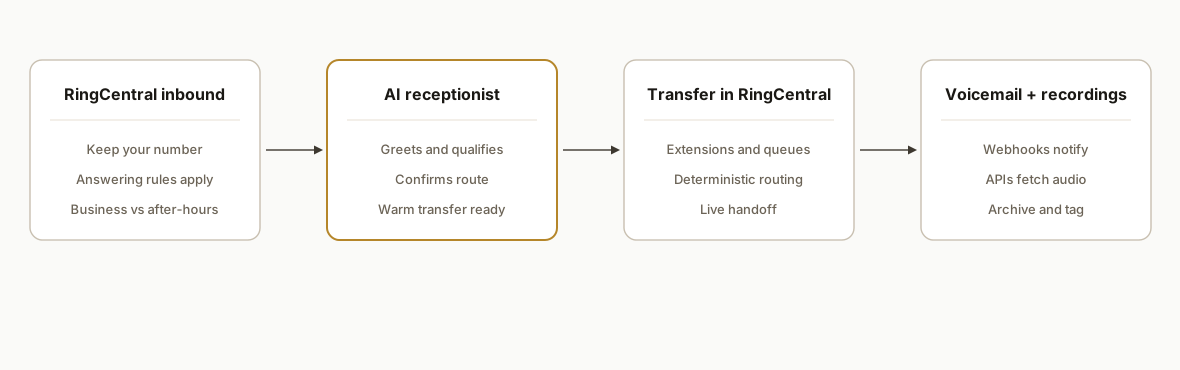
At a high level: we keep your existing RingCentral numbers. We configure business vs after-hours rules so the AI agent answers first during business hours, captures intent, then transfers to an internal extension or call queue. After hours, RingCentral routes to voicemail. We subscribe to voicemail and pull call recordings for archiving and QA.
- RingCentral API layer: OAuth 2.0 auth against platform.ringcentral.com. We use the Voice and Call Routing APIs to manage answering rules for business vs after-hours, and Call Log and Recording APIs for history and audio.
- AI receptionist engine: speech recognition, a routing brain, and text to speech. It runs your script: greetings, qualification, disambiguation, safe holds, and transfer confirmation.
- Transfer back to RingCentral: after the agent qualifies, it transfers callers to extensions or call queues defined in RingCentral.
- After-hours routing: RingCentral answering rules apply the after-hours path, usually straight to voicemail with an after-hours prompt.
- Voicemail and recording archive: webhooks notify on voicemail. We fetch voicemails and call recordings and store them off-platform so retention limits do not bite.
Step-by-step: how to build it
1) Create a RingCentral app and get OAuth tokens
Use RingCentral's OAuth 2.0 Authorization Code or JWT flow to get an access token. We used the standard auth-code flow during setup because it is easy to rotate.
# Exchange an authorization code for tokens
curl -u "$RC_CLIENT_ID:$RC_CLIENT_SECRET" \
  -X POST "https://platform.ringcentral.com/restapi/oauth/token" \
  -H "Content-Type: application/x-www-form-urlencoded" \
  -d "grant_type=authorization_code&code=$RC_AUTH_CODE&redirect_uri=$RC_REDIRECT_URI"
Key gotcha: store tokens securely and implement refresh. API rate limits apply: design exponential backoff on HTTP 429 responses.
2) Define business vs after-hours answering rules
We keep your number in RingCentral. We set call handling and answering rules so business-hours calls hit the AI agent. After-hours goes to voicemail.
{
  "enabled": true,
  "name": "BusinessHours-RouteToAI",
  "schedule": {
    "ranges": [{ "from": "09:00", "to": "17:00", "days": ["Mon","Tue","Wed","Thu","Fri"] }],
    "ref": "BusinessHours"
  },
  "callHandling": {
    "type": "RouteToTarget",
    "target": "AI-Receptionist-Entry-Point"
  }
}
We apply a complementary after-hours rule with a custom greeting that sets expectations and routes to voicemail.
3) Build the AI receptionist: greet, qualify, decide
The receptionist collects name, reason for calling, best callback number, and urgency. It confirms the routing choice and prepares a warm transfer.
// Pseudocode for the agent's decision layer
const routes = {
  sales: { kind: "extension", value: "101" },
  service: { kind: "queue", value: "Support-Queue" },
  billing: { kind: "extension", value: "203" }
};

function decideRoute(intent) {
  if (intent === "new_quote") return routes.sales;
  if (intent === "existing_issue") return routes.service;
  if (intent === "invoice_question") return routes.billing;
  return routes.service; // safe default
}
What tripped us up was allowing the caller to change their mind midstream. We added a last-step confirmation: I am transferring you to Service now. Is that right.
4) Transfer the call to RingCentral extensions or queues
After the agent confirms the route, it transfers the live call to a RingCentral extension or call queue. Zapier's RingCentral app historically has not provided a live call transfer action, so we use RingCentral's APIs for transfer behavior.
async function transferToRingCentral(route, call) {
  if (route.kind === "extension") {
    await rcTransfer({ callId: call.id, targetExtension: route.value });
  } else if (route.kind === "queue") {
    await rcTransfer({ callId: call.id, targetQueue: route.value });
  }
}
We log the transfer decision with caller name, number, and intent for audit.
5) Configure after-hours routing and prompts
We apply an after-hours rule with a firm prompt. The agent does not attempt warm transfers after hours.
{
  "enabled": true,
  "name": "AfterHours-Voicemail",
  "schedule": { "ref": "AfterHours" },
  "greeting": { "text": "Thanks for calling. Our office is closed. Please leave your name, number, and how we can help." },
  "callHandling": { "type": "Voicemail", "target": "Main-Voicemail" }
}
We include office closure dates in a small calendar that temporarily overrides business hours during holidays. For deeper overflow strategies, see our guide on after-hours and overflow routing for AI receptionists.
6) Subscribe to voicemail and archive audio
RingCentral supports near real time notifications for events like voicemail. We subscribe and point the webhook at our server. RingCentral disables webhooks if your endpoint does not return 200, so we respond fast and process async.
// Minimal Express handler: ack fast, process later
import express from "express";
import { putObject } from "./storage.js"; // S3, GCS, or equivalent
const app = express();
app.use(express.json({ limit: "1mb" }));

app.post("/ringcentral/webhook", async (req, res) => {
  try {
    res.status(200).send("OK");
    const evt = req.body;
    if (evt.type === "voicemail") {
      const audio = await fetchRecording(evt.recordingId, evt.token);
      await putObject(`voicemail/${evt.timestamp}-${evt.from}.mp3`, audio);
    }
  } catch (e) { console.error(e); }
});
We also fetch call recordings from the Call Log and store them off-platform. Recording retention is finite, so archiving protects QA and training assets.
7) Add backoff and monitoring for rate limits
RingCentral enforces API rate limits. If you exceed them, you get HTTP 429 responses and penalty windows. We back off and retry.
async function rcFetch(url, opts) {
  let attempt = 0;
  while (attempt < 5) {
    const resp = await fetch(url, opts);
    if (resp.status !== 429) return resp;
    const retryAfter = Number(resp.headers.get("Retry-After") || 5);
    await new Promise(r => setTimeout(r, Math.min(60000, (2 ** attempt) * retryAfter * 1000)));
    attempt++;
  }
  throw new Error("RC rate limit retries exhausted");
}
We also add a health check that verifies the webhook is still active and messages are being processed.
Where it gets complicated
Webhook reliability: RingCentral disables webhooks that do not return HTTP 200 or error repeatedly. We always ack in milliseconds, then process async. We also validate webhook tokens per the docs.
Rate limits: If you burst actions, you can hit HTTP 429 and a penalty window. We budget requests, add exponential backoff, and collapse duplicate calls.
Recording retention: Call recording downloads are available for a limited time. We archive recordings immediately to our own storage with the caller, extension, and intent as metadata.
Zapier vs API for transfers: Zapier's RingCentral connector is strong for voicemail triggers and SMS but historically did not provide a live call transfer action. We use the APIs for transfer behavior and keep Zapier or Make for non critical glue.
After-hours edge cases: People call at 4:59 pm and the call runs past 5 pm. We rely on RingCentral's answering rules for time boundaries and keep the agent logic simple.
RingCentral auto attendant vs AI receptionist: what is the difference
RingCentral auto attendant is a rules menu. AI receptionist is a natural conversation that captures details and routes based on intent. We keep your RingCentral rules in place and put AI in front during business hours.
- Auto attendant: press 1 menus. Fixed paths. No data capture beyond a transfer.
- AI receptionist: open questions. Confirms understanding. Collects name, reason, number, and urgency before transfer.
- When to use both: AI first for intent and data capture, then deterministic transfer to RingCentral extensions or queues.
If you want concrete conversation structures and prompts, see our playbook on AI receptionist scripts and call flows.
Will it work with call queues and multiple locations
Yes. We map intents to extensions or call queues that already exist in RingCentral. Multi location setups work by applying per number answering rules and a location specific script. For warm transfers, the agent confirms destination and hands off. If a queue does not answer, we apply the fallback you define: return to the agent, drop to voicemail, or route to a backup queue. For deeper routing patterns, see our notes on warm transfer and failover routing for AI receptionists.
Cost and timeline: what affects setup for RingCentral AI receptionist
We usually ship in 1 to 2 weeks once we have developer access, your extension and queue map, and your script. Total cost depends on four things: number of numbers and locations to cover, complexity of the script and language needs, where you want voicemails and recordings archived, and compliance requirements. For ranges and ROI considerations, see AI voice receptionist pricing and ROI and what we learned in production in do AI voice agents actually work.
Compliance: recording consent and retention basics
Many regions require disclosing recording. We implement a short disclosure and tag the call with consent status. Set a retention policy for archives that matches your policy.
Thanks for calling. This call may be recorded for quality and training. I can assist you now or transfer you. How can I help.What this actually changes
We shipped this for a multi location home services company already on RingCentral. The AI receptionist answered first, collected intent and contact info, and transferred to the right extension or support queue. After-hours voicemails were tagged by category and archived to storage for next day follow up. The qualitative impact was fewer missed live transfers, better after-hours clarity, and searchable recordings for coaching.
For speed to lead, the business impact is structural. Harvard Business Review reported that firms contacting leads within an hour were seven times more likely to qualify them than those who waited longer. Source: https://hbr.org/2011/03/the-short-life-of-online-sales-leads
Frequently asked questions
How do I add an AI voice receptionist to RingCentral without porting my number?
Keep your RingCentral number. Use RingCentral answering rules so business hours route to your AI receptionist entry point, and after hours route to voicemail. The AI agent qualifies and then transfers back to RingCentral extensions or call queues. Voicemail and recordings are archived via APIs or webhooks.
Does RingCentral have an API for this?
Yes. RingCentral exposes a public developer API on platform.ringcentral.com with OAuth 2.0. Call handling and answering rules are configurable, voicemail can be observed via webhooks, and call logs and recordings are retrievable through the Voice and Call Log APIs.
Can Zapier transfer a live RingCentral call to an extension or queue?
Zapier's RingCentral app is useful for triggers like New Voicemail and actions like Send SMS or RingOut. Live call transfer actions are typically handled via RingCentral's APIs or SDKs rather than Zapier. We use the APIs for deterministic transfers.
Will it work in real time?
Yes for the receptionist and transfers. After-hours voicemails are near real time via webhooks. We keep webhook handlers fast and resilient so RingCentral does not disable the subscription if your endpoint slows down.
What happens to call recordings and how long do I have to download them?
Recordings are available through the Call Log and Recording APIs, but downloads are only available for a limited retention window. We pull and archive them immediately to your storage so your QA library persists beyond the platform window.
How long does setup take and what do you need from me?
We usually ship this in about 1 to 2 weeks once we have RingCentral developer access, extension and queue maps, and your receptionist script. You keep your numbers in RingCentral. We handle the API integration, agent behavior, transfers, and archiving.
If you want this running on your RingCentral account, we have built this exact pattern before. See our service page on AI voice agents at /services#ai-voice-agents, a related post on the best way to build an AI phone agent for booking, and book a quick scope call at /book.
Want us to build this for you?
Nine questions, about 90 seconds. You see the hours it is costing you, then pick a time. No pitch.
Get your free assessment