
Client onboarding automation connects your deal-closed trigger to an orchestration service that sends welcome emails, creates checklists, collects required documents, and updates a status page without manual coordination. We ship this for service firms and SaaS vendors so new clients see progress immediately, and internal teams stop chasing steps.
Client onboarding automation is: a system that turns a signed agreement into structured emails, tasks, document requests, and live status tracking.
The problem it solves
Operators usually move from a signature to a flurry of emails, a copied checklist, and a dozen reminders. It is slow, it drops steps when people get busy, and nobody sees the true status. We replaced this with a single trigger that fans out welcome messaging, a role-based checklist, doc collection links, and a client-facing status page.
| Manual onboarding | Automated onboarding |
|---|---|
| Copy a template checklist, assign tasks by email, paste links | Generate tasks from a template, assign owners, link to a live board |
| Welcome email written per deal, sent late if someone is out | Welcome email sent instantly with correct links and timelines |
| Clients email attachments, wrong formats and missing items | Clients upload via secure links with required fields and file checks |
| Status tracked in a spreadsheet nobody updates | Status computed from task and document state, visible to client and team |
| Reschedules require re-emailing and reassigning steps | Offsets recomputed automatically on date change, reminders adjust |
What instant form intake is worth
Move the sliders to your own numbers. The defaults are only an example business, not client data.
Revenue from submissions you stop losing each year
$90,000
200 a month × 12 × 25% × 10% × $1500
- Extra customers a year
- 60
- 200 × 12 × 25% × 10%
- Staff cost of handling it by hand each year
- $5,600
- 200 × 4 min × $35/hr × 12
- Hours handed to the system each month
- 13 hrs
- 200 × 4 min ÷ 60
How the automation works
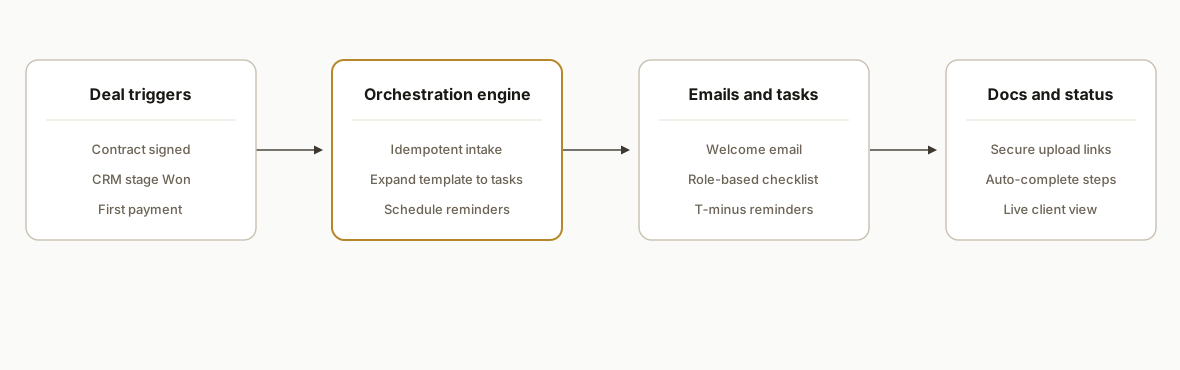
We wire your signed-deal signal to a small orchestration service. That service creates an onboarding record, expands the correct template into tasks, sends the welcome email, issues secure upload links for documents, and powers a status page for clients and internal teams. In production it runs the same way whether the trigger is a contract signature, a CRM stage change, or a first payment.
- Triggers: One of: contract signed, CRM stage changed to Won, first invoice paid. We normalize these into a single event shape and verify authenticity when the source supports signatures.
- Orchestration engine: A stateless HTTP service with a background job queue. It enforces idempotency so retries and duplicate webhooks do not double-send or double-create tasks.
- Email and task creation: Sends a templated welcome message, assigns tasks to roles, and schedules reminders at T-minus offsets from the kickoff date.
- Document collection: Issues pre-signed upload links, validates file types, and flips checklist items to complete when files pass checks.
- Status tracking: A lightweight dashboard or panel in your existing admin shows percent complete, upcoming steps, and a change log clients can follow.
Step-by-step: how to build it
1) Capture the signed-deal trigger and make it idempotent
Accept the upstream event, verify a signature when provided, and store a unique event key so retries do not double-create onboarding records.
// server/webhooks.js
import express from "express";
import crypto from "crypto";
import pg from "pg";

const app = express();
app.use(express.json({ type: "application/json" }));
const pool = new pg.Pool({ connectionString: process.env.DATABASE_URL });

function safeEquals(a, b) {
  if (!a || !b) return false;
  const ab = Buffer.from(a);
  const bb = Buffer.from(b);
  return ab.length === bb.length && crypto.timingSafeEqual(ab, bb);
}

app.post("/webhook/signed-deal", async (req, res) => {
  const sig = req.header("X-Signature");
  const body = JSON.stringify(req.body);
  const expected = crypto
    .createHmac("sha256", process.env.WEBHOOK_SECRET)
    .update(body)
    .digest("hex");
  if (!safeEquals(sig, expected)) return res.status(401).end();

  const { eventId, clientId, clientEmail, kickoffDate } = req.body; // normalized shape
  try {
    await pool.query(
      "insert into onboarding_events (event_id, client_id, payload) values ($1,$2,$3)",
      [eventId, clientId, body]
    );
  } catch (e) {
    if (e.code === "23505") return res.status(200).json({ ok: true, dedup: true });
    throw e;
  }

  // enqueue downstream work
  await pool.query(
    "insert into jobs (type, ref, run_at) values ($1,$2,$3)",
    ["onboarding:init", clientId, new Date()]
  );
  res.json({ ok: true });
});

export default app;
Key gotcha: enforce a unique constraint on onboarding_events.event_id and return 200 on duplicates so upstreams stop retrying.
2) Expand the template into an onboarding plan
Store templates as JSON with steps, owners by role, and T-minus offsets. Expand it into concrete tasks and persist them in one transaction.
-- schema.sql
create table if not exists onboarding (
  id uuid primary key,
  client_id text not null unique,
  kickoff_date date not null,
  status text not null default 'active',
  created_at timestamptz default now()
);

create table if not exists onboarding_tasks (
  id uuid primary key,
  client_id text not null references onboarding(client_id),
  step_no int not null,
  title text not null,
  owner_role text not null,
  due_at timestamptz not null,
  done_at timestamptz,
  unique(client_id, step_no)
);
// jobs/init-onboarding.js
import { v4 as uuid } from "uuid";
import { sql } from "slonik";
export async function initOnboarding(db, clientId, kickoffDate, template) {
await db.transaction(async trx => {
await trx.query(sql.typeAlias("void")`
insert into onboarding (id, client_id, kickoff_date)
values (${uuid()}, ${clientId}, ${kickoffDate})
on conflict (client_id) do update set kickoff_date = excluded.kickoff_date
`);
const rows = template.steps.map((s, i) => ({
id: uuid(),
client_id: clientId,
step_no: i + 1,
title: s.title,
owner_role: s.owner,
due_at: new Date(new Date(kickoffDate).getTime() + s.offsetDays * 86400000)
}));
for (const r of rows) {
await trx.query(sql.typeAlias("void")`
insert into onboarding_tasks (id, client_id, step_no, title, owner_role, due_at)
values (${r.id}, ${r.client_id}, ${r.step_no}, ${r.title}, ${r.owner_role}, ${r.due_at})
on conflict (client_id, step_no) do update set
title = excluded.title,
owner_role = excluded.owner_role,
due_at = excluded.due_at
`);
}
});
}Key gotcha: keep templates in versioned files so you can change future plans without rewriting existing clients.
3) Send the welcome email and assign owners
Send a templated welcome email with correct links. Notify internal owners per role. Keep email delivery separate from task writes to avoid partial failures.
// lib/mailer.js
import nodemailer from "nodemailer";
const transporter = nodemailer.createTransport({
  host: process.env.SMTP_HOST,
  port: 587,
  secure: false,
  auth: { user: process.env.SMTP_USER, pass: process.env.SMTP_PASS }
});

export async function sendWelcome({ to, name, dashboardUrl }) {
  const html = `
    <p>Hi ${name},</p>
    <p>Welcome aboard. Your onboarding plan and status are here:
    <a href="${dashboardUrl}">View your onboarding</a>.</p>
    <p>We will guide you step by step.</p>`;
  await transporter.sendMail({
    from: `Onboarding Team <onboarding@${process.env.SENDER_DOMAIN}>`,
    to,
    subject: "Welcome: your onboarding is live",
    html
  });
}
Key gotcha: align From name and domain with your DNS setup. True send-as requires DNS records and approval in your mail provider.
4) Collect documents with secure, expiring links
Issue pre-signed upload URLs so clients can upload to object storage without getting direct write access. Validate types server-side before marking a step complete.
// lib/uploads.js
import { S3Client, PutObjectCommand } from "@aws-sdk/client-s3";
import { getSignedUrl } from "@aws-sdk/s3-request-presigner";

const s3 = new S3Client({ region: process.env.AWS_REGION });

export async function issueUploadUrl(clientId, filename, contentType) {
  const key = `onboarding/${clientId}/${Date.now()}-${filename}`;
  const cmd = new PutObjectCommand({
    Bucket: process.env.UPLOAD_BUCKET,
    Key: key,
    ContentType: contentType,
    ACL: "private"
  });
  const url = await getSignedUrl(s3, cmd, { expiresIn: 900 });
  return { url, key };
}
Key gotcha: do not accept email attachments as the primary path. They are hard to validate and easy to lose in threads.
5) Power a simple status API and dashboard
Expose percent complete and upcoming steps for both client and team views. The computation comes from tasks and document checks, not manual updates.
// api/status.js
import express from "express";
import pg from "pg";
const r = express.Router();
const pool = new pg.Pool({ connectionString: process.env.DATABASE_URL });

r.get("/api/onboarding/:clientId", async (req, res) => {
  const { clientId } = req.params;
  const { rows } = await pool.query(
    `select count(*) filter (where done_at is not null) as done,
            count(*) as total,
            min(due_at) filter (where done_at is null) as next_due
       from onboarding_tasks where client_id = $1`,
    [clientId]
  );
  const { done, total, next_due } = rows[0];
  const pct = total > 0 ? Math.round((done / total) * 100) : 0;
  res.json({ clientId, percent: pct, nextDue: next_due });
});

export default r;
Key gotcha: keep client-facing data free of internal notes and PII you do not intend to expose.
6) Schedule reminders that respect reschedules
Reminders should be relative to kickoff or step dependencies. When kickoffDate changes, recompute due dates and reschedule jobs atomically.
// jobs/reschedule.js
export async function reschedule(db, clientId, newKickoff) {
  await db.transaction(async trx => {
    const { rows: tasks } = await trx.query(
      "select step_no, title, owner_role from onboarding_tasks where client_id=$1 order by step_no",
      [clientId]
    );
    // assume you can fetch the template again to get offsets
    const template = await getTemplateFor(clientId);
    for (let i = 0; i < tasks.length; i++) {
      const due = new Date(new Date(newKickoff).getTime() + template.steps[i].offsetDays * 86400000);
      await trx.query(
        "update onboarding_tasks set due_at=$1 where client_id=$2 and step_no=$3",
        [due, clientId, i + 1]
      );
      await enqueueReminder(clientId, i + 1, due);
    }
    await trx.query("update onboarding set kickoff_date=$1 where client_id=$2", [newKickoff, clientId]);
  });
}
Key gotcha: use unique keys on scheduled jobs so rescheduling replaces the existing job instead of duplicating it.
Where it gets complicated
Multiple trigger sources. Deals can close in a contract tool, a CRM, or on first payment. Events can arrive out of order. Normalize them to one internal event and pick a precedence rule so kickoff happens once.
Idempotency and retries. Upstream systems retry on timeouts. We store event IDs with a unique constraint and return 200 on duplicates. This prevented double-sends in production even under heavy retry storms.
Reschedule semantics. Changing a kickoff date should shift every T-minus reminder and due date. We recompute offsets and replace jobs in one transaction so reminders never fire from the old schedule.
Email identity and deliverability. A pretty From name is not the same as a true send-as. Align DNS, warm the domain if it is new, and avoid image-heavy welcome emails to keep inbox placement clean.
Secure uploads only. We issue short-lived pre-signed URLs and scan uploads before marking checklist items complete. Email attachments are accepted only as a fallback with manual review.
Ownership of scheduled tasks. In Google Apps Script builds the install-time Google account owns triggers. We document who owns which trigger and how to re-auth if a token expires so weekly runs do not silently stop.
What this actually changes
For a benefits consultancy we paired a two-tab ROI app with an onboarding tracker so new partners saw exactly what was needed and when. For a property operator we shipped an onboarding portal with a live project tracker and serverless endpoints so access, steps, and activity were visible on day one. The pattern eliminated back-and-forth emails and reduced missed steps because status was derived from tasks and uploads rather than manual updates.
One external data point: Wyzowl reports that 86 percent of people say they are more likely to stay loyal to a business that invests in onboarding content that welcomes and educates them (source: https://www.wyzowl.com/user-onboarding-statistics/). The same dynamic applies to client onboarding: clear next steps and fast time to first value raise retention and reduce support load.
Frequently asked questions
Can this work without a CRM?
Yes. We support contract signatures or payment confirmations as triggers. A CRM makes routing and segmentation easier, but the orchestration engine only needs one reliable deal-closed signal to start the plan.
How do you prevent duplicate emails and tasks?
We persist a unique event ID from the trigger, enforce a database unique constraint, and make every write idempotent. Retries from upstream systems get a 200 response without creating new tasks or re-sending emails.
Can non-technical teams change copy and steps?
Yes. We keep templates in versioned files or a simple admin surface. Teams can edit welcome copy, tasks, owners, and offsets without code deploys. Existing clients retain their original plan version unless you choose to migrate them.
What happens when a kickoff date changes?
We recompute all T-minus offsets from the new date and atomically update due dates and scheduled reminders. Old reminder jobs are replaced so clients do not get mixed signals.
What does this cost to run monthly?
Infrastructure costs are modest for this class of workflow. You pay your email provider and object storage. The primary cost is the one-time build that connects your systems, templates, and dashboard. We scope that on a short discovery call.
How long does it take to ship?
We reuse this architecture. Typical deployments land quickly once we have your templates, roles, and trigger sources. If you need a client-facing status page, we can add that as a panel in your existing admin or as a small standalone page.
If you want this running from your next signed deal, we have built it for consultancies, property operators, and product teams. See how we paired onboarding with a live tracker in our post on a partner ROI and onboarding dashboard. We also build adjacent systems like workflow automation. When you are ready to scope yours, book a 20 minute call.
Sources
- 1.User onboarding statistics (Wyzowl)wyzowl.com
Want us to build this for you?
Nine questions, about 90 seconds. You see the revenue it is costing you, then pick a time. No pitch.
See your options