
Stripe dunning automation works by listening to Stripe webhooks for failed or upcoming invoices, running a timed retry plan, and sending on-brand emails from your email provider while leaving Stripe's Smart Retries intact. We built this pattern for SaaS and membership teams that needed higher recoveries and fewer support tickets without fighting the defaults.
Definition: Dunning automation is the system that contacts a customer after a payment attempt fails, guides them to update their payment method, and retries collection on a safe schedule.
The problem it solves
Stripe Billing sends basic emails, but they are not enough when you need plan-specific copy, localized sequences, or conditional end actions. Manually chasing declines burns time and introduces errors, and ad hoc Zapier steps misfire when webhooks retry or events arrive out of order.
| Manual follow-up | Automated Stripe dunning we ship |
|---|---|
| Ops exports failed invoices weekly and emails each customer | Webhooks fire on failure and upcoming renewals; sequences start immediately |
| One-size email copy, weak branding | On-brand templates per plan and locale via your mailer |
| Missed retries and double sends on re-attempts | Idempotent handlers keyed on event.id with stateful locking |
| No visibility on which step worked | Central log shows event, send, retry, and resolution |
ProfitWell has reported that involuntary churn often accounts for 20 to 40 percent of total churn for subscription businesses (source: ProfitWell). Reducing failed renewals meaningfully moves the needle.
What recovering failed payments is worth
Move the sliders to your own numbers. The defaults are only an example business, not client data.
Your own estimate. Card expiries and soft declines are the easiest to win back.
Revenue recovered each year
$9,000
$50000 × 5% failed × 30% recovered × 12 months
- Staff cost of doing it by hand each year
- $3,640
- 2 hrs a week × $35/hr × 52 weeks
- Hours handed to the system each month
- 9 hrs
- 2 hrs a week × 52 ÷ 12
How the automation works
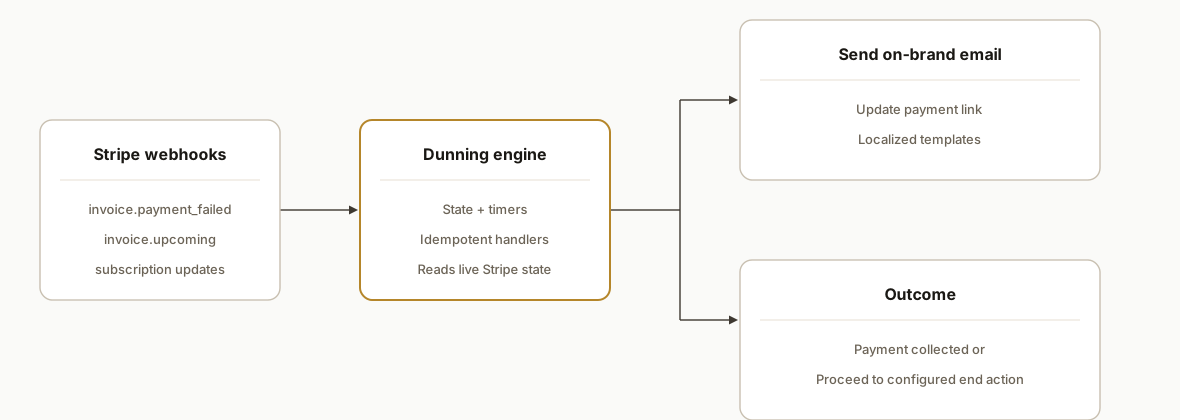
Our architecture keeps Stripe in control of payments and Smart Retries, and moves copy and sequencing to your stack so you can iterate safely.
- Stripe Billing events via webhooks: The engine listens for invoice.payment_failed, invoice.upcoming, customer.subscription.updated or deleted, and payment_intent.payment_failed. Stripe retries webhook deliveries for up to 3 days with exponential backoff, so handlers must be idempotent (source: https://docs.stripe.com/billing/subscriptions/webhooks and https://docs.stripe.com/webhooks).
- Dunning orchestration service (accented engine): Stores state per invoice or subscription, starts the right step, sets the next wake-up, and avoids duplicate sends if Stripe replays events.
- Email provider: Sends branded email with a secure pay or update link. We use our provider to control language, layout, and A or B testing while Stripe handles the charge.
- Smart Retries kept on: Where applicable, Stripe Smart Retries continue attempting payment. Certain payment methods may skip retries and jump to the end action per Stripe docs (source: https://docs.stripe.com/invoicing/automatic-collection).
- Reporting and exports: We log every step and use Stripe dashboard exports or scheduled CSVs for reconciliation alongside our log (source: https://docs.stripe.com/stripe-reports).
Step-by-step: how to build it
Step 1: Receive and verify Stripe webhooks
Set a webhook endpoint and verify signatures before processing events. Stripe uses HTTP Basic style auth on the API and signs webhook payloads; make handlers idempotent because Stripe will retry delivery for up to 3 days.
// server/webhooks.js (Node + Express example)
import express from "express";
import Stripe from "stripe";

const app = express();
app.use(express.raw({ type: "application/json" }));

const stripe = new Stripe(process.env.STRIPE_SECRET_KEY);
const webhookSecret = process.env.STRIPE_WEBHOOK_SECRET;

const seen = new Set(); // replace with a persistent store

app.post("/webhooks/stripe", (req, res) => {
  let event;
  try {
    const sig = req.headers["stripe-signature"]; // case-insensitive header lookup in production
    event = stripe.webhooks.constructEvent(req.body, sig, webhookSecret);
  } catch (err) {
    return res.status(400).send(`Webhook Error: ${err.message}`);
  }

  if (seen.has(event.id)) return res.status(200).send("ok");
  seen.add(event.id);

  switch (event.type) {
    case "invoice.payment_failed":
    case "payment_intent.payment_failed":
      // enqueue dunning step 1
      break;
    case "invoice.upcoming":
      // optional pre-bill nudge
      break;
    case "customer.subscription.updated":
    case "customer.subscription.deleted":
      // adjust state or stop sequence
      break;
  }
  res.status(200).send("ok");
});

export default app;
Stripe retries webhook deliveries for up to 3 days with exponential backoff, and manual resends do not cancel automatic retries, so idempotency is non-negotiable (source: https://docs.stripe.com/webhooks).
Step 2: Model your dunning state machine
Define states and timers so every invoice or subscription has one truthy place to live.
{
  "key": "in_12345",
  "status": "step1_email_sent",
  "nextAttemptAt": "2026-08-09T10:00:00Z",
  "attempts": 1,
  "reason": "insufficient_funds",
  "locale": "en-US",
  "plan": "pro-annual"
}
Keep Smart Retries on. Your job is copy, nudges, and timing. Stripe still controls the next payment attempt where supported (source: https://docs.stripe.com/invoicing/automatic-collection).
Step 3: Send on-brand email via your provider
Send transactional emails from your email service with clear calls to action: update payment method or pay invoice.
// mailer.js
import fetch from "node-fetch";

export async function sendDunningEmail({ to, template, data }) {
  const body = { to, template_id: template, dynamic_template_data: data };
  const resp = await fetch("https://api.emailservice.com/send", {
    method: "POST",
    headers: {
      Authorization: `Bearer ${process.env.MAIL_API_KEY}`,
      "Content-Type": "application/json"
    },
    body: JSON.stringify(body)
  });
  if (!resp.ok) throw new Error(`Mail send failed: ${resp.status}`);
}
If you prefer a no-code start, Stripe has official Zapier and Make integrations; note Zapier email-related actions depend on Stripe email receipts being enabled in settings (sources: https://help.zapier.com/hc/en-us/articles/8496161863693 and https://www.make.com/en/integrations/stripe).
Step 4: Build the scheduler
Run a lightweight job every few minutes to wake invoices whose nextAttemptAt has passed and advance the state or send the next email.
// scheduler.js
import { dueDunningItems, advance } from "./store.js";

export async function tick(now = new Date()) {
  const work = await dueDunningItems(now.toISOString());
  for (const item of work) {
    await advance(item);
  }
}
A dedicated scheduler isolates time-based logic from webhook timing, which protects against out-of-order event delivery.
Step 5: Log every decision for audit
Store a compact log to reconcile with Stripe reports and support tickets.
-- dunning_log
CREATE TABLE dunning_log (
  id BIGSERIAL PRIMARY KEY,
  invoice_key TEXT NOT NULL,
  at TIMESTAMPTZ NOT NULL DEFAULT now(),
  action TEXT NOT NULL,
  meta JSONB NOT NULL
);
Stripe dashboard reports can be exported to CSV and scheduled, which we pair with this log during ops reviews (source: https://docs.stripe.com/stripe-reports).
Step 6: Keep the handler idempotent and conflict-free
Guard every side effect behind a single-write pattern keyed on event.id so manual resend plus automatic retries never double-send.
// effects.js
export async function once(eventId, doWork) {
  const locked = await tryLock(eventId); // insert-if-not-exists in a DB table
  if (!locked) return false;
  try {
    await doWork();
    return true;
  } finally {
    await releaseLock(eventId);
  }
}
Stripe retries webhooks for up to 3 days and may deliver duplicates, so this pattern is essential at scale (source: https://docs.stripe.com/webhooks).
Step 7: End actions and exceptions
Stripe may skip retries for certain payment methods and proceed directly to the configured end state like cancel or pause. Mirror that end action in your state machine to stop emails cleanly (source: https://docs.stripe.com/invoicing/automatic-collection).
// on subscription.deleted or terminal invoice state
stopSequence(invoiceKey);
notifyCRM(invoiceKey, "write-off");
Where it gets complicated
- Smart Retries coverage: Smart Retries do not apply to certain payment methods, and Stripe may jump to the end action. We keep our timing logic narrow and always read the latest subscription or invoice state before advancing (source: https://docs.stripe.com/invoicing/automatic-collection).
- Webhook delivery quirks: Stripe retries deliveries for up to 3 days and manual resends do not cancel automatic retries. We persist event.id locks and treat handlers as pure functions to stay idempotent (source: https://docs.stripe.com/webhooks).
- Email customization depth: Stripe supports branding and localization for its emails and hosted pages. For deeper, arbitrary templating we route via webhooks and your email provider so copy and layout are fully controlled (source on branding and pages: https://docs.stripe.com/invoicing/customize).
- No-code caveat: Zapier email steps require Stripe email receipts to be enabled in your Stripe settings. Without that toggle, some zaps never fire (source: https://help.zapier.com/hc/en-us/articles/8496161863693).
- Reconciliation discipline: Dashboard CSV exports and scheduled reports complement your dunning log and help explain edge cases to support and finance during month-end close (source: https://docs.stripe.com/stripe-reports).
What this actually changes
For subscription businesses, a production dunning flow reduces involuntary churn and cuts tickets from confused customers because the copy is clear and the links work on any device. ProfitWell reports involuntary churn often represents 20 to 40 percent of overall churn for subscriptions, which makes dunning leverage unusually high (source: ProfitWell). In production we saw fewer escalations, cleaner reconciliation using Stripe scheduled reports, and faster time to payment updates without touching your billing logic.
Frequently asked questions
Does Stripe have built-in dunning emails?
Yes. Stripe can send emails and host branded, localized pages for billing updates. When teams need deeper control over copy and sequencing, we keep Stripe handling payments and run emails through your mailer via webhooks so templates and languages are fully yours (source: https://docs.stripe.com/invoicing/customize).
Which Stripe webhooks should I listen to for dunning?
Core events are invoice.payment_failed, invoice.upcoming, customer.subscription.updated or deleted, and payment_intent.payment_failed. Stripe retries webhook deliveries for up to 3 days, so your handler must be idempotent to avoid duplicate sends (sources: https://docs.stripe.com/billing/subscriptions/webhooks and https://docs.stripe.com/webhooks).
Can I set this up without code?
You can start with Zapier or Make using their Stripe apps. Be aware that Zapier email-related actions require Stripe email receipts to be enabled in your Stripe settings. We move to a webhook-driven service for reliability and full control as volume grows (sources: https://help.zapier.com/hc/en-us/articles/8496161863693 and https://www.make.com/en/integrations/stripe).
How do Smart Retries interact with my emails?
We keep Smart Retries on where supported and time our nudges around them. Stripe may skip retries for certain payment methods and move straight to the end action, so our engine reads the live invoice or subscription state before any send (source: https://docs.stripe.com/invoicing/automatic-collection).
What does this cost to run monthly?
Stripe webhooks and reports are included. Your spend is your email provider plus a lightweight service to orchestrate timing and logs. We host this cheaply and keep the engine minimal. The bigger cost is the initial build; after that, copy tweaks are routine.
How long does it take to implement?
We shipped this pattern multiple times. A first deployment lands quickly once templates and end actions are approved. Most of the work is copy, localization, and verifying edge cases around retries and cancellations.
If you are ready to reduce involuntary churn without breaking billing, we already built this engine. See our related deep dive on Stripe Smart Retries vs custom retry logic, explore our workflow automation services, and when you want it running for your account, book a 20-minute call.
Sources
- 1.Using webhooks with subscriptionsdocs.stripe.com
- 2.Receive Stripe events in your webhook endpointdocs.stripe.com
- 3.Automatic collectiondocs.stripe.com
- 4.Stripe reportingdocs.stripe.com
- 5.How to get started with Stripe on Zapierhelp.zapier.com
- 6.Stripe integrations on Makemake.com
- 7.Customize invoicesdocs.stripe.com
Want this built around your systems?
Nine questions, about 90 seconds. You see the revenue it is costing you, then pick a time. No pitch.
See your optionsRather talk to a person first? Meet the team or tell us which system you run.