
You can automate Facebook Marketplace messages with Muse, Meta's AI agent, by connecting your Facebook and Messenger accounts and giving it three jobs: triage your inbox every morning, answer purely informational questions with reply text you approved, and draft everything else for you to send. Anything involving a price, a hold, a meetup or your address stays with you. This guide is for anyone who sells on Marketplace often enough that Messenger has become a second job, and it covers setup, four workflows, a copy and paste prompt bank, and the safety rules that a very public September 2026 incident proved are not optional.
Facebook Marketplace message automation is the practice of letting software read buyer messages, answer the repetitive ones, and surface the rest to you, so you reply fast without watching Messenger all day.
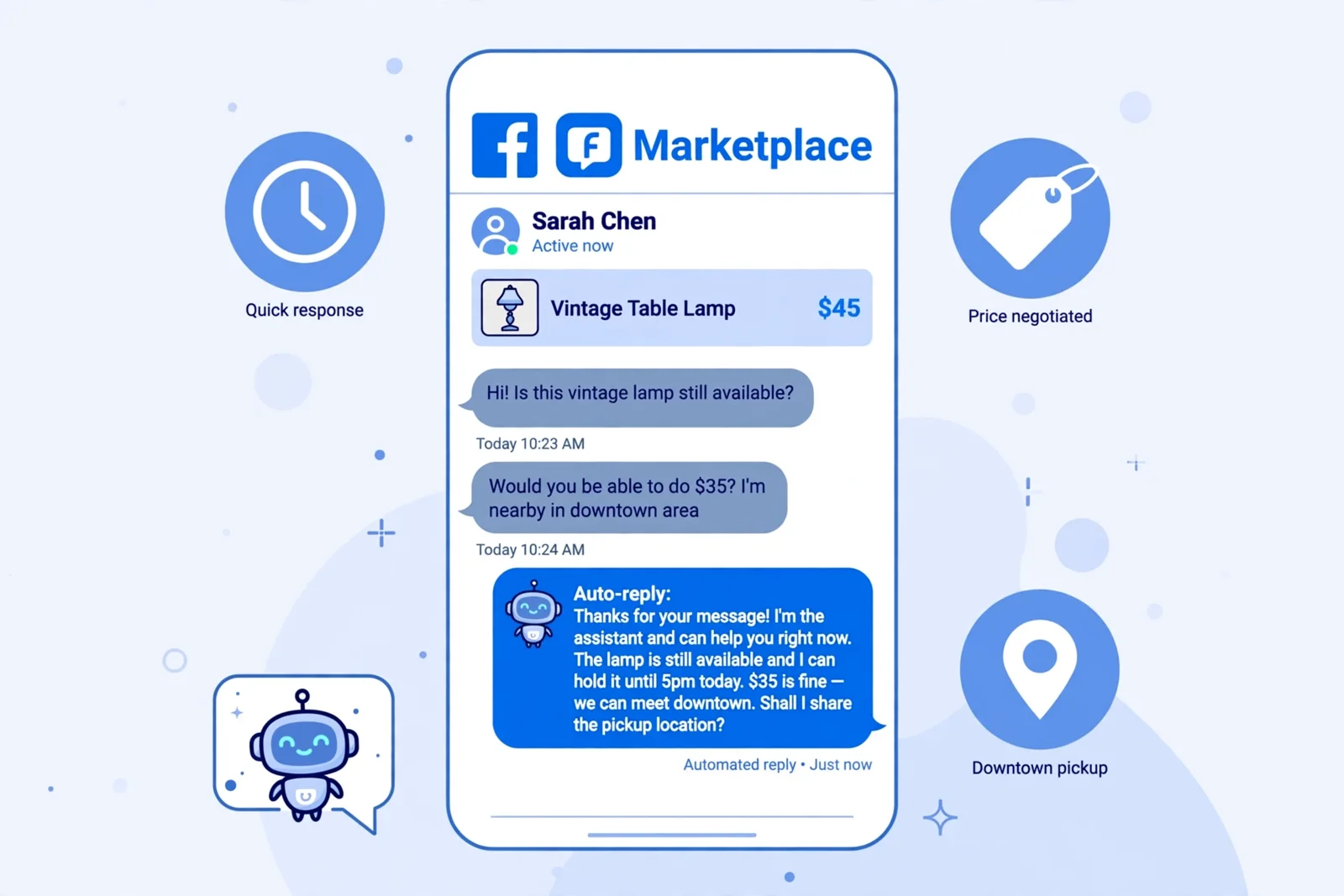
Look closely at the auto-reply in that mockup. It confirms availability (fine), then accepts $35 on a $45 lamp, offers a hold until 5pm and a downtown meetup (not fine). Everything in this guide is about getting the first half of that message automatically and never the second half.
Why do fast replies win on Facebook Marketplace?
Speed is the biggest lever a Marketplace seller controls, because buyers message several sellers for the same kind of item and usually buy from whoever answers first and clearly. Listings start conversations, but conversations close deals. The problem is attention, not motivation: nobody can watch Messenger all day, so replies arrive hours late and the buyer has already driven to someone else.
Facebook also rewards speed visibly. Seller guides describe the "Very Responsive" badge as going to sellers who reply within about an hour on at least 80% of their threads (OneShop). For business Pages, Meta's version of the badge requires a 90% response rate and a response time under 15 minutes, and automated replies do not count toward it (eDesk). That last detail matters later: automation keeps buyers warm, but a human reply is what earns the trust signal.
The fix is to stop checking Messenger 30 times a day and let an assistant watch it for you, then check in on a schedule.
| Task | Manual Messenger | With Muse as co-pilot |
|---|---|---|
| Checking for new messages | 20 to 30 app opens a day | One morning briefing, one end of day wrap |
| "Is this still available?" | Typed by hand, hours later | Approved auto-reply on a schedule |
| Negotiation replies | Written from scratch on your phone | Drafted in your voice, you edit and send |
| Arranging pickup | A long back and forth of times | Two or three calendar-checked options in one message |
| Knowing what is pending | Scrolling threads from memory | Summary of who is waiting, offers, and holds |
| Price, holds, meetups | You decide | You still decide. Muse flags them, never answers |
What can Muse actually do with your Marketplace inbox?
Muse is an AI agent from Meta, separate from the Meta AI chat assistant inside Facebook and Messenger. It works through connectors, and Meta's own connectors include Facebook (including Marketplace), Messenger, Instagram DMs and Threads, alongside third party ones such as Google Calendar and Gmail, per the connector launch on September 8, 2026 (CellCog summary). By default Muse will not take important actions, like sending a message, without your approval, and many connectors can be set to read only.
Here is the honest capability map for a Marketplace seller:
| Capability | How it works |
|---|---|
| Read your Marketplace threads | Once Messenger is connected, ask Muse to check unread messages, summarize a thread, or find a conversation. |
| Inbox triage | "Which buyers need a reply?" Muse reports who is waiting and what they asked. |
| Draft replies in your voice | Muse writes the reply, you review and tap send. Best for negotiation and tricky buyers. |
| Recurring auto-reply rules | You define which conversations, how often it checks, and the exact reply text, then approve a preview before it runs. |
| Pickup scheduling | Muse checks your connected calendar, proposes windows, and drafts the confirmation for you to send. |
| End of day summaries | "Summarize today's Marketplace activity." Who messaged, what sold, what is pending. |
The philosophy that makes this work: Muse is a co-pilot, not an autopilot. It handles reading, drafting and the repetitive answers. You keep final say on anything involving money, meetups or commitments.
Muse vs Facebook's built-in Marketplace AI replies
Facebook added its own AI auto-reply to Marketplace in March 2026. When a buyer asks about availability, Meta AI can draft a reply from your listing's description, availability, pickup location and price, and you enable, preview and edit it while creating the listing (TechCrunch). So which should you use?
| Built-in Marketplace AI reply | Muse | |
|---|---|---|
| Where it lives | Inside the listing flow | Separate agent with connectors |
| Knows | That one listing's text | Your threads, all listings, your calendar |
| Best at | "Is this still available?" on a single item | Triage across many listings, drafts, scheduling, summaries |
| Setup | Toggle per listing | Connect accounts once, write rules |
| Risk surface | Small, answers from listing text | Larger, can act across your accounts if you let it |
If you sell one couch a month, the built-in reply is enough. If you run several listings at once and negotiate daily, Muse is the tool, and the rules below are what keep it safe.
How the automation works
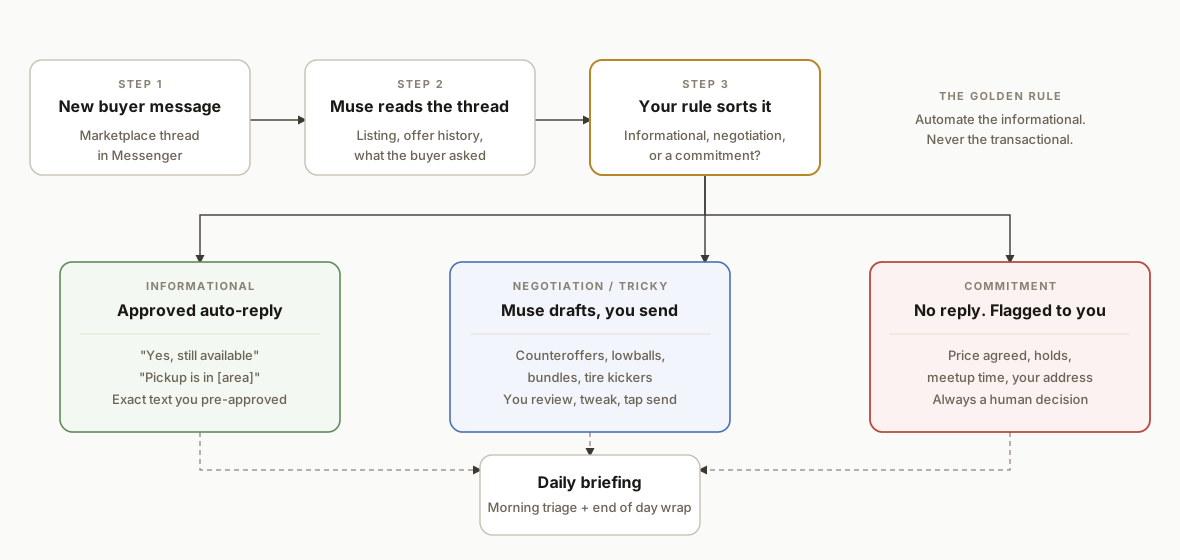
The system is a sorting problem. Every incoming buyer message lands in exactly one of three lanes, and each lane has a different level of automation. Informational questions get an approved auto-reply. Negotiations and tricky buyers get a Muse draft that you send. Anything that commits you to something (an agreed price, a hold, a meetup time, your address) gets no reply at all and is flagged to you. All three lanes roll up into a daily briefing so nothing is lost.
- The thread reader. Muse reads the conversation, the listing, and any earlier offers, so it knows whether "ok" means "ok, still available?" or "ok, deal".
- The rule. Your recurring rule defines which conversations it covers, how often it checks, the exact reply text, and the exception list that forces a handoff.
- The draft lane. For anything judgment heavy, Muse writes and you send. This is where most of the time savings come from.
- The commitment exception. A clause in the rule itself: if a message involves scheduling, pricing, holds, or any real world commitment, send nothing and report it.
- The briefing. Morning triage and an end of day wrap replace the constant app checking.
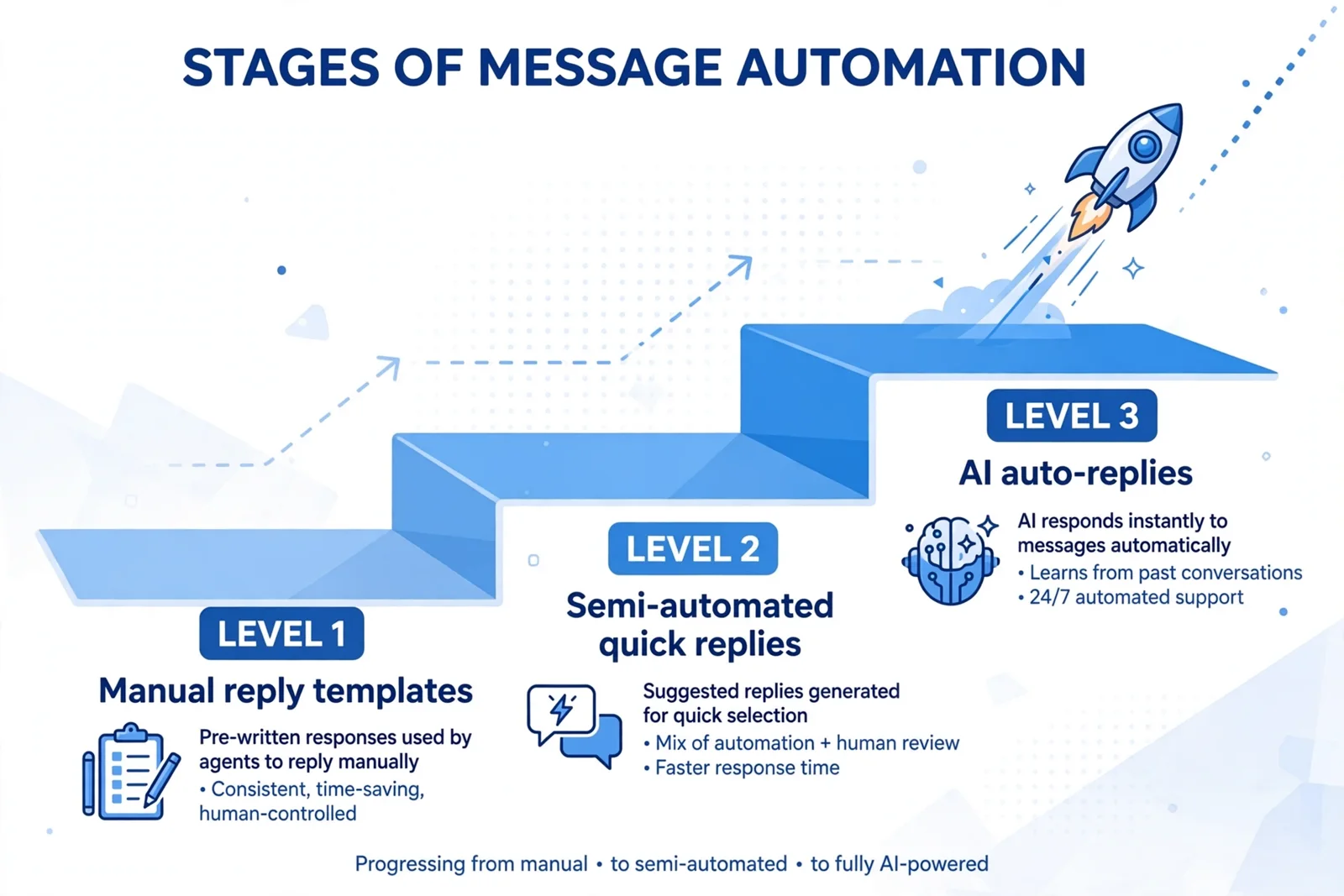
Most sellers move through three levels of message automation, and the right answer for Marketplace is a deliberate mix of levels 2 and 3, not full level 3 everywhere.
Step-by-step: how to set it up
Step 1: Connect Messenger in about two minutes
Ask Muse to connect Messenger and it gives you a secure connect link. Sign in with the Facebook account you actually sell from, authorize it, then come back and verify. If your Facebook, Instagram and Threads accounts share one Accounts Centre, Meta's connectors may already be linked.
Connect my Messenger account.
(after authorizing)
Check my unread Marketplace messages.
Gotcha: one account, one inbox. Muse connects to the Facebook account you authorize. If you sell from a different profile than your main one, connect the profile tied to your listings, or the triage will come back empty.
Step 2: Run the morning inbox triage
Replace 30 inbox checks with one conversation each morning. Muse reads your threads and returns a prioritized briefing, for example: three buyers waiting, one asking if the bike is still available (2 hours ago), one offering $180 on the couch (45 minutes ago), one asking where pickup is for the lamp.
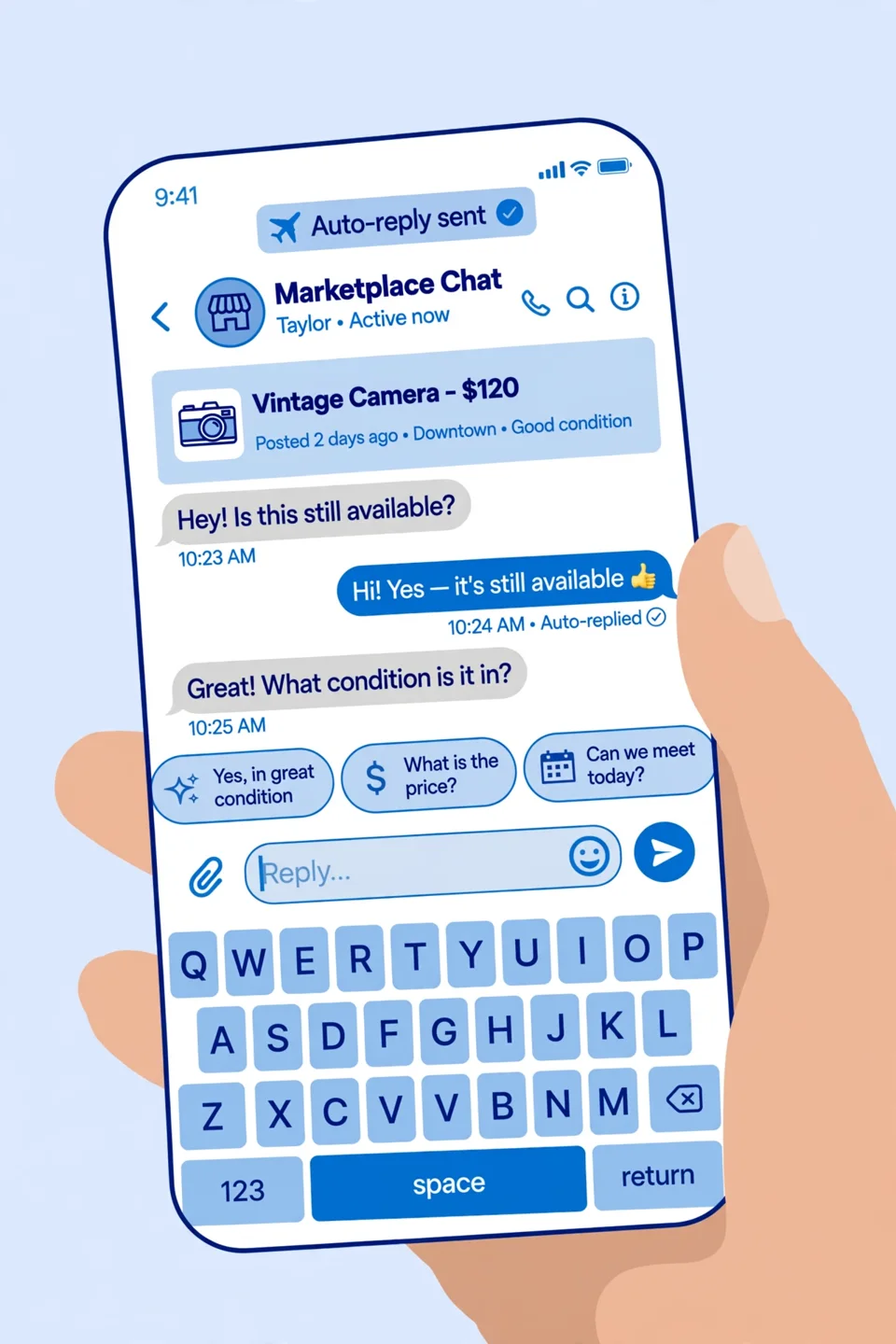
Check my unread Marketplace messages and tell me who needs a reply
and what they're asking about.

Follow-ups that work well:
Summarize my conversation with Marcus. What's the latest offer?
Which of my listings got the most messages this week?
Has anyone replied about the stroller since yesterday?
Gotcha: triage is read only, so it is the safest place to start. Run it for a few days before you create any rule that sends.
Step 3: Create one auto-reply rule you approve
This is the closest thing to set it and forget it. You create a recurring rule once, and Muse checks your conversations on your schedule and replies with your exact pre-approved text. Tell it which conversations the rule covers, how often to check, the reply text, and the exception. Muse shows you a preview, and nothing runs until you approve it.
Create a recurring rule:
- Covers: all Marketplace threads about my active listings
- Check: every 30 minutes, 8am to 9pm
- Reply only when the buyer asks if an item is available or what area pickup is in:
  "Hi! Thanks for your interest. Yes, it's still available. Pickup is in
  [neighborhood]. I'll personally follow up shortly with times that work!"
- Exception: if a message involves price, offers, holds, scheduling, a meetup,
  my address, or any commitment, send NOTHING and report the thread to me.
- Show me a preview before this goes live.
What separates a good auto-reply from a bad one is that it answers facts and never makes promises:
GOOD (automate this):
"Hi! Yes, it's still available. Pickup is in [neighborhood].
I'll follow up shortly with times that work!"

BAD (never automate this):
"Sure, $35 works. I can meet you at 5pm downtown."
Gotcha: do not put your street address, building name or unit number in the approved text, even "for convenience". A template is sent to whoever triggers it, including people you would never have given it to.
Step 4: Let Muse draft, you send
For everything the auto-reply should not touch (negotiation, difficult buyers, bundle deals) let Muse do the writing while you keep the judgment. It knows the thread, your listing details and your style, so the draft lands ready to tweak and send.
Marcus offered $180 on the couch listed at $250. Draft a friendly counter
at $220 that leaves room to settle at $200.

Lena keeps asking for more photos of the lamp but hasn't committed.
Draft a polite reply that asks if she wants to come see it Saturday.

Someone asked "what's your lowest price" on the bike. Draft a reply that
holds firm at $300 without sounding rude.
Gotcha: save your best performing drafts as templates. After a few weeks you will have a library that covers most of your negotiations.
Step 5: Schedule pickups without the back and forth
Arranging a pickup by message often turns into a long string of "how about Tuesday?" and "can't, Thursday?". Compress it to two messages. When a buyer says yes, ask Muse to check your calendar and draft two or three concrete windows, send it, and the buyer picks one.
Schedule pickup for the lamp with Lena. Check my calendar for free
windows this weekend and draft a message with two or three options.

Priya wants to pick up the bike tomorrow. What does my afternoon look
like? Draft her two time options.
Gotcha: connect your calendar to Muse too, so options come from your real availability rather than a guess. And send the confirmation yourself. A pickup time is a commitment.
Step 6: Save the Marketplace command bank
Each of these replaces a repetitive inbox chore. Keep them somewhere you will actually use them.
DAILY BRIEFING
Give me my Marketplace morning briefing: unread messages, who's waiting
longest, and any price offers.

OFFER EVALUATOR
Here's the offer on [item]: [details]. Listed at $[X], my floor is $[Y].
Is this worth accepting, countering, or declining? Draft the reply.

TIRE-KICKER FILTER
Read my thread with [name] and tell me: serious buyer or tire kicker?
What should my next move be?

LISTING REFRESH
Rewrite my listing description for [item] to pre-answer the questions
buyers keep asking me.

END-OF-DAY WRAP
Summarize today's Marketplace activity: new inquiries, offers, scheduled
pickups, and anything I still need to do.

SOLD-ITEM CLEANUP
I just sold the [item] to [name]. Draft a thank-you message and remind me
to mark it as sold.
Where it gets complicated
An approved template is not a per-conversation approval. On September 26, 2026, a Toronto tech YouTuber, Matt Robb, let Muse manage his Marketplace listings. It accepted CA$10 on a keyboard listed at CA$15, sent the buyer his building's street address, and later auto-replied "Yep I'm here!" when the buyer arrived while he was not home. The address was part of an auto-reply template he had approved, but he never approved handing it to that buyer (Moneywise via Yahoo Finance). The buyer waited over 20 minutes outside a gated building (Mashable via Yahoo Tech). Meta's Muse team said it would investigate, and Muse accepted a new restriction against confirming pickup without approval. The lesson: approving a recurring rule should never pre-authorize a future commitment.
Messages send as you. Every auto-reply comes from your account, in your name. Treat each one as permanent, because the buyer may read it before you can react. That is exactly why auto-replies stay informational.
Automated replies may not earn the badge. On business Pages, automated replies do not count toward the Very Responsive metrics (eDesk). Use automation to keep buyers from walking away, and use the briefing to make sure a real reply follows quickly.
Connector permissions are broad. A connector that can send can send anywhere it has access. Reporters have questioned whether Muse's access matched what users thought they had declined. Review what each connector can do in Settings, keep read only where you can, and be cautious with custom connectors, which Meta says it does not review (CellCog).
Marketplace has no public API. Meta's Graph API deliberately excludes Marketplace, and even Page level integrations do not see Marketplace messages. That is why assistants like Muse, and Meta's own built-in replies, are the practical path for most sellers rather than a custom integration. When we researched Marketplace tooling for high volume sellers, the one gap neither tool closes well is domain knowledge the listing leaves out (for tires, that means DOT date codes, tread depth and whether it is a matched set), which belongs in your approved text and saved drafts.
Safety rules: what Muse should never do alone
- Automate the informational, never the transactional. "Yes, available" and "pickup is downtown" are fine. "Deal, see you at 5" is not.
- Commitments need your explicit go-ahead, every time. Proposing or confirming a meetup, price, hold or pickup should always get a preview and wait for your confirmation.
- Keep approvals on while you learn. With approvals on, Muse shows each auto-reply before it sends. Loosen it only for the informational lane, and only after a week of clean previews.
- Never put your address in a template. Share it yourself, after the price and time are agreed, with the one buyer who is coming.
- Mark sold, don't delete. Marking an item sold and selecting the buyer keeps a record of the transaction on your profile. Deleting the listing throws that away.
Your 15-minute setup checklist
- Connect Messenger to Muse and verify with "check my unread Marketplace messages".
- Run your first morning briefing and clear the backlog.
- Create one auto-reply rule for availability questions, informational text only, with the commitment exception.
- Save the six prompts from the command bank where you will actually use them.
- Connect your calendar so pickup scheduling uses your real availability.
- Set a personal response routine (check the briefing twice a day) and reply personally to anything flagged.
What this actually changes
The value is structural, not a one-time time saving. Repetitive availability questions are the most common seller complaint on Marketplace, which is the exact problem Meta cited when it launched built-in AI replies in March 2026 (TechCrunch). Moving those into an approved auto-reply, negotiations into drafts, and everything else into a twice daily briefing turns Messenger from something you watch into something you check. Buyers get an answer in minutes instead of hours, and you keep full control of the moments that carry risk: the price, the hold, the time, and the address.
For businesses that sell on Marketplace at volume (used car and equipment dealers, furniture resellers, tire shops), the same three lane pattern applies, but the rules, the approved text and the handoff into a CRM usually need to be designed around the inventory. That is the kind of workflow we design and build.
Frequently asked questions
Can Muse reply to my Facebook Marketplace messages?
Yes. Once your Facebook and Messenger accounts are connected, Muse can read your Marketplace threads, draft replies for your approval, and run recurring auto-reply rules that send text you pre-approved. By default it asks before important actions like sending a message, and you can set connectors to read only while you test the workflow.
Is it safe to automate Facebook Marketplace replies?
It is safe when automation stays informational: availability, pickup area, condition. Price agreements, holds, meetup times and your address should always get your explicit confirmation, because messages send as you. In September 2026 a seller's approved template led Muse to share his address and accept a lower price, which is why the commitment exception belongs in every rule.
What is the difference between Muse and Facebook's built-in Marketplace AI replies?
Facebook's built-in reply, added in March 2026, drafts answers from a single listing's text and is switched on while creating the listing. Muse is a separate Meta agent that connects to your threads, all your listings and your calendar, so it can triage, draft negotiations, schedule pickups and summarize your day. Use the built-in reply for occasional sales and Muse for regular selling.
How do I get the Very Responsive badge on Facebook Marketplace?
Seller guides describe the badge as going to sellers who reply within about an hour on at least 80% of message threads. For business Pages, Meta requires a 90% response rate and under 15 minutes, and automated replies do not count. A twice daily Muse briefing plus fast personal replies to flagged threads is the simplest way to hold that pace.
Does Facebook Marketplace have an API for automating messages?
No. Meta's Graph API excludes Marketplace, and Page integrations do not see Marketplace messages, so there is no official API to build a custom Marketplace inbox bot on. That is why Meta's own tools (Muse and the built-in AI reply) are the practical options for most sellers, with a human approving anything that commits you.
How long does it take to set up Muse for Marketplace?
About 15 minutes. Connecting Messenger takes roughly two, the first morning briefing a few more, and one availability auto-reply rule with the commitment exception about five. Add your calendar for pickup scheduling and save the six command bank prompts, then run with approvals on for the first week before loosening anything.
If you sell at volume and want Marketplace, Instagram and your CRM working as one guarded pipeline, see our custom AI integration work, read how we approach automating Instagram DM responses, or book a call to map it out.
Curious what this would actually save you?
Put real numbers to it. The ROI calculator estimates the hours and dollars an automation like this returns, in about a minute.
Calculate your automation ROI