
Mortgage SMS follow-up automation works by listening for new leads, deduplicating them across sources, sending on-brand texts that capture basic prequalification, and handing hot replies straight to a booking link or a loan officer. For mortgage and real-estate teams, it replaces manual texting with a compliant, fast, and consistent flow. This guide shows the exact pattern we shipped in production and the gotchas to avoid.
Definition: SMS follow-up automation is a system that receives new leads, routes compliant text messages based on lead state and licensing rules, and moves prospects to booked appointments without manual texting.
The problem it solves
Manual SMS follow-up breaks at volume: slow first response, inconsistent tone, double-texting the same person from different lists, and no visibility on who booked. In our builds, owners juggled Zillow or portal leads, web forms, and social contacts with copy-paste texting. Quiet hours, licensing disclosures, and do-not-contact rules were enforced by memory.
| Manual texting | Automated SMS prequalification and booking |
|---|---|
| Reply when someone notices a new lead | Instant first touch within minutes of intake |
| Messages vary by person and day | On-brand templates with merge fields and guardrails |
| Duplicate texts from different sources | Global dedupe and source suppression |
| No proof of opt-out handling | STOP keywords logged and enforced |
| Time-zone and quiet hours forgotten | Quiet hours per lead time zone enforced |
| Booking link sent haphazardly | Smart handoff when signals show intent |
Harvard Business Review found that contacting leads within an hour made firms nearly seven times more likely to qualify them than waiting longer. Source: The Short Life of Online Sales Leads, HBR (https://hbr.org/2011/03/the-short-life-of-online-sales-leads).
What automatic reminders and rebooking are worth
Move the sliders to your own numbers. The defaults are only an example business, not client data.
Revenue from visits you stop losing each year
$25,920
400 a month × 12 × 12% × 30% × $150
- Visits saved a year
- 173
- 400 × 12 × 12% × 30%
How the automation works
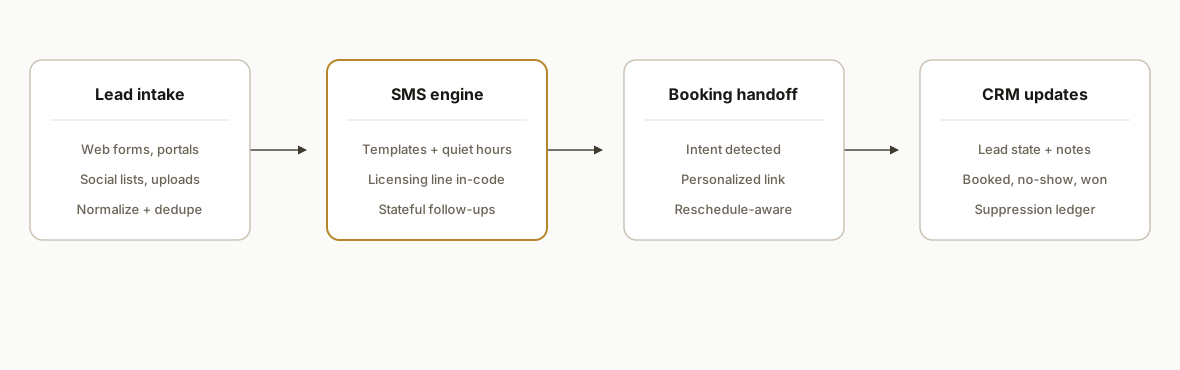
A small number of components make this reliable in production: a lead intake listener, a normalizer and deduper, an SMS engine with a template library and quiet-hour logic, a conversation state ledger, and a booking bridge that updates your CRM.
- Lead intake listener: Receives new leads from web forms, paid portals, and partner uploads. Normalizes fields into a single schema and tags the source for suppression logic.
- Normalizer and deduper: Hashes person identity keys to prevent cross-source double-sends and replays. Maintains a ledger of the last outreach per channel.
- SMS engine and templates: Sends first-touch, clarify, and booking texts with merge fields and licensing disclaimers where required. Enforces quiet hours and throttles.
- Conversation state ledger: Tracks intent signals and next actions. Moves contacts through states like new, engaged, booked, and opted_out.
- Booking bridge: Routes engaged leads to your calendar and writes outcomes back to the CRM for reporting and next steps.
- Inbound handling and compliance: Parses STOP keywords, stores consent events, and records timestamps and message bodies for audit.
Step-by-step: how to build it
Step 1: Capture every lead in one place
Create a listener that receives webhooks and uploads, then writes a normalized record and a suppression key. We commonly use Google Apps Script for Sheets-bound builds or a lightweight Node service when volume is higher.
// Apps Script: normalize inbound lead to a unified row
function doPost(e) {
  const body = JSON.parse(e.postData.contents || '{}');
  const lead = normalizeLead(body); // map portal/web form fields to a shared shape
  const key = makeSuppressionKey(lead); // e.g., sha256(email|phone)
  const sheet = SpreadsheetApp.getActive().getSheetByName('leads');
  if (isSuppressed(key)) return ContentService.createTextOutput('suppressed');
  sheet.appendRow([Date.now(), key, lead.source, lead.first, lead.last, lead.email, lead.phone, lead.zip, lead.state, 'new']);
  queueFirstTouch(key);
  return ContentService.createTextOutput('ok');
}
Key point: store a durable suppression key and the raw source tag now. You will need both to prevent double-sends later.
Step 2: Deduplicate and set guardrails
Block unlicensed states and obvious duplicates before texting. Mortgage pipelines must respect state licensing and NMLS disclosures.
function shouldText(lead) {
  const licensedStates = getConfig().licensedStates; // e.g., ["AZ","CA","CO",...]
  if (!lead.phone) return false;
  if (!licensedStates.includes(lead.state)) return false; // do not text outside licensing
  if (hasRecentSms(lead.key, 24)) return false; // 24h suppression window
  return true;
}
Key point: evaluate suppression before you spend SMS credits.
Step 3: Send the first-touch SMS with templates
Compose a short, on-brand text that asks one easy question. Inject the required licensing line when applicable.
function sendSms(lead, template) {
  const msg = template
    .replace('{{first}}', lead.first || 'there')
    .replace('{{zip}}', lead.zip || '')
    + licenseLineFor(lead.state); // returns \nNMLS #### where needed

  const payload = {
    to: lead.phone,
    body: msg,
    metadata: { key: lead.key, source: lead.source }
  };

  const resp = UrlFetchApp.fetch(getConfig().SMS_PROVIDER_URL, {
    method: 'post',
    contentType: 'application/json',
    payload: JSON.stringify(payload),
    headers: { Authorization: 'Bearer ' + getConfig().SMS_API_TOKEN }
  });
  logOutbound(lead.key, msg, JSON.parse(resp.getContentText()));
}
Key point: keep the license line out of the LLM. Compute it deterministically in code.
Step 4: Run a state machine and scheduler
Model the conversation as states with transitions and scheduled next actions. This keeps logic easy to reason about and test.
const States = { NEW:'new', ENGAGED:'engaged', BOOKED:'booked', OPTED_OUT:'opted_out' };

function processQueue() {
  const rows = getPendingRows();
  rows.forEach(r => {
    const lead = rowToLead(r);
    if (!shouldText(lead) || !withinSendWindow(lead.tz)) return;
    if (lead.state === States.NEW) {
      sendSms(lead, 'Hi {{first}}, did you want a quick rate check for {{zip}}? Reply yes and I will send options. Reply stop to opt out.');
      scheduleFollowUp(lead.key, 90); // minutes
    } else if (lead.state === States.ENGAGED && !lead.booked) {
      sendSms(lead, 'Want to grab a 10-min call to go over numbers? Here is the link: {{booking}}');
    }
  });
}
Key point: batch from a queue table so you can pause or replay safely.
Step 5: Handle inbound replies and opt-outs
Parse short replies and apply simple rules first. Keep STOP handling deterministic and immediate.
function onInboundSms(e) {
  const msg = JSON.parse(e.postData.contents || '{}');
  const text = (msg.body || '').trim().toLowerCase();
  const key = msg.metadata && msg.metadata.key;
  if (!key) return;

  if (text === 'stop' || text === 'unsubscribe') {
    setState(key, States.OPTED_OUT);
    recordConsentEvent(key, 'opt_out', msg);
    return;
  }
  if (text.startsWith('yes')) {
    setState(key, States.ENGAGED);
    enqueueBookingNudge(key);
  }
  appendInboundLog(key, msg);
}
Key point: store consent events with timestamps for audit.
Step 6: Generate a booking link and write back to the CRM
Personalize the booking handoff and update your CRM when booked. Keep vendor details abstracted so you can switch calendars later.
function bookingLink(lead) {
  const base = getConfig().BOOKING_URL; // e.g., your calendar page
  const params = encodeURIComponent(JSON.stringify({
    first: lead.first, phone: lead.phone, source: lead.source, zip: lead.zip
  }));
  return `${base}?prefill=${params}`;
}

function onBookingEvent(evt) { // calendar webhook posts here
  const { key, start, status } = parseBooking(evt);
  upsertCrmAppointment(key, start, status); // booked, rescheduled, no_show
  if (status === 'booked') setState(key, States.BOOKED);
}
Key point: one integration function per system keeps swaps low-risk.
Step 7: Enforce quiet hours and time zones
Never text at 5 am. Derive a local time zone per lead and enforce quiet hours.
function withinSendWindow(tz, now = new Date()) {
  const local = new Date(now.toLocaleString('en-US', { timeZone: tz || 'America/New_York' }));
  const h = local.getHours();
  const q = getConfig().quietHours || { start: 20, end: 9 }; // 8pm to 9am
  // Window is [end, start). Example: 9 <= h < 20
  return h >= q.end && h < q.start;
}
Key point: store the derived time zone on first touch to avoid repeated lookups.
Where it gets complicated
- Licensing and disclosures: Mortgage outreach must respect state licensing and NMLS disclosures. Compute disclosures in code and inject them per message. Do not rely on an LLM to remember them.
- Cross-source suppression: The same person can appear via portal, web form, and social. A durable person key and a last-outreach ledger prevent double-sends and awkward conversations.
- Carrier filtering and link domains: Unfamiliar domains and link shorteners increase filtering risk. Use your own branded domain and keep links sparse in first touch. Register and warm your sending numbers where required.
- Quiet hours and time zones: National outreach crosses time zones. Enforce send windows per lead. Store time zones at capture to avoid drift.
- DNC and opt-out handling: Honor STOP immediately. Persist opt-out state and check it before any send. Keep an audit trail.
- Booked vs held: Booking is not the finish line. Track whether appointments happen, and trigger reschedule nudges and human flags after no-shows.
What this actually changes
For a mortgage brokerage or a real-estate team, this shifted first contact from hours to minutes, made tone and compliance consistent, and removed duplicate texts across sources. The structural value is speed and control: every lead gets the right first touch automatically, only engaged contacts see the calendar, and your CRM reflects what happened without manual updates. Harvard Business Review reported that firms contacting leads within an hour were nearly seven times more likely to qualify them than those that waited longer. Source: HBR, The Short Life of Online Sales Leads (https://hbr.org/2011/03/the-short-life-of-online-sales-leads). An automated SMS engine makes that window the default instead of the exception.
Frequently asked questions
Can this run without switching SMS providers?
Yes. We keep the SMS provider abstracted behind one function so you can use your current CRM's texting, a dedicated SMS vendor, or switch later. The automation decides when and what to send. The provider only delivers the message.
Will it prequalify without pulling credit?
Yes. The first sequence collects lightweight information: intent, basic location, and whether a quick rate check is desired. Deeper steps and credit pulls stay human-in-the-loop. The automation only advances to booking when the contact signals interest.
How do you prevent duplicate texts from different sources?
We compute a durable suppression key from identity fields and store a last-outreach ledger by channel. Every send checks both before proceeding. This blocks double-sends across portal, web form, and social lists and respects recent human conversations.
Can it handle reschedules and no-shows automatically?
Yes. The calendar posts events to a webhook. When a booking is made, rescheduled, or missed, the system updates the CRM and can send a short, polite reschedule nudge during business hours. Humans can always jump in from the CRM.
What does this cost monthly?
Infrastructure is light. You pay SMS per message and your calendar vendor. The main investment is the build. We design it so running costs stay low and the provider is swappable if pricing changes.
How long does implementation take?
Most baseline deployments take 1 to 2 weeks: intake, dedupe, first-touch, booking bridge, and CRM updates. Compliance tailoring and multi-state licensing add time. We ship in steps so you can turn on first-touch quickly.
If you want this working for your team, we have already built and shipped this pattern. See our CRM automation services at /services#crm-automation, read how we handle calling for real-estate teams in our Follow Up Boss AI calling post at /blog/automate-follow-up-boss-ai-calling, and book a working session at /book to scope your exact flow.
Sources
- 1.The Short Life of Online Sales Leadshbr.org
Want us to build this for you?
Nine questions, about 90 seconds. You see the revenue it is costing you, then pick a time. No pitch.
See your options