
We built a no-show follow-up for Jackrabbit Class that sends an on-brand SMS first, then an email with a rebook link, and writes every outcome back to your CRM. It runs nightly from a scheduled attendance CSV email out of Jackrabbit and closes the gap Zapier polling leaves during busy afternoons.
Definition: Jackrabbit no-show follow-up automation is a workflow that detects missed classes, messages parents by SMS and email with rebook links, and logs the result in your CRM without staff intervention.
The problem it solves
Parents miss a class, staff notice it hours later, then copy-paste a text or draft an email. If you are busy on the floor, that outreach often slips, and the student never rebooks. Jackrabbit does not provide a broad public REST API for attendance, and Zapier polling can delay triggers. We solved this by running off scheduled CSV emails from Jackrabbit reports and syncing results into the CRM.
| Step | Manual process | Automated system |
|---|---|---|
| Detect absences | Staff scan rosters and mark no-shows | Scheduled attendance CSV email is parsed nightly |
| Find contacts | Look up parent phone and email | Contacts are matched from prior sync and cached |
| Write messages | Copy-paste SMS and email drafts | Templated SMS then branded email with rebook CTA |
| Send at right time | Remember quiet hours and windows | Time windows and quiet-hour logic enforced |
| Log outcomes | Update the CRM by hand | Outcome pushed to CRM with dedupe keys |
Note: Zapier's official Jackrabbit app uses polling which can run every 15 minutes on lower tiers: this can delay time-sensitive follow-up if used alone (Zapier directory).
How the automation works
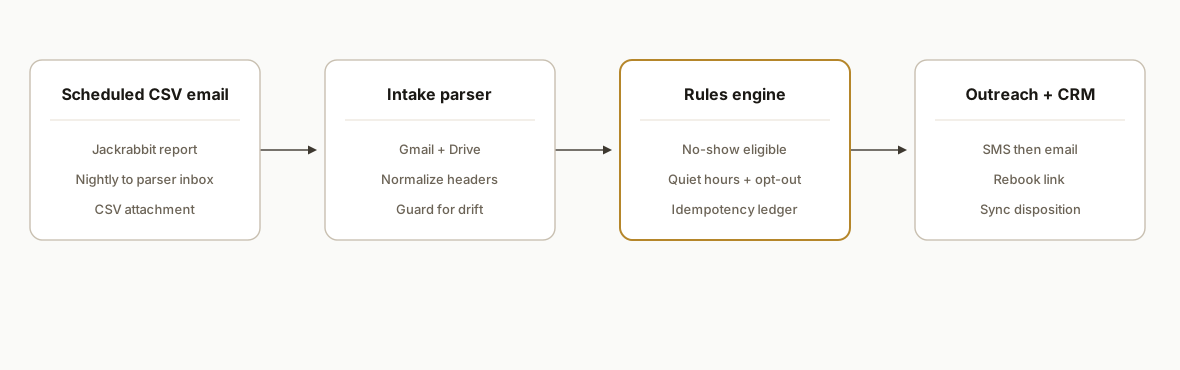
We ingest an attendance exceptions report from Jackrabbit via scheduled email, parse and qualify the no-shows, send an SMS and email with a rebook link, and push the outcome back to your CRM. The system stays inside Jackrabbit's supported surface: class listings JSON where needed, Zapier's app for enroll or update events, CSV export and scheduled emails for attendance.
- Intake via scheduled email CSV: Jackrabbit supports CSV exports on many table-style reports and lets admins schedule emails. We point that email to a parsing inbox the automation reads nightly.
- Eligibility and dedupe: We build a key from student ID plus class date to avoid double-messaging on re-runs and apply quiet hours and opt-out rules.
- Two-step outreach: SMS first for quick attention, then a branded email with the rebook link if no reply is seen within a window.
- CRM write-back: We upsert a timeline note and a follow-up task in your CRM with the disposition: rebooked, unreachable, declined, or bounced.
- Bridges for gaps: Jackrabbit's broader REST endpoints are not public. We bridge with Zapier triggers where available and CSV email exports for attendance. If Make.com is your standard, we use HTTP modules because there is no native Make app confirmed.
Step-by-step: how to build it
1) Send the attendance exceptions report to a parsing inbox
Create a Scheduled Email in Jackrabbit for the report you already trust for daily absences. Point it to a dedicated inbox your automation can read. We use Google Apps Script to catch the attachment and save it to Drive.
// Apps Script: capture the nightly CSV
function captureAttendanceCsv() {
  const query = 'from:(jackrabbit) subject:(Attendance) newer_than:2d has:attachment';
  const threads = GmailApp.search(query, 0, 10);
  threads.forEach(t => t.getMessages().forEach(m => {
    m.getAttachments({includeInlineImages: false, includeAttachments: true})
     .filter(a => /\.csv$/i.test(a.getName()))
     .forEach(a => DriveApp.getFolderById(PropertiesService.getScriptProperties().getProperty('CSV_FOLDER_ID'))
       .createFile(a.copyBlob()).setName(`${new Date().toISOString().slice(0,10)}_${a.getName()}`));
  }));
}
Gotcha: some Jackrabbit reports allow CSV export while others do not. Aim for a table-style report with CSV in the Export menu.
2) Parse the CSV and normalize rows
We parse into a stable shape: date, class name, student name, student ID, guardian name, phone, and email.
function parseCsvFile(fileId) {
  const csv = DriveApp.getFileById(fileId).getBlob().getDataAsString();
  const rows = Utilities.parseCsv(csv);
  const [header, ...data] = rows;
  const idx = Object.fromEntries(header.map((h,i)=>[h.trim().toLowerCase(), i]));
  return data.map(r => ({
    date: r[idx['date']],
    className: r[idx['class']],
    studentName: r[idx['student']],
    studentId: r[idx['student id']] || r[idx['id']],
    guardian: r[idx['parent']] || r[idx['guardian']],
    phone: r[idx['phone']],
    email: r[idx['email']]
  }));
}
Gotcha: column headers drift. Normalize to lowercase and guard for synonyms to prevent silent drops.
3) Apply eligibility, quiet hours, and idempotency
We avoid double-messaging by writing an idempotency key to a small ledger Sheet.
function shouldNotify(row) {
  const key = `${row.studentId}:${row.date}`;
  const sheet = SpreadsheetApp.openById(PropertiesService.getScriptProperties().getProperty('LEDGER_SHEET_ID')).getSheetByName('ledger');
  const found = sheet.createTextFinder(key).matchCase(true).findNext();
  const hour = new Date().getHours();
  const quiet = hour < 9 || hour > 19; // 9am, 7pm local
  if (found || quiet) return {ok:false, reason: found ? 'duplicate' : 'quiet-hours'};
  sheet.appendRow([new Date(), key, row.studentName, row.guardian]);
  return {ok:true};
}
Gotcha: respect opt-outs. Store Do Not Text flags and filter before you send.
4) Send an SMS with Twilio, then a follow-up email
We keep messages deterministic and template-driven. SMS body is short with a direct rebook link.
function sendSms(to, body) {
  const p = PropertiesService.getScriptProperties();
  const sid = p.getProperty('TWILIO_SID');
  const tok = p.getProperty('TWILIO_TOKEN');
  const from = p.getProperty('TWILIO_FROM');
  const url = `https://api.twilio.com/2010-04-01/Accounts/${sid}/Messages.json`;
  const payload = { To: to, From: from, Body: body };
  const options = {
    method: 'post', payload: payload,
    headers: { Authorization: 'Basic ' + Utilities.base64Encode(sid + ':' + tok) }, muteHttpExceptions: true
  };
  const resp = UrlFetchApp.fetch(url, options);
  return {status: resp.getResponseCode(), body: resp.getContentText()};
}

function sendEmail(to, subject, html) {
  GmailApp.sendEmail(to, subject, '', {htmlBody: html, name: 'Front Desk'});
}
Gotcha: schedule the email fallback only if there is no SMS delivery receipt within your window, or send both with different copy.
5) Write the outcome to your CRM
We push a simple JSON payload to a CRM webhook so the team sees context.
function logToCrm(row, disposition) {
  const url = PropertiesService.getScriptProperties().getProperty('CRM_WEBHOOK_URL');
  const payload = {
    student_id: row.studentId,
    student_name: row.studentName,
    class: row.className,
    date: row.date,
    disposition
  };
  UrlFetchApp.fetch(url, {
    method: 'post', contentType: 'application/json',
    payload: JSON.stringify(payload), muteHttpExceptions: true
  });
}
Gotcha: if you use Zapier for the CRM handoff, remember Zapier is polling-based which introduces minor latency on lower tiers.
6) Add an optional pre-build using Zapier events
Jackrabbit's Zapier app exposes triggers like Student Enrolled or Class Updated. We have used it to pre-stage expected attendees for the next day and reconcile against the CSV. This reduces mismatches and lets staff see a to-contact list even before the nightly email lands.
Zap 1: Jackrabbit Class: Student Enrolled → Formatter → Google Sheet "Expected Attendance"
Zap 2: Formatter: Date math to roll to local time → Delay Until class start → Flag expected
Gotcha: this is additive. The nightly CSV remains the source of truth for absences when Events do not have an API.
Where it gets complicated
No broad public REST attendance API. Jackrabbit publicly documents a class listings JSON feed and Zapier API key auth for its Zapier app. Broader REST details are not public, and Events list no API. We bridge with CSV exports and scheduled emails.
Polling delays. The Zapier app is polling-based. On lower tiers polling can be every 15 minutes. For time-sensitive work, rely on the nightly CSV plus your own scheduler rather than expecting instantaneous triggers.
CSV schema drift. Staff can change report layouts which will reshuffle headers. Normalize headers and add tests that fail loud on missing columns.
Quiet hours and carrier rules. Enforce local quiet hours and opt-outs. Maintain a Do Not Text ledger and add STOP handling in copy.
Dedupe across retries. Retries happen: email timeouts, Twilio hiccups, CSV re-sends. Use a ledger key of studentId:classDate so messages never double-send.
What this actually changes
For a multi-location kids activity studio, this removed the nightly detective work. In production it handled the import, drafted and sent the first SMS within the allowed window, followed with an email where needed, and left a clean CRM trail for the morning. The result was consistent next-day rebooking outreach without staff chasing rosters.
One practical limit to consider: if you rely only on Zapier polling, time-sensitive actions can lag because Zapier checks every 15 minutes on lower tiers (Zapier directory). That is why we anchor attendance detection on scheduled CSV emails and use Zapier only to pre-stage expectations.
Frequently asked questions
Does Jackrabbit have an official API for this?
Jackrabbit publicly documents a read-only class listings JSON feed and an official Zapier app that authenticates by API key. Events do not list an API, and broader REST details are not public. We bridge no-show detection with CSV exports and scheduled emails, then use Zapier where helpful.
Can this run in near real-time?
Near real-time is limited by polling on Zapier and the cadence of your scheduled emails. Our production setup runs nightly from the CSV. If you need same-day messages, pair the CSV with a pre-staged expected-attendance list built from Zapier triggers and a scheduler.
What tools do I need to run this?
You need a Jackrabbit admin to configure scheduled report emails and CSV exports, a parsing runtime (we used Google Apps Script with Drive and Sheets), an SMS provider like Twilio, and a CRM webhook or connector. If you already use Zapier, we can route the CRM write-back through it.
Will this spam parents?
No. We enforce quiet hours, store opt-outs, and send one concise SMS with a rebook link. If no reply arrives, we follow with a single branded email. Idempotency keys block duplicates across retries.
What does it cost monthly?
Google Apps Script and Drive are effectively free at this scale. SMS is pay-as-you-go. Zapier cost depends on plan and task volume. The primary expense is the one-time build and light upkeep.
If you run Jackrabbit and want no-show follow-up to happen automatically and still land in your CRM, we have already shipped this. See our related write-up on the Jackrabbit to GoHighLevel integration, review our CRM automation services, and when you are ready to scope yours, book a 20-minute call.
Sources
- 1.Jackrabbit Class integrations on Zapierzapier.com
Want us to build this for you?
Nine questions, about 90 seconds. You see the revenue it is costing you, then pick a time. No pitch.
See your options