
We built a production pipeline that syncs Autopilot Journeys data from Ortto into Google Sheets in real time and pushes cleaned contacts back to Ortto. It gave marketing ops a live journey-events log for analysis while keeping the Ortto audience clean without CSVs.
Ortto to Google Sheets automation is the process of capturing Ortto journey activities via webhooks or exports, deduplicating events, and appending structured rows to a Google Sheet while optionally upserting contacts in Ortto through its API.
If you run Ortto Journeys and want a lightweight analytics sink or a reversible audit log in Sheets, this guide shows the working architecture, code, and the gotchas we solved in production.
The problem it solves
Most teams export Ortto activity data ad hoc or once per day, then try to stitch it to contacts in a spreadsheet. The manual path is fragile and dated by the time you open the file. Journey events arrive out of order, duplicates sneak in, and contacts drift between tools.
| Workflow | Manual file exports | Automated webhook and API sync |
|---|---|---|
| Event freshness | 24 hour lag from email link downloads | Near real time via Ortto webhooks |
| Duplicates | Frequent, resolved by hand | Hashed dedupe before append |
| Contact hygiene | CSV uploads, error prone | API upsert on change, consistent keys |
| Backfills | Slow, brittle copy paste | One-time JSONL ingest then live webhooks |
| Ops effort | Hours each week | Set and forget, exceptions only |
What keeping your systems in sync is worth
Move the sliders to your own numbers. The defaults are only an example business, not client data.
Revenue from deals that stop slipping each year
$100,800
80 a month × 12 × 5% × 70% × $3000
- Deals kept a year
- 34
- 80 × 12 × 5% × 70%
- Staff cost of doing it by hand each year
- $9,100
- 5 hrs a week × $35/hr × 52 weeks
- Hours handed to the system each month
- 22 hrs
- 5 hrs a week × 52 ÷ 12
How the automation works
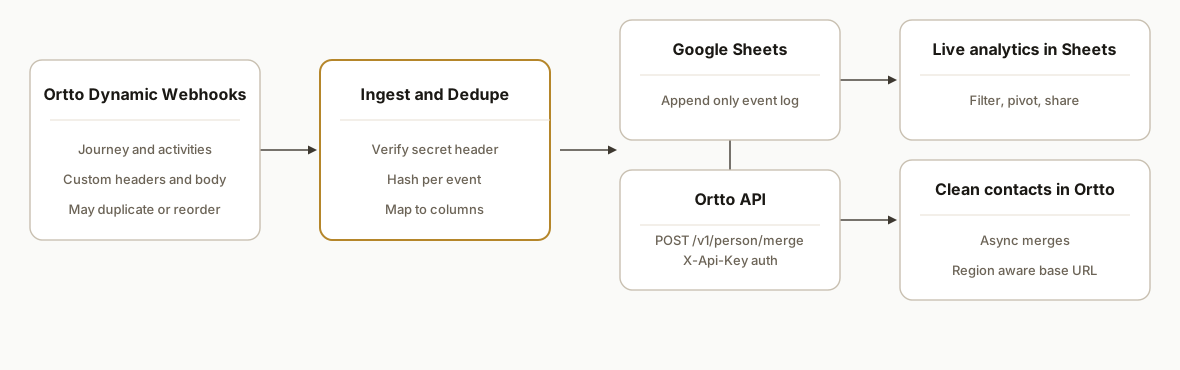
At a high level: Ortto dynamic webhooks POST journey events to our serverless endpoint. We validate and hash each payload to prevent duplicates, then append normalized rows into a Google Sheet. For contact hygiene, we use Ortto's API to merge people when emails or attributes change. For historical seeds, we process Ortto's activities export once, then switch to live webhooks.
- Ortto Dynamic Webhooks: Push journey or activity payloads to our URL. Dynamic webhooks in Ortto let you set the target URL, headers, and body shape, so we include our shared secret header and the fields we care about. Ortto's help center notes that duplicates can occur and ordering is not guaranteed, so we design accordingly.
- Ingest API and Dedupe: A serverless endpoint receives events, verifies a shared secret, and computes a stable hash of the body plus timestamp. If the hash exists, we drop the duplicate. If not, we map it to columns and append to Sheets.
- Google Sheets Sink: A simple spreadsheet with typed headers holds events. Analysts can filter and pivot without touching Ortto. We keep a hash column and a raw JSON column for audit.
- Ortto API Upserts: When we need to correct contact attributes or create people from a Sheet row, we call Ortto's public API. Auth uses X-Api-Key with Content-Type: application/json. We rely on POST /v1/person/merge and prefer async merges or merges by person_id to avoid email-based concurrency conflicts.
- Backfills and Reports: For history, we use Ortto's activities export: a .jsonl file delivered via an email link once per 24 hours. For periodic reporting, Ortto table and ledger reports can be scheduled to CSV or PDF and dropped alongside the Sheet if needed.
Step-by-step: how to build it
1) Create your Google Sheet schema
Define clear headers. We keep both normalized fields and a raw column for audits. Include a hash column for dedupe and a processed_at timestamp.
Sheet: Ortto_Events
Headers: occurred_at, event_type, journey_name, journey_id, person_email, person_id, properties_json, event_hash, processed_at
Key gotcha: Sheets editors must not reorder or rename headers. Lock the header row and describe the schema in a hidden Notes tab.
2) Configure a Dynamic Webhook in Ortto
In Ortto, add a Dynamic Webhook that posts to your endpoint URL. Set a shared secret header and define a body schema with the fields you want to land in Sheets.
{
  "event_type": "{{activity.type}}",
  "occurred_at": "{{activity.occurred_at}}",
  "journey": { "id": "{{journey.id}}", "name": "{{journey.name}}" },
  "person": { "id": "{{person.id}}", "email": "{{person.email}}" },
  "properties": {{activity.properties_json}}
}
Add a header like X-Webhook-Secret: YOUR_SHARED_SECRET. Ortto documents that webhook delivery can duplicate and arrive out of order, so we will handle both on ingest.
Key gotcha: Activities data retention defaults to 90 days. If you need older history, run the one-time export before enabling the webhook so your Sheet starts complete.
3) Build the ingest endpoint and append to Sheets
We use a Next.js API route with Google Sheets API. It validates the secret, computes a hash, checks recent hashes, then appends a new row.
// pages/api/ortto-webhook.ts
import type { NextApiRequest, NextApiResponse } from "next";
import { google } from "googleapis";
import crypto from "crypto";

const SHEET_ID = process.env.SHEET_ID!;
const RANGE = "Ortto_Events!A:H";
const SHARED_SECRET = process.env.WEBHOOK_SECRET!;

function hashEvent(body: any) {
  const basis = `${body.event_type}|${body.occurred_at}|${body.person?.id || body.person?.email}`;
  return crypto.createHash("sha256").update(basis).digest("hex");
}

export default async function handler(req: NextApiRequest, res: NextApiResponse) {
  if (req.method !== "POST") return res.status(405).end();
  if (req.headers["x-webhook-secret"] !== SHARED_SECRET) return res.status(401).end();

  const body = req.body;
  const eventHash = hashEvent(body);

  const auth = new google.auth.GoogleAuth({ scopes: ["https://www.googleapis.com/auth/spreadsheets"] });
  const sheets = google.sheets({ version: "v4", auth: await auth.getClient() });

  // Optional: fetch last 1000 rows to check duplicates
  const recent = await sheets.spreadsheets.values.get({ spreadsheetId: SHEET_ID, range: "Ortto_Events!H:H" });
  const seen = new Set((recent.data.values || []).flat());
  if (seen.has(eventHash)) return res.status(200).json({ status: "duplicate" });

  const row = [
    body.occurred_at,
    body.event_type,
    body.journey?.name || "",
    body.journey?.id || "",
    body.person?.email || "",
    body.person?.id || "",
    JSON.stringify(body.properties || {}),
    eventHash,
    new Date().toISOString()
  ];

  await sheets.spreadsheets.values.append({
    spreadsheetId: SHEET_ID,
    range: RANGE,
    valueInputOption: "RAW",
    requestBody: { values: [row] }
  });

  res.status(200).json({ status: "ok" });
}
Key gotcha: Event ordering is not guaranteed. Your Sheet is a log, so treat it as append-only. Do any sequence logic in downstream analysis, not at write time.
4) Upsert contacts back into Ortto with the API
When a Sheet-backed workflow updates contact attributes, call Ortto's API to merge people. Use the correct regional base URL and X-Api-Key. Prefer async: true or merge by person_id to reduce email-based concurrency issues.
# Replace BASE with https://api.ap3api.com or your region
curl -X POST "${BASE}/v1/person/merge" \
  -H "X-Api-Key: $ORTTO_API_KEY" \
  -H "Content-Type: application/json" \
  -d '{
    "async": true,
    "people": [
      {
        "email": "alex@example.com",
        "attributes": { "plan_tier": "Pro", "source": "sheet-sync" }
      }
    ]
  }'
Key gotcha: Ortto documents that synchronous merge-by-email can hit concurrency limits. Using async: true or addressing by person_id is safer at volume.
5) One-time backfill with Activities export
Ortto lets you export an activity to a .jsonl file once every 24 hours from the activity page. Download the file from the emailed link and load it into your Sheet before you turn on webhooks.
# Ingest a JSONL file to CSV rows for your Sheet
node -e '
  const fs = require("fs");
  const rl = require("readline").createInterface({ input: fs.createReadStream(process.argv[2]) });
  rl.on("line", l => {
    const o = JSON.parse(l);
    const row = [o.occurred_at, o.type, o.journey?.name || "", o.journey?.id || "", o.person?.email || "", o.person?.id || "", JSON.stringify(o.properties || {}), "", new Date().toISOString()];
    console.log(row.map(v => typeof v === "string" ? v.replaceAll("\"", "'") : v).join(","));
  });
' activities.jsonl > seed.csv
Key gotcha: The export can include up to 10 contact fields depending on configuration. Store the raw JSON in your Sheet so you do not lose details.
6) Optional: no-code path with Zapier or Make
You can run a no-code version if engineering time is tight. Ortto has an official Zapier app with Google Sheets templates and a Make.com app labeled Autopilot by Ortto. Create a Zap or scenario that triggers on new Ortto activities and appends rows in Sheets. For contact hygiene, add Create or Update Contact or Add Contact to Journey modules.
Make scenario outline
1. Autopilot by Ortto: Watch Activities
2. Tools: Text aggregator to build a stable hash
3. Google Sheets: Search Rows by hash, Router if not found
4. Google Sheets: Add Row
5. Autopilot by Ortto: Create or Update Contact (optional)
Key gotcha: Platform quirks exist. In Make, some modules expect lowercase method names and specific ID formats. Test dedupe and error branches before you leave it unattended.
Where it gets complicated
Region and base URL selection. Ortto uses region specific API hosts: default api.ap3api.com, AU api.au.ap3api.com, EU api.eu.ap3api.com. Hardcode via config and never guess from email domains.
Webhook duplicates and ordering. Ortto documents that webhooks can duplicate and arrive out of sequence. Always hash per event and append only if unseen. Do not assume chronological delivery.
Activities retention window. Activities data defaults to 90 days of retention. If you need longer trend lines, seed your Sheet from the export before you rely only on live webhooks.
Merge concurrency. Synchronous merge by email can collide under load. Favor async: true or merge by person_id when upserting people.
Sheets write limits. Appending thousands of rows per day can hit Sheets limits. Batch appends or rotate to a monthly tab, and keep a raw JSON column for recovery.
Exports cadence. Activities export is limited to one per 24 hours. Plan backfills and QA accordingly and do not design a daily-batch dependency on more frequent exports.
What this actually changes
For a B2B SaaS marketing team using Ortto, this removed CSV handoffs. Journey events now land in a Sheet within seconds and analysts can pivot campaigns without asking engineering. Contact fixes from cleanup tabs flow back to Ortto through the API, so audiences stay consistent.
As a broader reference point, Nucleus Research reported marketing automation delivers an estimated 14.5 percent increase in sales productivity and a 12.2 percent reduction in marketing overhead on average. Source: Nucleus Research
Frequently asked questions
Does Ortto have an API we can call from our app?
Yes. Ortto exposes a public API with region specific hosts. Auth uses an X-Api-Key header and Content-Type: application/json. A common operation for contact hygiene is POST /v1/person/merge, and you can set async true for safer merges at volume.
Can Ortto push events to us in real time or only via exports?
Ortto supports both. Dynamic webhooks let you define a URL, headers, and the JSON body so events POST to your endpoint in near real time. You can also export activities as a .jsonl file once every 24 hours for backfills and audits.
How do we prevent duplicates and out of order events?
Hash each payload on ingest using stable fields like event type, occurred_at, and person id or email. Check the hash before append. Treat your Sheet as an append only log and do any sequence logic in your analysis layer, not at write time.
What base URL do we use for the Ortto API?
Use the correct regional host. Default is https://api.ap3api.com. Australia uses https://api.au.ap3api.com and the EU uses https://api.eu.ap3api.com. Keep this in configuration and do not hardcode a single host across regions.
Can a non developer build this with Zapier or Make?
Yes. Ortto has official apps on both platforms and Google Sheets modules are first class. You can watch activities, append rows, and create or update contacts. For scale and custom dedupe, a small serverless endpoint is more flexible, but no code works for many teams.
What does this cost monthly?
Google Sheets and a serverless endpoint are low cost. Zapier or Make pricing depends on task volume. Ortto API usage is included in your Ortto subscription. Your real cost driver is event volume and how you choose to process it, not the integration pattern.
If you want this running against your Ortto workspace without building from scratch, we already shipped it. See our broader workflow automation services at /services#workflow-automation, and for adjacent CRM plumbing read /blog/automate-crm-lead-followup. When you are ready to scope your instance, /book a 20 minute call.
Want us to build this for you?
Nine questions, about 90 seconds. You see the revenue it is costing you, then pick a time. No pitch.
See your options