
An AxisCare API integration is a small custom service that reads client, caregiver, visit and schedule data from your agency's AxisCare site with a scoped bearer token, and pushes website and CRM intake toward AxisCare, so nobody re-keys the same person twice. It is for home care operators with more than one place where a referral can land (web form, CRM, phone log) who want those records to reach AxisCare cleanly. This guide covers what the API allows, where it stops, the sync we would build, and what to settle before anyone writes code.
Definition: home care integration automation is software that moves client, caregiver and scheduling records between your care management system and your other tools on a trigger, with matching rules and an audit trail, instead of by manual export and re-entry.
The problem it solves
Most agencies have three or four places where the same client exists: the website form, a CRM or spreadsheet used by intake staff, AxisCare itself, and often a payroll or reporting tool. Every handoff is a person copying fields. Referrals sit in an inbox overnight, a caregiver's availability lives in a text thread, and the weekly census report is rebuilt by hand from exports. Demand is not shrinking either: the Bureau of Labor Statistics projects that employment of home health and personal care aides will grow 18 percent from 2025 to 2035, much faster than the average for all occupations, so the admin load per office employee tends to rise.
Here is what the realistic options look like for AxisCare specifically. The facts below come from AxisCare's own documentation and third-party connector docs; anything we could not confirm is marked.
| Option | What it really gives you | Limits we found | Setup effort |
|---|---|---|---|
| Built-in reports and exports | 70+ reports and a custom report builder with 80+ visit fields, exportable to CSV, Excel or PDF | Pull-only and manual to trigger; scheduled email delivery is unconfirmed | Hours |
| Celigo prebuilt connector | Prebuilt operations for clients, caregivers and visits | Does not cover every endpoint; other endpoints need HTTP mode; the token is never shown again after saving and must be re-entered when you edit the connection | Days, plus an iPaaS subscription |
| Workato | AxisCare points to Workato for pre-built connections | We did not verify recipe coverage or pricing | Days, plus an iPaaS subscription |
| Zapier or Make | No native AxisCare app found on either; a generic HTTP or webhook module might work but is unconfirmed | Unverified, so we would not promise it | Unknown |
| Custom sync service | Exactly the fields, matching rules and alerts you need, with logs | You need a developer or partner; AxisCare says it does not provide engineering resources for custom integrations | Our estimate: one to three weeks depending on scope |
The custom route matters when your intake path is unusual, you want matching and review rules, or you need per-agency configuration across several sites.
How the automation works
The system is a small scheduled service with one job per data flow. It reads from AxisCare using the documented API, normalizes records into your own staging store, applies matching and validation rules, and then either writes onward or raises a review item for a human. Website and CRM intake enter the same staging store, so every flow shares one set of rules.
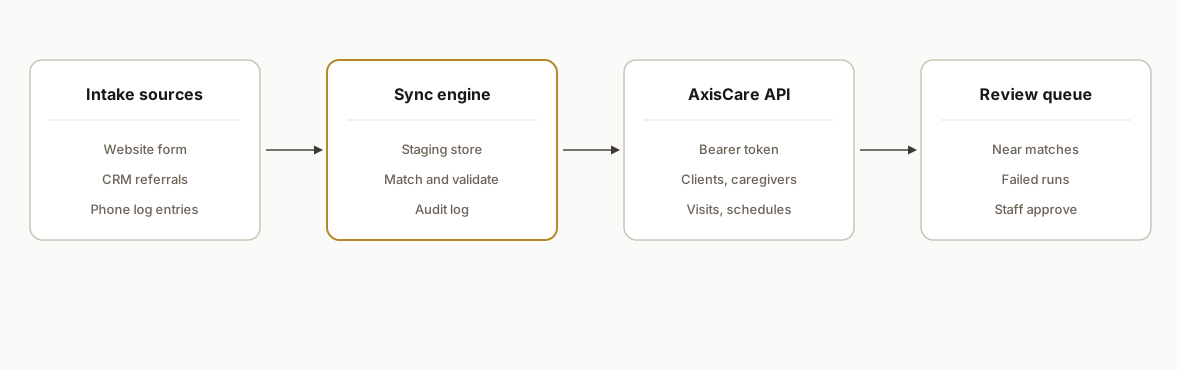
Intake collectors: A web form handler and a CRM export or webhook capture new referrals with consent flags and source. Each lands in staging with a stable external ID before anything touches AxisCare.
Sync engine: A scheduled worker (a small Node or Python service, or Apps Script for light loads) pulls clients, caregivers, visits and schedules, compares them with staging, and records what changed.
AxisCare API client: One module owns the base URL, the bearer token and error handling. AxisCare's API reference states that requests use a bearer token in the Authorization header and that the URL includes your agency's unique site number.
Matching and validation rules: Dedupe on a composite key (name, date of birth, phone) and never on name alone. Ambiguous matches go to a person.
Review queue and alerts: Anything the rules cannot resolve becomes a queue item with a reason. Failed runs alert by email or Slack with the record ID and no clinical detail.
Step-by-step: how to build it
Step 1: Get the token and scope it narrowly
Per the research we rely on, an admin creates the token in AxisCare under Admin, then API token, then Create new token. Some accounts need AxisCare Support to enable that page first. Tokens can be scoped, so request only what the first flow needs, for example read access to Caregivers, Schedules and Visits. The docs list sections for Clients, Caregivers, Visits, Schedules, Leads, Notes, Contacts, Tasks and Webhooks. API access is customer-sponsored, so the agency, not the vendor, requests it.
# tenant config, one file per agency
tenant: agency-a
base_url: https://SITENUMBER.axiscare.com
token_env: AXISCARE_TOKEN_AGENCY_A
scopes_requested:
  - caregivers:read
  - schedules:read
  - visits:read
staging_db: postgres://sync_user@db/agency_a
Gotcha: keep the token in an environment secret, never in the repo or a spreadsheet cell.
Step 2: Write one API client module
Every call goes through one function so auth, retries and logging live in one place. We deliberately do not hardcode endpoint paths here. You copy them from the live documentation for your agency, because we could not confirm exact paths or rate limits and you should not trust a blog post for either.
const BASE = `https://${process.env.SITE_NUMBER}.axiscare.com`;

async function axisGet(pathFromDocs, params = {}) {
  const url = new URL(pathFromDocs, BASE);
  Object.entries(params).forEach(([k, v]) => url.searchParams.set(k, v));
  const res = await fetch(url, {
    headers: { Authorization: `Bearer ${process.env.AXISCARE_TOKEN}` },
  });
  if (res.status === 429 || res.status >= 500) throw new RetryableError(res.status);
  if (!res.ok) throw new Error(`AxisCare ${res.status}`);
  return res.json();
}
Gotcha: because rate limits are not published where we looked, treat a 429 as normal, back off with jitter, and cap page size until you have measured real behavior.
Step 3: Stage records with a stable key
Pull clients and caregivers into your own tables with the AxisCare ID stored alongside your internal ID. Staging lets you diff, retry and audit without hitting the API repeatedly.
CREATE TABLE client_stage (
  id            BIGSERIAL PRIMARY KEY,
  axis_id       TEXT UNIQUE,
  external_id   TEXT UNIQUE,
  match_key     TEXT NOT NULL,
  payload_hash  TEXT NOT NULL,
  status        TEXT NOT NULL DEFAULT 'new',
  updated_at    TIMESTAMPTZ DEFAULT now()
);
Gotcha: hash the payload so an unchanged record produces no write and no log noise.
Step 4: Add the intake collectors
The website form and the CRM both post to one intake endpoint on your side. It validates required fields, stamps the source and consent, builds the match key and writes to staging.
app.post('/intake', async (req, res) => {
  const r = validate(req.body);
  const key = matchKey(r.firstName, r.lastName, r.dob, r.phone);
  await db.upsert('client_stage', { external_id: r.id, match_key: key, status: 'pending_review' });
  res.sendStatus(202);
});
Gotcha: whether the Leads endpoint accepts writes is not something we could confirm. Test it in your tenant before promising auto-creation. If it is read-only, the fallback is a task or review item that staff action in AxisCare, with the staged data pre-formatted for fast entry.
Step 5: Matching rules and the review queue
Exact composite matches update or link. Near matches become a review item. Nothing is auto-merged on a name alone.
rules:
  exact_match: [last_name, dob, phone]
  near_match: [last_name, dob]
  on_exact: link_records
  on_near: queue_for_review
  on_none: create_pending_intake
Gotcha: caregivers and clients often share family phone numbers, so phone alone is never a key.
Step 6: Schedule, log and alert
Run reads on a timer, and use the Webhooks section only after you have read its event list in your own documentation, since we could not confirm event types or payloads. Until then, polling is the safe baseline.
jobs:
  caregivers_sync:  every 30 min
  schedules_sync:   every 15 min
  intake_sweep:     every 5 min
alerts:
  on_failure: email ops@youragency.example
  log_fields: [job, record_id, status]   # never names, never clinical notes
Gotcha: log record IDs and statuses only, so your logs never become a second copy of protected health information.
Where it gets complicated
Access is sponsored by the customer. There is no self-service vendor signup. The agency admin has to create the token, and on some accounts support has to enable the page first. Budget a few days for this before any build starts.
Each agency is its own tenant. Every site has its own site number, URL and token. A multi-agency rollout needs per-tenant configuration and per-tenant secrets, and one agency's failure must not stall another's job.
Nobody supplies engineering help. AxisCare's documentation says it does not provide engineering or software resources to create and manage custom integrations, so you need your own developer or a partner. That is the real reason the pre-built connector route exists.
Connector coverage is partial. Celigo's prebuilt operations cover clients, caregivers and visits, but not every endpoint, and other endpoints need HTTP mode. Re-entering the token on every connection edit is a small but recurring annoyance.
Write-back is the risky half. Reads are low risk. Writing intake into AxisCare changes your system of record, so we would ship read-only first, then add writes behind a review gate once matching rules have proven themselves on real volume.
Protected health information changes the engineering. Client records are protected health information in the US. We build with hashed identifiers in logs, encrypted staging, minimum token scopes and a signed business associate agreement with any vendor that touches the data. When we scoped a proof-of-concept for a home care agency (sharkfoot1, a case-study demo with mocked AxisCare payloads, not a live deployment), those same boundaries, no raw clinical data in logs and no stored identifiers beyond verification, were the contract requirements, not extras.
What this actually changes
We do not have a live AxisCare deployment to quote results from, so here is the structural case instead. Intake stops depending on who is at the desk: every referral gets a record, a timestamp and a match decision within minutes. Reporting stops depending on a weekly export ritual. Staff time moves from re-keying to the ambiguous cases the rules flag. The scoping pattern we use is a fixed-length proof-of-concept first. For that sharkfoot1 demo we quoted a 5 business day POC at 1,650 USD with mocked payloads and a documented path to a full build, and we would use the same read-only-first approach here. For a live read-only sync of clients, caregivers and schedules, our estimate is one to three weeks, driven mostly by how many tenants and how messy the intake sources are. Exact pricing depends on scope, and we quote after reading your token scopes and a sample of your intake data.
Frequently asked questions
Does AxisCare have an API?
Yes. AxisCare publishes API documentation with sections for Clients, Caregivers, Visits, Schedules, Leads, Notes, Contacts, Tasks and Webhooks. Requests use a bearer token and your agency's site number in the URL. AxisCare says agencies need their own development team or partner to build against it.
How do you get an AxisCare API token?
An admin creates it under Admin, then API token, then Create new token. Some accounts need AxisCare Support to enable that page first. You can scope a token, for example to read access for Caregivers, Schedules and Visits, so start narrow and widen only when a flow needs it.
Does AxisCare work with Zapier or Make?
We found no native AxisCare app on either platform, so we would not promise it. Celigo has a connector, and AxisCare lists its API integrations, including a pointer to Workato. A generic HTTP module might work, but we could not confirm that.
Can website or CRM leads be pushed into AxisCare automatically?
The API has a Leads section, but we could not confirm that it accepts writes. The safe design stages every referral in your own store, matches it, and either creates it if writes are confirmed in your tenant or queues a pre-formatted task for staff. Test write access before committing to full automation.
What does an AxisCare integration cost and how long does it take?
We cannot give a flat figure without your scope. As an estimate, a read-only sync of clients, caregivers and schedules takes one to three weeks. Costs rise with the number of agencies, the number of intake sources, and whether you want write-back. We quote after reviewing token scopes and sample data.
Can a non-technical owner set this up?
The token step, yes. Everything after it needs a developer. AxisCare's documentation states it does not provide engineering resources for custom integrations, so owners typically hire a partner for the build and then manage matching rules and alerts from a simple configuration file.
If you run home care on AxisCare and your referrals still travel by copy and paste, our workflow automation work covers exactly this kind of read-first, review-gated sync. For a neighbouring system with a similar shape, see our guide on HHAeXchange integration automation. When you are ready to scope it, book a 20 minute call and bring your intake sources and a sample of your reports.
Sources
- 1.Home Health and Personal Care Aides : Occupational Outlook Handbook: : U.S. Bureau of Labor Statisticsbls.gov
- 2.AxisCare APIstatic.axiscare.com
- 3.Home Care Software API Integrationsaxiscare.com
Want us to build this for you?
Nine questions, about 90 seconds. You see the revenue it is costing you, then pick a time. No pitch.
See your options