
An HHAeXchange integration moves visit, authorization and schedule data between the EVV platform and the systems around it (payroll, billing, CRM) so nobody re-keys a visit. HHAeXchange does not publish an open developer API. Access to its integration API is partner-gated, so the realistic paths are an EVV or software vendor that has already built the connection, or a scoped build that goes through the HHAeXchange integration team. This guide is for home care agency operators and ops leads who already know they need the sync. It covers what the access path allows, the custom bridge we would build, the stack, and what breaks.
Home care integration is the practice of connecting the EVV system of record to payroll, billing and CRM so that a completed visit becomes a pay line, a claim line and a client record update without manual entry.
The problem it solves
An agency on HHAeXchange has visits captured in one system, caregiver pay in another, claims or invoices in a third, and referral and family contact in a CRM. Someone reconciles them each pay period. The pressure is rising: the Bureau of Labor Statistics projects that employment of home health and personal care aides will grow 18 percent from 2025 to 2035, so caregiver headcount and visit volume grow faster than back-office staff.
Federal rules also fix what a visit record must contain. Section 1903(l)(5)(A) of the 21st Century Cures Act requires an EVV system to verify the type of service, the individual receiving it, the date, the location, the individual providing it, and the start and end times. Those fields are exactly what payroll and billing need, which is why the sync is worth building.
The options below are what we see for this system. Items we could not confirm are marked as such.
| Option | What it does | Limits | Setup effort |
|---|---|---|---|
| Native HHAeXchange payroll export | The vendor describes a payroll export of hours, pay codes, overtime, holiday pay and adjustments in a pre-configured format (HHAeXchange billing and payroll page) | Vendor claim; only formats they have configured; no CRM | Configuration with HHAeXchange |
| Vendor-built connector (for example an EHR or agency software that integrates) | Visits flow automatically when EVV completes | Availability is state-limited; one vendor listed it for Illinois, Minnesota and New Jersey only | Client ID and secret, then vendor setup |
| Zapier or Make | Would trigger on new visits | No native listing confirmed; no confirmed webhook or export to trigger from | Not viable until a trigger exists |
| Partner-gated integration API | Service Provider, Member, Schedule, Visit and Authorization operations are listed in HHAeXchange material | Access starts with a ticket in the Client Support Portal; base URL, auth and rate limits unconfirmed | Weeks, driven by their approval and testing |
| Custom bridge (our build) | Normalizes visits and authorizations, then fans out to payroll, billing and CRM | Depends on whichever access path above you get | Scoped after the access path is known |
How the automation works
The pattern is a normalizing layer between the EVV source and each downstream system. The source is either the partner API (if approved) or the output of a vendor connector. The layer stores every visit once, validates it against the authorization, and writes to payroll, billing and CRM through idempotent jobs.
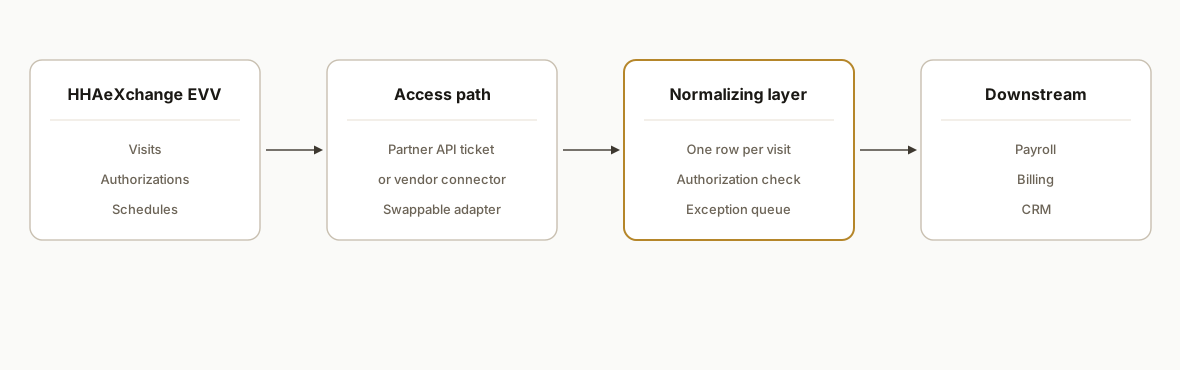
- Source adapter: One module reads visits, authorizations and schedules from whichever path you have. It is the only part that knows about HHAeXchange, so it can be swapped.
- Normalized store: A database table keyed on visit ID with a content hash. Replays and late edits update the same row instead of creating a duplicate.
- Authorization check: Each visit is matched to its authorization and flagged when hours or dates fall outside it.
- Downstream writers: Separate jobs for payroll, billing and CRM, each with its own retry and its own status column.
- Exception queue: Anything that fails validation lands in a review list for a person, not in a silent log.
Step-by-step: how to build it
Step 1: Confirm the access path
Before any code, find out which path you have. In the systems we ship, this decision sets the whole timeline. Open a ticket in the HHAeXchange Client Support Portal asking for integration access, and in parallel ask your payroll and billing vendors whether they already have a connector.
Access checklist
- State and payer: which EVV spec applies (some states use their own EDI specs)
- Ticket opened in Client Support Portal: integration API access
- Web Service API Guide received: yes/no
- Existing vendor connector available: payroll / billing / CRM
- Who owns scheduling: HHAeXchange or third-party software (never both)
The gotcha: Texas guidance says that if you schedule in third-party software you must not also create schedules in HHAeXchange. Settle this first or you build on duplicates.
Step 2: Define the normalized visit record
Use the Cures Act fields as the spine, then add what payroll and billing need.
CREATE TABLE visits (
  visit_id TEXT PRIMARY KEY,
  member_id TEXT NOT NULL,
  caregiver_id TEXT NOT NULL,
  service_type TEXT NOT NULL,
  visit_date DATE NOT NULL,
  start_ts TIMESTAMPTZ,
  end_ts TIMESTAMPTZ,
  location TEXT,
  auth_id TEXT,
  content_hash TEXT NOT NULL,
  payroll_status TEXT DEFAULT 'pending',
  billing_status TEXT DEFAULT 'pending',
  crm_status TEXT DEFAULT 'pending',
  updated_at TIMESTAMPTZ DEFAULT now()
);
The gotcha: visit maintenance edits change start and end times after the fact. The content hash is what tells you a row needs to be re-pushed.
Step 3: Build the source adapter
Write it behind an interface so the access path can change without touching the rest. Endpoint names, auth and rate limits come from the Web Service API Guide you receive, not from assumptions.
// adapter contract, implementation depends on the approved access path
async function fetchVisits(sinceIso) { /* returns normalized visits */ }
async function fetchAuthorizations(memberId) { /* returns auths */ }
The gotcha: if no API access is granted, the same contract can be fed by a vendor connector's output instead.
Step 4: Validate against authorizations
Flag visits that exceed authorized units or fall outside the authorization window before they reach billing.
function checkAuth(visit, auth) {
  const hours = (visit.end - visit.start) / 36e5;
  if (visit.date < auth.start || visit.date > auth.end) return 'outside_window';
  if (auth.usedHours + hours > auth.totalHours) return 'over_units';
  return 'ok';
}
The gotcha: authorizations are per payer and per service code, so match on both, not on member alone.
Step 5: Write to payroll
Build the pay lines per period: hours, pay code, overtime and adjustments. If HHAeXchange's own payroll export already covers your provider, use it and skip this writer; the vendor describes it as sending hours, pay codes, overtime, holiday pay and adjustments in a pre-configured format.
await upsertPayLine({ caregiverId, periodEnd, hours, payCode, key: visit.visit_id });The gotcha: key every write on the visit ID so a re-run replaces a line instead of adding one.
Step 6: Write billing and CRM updates
Billing gets claim or invoice lines for visits that passed the authorization check. The CRM gets a last-visit date and a flag when a client is nearing authorization exhaustion, so a coordinator can request a reauthorization.
if (check === 'ok') await createInvoiceLine(visit);
await crm.updateContact(visit.memberId, { lastVisit: visit.date, authRemaining });
The gotcha: we found no official HHAeXchange documentation of CRM integration, so treat CRM as a custom write from your normalized store, not a vendor feature.
Step 7: Add the exception queue and monitoring
Surface failed validations, rejected writes and visits stuck in pending beyond a threshold.
SELECT visit_id FROM visits
WHERE payroll_status='pending' AND updated_at < now() - interval '2 days';
The gotcha: a quiet failure at payroll is worse than a loud one, so alert on age, not only on errors.
Where it gets complicated
Access is gated, not self-serve. The integration API is reached through a support ticket and a Web Service API Guide. Base URL, auth and rate limits are unconfirmed publicly, so we do not scope a fixed build until we have that guide in hand.
State specs differ. Illinois, for example, uses its own EDI specs that must be reviewed and attested, with setup and testing done with the HHAX integration team. A build that works in one state is not automatically valid in another.
Duplicate scheduling. Texas states that if you schedule in third-party software, you do not also create schedules in HHAeXchange. A bridge that writes schedules both ways creates exactly that duplicate.
Visit maintenance stays in the portal. In Texas, agencies still handle visit maintenance, EVV Transaction Manager tasks and aggregator rejections in the HHAeXchange portal. Automation reduces the volume but does not remove that work.
Vendor connectors are limited. One vendor's HHAeXchange integration was listed for only three states and needs a client ID and secret. Check your state before you count on one.
Billing versus payroll ownership. Texas guidance places billing and payroll tasks in the third-party software, so decide which system is the source of truth for each before wiring writers.
What this actually changes
We have not shipped this specific HHAeXchange bridge for a named customer, so we do not quote results here. The structural change is that a visit is entered once at the point of care and reaches pay and claim lines through validated jobs. The Cures Act fields are already captured at the visit, so the downstream systems do not need a second data entry pass. The work that remains for staff is the exception queue: visits that fail an authorization check or need maintenance.
Frequently asked questions
Does HHAeXchange have a public API?
Not a public, self-serve one that we could confirm. A partner-gated integration API exists, with operations for Service Provider, Member, Schedule, Visit and Authorization. Access starts with a ticket in the Client Support Portal, and the specification sits in a Web Service API Guide you receive after approval.
Can Zapier or Make connect to HHAeXchange?
We found no confirmed native listing for either, and no confirmed webhook or scheduled export to trigger from. Until a trigger source exists, a no-code tool has nothing to listen to. A vendor connector or the partner API is the more dependable route.
Can HHAeXchange export to payroll?
The vendor describes a payroll export that sends hours, pay codes, overtime, holiday pay and adjustments to the payroll provider in a pre-configured format. That is a vendor claim, so confirm with HHAeXchange that your payroll provider's format is supported before relying on it.
How do you avoid duplicate schedules?
Pick one system to own scheduling. Texas guidance says that if you schedule in third-party software, you must not also create schedules in HHAeXchange. Our bridge reads schedules from the owner and never writes them back to the other system.
How long does an HHAeXchange integration take?
The build is the shorter part. The timeline is driven by getting access approved, receiving the API guide, and state-specific testing with the HHAX integration team. We scope after the access path is known rather than quoting up front.
Can this sync authorizations to a CRM?
Yes as a custom build. The partner API lists Authorization operations, and we would store them, calculate remaining hours, and flag clients nearing exhaustion in your CRM. We found no official HHAeXchange CRM integration, so this is our write, not a vendor feature.
If you run a home care agency and the EVV-to-payroll-to-CRM handoff still depends on someone re-keying visits, our workflow automation work covers exactly this kind of bridge. A related pattern is in our WellSky and ClearCare integration guide. Book a 20 minute call and we will tell you which access path fits your state and payers.
Sources
Want us to build this for you?
Nine questions, about 90 seconds. You see the revenue it is costing you, then pick a time. No pitch.
See your options