
You stop retyping CRM orders by putting a small middleware service between the CRM and the legacy billing system, then writing through the most structured interface the billing system genuinely supports: an API, a vendor-permitted database connection, a file or email import, or, last, a screen bot. The CRM (Salesforce, HubSpot, Zoho or Dynamics) is rarely the constraint. The billing system's interface is, and you can find out which one you have in an afternoon with the checklist below, no vendor sales call needed.
Rex Automaton is an AI implementation agency that builds and runs this kind of system for mid market operators.
Order entry automation here means three things together: a closed-won record becomes a customer, order and invoice in the billing system exactly once, with the same data the CRM holds, and with a reconciliation log that proves it happened.
The problem it solves
Sales closes the order in the CRM. Someone in finance opens a second system, finds or creates the customer, retypes the line items and checks the total by eye. Nothing compares what sales closed with what finance invoiced, so a gap stays invisible until a customer disputes a bill. The design below targets that missing comparison, not just the keystrokes.
Which route you can use depends on what the old system allows. This is the decision table we start every scoping conversation with. Cost, speed and risk are relative, not quotes, because they swing with the product and the order volume.
| Route | What you need from the billing system | Relative build cost | Speed of sync | Main risk |
|---|---|---|---|---|
| API | Documented, writable endpoints and credentials | Lowest when the API covers your objects | Near real time | API covers reads but not the write you need |
| Direct database | Vendor permits access; read-only is the safe default | Medium, plus schema mapping | Fast reads, writes are discouraged | Schema changes without notice and writes can bypass business rules |
| File or email import | A documented import format or scheduled import job | Low to medium | Batch (hourly or nightly) | Schema drift, silent parse errors, missing files, no acknowledgment |
| Screen automation (RPA) | Only a login and a stable user interface | Medium, with ongoing upkeep | Slowest, one order at a time | Breaks when the screens change |
The order of preference is the same as the order of the table. Use the most structured interface the vendor genuinely supports, and fall back only when it does not.
What automatic invoicing is worth
Move the sliders to your own numbers. The defaults are only an example business, not client data.
Your own estimate. A job that creates its own invoice cannot be forgotten, but a wrong rate can still slip through.
Revenue billed each year that slips through today
$40,320
400 a month × $350 × 3% leaked × 80% closed × 12 months
- Staff cost of doing it by hand each year
- $10,920
- 6 hrs a week × $35/hr × 52 weeks
- Hours handed to the system each month
- 26 hrs
- 6 hrs a week × 52 ÷ 12
Which CRM is the order coming from?
Any of the four works as a source, because each can fire on a closed-won event. The decision that matters is which event finance treats as final, because that event becomes the trigger and everything after it is hard to undo. A stage change is simplest but reps can move it back. A signed quote carries the line items but can be edited afterwards. A paid deposit delays billing until money moves. Pick one and write down the reversal rule before building.
If the billing system is a database or an OData-capable source, Salesforce also offers Salesforce Connect, which maps data tables in external systems to external objects in your org. That helps for looking up customers and prices from the billing side. It is not a substitute for a controlled order write.
For a worked example of the Salesforce side with a field-service billing system, see our guide to SedonaOffice and Salesforce order to billing sync.
What is the billing system called, and how old is it?
Buyers most often search for SedonaOffice, Dynamics GP, SYSPRO, QuickBooks Desktop and Sage 100. Of those, we will only state facts about QuickBooks Desktop here. For SedonaOffice, Dynamics GP, SYSPRO and Sage 100 we will not claim anything until we have read the vendor documentation for your version and modules.
QuickBooks Desktop has a documented route. Intuit's SDK exchanges messages with QuickBooks Desktop in qbXML, a version of XML, and the Desktop SDK components include the qbXML Validator and the Web Connector Programmer's Guide. So an old desktop package can still have a proper, supported write path.
For the rest, age and name tell you little. Interface access is often tied to a license tier or add-on, so the useful question for your vendor is what your edition includes.
Does it have an API, database access, or only screens?
This is the question the whole project turns on, and you can answer it yourself in an afternoon. Check in this order:
- API documentation: Does the vendor publish endpoints that can create customers and orders, not just read them?
- Import and export features: Does the system have scheduled imports, a documented import template, or an email or file intake?
- Database access the vendor permits: Is a connection allowed under your support agreement, and is it read-only?
- Screens only: If none of the above exist, a screen bot is the remaining option.
Middleware can sit between the CRM and the billing system in any of these cases, holding the mapping, retries and logs so neither side has to change.
How the automation works
The shape is the same whichever route the billing system allows. The CRM fires on the closed event, middleware owns the field mapping, the idempotency key and the retries, a swappable adapter writes to the billing system, and a reconciliation job compares what was sold with what was invoiced.
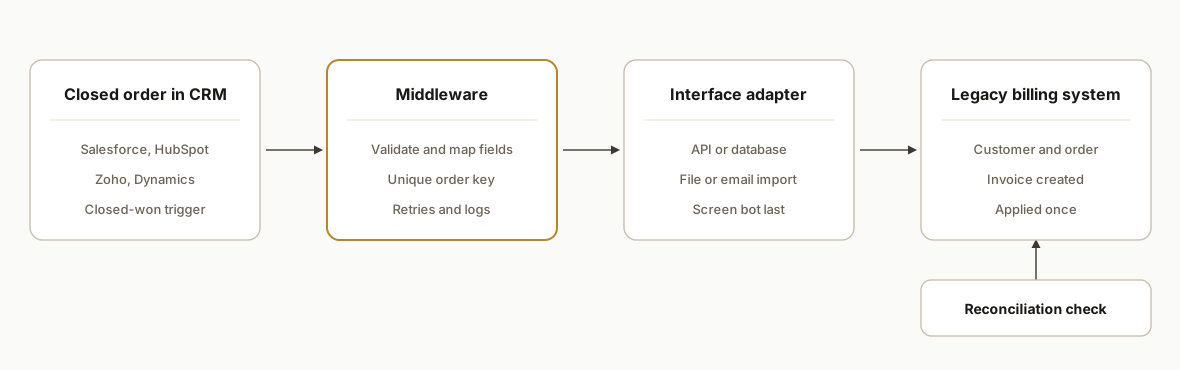
Two choices carry the design. All business rules live in the middleware, not in the CRM or the billing system, so a file drop can become an API later by replacing only the adapter. And reconciliation is a separate scheduled job, not part of the send, because a send that reports success is not evidence that the invoice exists.
Step-by-step: how to build it
Step 1: Inventory the interfaces
Run the afternoon checklist above and record the answers in one place, with the version and license tier next to them.
System: <billing system name and version>
API docs found: yes | no   (writes supported: yes | no | unknown)
Import feature: yes | no   (format: csv | xml | other)
Database access allowed by vendor: read-only | none | unknown
The gotcha: "unknown" is a valid answer. Mark it and ask the vendor in writing instead of guessing.
Step 2: Define the order contract
Agree on one minimal payload that finance signs off on: customer identifiers, line items, quantities, prices, tax and ship-to. Everything downstream maps from it. Settle the customer-matching rule in the contract itself, not in code.
order:
  crm_order_id: required
  customer_crm_id: required
  customer_billing_id: lookup
  on_missing_customer: human_queue   # or: create
  lines:
    - sku: required
      quantity: required
      unit_price: required
  tax_code: required
  closed_at: required
The gotcha: the CRM and the billing system rarely agree on customer names. Sending unmatched customers to a person is slower than auto-creating them, and cheaper than merging duplicate accounts later.
Step 3: Make every send idempotent
Retries are inevitable, so each order carries a stable key and the adapter refuses to write the same key twice.
import hashlib

def order_key(crm_order_id: str, version: int) -> str:
    return hashlib.sha256(f"{crm_order_id}:{version}".encode()).hexdigest()[:24]

def already_sent(ledger, key: str) -> bool:
    return key in ledger
The gotcha: amended orders. Version the key so a changed order updates or flags the invoice instead of creating a duplicate.
Step 4: Build the adapter for your route
For a file drop, write the file atomically and a checksum next to it so the importer never reads a half-written file.
import csv, hashlib, os

def write_batch(rows, path):
    tmp = path + ".tmp"
    with open(tmp, "w", newline="") as f:
        w = csv.writer(f)
        w.writerow(["order_id", "customer", "sku", "qty", "price"])
        w.writerows(rows)
    digest = hashlib.sha256(open(tmp, "rb").read()).hexdigest()
    os.replace(tmp, path)
    open(path + ".sha256", "w").write(digest)
For an API route the adapter makes a documented call instead. A screen bot is the last choice, used only when the first three routes are ruled out. Microsoft documents that desktop flows target UI elements rather than image recognition or absolute coordinates, which is steadier than click-by-pixel scripts. We found no independent reliability data for billing use, so we budget for monitoring and a manual fallback instead of promising uptime.
The gotcha: a file drop has no built-in acknowledgment, so you must build one (Step 5).
Step 5: Add acknowledgment and reconciliation
A sent order is not an applied order. Compare the two sides on a schedule and alert on any gap.
SELECT c.crm_order_id, c.total AS crm_total, b.total AS billing_total
FROM crm_orders c
LEFT JOIN billing_invoices b ON b.external_ref = c.crm_order_id
WHERE b.external_ref IS NULL OR b.total <> c.total;
The gotcha: if you only have read-only database access, this query is exactly the safe use of it. Reads for verification, a supported interface for writes.
Step 6: Alert on missing files and failures
If a batch is expected hourly, a 90 minute threshold gives one late run of slack before someone is paged. Each alert goes to a named person with the reason attached.
alerts:
  missing_batch_after_minutes: 90
  reconciliation_mismatch: notify_finance
  adapter_error: notify_owner_and_retry_3x
Where it gets complicated
A write that reports success may not have landed. In an order pipeline we built for BlackBoxMyCar on Make.com, a Data Store record write authored through the API could silently drop fields, so we moved the backup sink to a plain HTTP PUT and kept Google Sheets as the primary sink. The lesson carries straight to billing: never treat the adapter's success response as proof, and let the Step 5 reconciliation be the judge.
"Has an API" is not "can create an order." Confirm write support for the exact objects you need (customer, order, invoice) before you design around an API. Mark anything the vendor has not confirmed as unknown in the Step 1 inventory and get the answer in writing.
Amendments are where duplicates come from. The first send is easy. The trouble starts when the CRM order changes after it was sent. That is why the key in Step 3 carries a version, and why the rule for what happens to an already-invoiced order (update, credit, or flag to a human) must be agreed with finance before go-live, not discovered in production.
Direct database access is a verification tool, not a write path. Vendor schemas can change without notice and a direct insert skips the validation the application would have applied. We use read-only access for the reconciliation query and write through a supported interface.
Files have no receipt. A dropped file tells you nothing about whether the importer parsed it. Schema drift, silent parse errors and late files are the failure modes, which is why the checksum sidecar and the 90 minute missing-batch alert exist in the build rather than as later add-ons.
What this actually changes
Finance stops being the integration layer and starts reviewing exceptions: orders that failed validation, customers that did not match, totals that disagree.
We do not have a billing-system deployment to quote, so we are not giving a before and after number for one, and we have confirmed vendor facts only for QuickBooks Desktop. The closest real evidence is adjacent. For BlackBoxMyCar we built a Make.com scenario that watches Shopify orders, filters qualifying ones by postal code, excludes cancelled, refunded and pickup orders, and appends them to a Google Sheet with a backup write. We verified it end to end on three real orders, and it was live with no reported issues as of 2026-04-30. That is order capture into a sheet, not a billing write, but the filter, the primary plus backup sink and the verify-on-real-orders step are the same pieces this design uses.
We scope these projects after the Step 1 inventory, because the route you are allowed to use drives the cost more than the CRM does. In the first conversation we will tell you which route we think your system supports and which parts we could not confirm.
Frequently asked questions
Can we integrate QuickBooks Desktop without replacing it?
Intuit documents an SDK that exchanges messages with QuickBooks Desktop in qbXML, with a qbXML Validator and a Web Connector Programmer's Guide among its components. That gives a supported write path for an old desktop package. Whether it covers your exact objects is something we confirm against your version first.
What if my billing system is not QuickBooks Desktop?
We do not state API, import or database facts for SedonaOffice, Dynamics GP, SYSPRO or Sage 100 without reading your version's documentation. Bring the product name, version and license tier. Interface access is often tied to the edition, so the first answer comes from the vendor, in writing.
Can Salesforce Connect do the order write for me?
No. It maps data tables in external systems to external objects, which suits looking up customers and prices from the billing side. A controlled order write still needs middleware with an idempotency key, a mapping table and reconciliation, so we keep the two jobs separate.
Are the cost and timeline figures in vendor blogs reliable?
Treat them as directional. One vendor blog compares file-based and custom API integration with specific weeks and dollar ranges, but the vendor sells the work, so we do not reuse those numbers. Your cost depends on which route your system allows and how many order shapes you have.
What does a screen bot need from us that other routes do not?
A dedicated login, a stable screen layout and someone who will tell us before the billing application is upgraded. We also agree a manual fallback up front, because we found no independent reliability data for screen bots on billing systems and will not promise uptime.
If your team is retyping closed orders and you are not sure which route your system allows, our CRM automation services start with exactly that inventory. You can also run the qualification check first, read how the same pattern works for a field-service billing platform in SedonaOffice and Salesforce order to billing sync, or book a 20 minute call and bring the name and version of your billing system.
Sources
- 1.External Objectsdeveloper.salesforce.com
- 2.developer.intuit.comdeveloper.intuit.com
- 3.Desktop SDK componentsdeveloper.intuit.com
- 4.Automate using UI elementslearn.microsoft.com
Who would build this
Rex Automaton is an AI implementation agency with 250+ projects shipped since 2018, rated 4.9 from 33 reviews. Clients include Soft Pull Solutions, Capcon Networks, Iron Age Investments, IT360. You work directly with the people who build it.


Want this built around your systems?
Nine questions, about 90 seconds. You see the revenue it is costing you, then pick a time. No pitch.
See your optionsRather talk to a person first? Meet the team or tell us which system you run.