
A Salesforce to SedonaOffice sync turns a closed Salesforce opportunity into a SedonaOffice customer, site, system and recurring billing record without anyone re-keying the order, and it captures the customer's card as a Forte token so card data never lands in either system. This guide is for alarm dealers and medical alert (PERS) companies that sell in Salesforce and bill in SedonaOffice and already know they need a build. It covers what the SedonaOffice API path allows, where it gets gated, the custom integration we would build, and the failure modes we design against.
Order to billing sync, in this context, is the automated hand-off of a won sale from a CRM into the billing system of record, creating every record the billing team would otherwise enter by hand.
The problem it solves
In most alarm and PERS shops the sales team lives in Salesforce and the billing team lives in SedonaOffice. When a deal closes, someone re-enters the customer, the installation site, the monitored system, the monthly recurring charge and the payment method. That is five or more record types, typed twice, with a card or bank account number often passed around by email or phone, which is the part that creates real risk.
The options are not equal, and the SedonaOffice side is more constrained than most billing systems. Here is how the realistic paths compare.
| Option | What it can do | Main limit | Setup effort |
|---|---|---|---|
| Manual re-keying | Anything | Duplicate entry, typos, card data handled by staff | None, ongoing labor |
| Zapier or Make | Salesforce side triggers are easy | We found no native SedonaOffice connector, so you would need raw HTTP calls and a gated API anyway | Low to start, brittle in practice |
| Bold Group add-on modules | Stages, QuoteWerks, D-Tools, WeSuite are known integrations | None we found is a Salesforce connector | Vendor dependent |
| API 2.0 Limited | Connects to Sedona's own add-on modules | Does not support a third-party Salesforce sync | Not applicable |
| API 2.0 Full (SedonaCloud REST) | Third-party push and pull | Must be enabled through Bold Group, credentials issued by Bold Group Tech | Custom build required |
Our read is that a Salesforce sync means a custom build on the full API tier. We found no Salesforce connector in the sources we reviewed, so treat that as an inference to confirm with Bold Group, not a vendor statement.
What automatic invoicing is worth
Move the sliders to your own numbers. The defaults are only an example business, not client data.
Your own estimate. A job that creates its own invoice cannot be forgotten, but a wrong rate can still slip through.
Revenue billed each year that slips through today
$40,320
400 a month × $350 × 3% leaked × 80% closed × 12 months
- Staff cost of doing it by hand each year
- $10,920
- 6 hrs a week × $35/hr × 52 weeks
- Hours handed to the system each month
- 26 hrs
- 6 hrs a week × 52 ÷ 12
How the automation works
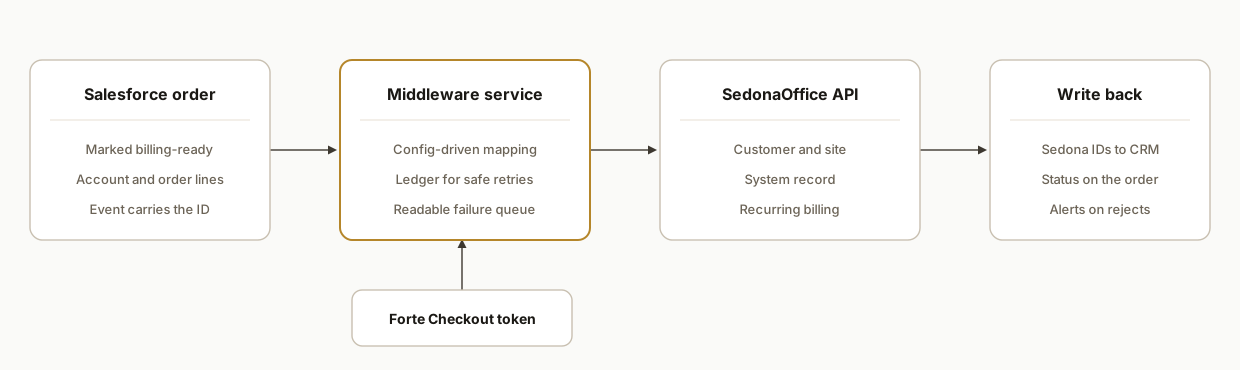
The architecture is a small middleware service between Salesforce and SedonaOffice. Salesforce emits an event when an opportunity or order reaches a closed stage. The service reads the order, maps it to SedonaOffice record types, creates them in dependency order, and writes the resulting SedonaOffice IDs back to Salesforce so the two systems stay linked.
- Trigger: A Salesforce platform event, flow or outbound message fires when an order is marked ready for billing. It carries the opportunity ID, not the whole payload, so the service always reads fresh data.
- Mapping layer: A config-driven map from Salesforce fields to customer, site, system and recurring records. Changing a plan code is a config edit, not a deploy.
- SedonaOffice client: A thin wrapper around the SedonaOffice REST API using the ClientID and client secret from Bold Group Tech, plus the security certificate file for hosted customers.
- Card capture path: The customer enters payment details in Forte Checkout. The service receives only the token and posts it to SedonaOffice.
- State ledger: A small database table keyed by Salesforce order ID that records each step's result, so a retry resumes rather than duplicates.
Step-by-step: how to build it
Step 1: Get API 2.0 Full enabled through Bold Group
Bold Group describes API 1.0 (the legacy SedonaAPI), API 2.0 Limited and API 2.0 Full. Limited only connects to Sedona's own add-on modules, so it will not work here. Full is sold as the SedonaOffice REST API and allows third-party push and pull. Setup uses a ClientID and client secret from Bold Group Tech, plus a certificate file for hosted customers. See the Bold Group integrations page and the SedonaAPI 2.0 pre-install checklist, though the first sits on an internal knowledge base and may not be public to you. We did not confirm the base URL, the exact auth flow or rate limits, so ask Bold Group for these in writing before scoping.
# Store in a secrets manager, never in the repo
SEDONA_CLIENT_ID=issued-by-bold-group-tech
SEDONA_CLIENT_SECRET=issued-by-bold-group-tech
SEDONA_CERT_PATH=/secrets/sedona-client.pfx
SEDONA_COMPANY_PREFIX=yourprefix
SEDONA_BASE_URL=confirm-with-bold-group
The key gotcha: the base URL and auth flow are unconfirmed, so build the client behind an interface and keep them in config.
Step 2: Define the Salesforce trigger
Use a record-triggered flow or platform event on the order or opportunity reaching your billing-ready stage. Send only an ID and an idempotency key to the service.
{
  "event": "order.ready_for_billing",
  "salesforceOrderId": "801XXXXXXXXXXXX",
  "idempotencyKey": "sf-801XXXXXXXXXXXX-v1"
}
The gotcha: fire on a status field, not on every edit, or a rep fixing a typo will re-trigger billing creation.
Step 3: Map Salesforce data to SedonaOffice records
Alarm and PERS billing separates the account holder, the physical site, the installed system and the recurring charge. Salesforce usually stores this as account, contact, order and order lines. Write the mapping as data.
customer:
  name: Account.Name
  billing_address: Account.BillingAddress
site:
  address: Order.ServiceAddress
system:
  type: OrderItem.Product2.SystemType
recurring:
  plan_code: OrderItem.Product2.BillingPlanCode
  amount: OrderItem.UnitPrice
  start_date: Order.ActivationDate
The gotcha: validate required fields in the middleware before calling Sedona, so a missing service address fails with a readable message instead of a partial create.
Step 4: Create records in dependency order
Create the customer first, then the site, then the system, then the recurring record. Save each returned ID to the ledger before the next call.
def sync_order(order):
    ledger = load_ledger(order.id)
    if not ledger.customer_id:
        ledger.customer_id = sedona.create_customer(order.customer)
        save(ledger)
    if not ledger.site_id:
        ledger.site_id = sedona.create_site(ledger.customer_id, order.site)
        save(ledger)
    # system and recurring follow the same resume-safe pattern
The gotcha: the ledger is what makes a retry safe. Without it, a timeout after the customer create produces a duplicate customer on retry.
Step 5: Capture the card as a Forte token
Per Sedona's documentation, no credit card or bank account information is held in the SedonaOffice database (EFT Payment Methods Overview). The documented pattern is to collect payment details in Forte Checkout, then use the Sedona API to add the payment method to the customer (how SedonaOffice gets ACH tokens). Documented paths include /{companyPrefix}/api/paymentmerchant/addcreditcard and /addbankaccount. Forte tokens can be permanent for recurring use or one-time use for card transactions only (Understanding Tokens), so request a permanent token for recurring billing.
def attach_payment(customer_id, forte_token):
    # path documented by Sedona; payload shape: confirm with Bold Group
    return sedona.post(
        f"/{PREFIX}/api/paymentmerchant/addcreditcard",
        {"customer": customer_id, "token": forte_token},
    )
The gotcha: Forte's customer token maps to Customer_Token and its payment token to ACH_Direct_Token in Sedona's data mapping, and Forte's consumer ID is user defined, so it may not equal the Sedona customer number. Store both IDs in your ledger.
Step 6: Create the recurring billing record
Post the recurring charge through POST /api/CustomerRecurring, linked to the customer, site and system created above.
{
  "customerId": "from-ledger",
  "siteId": "from-ledger",
  "planCode": "PERS-MONITOR-STD",
  "amount": 29.95,
  "startDate": "2026-11-01"
}
The field names above are illustrative, since we did not confirm the schema. The gotcha: in SedonaAPI 1.43.0, API-created customer recurrings are checked against the same rules as the app, so records that look fine in Salesforce can be rejected. Surface the rejection text to billing rather than swallowing it.
Step 7: Write back and alert
Write the SedonaOffice customer number and recurring ID to Salesforce, and post failures to a billing queue with the order ID and the rejection reason.
{
  "salesforceOrderId": "801XXXXXXXXXXXX",
  "sedonaCustomerNumber": "from-ledger",
  "syncStatus": "complete"
}
The gotcha: alert on partial states, such as customer created but recurring rejected, because those are the ones that silently under-bill.
Where it gets complicated
Access is gated, not self-serve. API 2.0 Full has to be enabled through Bold Group, and the Limited tier will not support a Salesforce sync. Start this request first, because it sets your timeline more than the code does.
Unconfirmed API details. We could not confirm the base URL, the auth flow beyond a client ID and secret, or rate limits. We would not commit to throughput numbers or retry budgets until Bold Group provides them.
Recurring validation rejects records. API-created recurrings face the same rules as the application. Plan codes, billing cycles and start dates that Salesforce allows may fail in Sedona, so mirror those rules in the middleware.
Token identity mismatches. Forte's user-defined consumer ID may not match the Sedona customer number. If you assume they match, payment methods attach to the wrong account or fail to attach.
Card capture sits outside both systems. Because card data never touches Sedona, you need a hosted Forte Checkout step in the sales flow, such as an emailed link, and a way to match the returned token to the right order.
No webhook or export path confirmed. We found no documented webhooks or scheduled export for SedonaOffice, so reverse sync, such as payment status back into Salesforce, may need polling or report files. Treat that as a scoped decision.
What this actually changes
The change is structural: the billing team stops being a typing pool and becomes an exception queue. Sales data is entered once, in Salesforce, and the same order creates every SedonaOffice record. Card details are handled by Forte alone, which shrinks the amount of sensitive data your staff and systems touch.
We have not shipped this exact Salesforce to SedonaOffice build for a customer, so we are not quoting outcomes. What we do build repeatedly is the pattern underneath it: an idempotent ledger-backed sync with readable failure queues. We built a similar approach for an AppFolio-driven reporting pipeline at Iron Age Investments, where deterministic handling of vendor API limits mattered more than the AI layer.
Frequently asked questions
Does SedonaOffice have an API for Salesforce?
Yes, but it is gated. Bold Group sells API 2.0 Full as the REST API for third-party push and pull, enabled through Bold Group. We found no native Salesforce connector, so a sync is a custom build on that tier.
Can Zapier or Make connect Salesforce to SedonaOffice?
We found no native SedonaOffice connector for either tool. You could call a REST API with raw HTTP steps, but you still need API 2.0 Full, and long multi-record, resume-safe flows are fragile in no-code tools.
How are credit cards stored when syncing?
They are not stored in SedonaOffice. Sedona's documentation says no card or bank account data is held in its database. The customer enters details in Forte Checkout, and the integration posts the resulting token to Sedona through the API.
What does a Salesforce to SedonaOffice integration cost and how long does it take?
We scope it after confirming API access, since the base URL, auth flow and schema affect effort. Bold Group enablement is usually the longest wait. Book a call and we will give a fixed quote once we see your record types and plan codes.
Can it sync payment status back to Salesforce?
Possibly, but we found no documented webhooks or export for SedonaOffice. Reverse sync would likely use polling or report files. We would confirm what Bold Group exposes before promising real-time updates.
Will it work for medical alert (PERS) companies?
The record model is the same: customer, site, system and recurring charge. PERS adds device and monitoring plan codes that you map in config. The sync does not depend on which monitoring type you sell.
If you sell in Salesforce and bill in SedonaOffice, this is a workflow automation problem with a gated API in the middle, and we can scope it quickly. For a related integration in the same industry, see our guide to automating alarm company billing. When you are ready, book a 20 minute call and we will tell you what your SedonaOffice setup allows.
Sources
- 1.Bold Group Integrationssecurityandalarminternalkb.knowledgeowl.com
- 2.Pre-install Checklist: SedonaAPI 2.0/SedonaWeb 2.0sedonaoffice.knowledgeowl.com
- 3.EFT Payment Methods Overviewsedonaoffice.knowledgeowl.com
- 4.How SedonaOffice gets ACH Tokens for Payment Methodssedonaoffice.knowledgeowl.com
- 5.Understanding Tokensdevelopers.forte.net
Want us to build this for you?
Nine questions, about 90 seconds. You see the revenue it is costing you, then pick a time. No pitch.
See your options