
Eaglesoft recall and reporting automation works by running a small Windows service inside the clinic network that either reads exported CSVs from Eaglesoft reports or, when approved, connects to the on-prem Innovation Connection API on the practice server. It normalizes due and overdue patients, syncs them to your CRM and messaging stack, and updates a reporting store. We deployed this pattern for multi-op clinics that needed external CRM and two-way messaging without changing their practice software.
Dental recall automation with Eaglesoft is: a LAN-safe bridge that turns your practice data into scheduled CRM tasks and compliant reminders without exposing the PMS to the public internet.
The problem it solves
A front desk team in a busy practice spends hours every week exporting lists, filtering who is due for recare, copy-pasting into a mailer, and marking recalls as contacted. The same patients slip through when CSVs are missed and lists go stale. Eaglesoft runs on a local server, so cloud tools cannot reach it directly and there is no official Zapier app to wire it up. You need a LAN-aware bridge that does not rely on a person remembering to export a file.
| What you do today | What the automation does |
|---|---|
| Manually run reports, click Save Data As, email or upload CSVs | A Windows service watches a folder for exports or calls the local API and ingests changes continuously |
| Sort and filter recall eligibility in Excel | A rules engine computes due and overdue based on hygiene interval, last completed codes, and scheduled next visit |
| Paste contacts into a mailer and hope no duplicates go out | Syncs to your CRM with dedupe and stages, fans out SMS and email via your messaging platform |
| Reconcile who booked, then backfill the PMS notes by hand | Writes a CRM activity log and updates the reporting store for dashboarding |
How the automation works
We install a lightweight on-prem service that speaks to Eaglesoft where it lives: on your server. It ingests data either from exported reports or, if you are an approved vendor under Patterson's Innovation Connection, via the local API on the practice host. It then computes recall eligibility and syncs downstream.
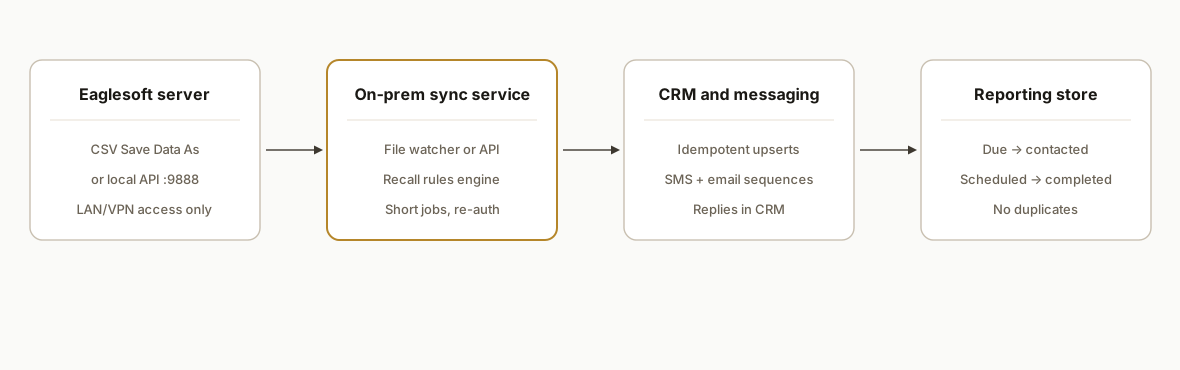
- Eaglesoft server (data source): Runs on your LAN. Two paths: CSV exports from report preview via Save Data As, or the on-prem Innovation Connection API on https://your-server:9888 with a vendor integrationKey and a Provider login to obtain a short-lived session token.
- On-prem sync service (accent): A Windows service with a file watcher and a LAN HTTP client. It keeps the job local, handles 15-minute session inactivity by chunking or re-auth, and pushes only the minimum fields out to your CRM and messenger.
- CRM and messaging: Any external CRM or campaign tool that accepts webhooks or API posts. Typical pairs are HubSpot, GoHighLevel, or a custom list in Sheets with Twilio or your platform's native SMS for reminders.
- Reporting store: A Postgres table or Google Sheet that tracks due, contacted, scheduled, and completed, so you can see lift by day and prevent duplicates.
Step-by-step: how to build it
1) Install a small Windows service on the clinic LAN
Run the sync where Eaglesoft lives. We ship it as a Node.js script registered under Task Scheduler to run every 10 minutes, which avoids long idle sessions.
# Install a scheduled task that runs the sync on a 10-minute cadence
$action = New-ScheduledTaskAction -Execute "C:\\Program Files\\nodejs\\node.exe" -Argument "C:\\eaglesoft-sync\\index.js"
$trigger = New-ScheduledTaskTrigger -Once -At (Get-Date).AddMinutes(1) -RepetitionInterval (New-TimeSpan -Minutes 10) -RepetitionDuration ([TimeSpan]::MaxValue)
Register-ScheduledTask -TaskName "EaglesoftSync" -Action $action -Trigger $trigger -RunLevel Highest -Description "Eaglesoft recall/CRM sync"
Key point: this runs inside the LAN, so no inbound ports are opened to the internet.
2) Ingest data: CSV file watcher or local API
Path A: CSV exports. Staff use Save Data As on the standard report and drop to a watched folder. The watcher ingests whenever a new file lands.
// index.js
import { watch } from "fs";
import { parse } from "csv-parse/sync";
import fs from "fs";

const INBOX = "C:/eaglesoft-exports";

watch(INBOX, { persistent: true }, (event, filename) => {
  if (!filename || !filename.endsWith('.csv')) return;
  const csv = fs.readFileSync(`${INBOX}/${filename}`, 'utf8');
  const rows = parse(csv, { columns: true, skip_empty_lines: true });
  handleRows(rows);
});
Path B: Innovation Connection API. When your vendor key and a Provider login are approved, the service connects to https://your-server:9888 from inside the LAN, obtains a session token, and pulls only what recall logic needs. Sessions expire after 15 minutes of inactivity, so we fetch in short chunks and re-authenticate as needed.
// apiClient.js: outline without endpoint specifics per vendor docs
import https from "https";

export async function withSession(run) {
  const token = await login(); // obtains a short-lived session token using integrationKey + Provider userId/password
  try { return await run(token); }
  catch (e) { if (isSessionExpired(e)) { const t2 = await login(); return await run(t2); } throw e; }
}

function login() {
  // Implement per Patterson Innovation Connection documentation
  // Returns a session token string to be sent as a header on subsequent calls
  return Promise.reject(new Error('Implement login per vendor docs'));
}
We shipped both paths. Clinics start on CSV, then move to the API when their vendor approval comes through.
3) Compute recall eligibility deterministically
We keep the rules off the LLM. Recall status comes from dates and codes, not guesses.
// recall.js
import dayjs from "dayjs";

export function computeRecallStatus(p) {
  // p: { patientId, lastHygieneDate, nextApptDate, intervalMonths }
  const last = p.lastHygieneDate ? dayjs(p.lastHygieneDate) : null;
  const next = p.nextApptDate ? dayjs(p.nextApptDate) : null;
  const due = last ? last.add(p.intervalMonths || 6, 'month') : null;

  if (next && next.isAfter(dayjs())) return { status: 'scheduled', dueDate: due?.toISOString() || null };
  if (!due) return { status: 'unknown', dueDate: null };
  if (due.isBefore(dayjs())) return { status: 'overdue', dueDate: due.toISOString() };
  if (due.diff(dayjs(), 'day') <= 30) return { status: 'due-soon', dueDate: due.toISOString() };
  return { status: 'not-due', dueDate: due.toISOString() };
}
We apply a second pass to exclude medically flagged patients or those without consent to message.
4) Sync to your CRM and prevent duplicates
We push idempotently with a stable external key per patient. CRM entries use a consistent stage and a single active task.
// crm.js
import fetch from "node-fetch";

export async function upsertLead(p) {
  const body = {
    external_key: `eaglesoft:${p.patientId}`,
    first_name: p.firstName,
    last_name: p.lastName,
    email: p.email,
    phone: p.phone,
    recall_status: p.recall.status,
    recall_due: p.recall.dueDate
  };
  const resp = await fetch(process.env.CRM_WEBHOOK_URL, {
    method: 'POST', headers: { 'Content-Type': 'application/json' }, body: JSON.stringify(body)
  });
  if (!resp.ok) throw new Error(`CRM error ${resp.status}`);
}
We log every push and skip if the record already exists with the same status and due date.
5) Trigger messaging from the CRM, not from the PMS
We keep messaging in the CRM or campaign tool. The sync only labels due or overdue. Your sequences handle timing and content.
// example: mark a contact for a recall campaign
await upsertLead({
  patientId: 12345,
  firstName: 'Jamie',
  lastName: 'Lee',
  email: 'jamie@example.com',
  phone: '+15551234567',
  recall: { status: 'overdue', dueDate: '2026-08-01' }
});
That label routes into a campaign that sends SMS and email with one click rescheduling links. Replies stay in your CRM.
6) Record outcomes for reporting
We ship a minimal ledger so you can see lift and avoid re-contacting.
-- Postgres table for recall campaign tracking
create table if not exists recall_events (
  id bigserial primary key,
  external_key text not null,
  status text not null, -- due-soon | overdue | scheduled | completed
  due_date date,
  first_seen_at timestamptz default now(),
  last_updated_at timestamptz default now()
);
create unique index on recall_events(external_key);
The dashboard shows total due, contacted, scheduled, and completed by day and operator.
Where it gets complicated
- Local-only API and network reachability: The Innovation Connection API runs on the practice's server at port 9888. External tools cannot reach it unless they are on the LAN or VPN. We run the sync on the LAN and post outward to the CRM.
- Short-lived sessions: The API's sessiontoken times out after 15 minutes of inactivity. We design short jobs, explicit re-auth, and avoid long-running pulls. For CSV paths we simply batch on file arrival.
- Connection levels and permissions: Method access depends on your integration level and the Provider account used. Plan recall logic around the fields your connection is allowed to access.
- No official Zapier/Make app: There is no public Eaglesoft app in Zapier or Make at the time of writing. Bridge via the on-prem API or exports, not a plug-and-play connector.
- CSV encoding and headers: Exports can carry inconsistent casing and locale formats. We normalize headers, parse dates with a single library, and reject files missing required columns.
What this actually changes
For a two-to-five operatory clinic we eliminated weekly CSV juggling and reduced duplicate recall sends by keeping a single external truth in the CRM. Staff booked from routed replies and the recall board finally reflected reality because updates flow one way into the dashboard instead of five tabs in Excel.
There is also a broader reason to run recall from a CRM: a Cochrane review found that text message reminders improved attendance across healthcare settings compared with no reminders. Source: https://www.cochranelibrary.com/cdsr/doi/10.1002/14651858.CD007458.pub2/full
Frequently asked questions
Does Eaglesoft have an official API?
Yes: Patterson offers an on-prem Innovation Connection API that runs on the clinic's server. You authenticate with a vendor-issued integrationKey and a valid Eaglesoft Provider login to get a short-lived sessiontoken. It is not a public cloud API and you reach it on the LAN or VPN.
Is there a Zapier or Make app for Eaglesoft?
We did not find an official Eaglesoft app in either directory. In practice you integrate by running a LAN-side service that uses the Innovation Connection API or by ingesting exported reports and then syncing to your CRM and messenger.
Can this run in near real time?
Yes within the constraints of a local system. Our deployments run on a short cadence. With CSV you ingest when staff export. With the local API you poll in frequent, short jobs and re-authenticate as needed because the session ends after 15 minutes of inactivity.
What do we need to start?
Windows admin access on the practice server or a LAN machine, a watched folder path for exports, and either vendor approval for Innovation Connection or a clear export convention. We also need API access to your CRM or a webhook target and your chosen messaging platform.
Can a non-technical owner set this up?
The day-to-day is simple, but the initial setup needs a technical install on the LAN and careful handling of the Innovation Connection credentials. We handle the install, permissioning, and a dry run before staff training.
We have shipped this LAN-safe recall bridge for dental clinics that wanted CRM-driven messaging without moving off Eaglesoft. If you want to see how this maps to your network and tools, read our related post on Dentrix recall automation at /blog/dentrix-api-integration-recall-automation, explore our CRM automations at /services#crm-automation, and book a working session at /book.
Want us to build this for you?
Nine questions, about 90 seconds. You see the hours it is costing you, then pick a time. No pitch.
Get your free assessment