
We built and shipped a production bridge that connects EZLynx to downstream CRMs using two lanes: the official EZLynx Zapier app for Sales Center objects in near real time, and scheduled Reports 5.0 CSV exports for the fields Zapier does not expose. It let an insurance agency move prospects, notes, and key report rows into their CRM without manual export steps.
Definition: an EZLynx Zapier integration is a workflow that uses the official EZLynx Zapier app for Sales Center triggers and actions, plus scheduled CSV exports from Reports 5.0 where fields fall outside Zapier's scope, to keep your CRM and automations current.
If you run EZLynx Sales Center and want leads and activities in your CRM with PII handled safely, this guide shows the exact pattern we run in production and where the limits are.
The problem it solves
Most agencies either hand-export EZLynx lists and paste them into a CRM, or they try to wire Zapier and hit field coverage limits. The manual process: export from Reports, save a CSV, upload to the CRM, fix column drift, and repeat. Notes and documents often never make it over, so producers work in two places and data diverges.
| Manual process | Automated with our bridge |
|---|---|
| Export a CSV from Reports 5.0 weekly or monthly and upload to a CRM | Sales Center changes stream into Zapier and upsert to the CRM continuously |
| Fix columns that change between report versions | Code step normalizes report rows before upsert |
| Re-enter notes and attachments manually | Notes flow through Zapier actions mapped to CRM activities |
| Chase down PII in spreadsheets | Outbound fields are limited by Zapier scope and our mapping redacts non-required PII |
| Missed follow-ups due to stale lists | Triggers run close to real time, reports fill the gaps on a schedule |
How the automation works
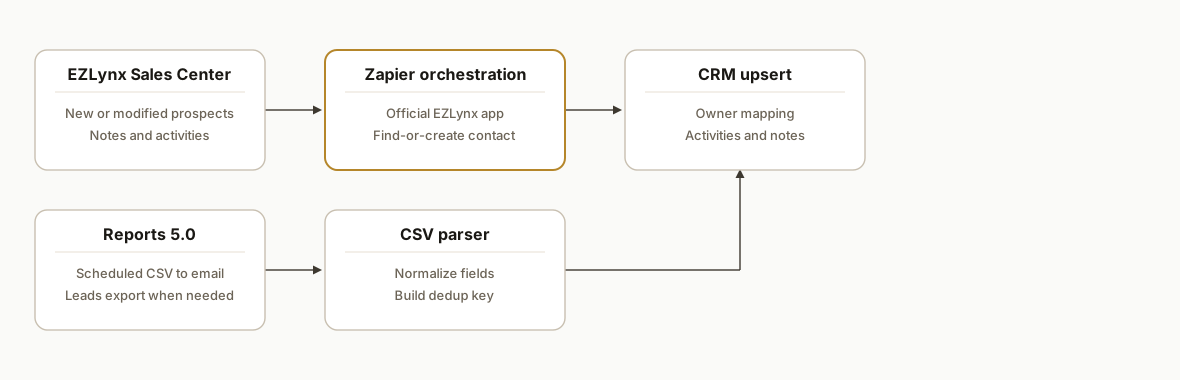
We keep two pipes in sync: a live pipe for Sales Center changes and a batch pipe for reports. The live pipe uses the official EZLynx Zapier app. It requires that you license Sales Center and ask EZLynx to enable the Zapier Product for your agency. The batch pipe relies on Reports 5.0 scheduled CSV or PDF and an email-driven capture flow for data Zapier does not expose.
- EZLynx Zapier app: The near real-time lane. Triggers like New or Modified Applicant, Prospect, or Opportunity fire and actions create or update records and notes. Scope is intentionally limited to Sales Center objects and a restricted field set.
- Reports 5.0 scheduling: The batch lane. We schedule CSV exports from Reports 5.0 to a target mailbox for data that is not available via the Zapier app. Admins can also export Sales Center leads to CSV when needed.
- Parsing and normalization: A Code by Zapier step cleans and normalizes CSV rows before upserting to the CRM. Common fixes include date formats and owner mapping.
- CRM upsert pattern: Find-or-create per email and agency key. We use a search step before create to keep the flow idempotent.
- PII guardrails: We map only the minimal fields the CRM needs. Zapier's outbound field set from EZLynx is already conservative, which reduces exposure.
Step-by-step: how to build it
1) Enable the EZLynx Zapier Product and connect Zapier
Ask EZLynx support to enable the Zapier Product for your agency and confirm you have Sales Center licensed. In Zapier, search for EZLynx and connect your account following the on-screen flow. Without Sales Center and the product enablement, the app will not authenticate or list triggers.
Key gotcha: plan the rollout when producers are available to validate mappings. Sales Center field coverage is intentionally limited, so align expectations before switching off manual steps.
2) Create a New or Modified Prospect trigger and map to your CRM
Build a Zap using the EZLynx New or Modified Prospect trigger. Add a Find Contact step in your CRM, then an Update or Create Contact step. Map conservative fields only: name, email, phone, status, source, and producer.
Example field mapping logic in a simple formatter step:
# Code by Zapier (Python)
# input_data: first_name, last_name, email, phone, status, producer
full_name = f"{input_data['first_name']} {input_data['last_name']}".strip()
status = (input_data.get('status') or '').title()
producer = (input_data.get('producer') or '').strip()

return {
  'full_name': full_name,
  'email': (input_data.get('email') or '').lower(),
  'phone': input_data.get('phone'),
  'status': status,
  'owner': producer
}
Gotcha: avoid pushing sensitive fields not needed by the CRM. EZLynx's Zapier surface excludes many PII-heavy fields by design, which helps here.
3) Flow notes and activities using EZLynx actions
Add a second Zap for New or Modified Note in Sales Center. Map it to a CRM activity tied to the contact you found in Step 2. Use a robust contact lookup by email and a fallback search by name if email is missing.
Example simple fallback combinator:
# Code by Zapier (Python)
email = (input_data.get('email') or '').lower()
name = (input_data.get('name') or '')
query = email if email else name
return {'lookup_query': query}
Gotcha: keep this path idempotent. Use a note external ID or a hash of timestamp+author+first 40 chars to prevent duplicates when notes are edited.
4) Bridge gaps with Reports 5.0 scheduled CSV to email
For policy or commission-adjacent fields not present in Zapier, schedule a CSV export in Reports 5.0 to a capture mailbox. In Zapier, use a Gmail New Attachment trigger, then a Code step to parse the CSV into rows and upsert through the same CRM mapping.
CSV parsing that survives quoted commas:
# Code by Zapier (Python)
import csv, io
csv_text = input_data['csv_text']  # pass attachment body from prior step
reader = csv.DictReader(io.StringIO(csv_text))
rows = []
for r in reader:
    rows.append({
      'policy_number': r.get('Policy Number','').strip(),
      'insured_name': r.get('Insured Name','').strip(),
      'effective_date': r.get('Effective Date','').strip(),
      'premium': r.get('Written Premium','').replace('$','').replace(',','').strip(),
      'email': (r.get('Email','') or '').lower()
    })
return {'rows': rows}
Gotcha: large or scheduled report runs can be blocked or fail due to attachment size. Split reports by producer or date range and schedule separately. If a single attachment is still too large, export manually for that run and resume the schedule afterward.
5) Upsert with a durable dedup key
Use a find-or-create pattern keyed on email plus an agency or account identifier. If email is missing, fall back to a normalized insured name plus policy number. Store the dedup key in the CRM to prevent double-creates when rows reappear.
Constructing a dedup key safely:
# Code by Zapier (Python)
import re
email = (input_data.get('email') or '').lower()
name = re.sub(r'\s+', ' ', (input_data.get('insured_name') or '').strip()).lower()
policy = (input_data.get('policy_number') or '').strip()
agency = (input_data.get('agency_id') or '').strip()
key = email or f"{name}|{policy}|{agency}"
return {'dedup_key': key}
Gotcha: normalize whitespace, strip punctuation where appropriate, and beware leading zeros in policy numbers.
6) Add monitoring and safe retries
Turn on Zapier notifications for halted runs. Add Filters to drop rows with missing minimal fields. For batch CSVs, log processing counts to a Slack channel so someone can spot sudden drops that imply a report change. If a report layout changes, adjust the DictReader header names in the Code step and redeploy.
Gotcha: keep an internal runbook with the exact report names and filters you scheduled. Reports 5.0 has a Test now button to validate the schedule and format before you set it live.
Where it gets complicated
- Sales Center licensing and enablement: You must both license Sales Center and have EZLynx enable the Zapier Product for your agency before the Zap works. We could not connect otherwise.
- Scope limits by design: The EZLynx Zapier app is focused on Sales Center objects and uses a conservative outbound field set to reduce PII exposure. Plan for a report-schedule lane for policy or commission-adjacent data.
- Report size and delivery: Large scheduled reports can fail or be blocked. We split schedules by producer, line, or date window, and we keep a manual-export fallback documented.
- Column drift in reports: When a report adds or renames a column, parsing breaks. We treat the Code step as a controlled schema adapter rather than mapping columns directly downstream.
- Owner and producer mapping: CRM owner names rarely match EZLynx producer names 1:1. Keep a small mapping table in your Zap or a shared spreadsheet lookup to translate roles.
What this actually changes
For the independent agency we implemented, Sales Center prospects and notes reached the CRM automatically and report rows that matter to producers arrived on a schedule. Manual CSV handling disappeared, and follow-ups no longer depended on someone running a report. The value was structural: a continuously updated pipeline rather than weekly data pushes.
Speed-to-lead matters. Companies that tried to contact potential customers within an hour of receiving a query were nearly seven times as likely to qualify the lead as those that tried even an hour later, and about 60 times as likely as companies that waited 24 hours or longer (Harvard Business Review: https://hbr.org/2011/03/the-short-life-of-online-sales-leads).
Frequently asked questions
Does EZLynx have a Zapier integration?
Yes. EZLynx has an official Zapier app covering Sales Center triggers and actions. You need two things enabled: a Sales Center license and the Zapier Product turned on for your agency. Without both, authentication and triggers will not work.
Does EZLynx have a public API we can call directly?
EZLynx references sending or receiving data via webservices in its Zapier guidance, but we have not seen public developer API docs. Our production builds lean on the official Zapier app plus scheduled Reports 5.0 CSV exports where Zapier does not cover a field.
Can we get policy or commission detail into the CRM?
Often not via the Zapier app, which is intentionally scoped to Sales Center objects and a restricted field set. We schedule Reports 5.0 CSV to a capture mailbox, parse it, and upsert key fields into the CRM on a daily or weekly cadence.
Is this real time?
Sales Center triggers in Zapier are near real time. Reports 5.0 schedules run on intervals. We usually run the live lane for lead and note updates and the scheduled lane nightly for supplemental data.
What does this cost to run monthly?
Zapier plan fees plus whatever CRM you use. There is no extra runtime fee inside EZLynx for the scheduled report emails in our builds. The primary cost is the initial implementation and ongoing maintenance when report schemas change.
Can a non-technical agency owner set this up?
You can connect the basic Zapier triggers and map simple fields. Bridging the gaps with scheduled reports, parsing CSVs safely, and keeping idempotent upserts is where most teams bring us in so it stays reliable over time.
If you want this wired into your CRM without spreadsheets in the loop, we have already shipped it. See our CRM automation services at /services#crm-automation, read how we handle downstream CRM routing in a related post at /blog/automate-gohighlevel-crm-make, and book a working session at /book.
Want us to build this for you?
Nine questions, about 90 seconds. You see the hours it is costing you, then pick a time. No pitch.
Get your free assessment