
We built a bi-directional Intercom and HubSpot sync that listens to Intercom webhooks in real time, routes qualified leads to the right HubSpot owner, and relies on HubSpot's native Gmail connection so the entire email thread logs to the contact timeline. It suits teams using Intercom for chat and HubSpot for pipeline.
Intercom to HubSpot lead routing automation is: Intercom webhooks plus a routing engine that upserts contacts and sets owners in HubSpot, while reps' Gmail replies log natively to HubSpot so no thread is lost.
The problem it solves
Most teams chat in Intercom and sell in HubSpot. Without a reliable bridge, new conversations sit unassigned, owners do not get notified, and Gmail threads live in inboxes instead of the CRM. When both tools' native syncs run together, duplicates and field conflicts appear.
| Process | Manual | Automated |
|---|---|---|
| New chat handling | A human copies details to HubSpot later | Intercom webhook fires instantly and creates or updates the contact in HubSpot |
| Lead assignment | Round-robin in a spreadsheet | Routing rules assign owners and set lifecycle stage automatically |
| Gmail thread visibility | Reps forward or paste notes | HubSpot's Gmail connection logs threads to the contact timeline |
| Backfills and QA | Occasional CSV merges | Scheduled exports and idempotent upserts reconcile nightly |
What instant follow up on every lead is worth
Move the sliders to your own numbers. The defaults are only an example business, not client data.
Your own estimate. Replies in the first few minutes convert far better than replies the next day.
Revenue from leads you stop losing each year
$144,000
150 a month × 12 × 40% × 10% × $2000
- Extra customers a year
- 72
- 150 × 12 × 40% × 10%
How the automation works
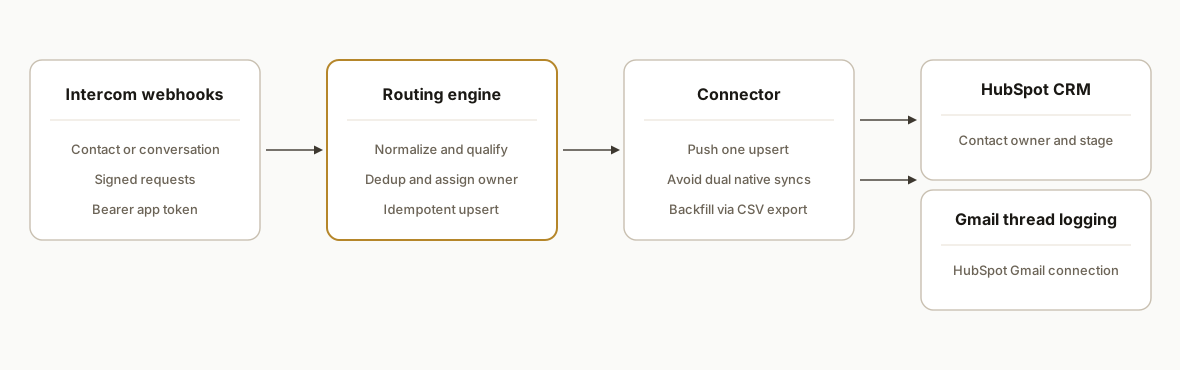
We subscribe to Intercom webhooks. A routing service qualifies the lead, dedupes by keys, and sends a single upsert to HubSpot via your chosen connector. We avoid running overlapping native syncs that create duplicates. Reps reply from Gmail with HubSpot's connection enabled, so every email logs back to the HubSpot contact automatically.
- Intercom webhooks: Intercom sends signed notifications for events like contact created or conversation received. We authenticate with Bearer tokens on setup and verify signatures on receipt. Source: Intercom developer docs.
- Routing engine: Applies routing criteria, ownership rules, and idempotency. It only emits one create or update per unique contact key to prevent duplicates.
- HubSpot contact upsert: We push one consistent payload into HubSpot using your preferred connector path. We do not run Intercom's HubSpot app in parallel with HubSpot's Data Sync to avoid conflicts.
- Gmail thread logging: HubSpot's native Gmail connection or Chrome extension logs sent emails to the CRM timeline. Source: HubSpot knowledge base.
- Backfill and QA: Intercom CSV exports reconcile nightly and repair any missed webhooks without manual merges.
Step-by-step: how to build it
1) Create an Intercom private app and gather credentials
Create a private app in Intercom. Use its access token to call the Intercom API and to subscribe to webhooks. Intercom uses Authorization: Bearer tokens and the base URL https://api.intercom.io.
# Store your Intercom token as an environment variable
export INTERCOM_TOKEN="icpat_..."
Key gotcha: treat the token as secret and rotate it using Intercom's app settings. Use a separate staging app for non-production tests.
2) Expose a verified webhook endpoint for Intercom
Expose a POST endpoint that returns 2xx fast. Read the signature header and verify it against your stored secret per the Intercom webhooks guide.
// server/webhooks.js
import express from "express";
import crypto from "crypto";

const app = express();
app.use(express.json({ type: "application/json" }));

function verifySignature(req) {
  const rawBody = JSON.stringify(req.body);
  const secret = process.env.INTERCOM_WEBHOOK_SECRET;
  const signatureHeader = req.get(process.env.INTERCOM_SIG_HEADER || "x-signature");
  if (!secret || !signatureHeader) return false;
  const hmac = crypto.createHmac("sha256", secret).update(rawBody).digest("hex");
  return crypto.timingSafeEqual(Buffer.from(hmac), Buffer.from(signatureHeader));
}

app.post("/webhooks/intercom", async (req, res) => {
  if (!verifySignature(req)) return res.status(401).end();
  queueLead(req.body); // Hand off to routing quickly
  res.status(202).end();
});

export default app;
Key gotcha: do not process heavy logic inline. Acknowledge quickly then hand work to a queue to avoid retries.
3) Normalize and qualify the lead payload
Translate Intercom's event into a normalized shape your routing engine understands. Keep a stable dedupe key and apply your qualification rules.
// lib/normalize.js
export function normalizeIntercomEvent(evt) {
  const contact = evt.data?.item || {};
  return {
    source: "intercom",
    externalId: contact.id,
    email: contact.email?.trim().toLowerCase() || null,
    name: [contact.name, contact.first_name, contact.last_name].filter(Boolean).join(" ").trim() || null,
    phone: contact.phone || null,
    intent: evt.topic || "contact.created",
    meta: { raw: evt }
  };
}

export function qualifyLead(n) {
  const disqual = !n.email || /@example\.com$/.test(n.email);
  return { ...n, qualified: !disqual };
}
Key gotcha: some Intercom contacts lack emails. Decide whether to open a placeholder in HubSpot or park the record until an address arrives.
4) Dedupe and assign an owner before upsert
Use an idempotency ledger to prevent double-creates and to apply assignment rules once.
// lib/router.js
import crypto from "crypto";
import { kv } from "@vercel/kv"; // or Redis/Postgres

function idKey(n) {
  const basis = n.email || `intercom:${n.externalId}`;
  return "lead:" + crypto.createHash("sha1").update(basis).digest("hex");
}

export async function routeLead(n) {
  if (!n.qualified) return { skipped: true };
  const key = idKey(n);
  const already = await kv.get(key);
  if (already) return { deduped: true };

  const owner = pickOwner(n.email);
  await kv.set(key, { owner, at: Date.now() });
  return { owner };
}

function pickOwner(email) {
  // Example round-robin by hash
  const owners = ["alice@company.com", "ben@company.com", "chris@company.com"];
  const i = Math.abs(hash(email)) % owners.length;
  return owners[i];
}
function hash(s) { return [...s].reduce((a,c)=>((a<<5)-a+c.charCodeAt(0))|0,0); }
Key gotcha: never rely on just name for dedupe. Use email first, then a stable external ID fallback.
5) Upsert into HubSpot through your connector of choice
Emit a single upsert call to your HubSpot connector. We typically call a Make.com webhook scenario that handles the HubSpot create or update so client-side credentials stay in the connector.
// lib/sink.js
import fetch from "node-fetch";

export async function pushToHubSpotViaMake(payload) {
  const url = process.env.MAKE_WEBHOOK_URL; // scenario handles HubSpot write
  const resp = await fetch(url, {
    method: "POST",
    headers: { "Content-Type": "application/json", Authorization: `Bearer ${process.env.MAKE_TOKEN}` },
    body: JSON.stringify({ action: "upsert_contact", payload })
  });
  if (!resp.ok) throw new Error(`Make push failed: ${resp.status}`);
}
Key gotcha: do not run Intercom's HubSpot app together with HubSpot's Data Sync. Running both can create duplicates and conflicts. Source: Intercom community thread.
6) Ensure Gmail threads log to HubSpot
Connect each rep's Gmail to HubSpot using HubSpot's native connection or Chrome extension so sent emails log to the CRM automatically.
Steps:
1) In HubSpot, connect your inbox: Settings -> General -> Email -> Connect personal email.
2) Install the HubSpot Sales Chrome extension to enable track and log in Gmail.
3) Confirm the Log checkbox is enabled on compose, and select the right contact and deal.
Key gotcha: Gmail thread logging is provided by HubSpot's native Gmail connection and extension, not by Intercom. Source: HubSpot knowledge base.
Where it gets complicated
Intercom HubSpot app limits. Intercom's HubSpot app does not sync Intercom conversation fields to HubSpot, and updating a lead's email in Intercom can create a new HubSpot contact. We avoid relying on that app for critical fields. Source: Intercom help article.
Do not run two syncs at once. Running HubSpot Data Sync and Intercom's HubSpot app together can create duplicates and overwrite conflicts. Pick one approach and keep it consistent. Source: Intercom community thread.
Webhook hygiene. Verify signatures, reply 2xx quickly, and make retries idempotent. Slow handlers cause backoffs and duplicate deliveries.
Identifier drift. Chat contacts often lack emails. Decide your fallback and when to upgrade a placeholder to a real contact once email arrives.
Backfill reality. Webhooks miss things during downtime. Intercom supports CSV exports for conversations and outbound messages that you can schedule, then reconcile nightly against the CRM. Source: Intercom export docs.
What this actually changes
In production this eliminated hand copy-paste from Intercom to HubSpot and made owner assignment immediate. Reps replied from Gmail and the full thread appeared on the HubSpot contact without extra clicks.
One hard number to anchor speed-to-lead value: firms that tried to contact leads within one hour were nearly seven times more likely to qualify the lead than those who waited longer, according to Harvard Business Review. Source: https://hbr.org/2011/03/the-short-life-of-online-sales-leads
Frequently asked questions
Does Intercom have an API for this?
Yes. Intercom exposes a public API at https://api.intercom.io and authenticates with Authorization: Bearer tokens. You can also implement OAuth for installed apps. Source: Intercom developer docs.
Can Intercom webhooks trigger real-time HubSpot updates?
Yes by using Intercom webhooks as the trigger and a routing service that pushes one upsert into HubSpot through your chosen connector. Intercom webhooks provide real-time events and signed requests. Source: Intercom webhooks docs.
How do you log Gmail email threads to HubSpot?
Use HubSpot's native Gmail connection or Chrome extension to track and log emails so messages appear on the contact timeline. Logging happens on the HubSpot side, not via Intercom. Source: HubSpot knowledge base.
Why not just turn on the Intercom HubSpot app?
It is useful but has limits. Conversation fields do not sync, updating a lead's email in Intercom can create a new HubSpot contact, and running it alongside HubSpot Data Sync can create duplicates. We prefer a single controlled path. Source: Intercom help and community.
How do you prevent duplicates between systems?
Establish one dedupe key order: email first, then a stable external ID. Keep an idempotency ledger so the same lead does not create two contacts on retries. Do not run overlapping native syncs in parallel.
What does this cost monthly?
Intercom and HubSpot provide the platform features. Your routing layer can run on a small serverless footprint. The main costs are engineering time to implement, plus any connector tooling like Make or Zapier if you choose those.
If you want this running in your stack, we built and shipped this pattern already. See our CRM work in Services, read how we handle Gmail logging across CRMs in Sync Gmail to HubSpot, GoHighLevel, or Pipedrive, then book a 20-minute call.
Sources
- 1.The Short Life of Online Sales Leadshbr.org
Want us to build this for you?
Nine questions, about 90 seconds. You see the revenue it is costing you, then pick a time. No pitch.
See your options