
A FieldEdge integration moves customers, work orders, and invoices out of FieldEdge into the CRM and accounting tools your office actually works in, so nobody re-keys a job after the tech closes it. This guide is for HVAC and plumbing contractors with a few trucks or more who already know they need the sync built. It covers what FieldEdge lets you get out, where access is gated, the integration we would build, and the failure modes we design against.
FieldEdge integration, defined: a one-way or two-way data flow that picks up a trigger in FieldEdge (a new customer, a completed work order, a posted invoice) and writes the matching record into another system, with matching rules so the same customer never appears twice.
The problem it solves
Most contractors on FieldEdge end up with three places that each hold part of the truth. FieldEdge holds the customer, the equipment, and the job. QuickBooks holds the money. A CRM or marketing tool holds the follow-up: maintenance agreement renewals, review asks, seasonal tune-up campaigns. The gaps between them get filled by someone exporting a list and pasting it somewhere on Friday afternoon.
The accounting gap is the one FieldEdge has addressed itself. Its own QuickBooks integration page says invoices appear in QuickBooks instantly with no batch delays, and that it works with both QuickBooks Desktop and QuickBooks Online. FieldEdge also markets it as the only real-time sync between QuickBooks and a field service management product, per its QuickBooks real-time integration hub (that is a vendor claim, so weigh it accordingly). The CRM gap is different: we found no official FieldEdge help-center page describing a CRM sync.
Here is how the realistic options compare, using only what we could verify:
| Option | What it covers | Limits we could verify | Setup effort |
|---|---|---|---|
| Native QuickBooks integration | Invoices to QuickBooks, Desktop or Online | Vendor-described; customer, payment and pricebook coverage is described by third parties, not confirmed on FieldEdge's page | Configuration inside FieldEdge |
| Manual per-tab exports | Customers, work orders (Dispatching tab), invoices | Per-tab and manual. A competitor's migration guide warns that unless filters are set to All, you may get only a partial range such as the last 6 months of invoices | Minutes per export, repeated forever |
| Zapier | Some third parties claim a FieldEdge link through Zapier | We found no official FieldEdge app on Zapier or Make. Treat as unconfirmed | Unknown until tested |
| Official FieldEdge Open API | Partner and private integrations, with a sandbox | Access runs through an onboarding request, so it is not self-serve. Rate limits and which work-order or invoice endpoints exist are unconfirmed | Weeks, including access approval |
| Unofficial browser-automation API (third-party) | Whatever the UI exposes | Can break when the FieldEdge UI changes | Fast to start, fragile to run |
The honest summary: accounting has a native path, and everything touching a CRM is either an export you schedule yourself or an API you have to be approved for.
What keeping your systems in sync is worth
Move the sliders to your own numbers. The defaults are only an example business, not client data.
Revenue from deals that stop slipping each year
$100,800
80 a month × 12 × 5% × 70% × $3000
- Deals kept a year
- 34
- 80 × 12 × 5% × 70%
- Staff cost of doing it by hand each year
- $9,100
- 5 hrs a week × $35/hr × 52 weeks
- Hours handed to the system each month
- 22 hrs
- 5 hrs a week × 52 ÷ 12
How the automation works
Our standard pattern for a system like this is an adapter architecture. The source side (how we get data out of FieldEdge) is isolated behind one interface, so the rest of the pipeline never knows whether the data came from the Open API or from a scheduled export. That matters here because the API route depends on approval and on endpoints we cannot yet confirm.
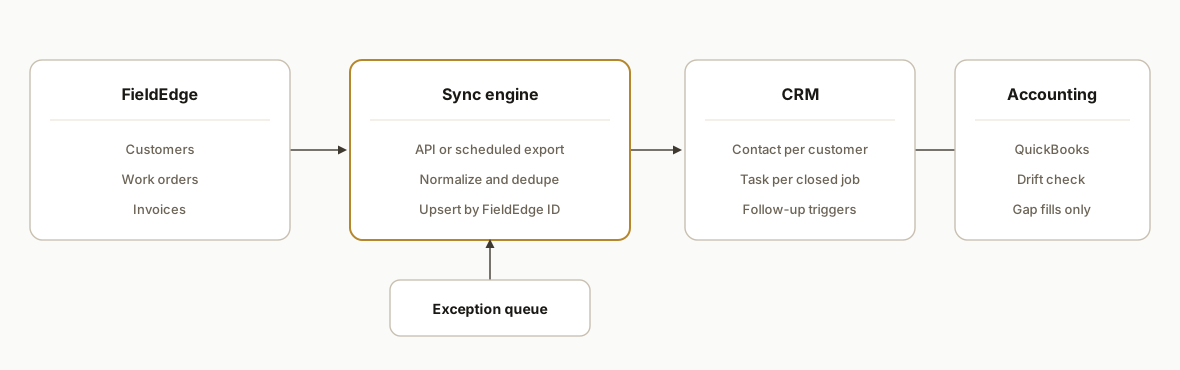
The components:
- Source adapter: Pulls customers, work orders, and invoices from FieldEdge. One implementation uses the Open API once access is granted. A fallback implementation ingests the per-tab exports on a schedule. Same output shape either way.
- Staging store: A small database table of every record seen, with its FieldEdge identifier, a content hash, and a last-synced timestamp. This is what makes reruns safe.
- Matching and dedupe layer: Decides whether an incoming customer is new or already in the CRM, using FieldEdge ID first, then normalized phone and service address.
- Destination writers: Upsert into the CRM (contact, plus a deal or task per job) and, where the native QuickBooks sync does not cover it, accounting.
- Exception queue: Records that fail validation or match ambiguously land in a review list instead of silently writing bad data.
Step-by-step: how to build it
Step 1: Decide the system of record per field
Before code, write down which system owns which field. FieldEdge should own service address, equipment, and job status. The CRM should own marketing consent and campaign tags. Accounting should own balances. Conflicts resolve by this table, not by whichever sync ran last.
fields:
  customer.name:        owner: fieldedge
  customer.phone:       owner: fieldedge
  customer.sms_consent: owner: crm
  job.status:           owner: fieldedge
  invoice.balance:      owner: accounting
Step 2: Request Open API access early
The developer portal describes onboarding through a request form, a sandbox, and a client-credentials token exchange that returns a Bearer token. Because approval gates everything, file the request on day one and build the export fallback in parallel. We would not promise a work-order endpoint to a client until the sandbox confirms it exists.
POST <token endpoint from partner auth guide>
Content-Type: application/x-www-form-urlencoded

grant_type=client_credentials&client_id=...&client_secret=...
Step 3: Build the export fallback with explicit date ranges
If the API is unavailable or incomplete, ingest the manual exports on a schedule. The practical trap, noted in ServiceTitan's FieldEdge export guide, is that filters must be set to All or you may receive only part of the history, such as the previous 6 months of invoices. Customers come from the Customers tab, work orders from Dispatching, invoices from Invoices. Our loader checks row counts against the previous run and alerts on a sudden drop.
def validate_export(rows, prev_count):
    if prev_count and len(rows) < prev_count * 0.9:
        raise ExportShrank(f"{len(rows)} rows vs {prev_count} last run")
Step 4: Normalize and hash every record
Normalize phone to E.164, uppercase and trim addresses, lowercase emails. Hash the normalized payload. A record is only written downstream when its hash changed.
import hashlib, json
def record_hash(rec: dict) -> str:
    return hashlib.sha256(json.dumps(rec, sort_keys=True).encode()).hexdigest()
Step 5: Match customers before writing
Match order: stored FieldEdge ID, then phone plus service address, then email. Anything that matches two CRM contacts goes to the exception queue.
def match(rec, crm):
    return (crm.by_external_id(rec["fe_id"])
         or crm.by_phone_and_address(rec["phone"], rec["addr"]))
Step 6: Upsert, never insert
Write with the FieldEdge ID as the external key so a rerun updates instead of duplicating. For each completed work order, create a CRM task or deal stage change that drives the follow-up: review request, maintenance agreement offer, or tune-up reminder.
Step 7: Reconcile against accounting nightly
Compare invoice totals per day between FieldEdge and QuickBooks. If the native sync is running, this is a read-only check that catches stalls. Third-party commentary says the QuickBooks sync tool must stay running and Desktop setups can stall needing manual reconciliation (that source promotes its own product, so verify in your account), which is exactly why we alarm on drift rather than assume it.
Where it gets complicated
API access is gated. The Open API is built around partner and private-integration onboarding. A private CRM sync therefore starts with an approval step you do not control, and the timeline depends on it.
Unconfirmed endpoints. We could not verify rate limits, the full base URL, or whether work-order and invoice endpoints exist. We design the adapter so that if they do not, the export path carries the load without rewriting downstream logic.
Partial exports look like success. An export with the wrong filter range returns fewer rows without erroring. Without a row-count check, the sync would quietly treat the missing customers as unchanged.
Duplicate customers. Households with multiple service locations, landlords with many properties, and commercial accounts with several contacts break naive phone matching. This is why address participates in the match key and ambiguous cases go to a human.
Unofficial API fragility. Browser-automation APIs sold by third parties can break when the vendor changes its UI. We would use one only as a stopgap with monitoring, never as the long-term foundation.
Two accounting paths. If native QuickBooks sync already handles invoices, a custom accounting writer risks double-posting. We map what the native sync owns first and build only the gaps.
What this actually changes
We have not run this specific FieldEdge build for a customer, so we will not quote a result. What we can say is structural. The recurring cost of a manual export-and-paste process is the hours spent, plus the errors, plus the follow-ups that never happen because the data was a week stale. A sync that writes every closed work order into the CRM within minutes turns review requests and renewal reminders into automatic by-products of closing a job. The accounting side already has a vendor-supported path, so the new value is almost entirely on the CRM and reporting side.
Frequently asked questions
Does FieldEdge have an API?
Yes, there is an official developer portal called FieldEdge Open API for partner and private integrations, with a sandbox. Access goes through an onboarding request, so it is not self-serve. We could not confirm rate limits or which work-order and invoice endpoints exist, so verify those in the sandbox.
Can I export customers and work orders from FieldEdge?
Yes, manually. According to ServiceTitan's migration guide, customers export from the Customers tab, work orders from Dispatching, and invoices from Invoices. Set filters to All first or you may get a partial range. Whether the files are CSV is unconfirmed, so check in your account.
Does FieldEdge sync with QuickBooks?
Yes. FieldEdge says invoices appear in QuickBooks instantly with no batch delays, and it supports both QuickBooks Desktop and Online. Exact coverage of payments and pricebook items is described by third parties, so confirm it with FieldEdge before relying on it.
Is there a FieldEdge Zapier or Make integration?
We found no official FieldEdge app on either platform. A couple of third parties claim a Zapier-based link, but that is unconfirmed. Test any such route against your real data before building on it.
How long does a FieldEdge to CRM sync take to build?
The build itself is typically a matter of weeks, but API approval can set the pace. A scheduled-export version can start sooner. We scope it on a call once we see which export or API route your account actually supports.
Can this prevent duplicate customers in the CRM?
Yes, by matching on the FieldEdge ID first, then phone plus service address, and upserting on an external key. Ambiguous matches go to a review queue rather than being written.
If you run HVAC or plumbing crews on FieldEdge and want customers and work orders flowing into your CRM and books without re-keying, see our CRM automation services. For a comparable closed-system pattern, read our guide to ServiceTitan API integration and CRM sync. When you are ready to scope it, book a 20 minute call.
Sources
- 1.quickbooks integrationfieldedge.com
- 2.The QuickBooks Real-time Integration Resource Hubfieldedge.com
- 3.Export your FieldEdge datahelp.servicetitan.com
Want us to build this for you?
Nine questions, about 90 seconds. You see the revenue it is costing you, then pick a time. No pitch.
See your options