
Forte token integration means your storefront, CRM and billing system pass around opaque Forte token IDs instead of card numbers, so a card captured once can be charged later by a system that never saw it. The pattern we build keeps raw card data inside Forte Checkout, stores only customer and paymethod tokens plus the location ID that owns them, and lets the billing job charge through the Forte REST API v3. It is written for operators who sell online, track customers in a CRM and bill on a schedule, and who want those three systems to agree on who has a card on file. This guide covers the token model, the build steps, and the places where it gets complicated, including several details Forte does not document publicly and that you must test yourself.
We write this as practitioners: this is how we build the pattern, not a claim about a specific customer deployment.
The problem it solves
A card captured at checkout is only useful to the billing team if the billing system can charge it later. Without tokens, that means someone re-keys the card, or the card number travels through the CRM and a spreadsheet, and every system it touches joins your PCI scope. A token fixes this: per Forte's token documentation, a token is a unique string ID that references stored customer information (a Wallet) or a customer's stored payment information such as a credit card or an echeck.
The hard part is not tokenizing. It is keeping three systems consistent about which token belongs to which customer, at which Forte location, and whether the card is still valid. Here are the real options for this system.
| Option | What it covers | Limits we know of | Fit |
|---|---|---|---|
| Forte Checkout alone | Hosted card capture, and token creation when save_token is set | Does not update your CRM or billing system on its own | Capture only |
| Forte Zapier app | Forte describes a CSG Forte Payments Zapier app, with a sale transaction as an example trigger | Token mapping, location handling and retries are yours to design; a native Make app is unconfirmed | Light, single-location flows |
| Dex exports | Transaction exports with daily and overall summaries across one or more locations | Export format and scheduled email delivery are unconfirmed | Reconciliation by humans |
| Custom build on REST API v3 plus webhooks | Token ledger, CRM write-back, scheduled charges, reconciliation | You own the code, the monitoring and the sandbox testing | Multi-system, multi-location operators |
If your flow is one storefront and one location with no CRM write-back, the Zapier app may be enough. Once tokens must be tied to CRM records and charged by a separate billing job, a small custom service is the sturdier choice.
What automatic invoicing is worth
Move the sliders to your own numbers. The defaults are only an example business, not client data.
Your own estimate. A job that creates its own invoice cannot be forgotten, but a wrong rate can still slip through.
Revenue billed each year that slips through today
$40,320
400 a month × $350 × 3% leaked × 80% closed × 12 months
- Staff cost of doing it by hand each year
- $10,920
- 6 hrs a week × $35/hr × 52 weeks
- Hours handed to the system each month
- 26 hrs
- 6 hrs a week × 52 ÷ 12
How the automation works
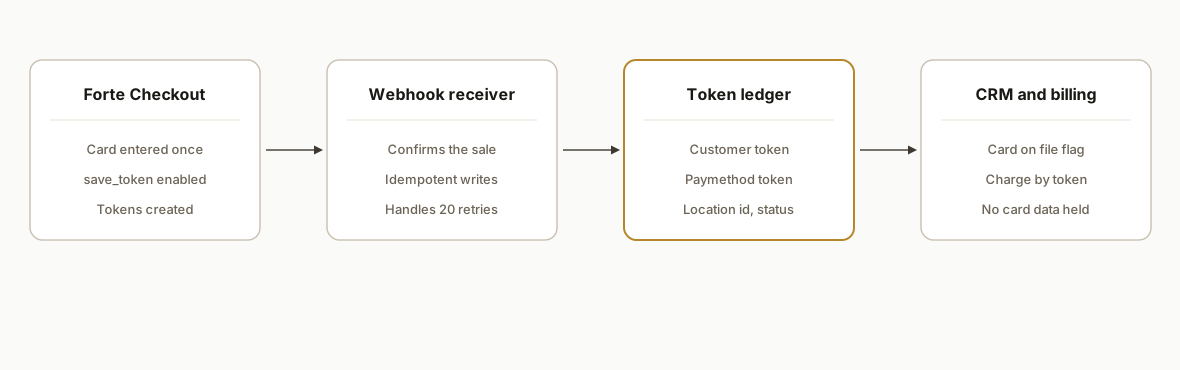
The system has one rule: card data never leaves Forte Checkout. Checkout creates the tokens, a webhook tells your service the transaction happened, a small token ledger records the mapping, and the CRM and billing system read from that ledger. Every later charge is an API call that names a token and a location, never a card.
- Forte Checkout: the hosted card capture on the storefront. With save_token enabled, Checkout saves a customer token and a payment method token when the transaction completes.
- Webhook receiver: a small endpoint that accepts Forte event notifications. Forte retries delivery up to 20 times, so the receiver must be idempotent.
- Token ledger: a table keyed by CRM contact, holding organization ID, location ID, customer token and paymethod token. It holds no card data, only references.
- CRM sync: writes a safe reference (token IDs, card status, location) back onto the contact so staff can see whether a card is on file without seeing the card.
- Billing runner: a scheduled job that charges through the REST API v3 using the ledger, and records success or failure back to the CRM.
Step-by-step: how to build it
Step 1: Get API credentials and lock the API version
Forte API v3 uses HTTP Basic authentication. The API Access ID is the username and the Secure Key is the password, both created in Dex under Developer, then API Credentials. v3 also expects an X-Forte-Auth-Organization-Id header. The sandbox base URL is . We could not confirm a production base URL from a Forte source, so take it from your Forte onboarding contact rather than from a third-party catalog.
curl -u "$FORTE_ACCESS_ID:$FORTE_SECURE_KEY" \
  -H "X-Forte-Auth-Organization-Id: org_$ORG_ID" \
  -H "Content-Type: application/json" \
  "https://sandbox.forte.net/api/v3/organizations/org_$ORG_ID/locations/loc_$LOC_ID/customers"
Gotcha: v2 and v3 differ in endpoints and headers. Pick v3 and keep every integration on it.
Step 2: Turn on token saving in Forte Checkout
Checkout saves tokens only when the button is configured to. The Forte guidance we worked from names save_token set to true in the button code. Confirm the exact attribute names against the current Checkout guide, because the example and the parameter table we reviewed disagreed on payment_token versus paymethod_token.
<script src="https://checkout.forte.net/v1/checkout.js"></script>
<button class="forte-checkout"
  api_access_id="YOUR_ACCESS_ID"
  location_id="loc_YOUR_LOCATION"
  save_token="true"
  callback="onForteResult">
  Pay now
</button>
Treat the script URL and attribute set above as a template to verify against the current guide, not as copy-paste truth. Gotcha: never trust the client-side callback alone to mark an order paid.
Step 3: Receive the webhook and confirm before fulfilling
Forte recommends confirming a transaction by webhook before fulfilling an order. Your receiver verifies the event, stores the raw payload, and returns quickly. Because delivery can retry up to 20 times, key every write on a unique event or transaction identifier.
app.post('/forte/webhook', async (req, res) => {
  const event = req.body;
  const eventKey = extractEventKey(event); // map from a real sandbox event
  const seen = await db.query('select 1 from forte_events where event_key = $1', [eventKey]);
  if (seen.rowCount === 0) {
    await db.query('insert into forte_events(event_key, payload) values ($1, $2)', [eventKey, event]);
    await queue.add('process-forte-event', { eventKey });
  }
  res.sendStatus(200);
});
We deliberately do not name payload fields here. Capture a real sandbox event first and map from that.
Step 4: Store tokens in a ledger that includes the location
The Forte REST API v3 documentation states that locations own all transaction data, including sensitive payment method data and tokens. So a token without its location ID is an incomplete reference.
create table forte_token_ledger (
  id bigserial primary key,
  crm_contact_id text not null,
  organization_id text not null,
  location_id text not null,
  customer_token text not null,
  paymethod_token text not null,
  status text not null default 'active',
  updated_at timestamptz not null default now(),
  unique (location_id, customer_token, paymethod_token)
);
Gotcha: never store a card number, expiry or CVV in this table, and never log full webhook payloads without checking them for sensitive data first.
Step 5: Write a safe reference back to the CRM
Staff need to know a card is on file, not what it is. Write the token IDs, the location, and a status field onto the CRM contact through the CRM's own API. Keep the ledger as the source of truth and treat the CRM as a display copy.
{
  "forte_customer_token": "cst_XXXXXXXX",
  "forte_location": "loc_XXXXXXXX",
  "card_on_file": true,
  "last_token_sync": "2026-10-25T09:00:00Z"
}
Gotcha: if the CRM is writable by many users, someone will paste a card number into a notes field. Add a field validation rule and a periodic scan.
Step 6: Charge from the billing runner using token paths
The billing job reads active ledger rows and calls the v3 API for the right location. Paymethod endpoints follow the location-scoped pattern, for example customers, then the customer token, then paymethods, then the paymethod token.
curl -u "$FORTE_ACCESS_ID:$FORTE_SECURE_KEY" \
  -H "X-Forte-Auth-Organization-Id: org_$ORG_ID" \
  "https://sandbox.forte.net/api/v3/organizations/org_$ORG_ID/locations/loc_$LOC_ID/customers/cst_$CUSTOMER/paymethods/mth_$PAYMETHOD"
Gotcha: rate limits are not stated in the sources we could verify, so build backoff and a concurrency cap, and ask Forte what your account allows.
Step 7: Reconcile nightly
Pull transactions, compare them to what the billing runner believes it charged, and flag mismatches. Dex provides transaction exports with daily and overall summaries across locations, which are useful for a human check. We have not confirmed the export format, so for automated reconciliation we prefer the API and webhook history.
Where it gets complicated
Location scoping is the main design constraint. Every token path includes a location ID, and locations own the tokens. Whether a token created at one location can be used at another is unconfirmed. Test it in the sandbox before you design a CRM-to-billing handoff that assumes it can. If it cannot, the ledger must allow one contact to hold a separate token set per location.
The client-side callback is not proof of payment. A customer can close the tab, lose connection, or tamper with the page. Fulfil orders from the confirmed webhook, and treat the callback as a UX hint only.
Tokenization narrows scope but does not erase compliance. The Forte Checkout material describes minimizing exposure to sensitive data, and merchants still complete an annual SAQ. We could not find a Forte source stating SAQ-A eligibility, so do not assume it. Ask your acquirer or QSA which questionnaire applies to your exact setup. The PCI Security Standards Council's tokenization guidance makes the same general point: tokenization solutions do not eliminate the need to maintain and validate PCI DSS compliance.
Duplicate webhooks will happen. With up to 20 retries, a slow or failing receiver can see the same event many times. Idempotency keys and a fast 200 response are not optional.
Parameter naming drift in Checkout docs. The button example and the parameter table we reviewed used different names for the payment method token parameter. Confirm against the live guide and a sandbox transaction before you write code that depends on it.
Tokens go stale. Cards expire and customers replace them. Your ledger needs a status column and a path for marking a paymethod inactive after a failed charge, with a CRM task for the account owner.
What this actually changes
The change is structural. The CRM and billing system stop being places where card data might leak, and become consumers of references. Staff can answer whether a customer has a card on file without opening a payment screen. Billing no longer waits on someone to re-collect a card for a recurring charge. Reconciliation becomes a comparison of two ledgers instead of a hunt through exports.
We have not attached a result number to this post because we are describing a build pattern, not a measured deployment. The value to model for your own business is the hours your team spends on card re-collection and reconciliation per month, and the cost of being wrong about PCI scope. A scoping call can put real figures on both.
Frequently asked questions
Does Forte have an API for storing and charging cards by token?
Yes. Forte has a REST API v3 with developer documentation, HTTP Basic authentication and location-scoped customer and paymethod endpoints. Customers carry cst_ tokens and payment methods carry mth_ tokens. Use the sandbox at for testing, and get the production base URL from your Forte contact.
Does using Forte tokens take my CRM out of PCI scope?
Not automatically. Tokens mean your CRM stores references instead of card numbers, which reduces what it touches, but tokenization does not eliminate your compliance obligations. Merchants still complete an annual SAQ, and we could not verify a Forte statement on SAQ-A eligibility. Confirm the right questionnaire with your acquirer or a QSA.
Can a token from one Forte location be used at another?
We could not confirm this. Every token path includes a location ID, and locations own the tokens, so assume a token is tied to its location until you prove otherwise in the sandbox. Design the ledger to store the location with every token so you can handle either answer.
Can I do this with Zapier or Make?
Forte describes a CSG Forte Payments Zapier app, with a sale transaction as an example trigger, which can cover simple flows. We found no native Make app. For token ledgers, multiple locations, retries and scheduled charges, a small custom service is usually easier to keep correct.
How should I confirm a payment before fulfilling an order?
Use the webhook. Forte recommends confirming a transaction by webhook before fulfilling an order, rather than trusting only the Checkout callback in the browser. Make the receiver idempotent, because Forte retries delivery up to 20 times, and fulfil only after the confirmed event is stored.
What does a build like this cost and how long does it take?
It depends on the number of locations, the CRM, and how much reconciliation you want automated. A single-location capture, ledger and write-back is a small build; multi-location handoff and scheduled billing add testing time. We scope it on a call and quote a fixed price before work starts.
If you run a storefront, a CRM and a separate billing system on Forte and want them to share tokens without widening PCI scope, our custom AI integration services cover exactly this kind of build. For a related payments pattern, see our guide to Stripe failed payment retry strategy. When you are ready to scope your own token flow, book a 20 minute call and we will map your locations, systems and compliance questions.
Sources
- 1.Understanding Tokensdevelopers.forte.net
- 2.Forte REST API v3developers.forte.net
Want us to build this for you?
Nine questions, about 90 seconds. You see the revenue it is costing you, then pick a time. No pitch.
See your options