
A ServiceTitan API integration pulls jobs, estimates and memberships out of ServiceTitan on a schedule and writes them into your CRM, your marketing tool and your review-request flow, so follow-up no longer depends on someone exporting a report. This guide is for home service contractors (HVAC, plumbing, electrical) who already run ServiceTitan and need its data to drive the rest of the stack. It covers what the API and export paths allow, the limits we design around, the build we would run, and where it gets complicated.
ServiceTitan integration is the practice of moving job, estimate, customer and membership records between ServiceTitan and other systems through its public API, its Zapier connector or file exports, so that downstream tools act on current data.
The problem it solves
ServiceTitan is the system of record for the work: who was booked, what was quoted, who bought a membership. The tools that run marketing, sales follow-up and reputation usually live somewhere else. Without a bridge, an unsold estimate sits untouched, a completed job never triggers a nurture sequence, and expiring memberships are found by hand.
There are four realistic paths. Here is how they compare for this system.
| Option | What it does | Limits | Setup effort |
|---|---|---|---|
| Native Reputation review requests | Sends review requests from ServiceTitan itself | Per the ServiceTitan Reputation FAQ, requests trigger on job completion and manual trigger. Technicians can also send one from the job in the mobile app (ServiceTitan Help Center). Nothing about estimates or memberships. | Configuration only |
| ServiceTitan Zapier integration | Triggers and actions on a defined set of records | ServiceTitan documents it; v3.0 adds Leads, Form Submissions and Custom Fields. It requires the Works or Legacy package, and one help page still calls it open beta. | Hours |
| SFTP CSV export | Scheduled flat files | Has to be set up through your CSM or Account Executive. Batch only. | Days, vendor dependent |
| Custom API integration | Polls the API and writes to any system | You own auth, paging, retries and rate limits | One to a few weeks depending on scope |
Scheduled report emails exist in the UI, but the attachment formats we found were PDF and XLSX, which are poor inputs for automation. We could not confirm a CSV email option, so we do not plan around one. We also could not confirm a Make connector, so we do not assume one.
What keeping your systems in sync is worth
Move the sliders to your own numbers. The defaults are only an example business, not client data.
Revenue from deals that stop slipping each year
$100,800
80 a month × 12 × 5% × 70% × $3000
- Deals kept a year
- 34
- 80 × 12 × 5% × 70%
- Staff cost of doing it by hand each year
- $9,100
- 5 hrs a week × $35/hr × 52 weeks
- Hours handed to the system each month
- 22 hrs
- 5 hrs a week × 52 ÷ 12
How the automation works
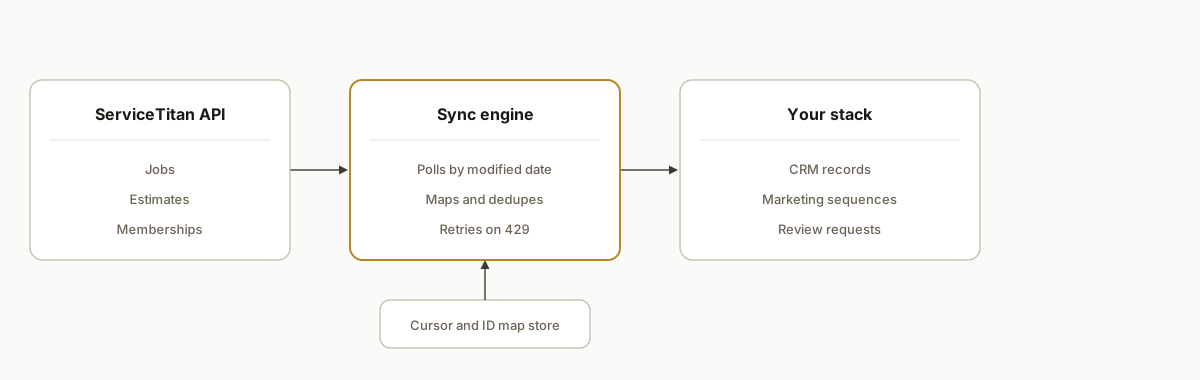
The pattern is a scheduled poller with a small state store in the middle. A worker authenticates to ServiceTitan, asks for records changed since the last successful run, normalizes them, and upserts them into the destination. Review requests and marketing triggers fire from the normalized events, not from ServiceTitan directly.
Auth and token manager: ServiceTitan uses OAuth 2.0 client credentials plus an ST-App-Key header on each call. Tokens are short-lived (a sample response shows 900 seconds), so the worker caches and refreshes them.
Poller: Per entity (jobs, estimates, memberships), it queries with a modified-since cursor, using the modifiedOnOrAfter filter. Webhooks are not something we can confirm as available to new integrations, so polling is our default.
State store: A small table holds the cursor per entity, the ServiceTitan ID to CRM ID map, and a hash of the last synced payload so unchanged records are skipped.
Event rules: Normalized changes become events: job completed, estimate open for N days, membership nearing expiry. Each event maps to an action in the CRM, the email platform or the review tool.
Destination writers: Idempotent upserts into the CRM, with a dead-letter queue for records that fail validation.
Step-by-step: how to build it
Step 1: Get credentials for the right environment
An admin generates a Client ID and Client Secret, and you need an app key. Credentials are per environment, so sandbox and production each need their own set. Build against the integration (sandbox) hosts first.
# Integration (sandbox) token request
curl -X POST https://auth-integration.servicetitan.io/connect/token \
  -d grant_type=client_credentials \
  -d client_id=$ST_CLIENT_ID \
  -d client_secret=$ST_CLIENT_SECRET
Production auth and API hostnames come from third-party documentation in our research (auth.servicetitan.io and api.servicetitan.io), so confirm them against your tenant's developer portal before go-live.
Step 2: Build a request wrapper
Every call needs the bearer token and the ST-App-Key header, and paths follow the pattern //v2/tenant//.... Put retry logic here, including honoring Retry-After on a 429.
import time, requests

def st_get(path, params, token, app_key, base):
    headers = {"Authorization": f"Bearer {token}", "ST-App-Key": app_key}
    for attempt in range(5):
        r = requests.get(f"{base}{path}", params=params, headers=headers, timeout=30)
        if r.status_code == 429:
            time.sleep(int(r.headers.get("Retry-After", "5")))
            continue
        r.raise_for_status()
        return r.json()
    raise RuntimeError("rate limited too long")
Step 3: Poll with a modified-since cursor
Store the cursor only after the whole page set is written, and subtract a small overlap window so a record modified mid-run is not missed.
cursor = state.get("jobs_cursor")
params = {"modifiedOnOrAfter": cursor, "pageSize": 200, "page": 1}
while True:
    data = st_get(f"/jpm/v2/tenant/{TENANT}/jobs", params, tok, KEY, BASE)
    write_batch(data["data"])
    if not data.get("hasMore"):
        break
    params["page"] += 1
state.set("jobs_cursor", run_started_at_minus_overlap)
Verify exact endpoint paths and response field names against the developer portal for your tenant. We treat the paths above as a template, not a contract.
Step 4: Map and upsert into the CRM
Key every record on the ServiceTitan ID. Match customers on a stable key (ServiceTitan customer ID first, then normalized phone or email as a fallback) so a returning customer does not become a duplicate contact.
{
  "match": ["st_customer_id", "email", "phone_e164"],
  "on_conflict": "update",
  "fields": {"last_job_date": "job.completedOn", "open_estimate_total": "estimate.total", "membership_status": "membership.status"}
}
Step 5: Turn changes into events
Rules sit in config, not code, so the office can adjust them.
rules:
  - when: estimate.status == open and age_days >= 3
    do: crm.start_sequence("estimate-followup")
  - when: job.status == completed
    do: reviews.queue_request(delay_hours=4)
  - when: membership.days_to_expiry <= 45
    do: crm.start_sequence("membership-renewal")
Step 6: Decide who sends review requests
If ServiceTitan Reputation already sends on job completion, do not send a second request. Use the integration for what it cannot do: skip customers with an open complaint, hold requests on jobs with a callback, or send based on a membership visit. Otherwise you double-ask the customer.
Step 7: Run in shadow mode, then monitor
For the first week, write to a staging view and compare counts against ServiceTitan reports. Alert on cursor lag, dead-letter growth and repeated 429s.
Where it gets complicated
Rate limits differ by API type. Our research found 60 calls per second per app per tenant for regular APIs, while reporting APIs allow one call per minute for the same report. Part of that comes from a third-party summary, so confirm it in your tenant. Pull transactional data from the regular endpoints and keep reporting calls for nightly reconciliation.
Webhooks are not a safe assumption. One third-party spec says V1 is closed to new subscriptions, and we found no official confirmation that V2 has launched. Design for polling, and treat webhooks as an upgrade if your account has them.
Sandbox and production are separate worlds. Credentials are per environment, and sandbox data will not look like your real jobs. Plan a real cutover test with a few live records.
Zapier is real but package gated. The connector needs the Works or Legacy package and is described as open beta on at least one page. It suits low-volume triggers; we would not carry a full backfill or membership sync through it.
Customer identity is messy. One household can have several locations and contacts. Decide whether your CRM contact maps to the customer, the location or the person before you write a single record.
Backfills compete with live syncs. A multi-year history load can eat your rate budget. Run it off-hours with its own throttle.
What this actually changes
We do not cite a deployed customer result here. What changes is structural: an open estimate or a finished job becomes a trigger instead of a line on a report. Reviews matter to that follow-up. According to BrightLocal's Local Consumer Review Survey 2026, 97% of consumers read reviews for local businesses, so a review request that goes out reliably after each completed job is worth wiring correctly. The value is consistency: nothing waits for someone to remember.
Typical scope and timing, as our estimate: a jobs and estimates sync to one CRM with review and follow-up rules is roughly one to two weeks of build, and adding memberships, a second destination and a backfill pushes it toward three to four weeks. Ongoing cost is the hosting for a small worker plus your tool subscriptions, and it depends on your volume and stack.
Frequently asked questions
Does ServiceTitan have a public API?
Yes. It uses OAuth 2.0 client credentials plus an ST-App-Key header, with short-lived tokens. Sandbox (integration) and production use separate hosts and separate credentials, which an admin generates. Paths follow a //v2/tenant// pattern.
Does ServiceTitan work with Zapier or Make?
ServiceTitan documents its own Zapier integration, and v3.0 adds Leads, Form Submissions and Custom Fields. It needs the Works or Legacy package. We could not confirm a Make connector, so we would use the API directly there.
Can ServiceTitan send data out automatically?
CSV export is available over SFTP and has to be set up through your CSM or Account Executive. Scheduled report emails exist, but the formats we found were PDF and XLSX. We could not confirm webhooks, so we poll the API.
What are the ServiceTitan API rate limits?
Our research found 60 calls per second per app per tenant for regular APIs, and one call per minute for the same report on reporting APIs. Throttled calls return a 429 with a Retry-After header. Part of this is from a third-party summary, so verify it.
Can ServiceTitan send review requests by itself?
Yes. Per the ServiceTitan Reputation FAQ, requests trigger on job completion and manual trigger, and technicians can send one from the job in the mobile app. A custom integration adds rules the native flow lacks.
Can a non-developer set this up?
The Zapier route can be configured by a technical office manager for simple triggers. A polling sync with deduplication, retries and a backfill is engineering work, and we would build it and hand over the rules as config.
If you run ServiceTitan and want jobs, estimates and memberships driving your CRM and follow-up, we cover this under CRM automation. For a comparable pattern on another field service system, see our Housecall Pro to GoHighLevel SMS build. When you are ready to scope yours, book a 20 minute call.
Sources
- 1.Reputation - FAQhelp.servicetitan.com
- 2.Request customer reviews from a job on ServiceTitan Mobilehelp.servicetitan.com
- 3.Local Consumer Review Survey 2026: Star Ratings Keep ...brightlocal.com
Want us to build this for you?
Nine questions, about 90 seconds. You see the revenue it is costing you, then pick a time. No pitch.
See your options