
We built a Gmail-to-CRM sync that watches your inbox and auto-creates or updates contacts and activities in HubSpot, GoHighLevel, Pipedrive, and Intercom. In production it routes by rules, deduplicates by email and Message-ID, and posts to the right owner so nothing falls through the cracks. This guide shows the exact integration patterns we ship.
Gmail-to-CRM sync automation is: a rules-driven pipeline that reads Gmail via API or a connector and writes structured leads and emails into your CRM in near real time.
The problem it solves
Most teams forward emails manually or paste leads into the CRM. Replies get lost in threads. New inquiries sit in a shared inbox without owner assignment. A routed sync removes the copy-paste work and standardizes how every lead and thread becomes a contact, an activity, and the right follow-up in the CRM.
| Manual workflow | Automated Gmail-to-CRM sync |
|---|---|
| Manually read inbox and decide if it is a lead | Rules match sender, subject and labels to detect leads and route them |
| Copy-paste name and email into the CRM | Auto-create or update the contact with normalized fields |
| Paste body into a note and link the thread | Store the email as an activity and attach thread metadata |
| Ask sales who owns it | Assign owner from routing rules by domain, intent or pipeline |
| Miss replies on nights and weekends | Push runs continuously and posts within minutes via Pub/Sub |
A fast response matters. Harvard Business Review reported that firms responding within five minutes are many times more likely to qualify a lead than those taking longer, and the odds drop sharply after that window (source: https://hbr.org/2011/03/the-short-life-of-online-sales-leads).
What instant follow up on every lead is worth
Move the sliders to your own numbers. The defaults are only an example business, not client data.
Your own estimate. Replies in the first few minutes convert far better than replies the next day.
Revenue from leads you stop losing each year
$144,000
150 a month × 12 × 40% × 10% × $2000
- Extra customers a year
- 72
- 150 × 12 × 40% × 10%
How the automation works
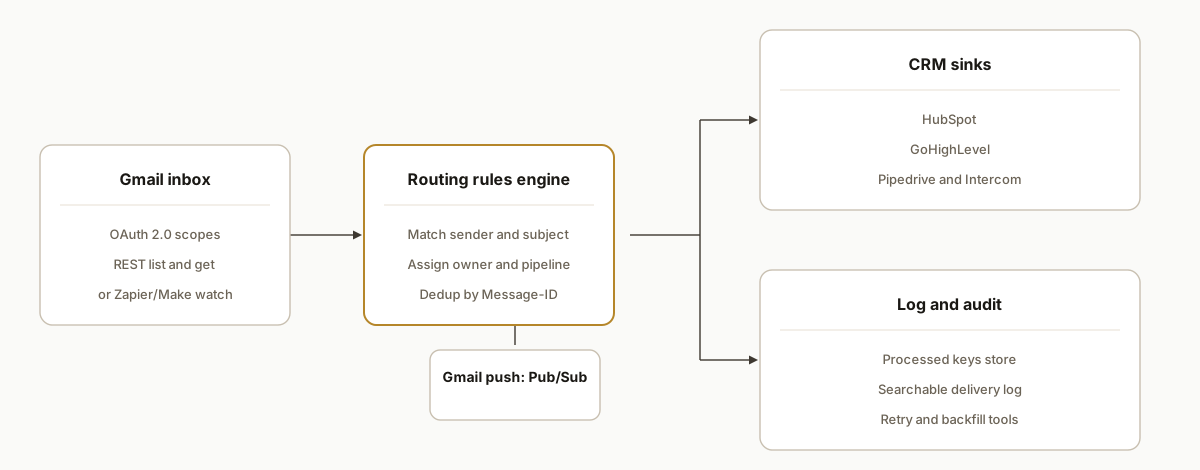
At the core: Gmail is the source, a rules engine classifies and routes, then CRM sinks receive creates and updates. There are two reliable ingestion paths. Push: Gmail API watch sends notifications through Google Cloud Pub/Sub. Polling: Zapier or Make watch your Gmail and hand off to CRM actions. We ship both depending on client constraints.
- Gmail API: OAuth 2.0 + REST: We authorize with Gmail scopes like gmail.readonly and fetch messages from
https://gmail.googleapis.com/gmail/v1/users/{userId}/.... OAuth 2.0 handles consent and tokens. - Push notifications via Pub/Sub: Gmail does not post to arbitrary webhooks. A watch registers a Google Cloud Pub/Sub topic and Gmail pushes change notifications there. Your worker then pulls the right messages.
- Routing rules engine: Simple expressions match sender domain, subject keywords, label patterns, and mailbox to decide which CRM, pipeline, and owner to use. We keep these editable.
- CRM sinks: We write to HubSpot, GoHighLevel, Pipedrive, or Intercom using each platform's documented create and update paths or their official Zapier/Make apps, depending on the client's stack and permissions.
- Deduplication and logging: We store a hash of Gmail Message-ID and thread ID. That lets us upsert instead of creating duplicates and gives support a searchable audit trail.
Step-by-step: how to build it
Step 1: Set up OAuth 2.0 and a minimal Gmail fetch
Authorize with Gmail scopes and call the Messages list endpoint. We keep the scope least-privileged for read-only ingestion.
// Minimal fetch using a Bearer token acquired via OAuth 2.0
const fetchInbox = async (accessToken, userId = 'me') => {
  const url = `https://gmail.googleapis.com/gmail/v1/users/${encodeURIComponent(userId)}/messages?labelIds=INBOX&q=newer_than:1d`;
  const res = await fetch(url, { headers: { Authorization: `Bearer ${accessToken}` } });
  if (!res.ok) throw new Error(`Gmail list failed: ${res.status}`);
  return res.json();
};
Gotcha: authentication is OAuth 2.0 with Gmail scopes, not an API key. Confirm you requested gmail.readonly or broader only if you need to send or modify.
Step 2: Register Gmail push notifications with Pub/Sub
Gmail push uses a watch tied to a Google Cloud Pub/Sub topic you own. We register it and renew on a schedule.
// Register a watch so Gmail pushes change notifications to your Pub/Sub topic
const startWatch = async (accessToken, topicName, userId = 'me') => {
  const url = `https://gmail.googleapis.com/gmail/v1/users/${encodeURIComponent(userId)}/watch`;
  const body = { topicName }; // e.g., projects/your-project/topics/gmail-inbox
  const res = await fetch(url, {
    method: 'POST',
    headers: {
      Authorization: `Bearer ${accessToken}`,
      'Content-Type': 'application/json'
    },
    body: JSON.stringify(body)
  });
  if (!res.ok) throw new Error(`Gmail watch failed: ${res.status}`);
  return res.json();
};
Gotcha: Gmail push is Pub/Sub based. It is not a generic webhook URL. Plan for Google Cloud project setup and IAM on the topic.
Step 3: Handle Pub/Sub and read the changed message
Your HTTPS endpoint receives Pub/Sub push requests. A simple worker fetches the message and expands headers and body for routing.
// Express-like handler for Pub/Sub push
app.post('/pubsub/gmail', async (req, res) => {
  const msg = req.body && req.body.message;
  if (!msg || !msg.data) return res.status(400).send('no message');
  // Your logic determines which messages to fetch. A common pattern is to re-list recent INBOX items.
  const { accessToken } = await getToken();
  const list = await fetchInbox(accessToken);
  for (const m of list.messages || []) {
    const full = await fetch(`https://gmail.googleapis.com/gmail/v1/users/me/messages/${m.id}?format=metadata&metadataHeaders=From&metadataHeaders=Subject`, {
      headers: { Authorization: `Bearer ${accessToken}` }
    }).then(r => r.json());
    await routeEmailToCRM(full);
  }
  res.status(204).end();
});
Gotcha: keep the worker idempotent. Pub/Sub may redeliver a message. Store processed hashes to avoid double-creating CRM activities.
Step 4: Normalize a lead from Gmail headers
We extract sender, subject, a preview, and a permalink to the message for reps.
const normalizeLead = (gmailMessage) => {
  const headers = Object.fromEntries((gmailMessage.payload.headers || []).map(h => [h.name, h.value]));
  const from = headers.From || '';
  const emailMatch = from.match(/<([^>]+)>/);
  const email = emailMatch ? emailMatch[1] : from;
  return {
    email,
    subject: headers.Subject || '',
    gmailId: gmailMessage.id
  };
};
Gotcha: threading and replies can share a subject. Use the Gmail message ID or Message-ID header for dedup, not subject alone.
Step 5: Apply routing rules and write to your CRM
We keep rules as data. That drives which CRM to call and how to assign owners.
const rules = [
  { test: m => m.subject.toLowerCase().includes('demo'), sink: 'hubspot', owner: 'east' },
  { test: m => m.email.endsWith('@targetdomain.com'), sink: 'pipedrive', owner: 'ae-2' },
  { test: m => /support|trial/i.test(m.subject), sink: 'intercom', owner: 'success' },
  { test: m => true, sink: 'gohighlevel', owner: 'roundrobin' }
];

async function routeEmailToCRM(message) {
  const lead = normalizeLead(message);
  const rule = rules.find(r => r.test(lead));
  if (!rule) return;
  const payload = { lead, owner: rule.owner, source: 'gmail' };
  // Bridge to your chosen sink: direct API or a Zapier/Make webhook step
  await fetch(process.env.ROUTER_URL, {
    method: 'POST', headers: { 'Content-Type': 'application/json' }, body: JSON.stringify({ sink: rule.sink, payload })
  });
}
Gotcha: when using Zapier or Make as the sink, use their official Gmail app on the front or an incoming webhook on the back. Both platforms offer a Gmail app and CRM apps you can chain.
Step 6: Polling path with Zapier or Make when push is not an option
When Pub/Sub is off the table, we ship a polling path. Zapier's Gmail app and Make's Gmail modules provide Watch, Search and Send actions. We add filters and dedup in the scenario before CRM creates.
Zapier: Trigger Gmail New Email in Label -> Filter -> Formatter -> CRM Create/Update
Make: Gmail Watch emails -> Router (rules) -> CRM modules -> Google Sheets Append (log)
Gotcha: vendor documentation notes polling and threading nuances and Gmail sending limits. Plan for the occasional duplicate trigger and protect downstream creates with a dedup key.
Where it gets complicated
- Push requires Pub/Sub: Gmail push notifications require Google Cloud Pub/Sub. This is extra infrastructure and auth, not a simple external webhook URL.
- Zapier polling nuance: Zapier's Gmail help docs call out threading and polling windows. Replies in the same thread may be captured differently across time windows. Add safeguards and logs.
- Gmail sending limits still apply: If you also send acknowledgements from Gmail in an automation, Gmail sending limits and too many simultaneous connections can affect automations. Keep volume-controlled.
- Forwarding is not an integration: Gmail can auto-forward all new mail or filtered subsets after verifying the destination, but it is prospective and not a webhook. Use the API with Pub/Sub for reliable push.
- Multiple forward destinations is unclear in user settings: Workspace admins can route mail broadly, but consumer-level multiple forward destinations from user settings is not confirmed. We avoid forwarding for multi-sink routing and stay on API or connectors.
What this actually changes
After we shipped this, inbound leads no longer waited in a shared inbox. Contacts and activities landed in the right CRM automatically, assigned by owner rules. Sales worked from a single source of truth, and support saw the same thread history. The structural change is consistent capture and ownership: fewer misses and a faster first response. Harvard Business Review quantified the speed-to-lead effect years ago, and the principle remains: responding within five minutes materially increases qualification odds (source: https://hbr.org/2011/03/the-short-life-of-online-sales-leads).
Frequently asked questions
Does Gmail have webhooks for new emails?
Not as a generic webhook. Gmail push uses a watch that delivers notifications to a Google Cloud Pub/Sub topic. Your worker then pulls the relevant messages using the Gmail API.
Can I do this without coding?
Yes. Zapier and Make have official Gmail apps with triggers like New Email or Watch emails and actions for common CRMs. You still need routing logic and dedup. For higher reliability and near real time, we use the Gmail API with Pub/Sub.
How do you prevent duplicates in the CRM?
Store a dedup key, typically the Gmail message ID or the Message-ID header, plus the mailbox label. On each run, upsert on that key instead of a blind create.
Can it run in real time?
The push pattern delivers notifications through Pub/Sub rather than polling, then the worker fetches messages with the Gmail API. The polling path with Zapier or Make introduces a time window by design and is not immediate.
What does this cost monthly?
The Gmail API itself is part of Google's Workspace platform. The main costs are your workflow platform subscription if you use Zapier or Make, and modest Google Cloud costs for Pub/Sub and the worker. We size the stack to client volume.
What do I need to start?
A Google Workspace or Gmail account with permission to authorize Gmail scopes, a destination CRM account, and either a Zapier or Make plan or a small Google Cloud project for Pub/Sub and a worker. We provide the routing rules template and the logging store.
If you want Gmail to stop being a black box and to have every lead and reply show up in your CRM with ownership, we have shipped this stack with both push and polling paths. See our broader CRM automation services, read how we automate CRM lead follow-up, then book a 20-minute call. We will map your Gmail and CRM to the exact pattern that fits.
Sources
- 1.The Short Life of Online Sales Leadshbr.org
Want us to build this for you?
Nine questions, about 90 seconds. You see the revenue it is costing you, then pick a time. No pitch.
See your options