
Eight a.m. You knock. Dark windows. Nobody's home.
You drove across town for this estimate. Your comfort advisor blocked the morning for it. The homeowner booked it two weeks ago, forgot, and is at work. Nobody texted them yesterday to say "see you at 8", because in Housecall Pro, nobody could. The software reminds customers about jobs. It does not remind them about estimates.
This guide is for HVAC owners on Housecall Pro who keep eating that wasted truck roll. It covers the exact gap (with Housecall Pro's own help center as the source for every claim), the four neighbouring gaps that make the obvious workarounds fail, and then every technical step to build a day before reminder for estimate visits and walkthroughs, the way we build it for contractors. You or your tech person can follow it start to finish.
Why don't Housecall Pro estimate visits get reminder texts?
Housecall Pro's SMS reminders only cover jobs. Its help center says it plainly: "SMS job reminders are currently only sent for jobs." Estimates are not jobs, so an estimate appointment never gets a day before text, no matter how you set up your notifications. And even for jobs, the reminders are switched off until you turn them on.
That is the first of five gaps. The other four are why the usual fixes do not close it.
Gap 1: reminders are for jobs only, and off by default. Under Settings, Notifications, Customer, the help center notes "SMS job reminders will be toggled off by default." Once on, they send at 9:00 AM one day before, and you can change the timing. None of it touches estimates (Housecall Pro help center). If you have never opened that screen, check it today: your jobs may be going out unreminded too.
Gap 2: Events have no customer. A lot of shops book walkthroughs and site visits as Events. An Event holds an employee, a name, a note and a location, but no customer, so there is no phone number to text. You cannot fix it later either: "Events can't be converted to jobs or estimates at this time" (Housecall Pro help center).
Gap 3: calendar sync runs one way. The built in calendar integration is Google Calendar, and "the integration only works one way" (Housecall Pro help center). We could not find a built in Outlook option on any of Housecall Pro's official pages. So pushing estimates to a calendar app and letting that app send reminders is not a clean path. One owner put it this way on the Zapier Community in January 2026: "I am using Housecall Pro and Outlook. It pulls the new jobs just fine, but doesn't pull the new estimates to put on my calendar" (Zapier Community).
Gap 4: estimate follow ups live in Pipeline, a paid add on. Automatic follow ups on estimates you already sent sit inside Pipeline (Housecall Pro help center). Pipeline's price is not published on the pricing page; you get it on a demo call (Housecall Pro pricing). And it chases quotes after the visit. It does not remind anyone before the visit.
Gap 5: the API and Zapier are MAX only. Any outside tool that reads your estimates needs the API or Zapier, and both are on the MAX plan, $299 a month billed annually or $329 month to month (Housecall Pro pricing). The help center confirms it: "API is available only to Pros on a MAX plan" (Housecall Pro help center).
| What you need | Housecall Pro on its own | With the reminder build |
|---|---|---|
| Day before text for an estimate visit | Not available, jobs only | Sent automatically at 2 PM the day before |
| Reminder for a walkthrough booked as an Event | Not possible, no customer on an Event | Walkthroughs booked as jobs are matched by keyword and reminded |
| Rescheduled estimate | Office has to remember to re-text | Reminder date moves with the appointment |
| Cancelled estimate | Office has to remember not to text | Reminder cancels itself on the next check |
| See and control every queued text | No single screen | Dashboard with cancel and send now |
What automatic reminders and rebooking are worth
Move the sliders to your own numbers. The defaults are only an example business, not client data.
Revenue from visits you stop losing each year
$25,920
400 a month × 12 × 12% × 30% × $150
- Visits saved a year
- 173
- 400 × 12 × 12% × 30%
How does an estimate reminder system for Housecall Pro work?
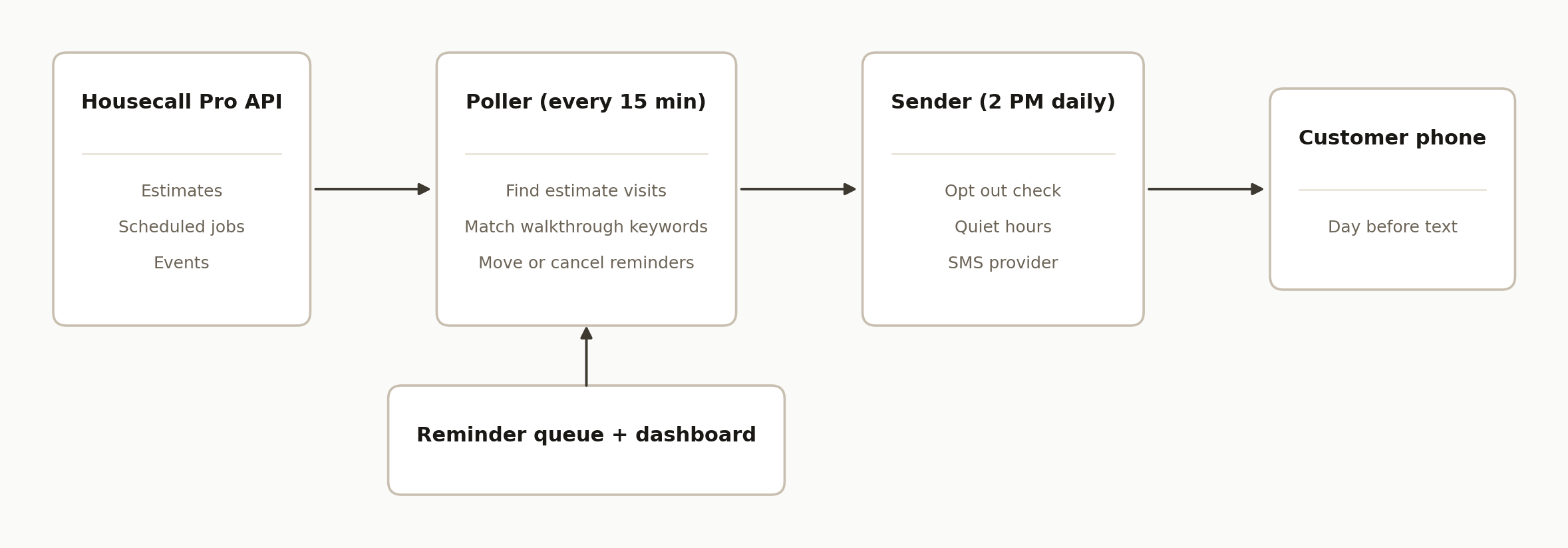
An estimate reminder system for Housecall Pro is a small service that reads your schedule through the Housecall Pro API every 15 minutes, keeps a queue of upcoming estimate visits, and texts each customer the afternoon before. It never writes to Housecall Pro, so it cannot break your schedule.
It has five parts:
- Housecall Pro API. The source of truth. The system reads estimates and scheduled jobs from it and nothing else.
- A poller. A scheduled function that runs every 15 minutes, pulls upcoming estimates and walkthrough jobs, and adds, updates or cancels rows in the queue.
- A reminder queue. A Google Sheet or a small database table, one row per appointment, with a status column. This is the memory that stops double texts.
- A sender. A second scheduled function that runs once a day at 2 PM local time and texts every row due tomorrow through an SMS provider.
- A dashboard and alerts. One screen where the office can cancel or send a reminder now, plus a warning when something stops working.
Google Apps Script is a good home for the poller and sender if you already use Google Workspace, because its time driven triggers cost nothing and need no server (Google Apps Script docs). Any scheduler works the same way.
Step by step: how to build Housecall Pro estimate reminders
Step 1: Get the MAX plan and an API key
You need the MAX plan, because that is where the API lives. Only an Admin user can create the key: in Housecall Pro, open the App Store, find API Key Management, click Generate API Key and name it (Housecall Pro help center).
Store the key somewhere secret, never in the code itself. In Apps Script that means Script Properties. Every request sends it as a header:
const HCP_BASE = "https://api.housecallpro.com";

function hcpGet(path) {
  const key = PropertiesService.getScriptProperties().getProperty("HCP_API_KEY");
  const res = UrlFetchApp.fetch(HCP_BASE + path, {
    headers: { Authorization: "Token " + key, Accept: "application/json" },
    muteHttpExceptions: true,
  });
  if (res.getResponseCode() !== 200) {
    throw new Error("HCP " + res.getResponseCode() + ": " + res.getContentText().slice(0, 300));
  }
  return JSON.parse(res.getContentText());
}
Throwing on a non 200 matters. A poller that quietly treats an API error as "no estimates" will cancel your whole queue on the next step.
Step 2: Poll estimates and jobs every 15 minutes
Ask for estimates scheduled from today onward, page by page, and keep only the ones whose status is scheduled. Do the same for jobs with a scheduled status, because that is where walkthroughs live once you stop booking them as Events (step 3).
function fetchUpcomingEstimates() {
  const since = encodeURIComponent(startOfTodayIso());
  let page = 1, all = [];
  while (page <= 20) {
    const data = hcpGet("/estimates?page=" + page + "&page_size=100&scheduled_start_min=" + since);
    const batch = data.estimates || [];
    all = all.concat(batch);
    if (batch.length < 100) break;
    page++;
  }
  return all.filter(e => String(e.work_status).toLowerCase() === "scheduled");
}
Set the trigger to run every 15 minutes. Fifteen minutes is fast enough that an estimate booked this morning is in the queue long before tomorrow's reminder goes out, and slow enough to stay well inside API limits. Cap the page loop so a bad response can never spin forever.
Step 3: Find estimate visits and walkthroughs, and deal with Events
Estimates are easy: everything from the estimates endpoint is an estimate visit. Walkthroughs, commissioning visits and site assessments are harder, because they are usually booked as jobs or Events with free text names.
For jobs, match keywords in the description and the line item names (add the job type field too if your account uses job types):
const VISIT_KEYWORDS = ["walkthrough", "walk through", "commissioning",
                        "site visit", "site inspection", "assessment", "consultation"];

function isVisitJob(job) {
  const text = [job.description || ""]
    .concat((job.line_items || []).map(i => i.name))
    .join(" ").toLowerCase();
  return VISIT_KEYWORDS.some(k => text.includes(k));
}
Keep the list in a settings tab, not in code, so the office can add a word when they start calling something new.
For Events there is no clean fix, because there is no customer to text and no way to convert them. Do two things. First, change the booking habit: walkthroughs get booked as jobs with "walkthrough" in the description, so they carry a customer and a phone number. Second, read the Events endpoint anyway, and when an upcoming Event's name matches a keyword, flag it on the dashboard as "cannot be reminded, rebook as a job." That turns a silent miss into a visible to do.
Step 4: Store a reminder queue with a status
Every appointment becomes one row, keyed by its Housecall Pro ID. The ID is what stops a customer getting four texts in an hour.
| Column | What it holds |
|---|---|
| hcp_id | Estimate or job ID from Housecall Pro (unique key) |
| kind | estimate or walkthrough |
| customer_name, phone, address | Copied from the API at poll time |
| hcp_start_seen | The appointment start as Housecall Pro last reported it |
| appt_date, appt_time | What the reminder will say |
| remind_on | The date the text should go out (appointment date minus one day) |
| status | pending, sent, cancelled, error, opted_out |
| manual_override | true when the office changed this row on the dashboard |
| sent_at, notes | Audit trail |
On each poll, a new ID gets a pending row. An ID that is no longer scheduled in Housecall Pro gets status cancelled with a note, so a cancelled estimate never gets a reminder. Pick the customer's mobile number first, then home, then work, and mark the row error with "missing phone" when there is none, so the office sees it.
Calculate dates in your business time zone, not the server's. A start time that arrives as UTC and gets turned into a date on a server set to another zone will put the reminder on the wrong day. If you use a Google Sheet, also watch for Sheets turning "2:00 PM" into a date object behind your back; read time cells defensively and format them yourself.
Step 5: Send the day before text at 2 PM local, with opt outs and quiet hours
A second trigger runs once a day at 2 PM in your time zone. In Apps Script that is a daily trigger with atHour(14) and your time zone set on it. It picks every row where status is pending and remind_on is today, sends the text, and writes sent plus a timestamp. Two in the afternoon works because people read it at work, and there is still time to reschedule before your evening dispatch.
Example message:
Hi Sarah, this is Northside Heating and Cooling. Reminder that your estimate is tomorrow, Thursday Oct 23, at 8:00 AM at 123 Elm St. Need a different time? Reply here or call 555 010 2030. Reply STOP to opt out.
For the sender, use the texting tool your office already answers. Twilio is the most common choice. Keep Housecall Pro's built in reminders on for jobs. They cannot be pointed at estimates, so estimate texts go through your own provider. In the US, business texting from a local number needs A2P 10DLC registration first (Twilio), so start it before you write any code.
Opt outs need two layers. Twilio handles the standard STOP keywords on its side and blocks further messages to that number (Twilio). Your queue should also know: keep an opt out list, check it before every send, and mark those rows opted_out instead of letting them fail as errors every day.
Quiet hours protect against the one case where a text goes out at a strange time: the send now button. The sender should refuse anything outside 8 AM to 9 PM in the customer's local time and hold it for the next morning.
Space sends a second apart, catch errors per row so one bad number does not stop the batch, and write the error message into the row's notes.
Step 6: Give the office a dashboard to cancel or send now
The office will always know things the software does not. A customer called to move the visit, the owner wants to text someone today, a duplicate slipped in. They need one screen listing every queued and sent reminder with three buttons: cancel, reschedule and send now.
Keep the buttons simple. Cancel sets status cancelled and stops the text only; it does not touch the appointment in Housecall Pro. Send now sends immediately (subject to quiet hours) and marks the row sent so the 2 PM run skips it. Reschedule sets a new date and time and recalculates remind_on. Every button press sets manual_override to true, which matters in the next step.
The dashboard can read the Google Sheet directly, or a small database the sheet syncs to every 15 minutes. Either way, actions should go into an action queue the backend processes, rather than the browser editing rows itself.
Step 7: Handle reschedules without overwriting the office
Reschedules are where most reminder systems break. Two rules make it safe.
A reschedule in Housecall Pro must move the reminder. On every poll, compare the start time Housecall Pro reports now with hcp_start_seen, not with the appointment fields the dashboard can edit. If they differ, the appointment really moved: update appt_date, appt_time and remind_on, set status back to pending, and add a note like "rescheduled from Oct 23 8:00 AM." If the new date is today or earlier, send nothing and leave a note.
The poll must not undo a manual change. If manual_override is true and Housecall Pro's start time has not changed since the override, the poll leaves the row alone. If Housecall Pro's time does change after an override, Housecall Pro wins, because someone moved the real appointment, and the row gets a note saying the dashboard change was replaced.
Comparing against hcp_start_seen also avoids a nasty bug: if the stored time is formatted differently from the API's (Sheets date coercion again), every poll looks like a reschedule and keeps resetting sent rows to pending. Store the raw API value and compare like with like.
Step 8: Log every run and alert when it stops
A reminder system fails silently. Nobody calls to say "I did not get a text." So build the alarm in.
- Write one log line per run: when it ran, how many estimates it read, how many rows it added, moved, cancelled, sent and errored.
- Store a heartbeat timestamp after every successful poll. A separate check emails or texts the owner if the last good poll is more than an hour old.
- Send an alert on any API error, and on any day the 2 PM run has errors.
- Send the office a short daily summary: tomorrow's reminders, any rows with a missing phone, and any Events that look like walkthroughs.
Where it gets complicated
Estimates with no scheduled time. An estimate created but not yet scheduled has no start, so skip it and pick it up on a later poll once it is booked.
Multi option and multi visit estimates. One estimate can carry several options. Remind on the appointment, not per option, or the customer gets three texts.
Same day bookings. An estimate booked this morning for tomorrow morning still gets its reminder at 2 PM today. One booked at 4 PM for tomorrow has missed the run. Decide whether those get a short confirmation text right away instead.
Shared phone numbers. Landlords and property managers often have many estimates on one number. Keep the reminder per appointment and include the address, so the text makes sense.
API limits and plan changes. If the account ever drops below MAX, the API key stops working. The heartbeat alert is what tells you, the same day instead of a month later.
What it looks like running
At one HVAC contractor on Housecall Pro where we run this pattern, it sends about 12 to 14 estimate reminders a week, every one at 2 PM the day before, without anyone in the office opening the schedule. Walkthroughs and commissioning visits booked as jobs get the same treatment with the address in the text. The office's only job is the dashboard, when they want to override something.
The value is structural rather than clever. Every estimate gets a reminder because a missed reminder is no longer something a person can forget. Cancelled and moved appointments clean themselves up on the next check, so the system does not text people about visits that changed. For the bigger list of what Housecall Pro does and does not do, see our breakdown of Housecall Pro missing features, and for the texting side through your own number, see Housecall Pro SMS reminders with GoHighLevel.
Frequently asked questions
Does Housecall Pro send reminders for estimates?
No. As of October 2026, Housecall Pro's help center says "SMS job reminders are currently only sent for jobs." Estimates do not get a day before reminder. You can book estimate visits as jobs to get the native reminder, or add a reminder system that reads your estimates through the API and texts customers the day before.
Can I just book my estimates as jobs instead?
You can, and it is the cheapest fix if you are not on MAX. The trade off is that estimates booked as jobs drop out of Housecall Pro's estimate tools: options, approvals and Pipeline follow ups all work on estimates. Most shops that sell replacements want to keep estimates as estimates and add the reminder on the side.
What Housecall Pro plan do I need to build this?
MAX. The API and Zapier are only on MAX, which is $299 a month billed annually or $329 month to month. Without the API, nothing outside Housecall Pro can see your estimate schedule, so there is nothing to build on.
Can I do this with Zapier instead of custom code?
Partly. Zapier is also MAX only, and an owner on the Zapier Community reported in January 2026 that the connection "pulls the new jobs just fine, but doesn't pull the new estimates." Even with a workaround, Zapier alone does not give you a reminder queue, reschedule handling or a cancel button, which are the hard parts.
How much does it cost to run each month?
Apps Script and a Google Sheet cost nothing on top of Google Workspace. The main running cost is texting, which your SMS provider charges per message plus carrier fees. At a dozen or so estimate reminders a week, that is a small monthly line.
Can a non technical owner set this up?
The steps above are everything a developer needs. An owner comfortable with Google Sheets can follow steps 1 and 4, but the poller, reschedule rules and alerting take someone who writes code. Budget time for A2P 10DLC registration too, which you start yourself.
If you would rather have this running than build it, we set it up for Housecall Pro shops, wired to your own texting number, with the dashboard and alerts included. Book a 15 minute call and we will tell you in the first five minutes whether your setup maps to this pattern, or browse our services first.
Sources
- 1.Setting Up SMS Job Reminders (Housecall Pro Help Center)help.housecallpro.com
- 2.Events Overview (Housecall Pro Help Center)help.housecallpro.com
- 3.Integrate with Google Calendar (Housecall Pro Help Center)help.housecallpro.com
- 4.Housecall Pro not syncing estimates to my calendar (Zapier Community)community.zapier.com
- 5.Getting Started with Pipeline (Housecall Pro Help Center)help.housecallpro.com
- 6.Housecall Pro pricinghousecallpro.com
- 7.API Overview (Housecall Pro Help Center)help.housecallpro.com
- 8.Google Apps Script docsdevelopers.google.com
- 9.Twiliotwilio.com
- 10.Twiliohelp.twilio.com
Want us to build this for you?
Nine questions, about 90 seconds. You see the revenue it is costing you, then pick a time. No pitch.
See your options