
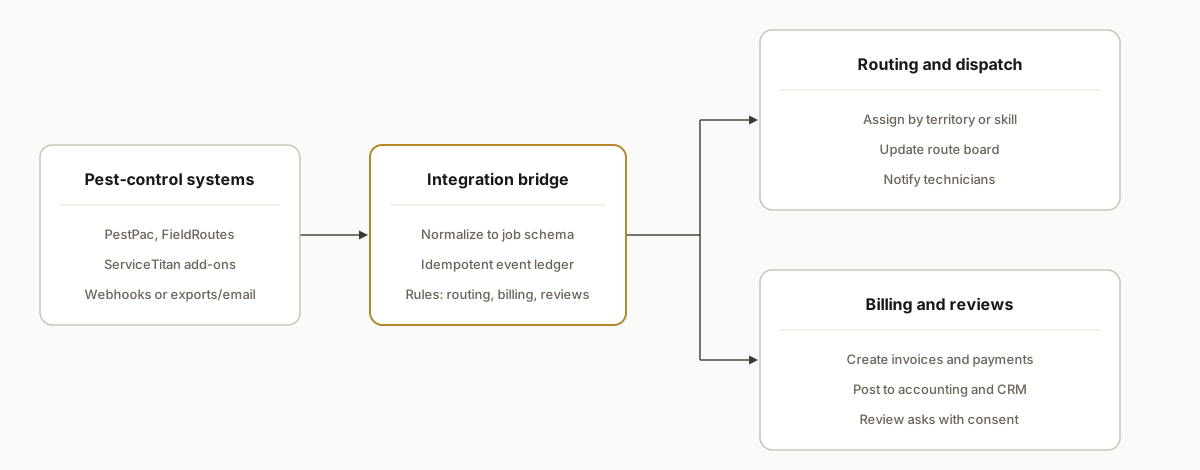
Pest control software integration works by capturing job and customer events from your platform of record, normalizing them to a common job schema, then fanning out to three flows: routing and technician dispatch, billing and accounting, and review and CRM follow-up. When your tool lacks open hooks, we bridge it with scheduled exports, email parsing, or a safe RPA login.
Definition: Pest control software API integration is the process of connecting your scheduling and job system to downstream tools for dispatch, billing, and customer follow-up using official APIs where available, and reliable bridges where they are not.
The problem it solves
Most operators juggle three repetitive handoffs every day: update the route plan as jobs move, generate invoices and collect payment, and ask happy customers for a review. When your platform has no open API or only partial add-ons, that handoff becomes copy and paste, CSV exports, and a dozen browser tabs.
| Task | Manual workflow | Automated workflow |
|---|---|---|
| Routing updates | Dispatcher retypes reschedules into a map and texts techs | Job event feeds a rules engine that updates the route and pings the assigned tech |
| Billing | Office staff creates invoices at day end and chases payments | Completed jobs auto-create invoices, sync to accounting, and send pay links |
| Reviews | CSR runs a weekly export and sends asks by hand | Satisfied-job events trigger review requests with opt-out and throttles |
| CRM history | Notes live in the field app only | Notes and outcomes post to your CRM for future upsell |
A day with five techs and 20 stops turns into dozens of small manual decisions. The software runs the trucks. The integration runs the handoffs.
How the automation works
We build a narrow, reliable spine that starts at your field system and ends at your dispatch map, accounting, and follow-ups. When the platform offers official webhooks or partner apps, we use them. When it does not, we fall back to exports, inbox parsing, or a controlled browser harness that logs in on a schedule.
- Event intake: New jobs, reschedules, and completions arrive via webhook, scheduled CSV export, or a dedicated email inbox that receives job PDFs. We verify authenticity where possible and write a single ledger row per event.
- Normalizer: A small service maps platform fields to a common job schema: customer, service address, window, tech, price, outcome, and consent flags. The mapping lives in config so ops can change it without code.
- Dispatch fan-out: Routing rules assign or reassign jobs by territory, skill, or time window. We notify the tech and update the route board your team already uses.
- Back office fan-out: Completed jobs create invoices, payments post back, and any finance error lands in a human review queue with a retry button.
- Reputation and CRM: Positive outcomes queue a review ask with quiet hours, throttles, and opt-out. All jobs post a clean activity to your CRM.
Does PestPac offer an API?
Short answer: availability varies by account and plan. Some teams have access to official integrations or partner apps. Others do not see webhooks or API keys exposed in their admin. We integrate either way by choosing the cleanest path your subscription permits, then bridging when needed so routing, billing, and reviews still run.
How to check your account today:
- Look for an Integrations or Marketplace section in your admin. If you see partner apps or webhook settings, we can wire those first.
- Ask your vendor rep whether API or webhooks are available on your plan and whether there are enablement steps or fees.
- If you have a scheduled export or report delivery feature, we can treat that as an event feed and reach near real time on a 5 to 15 minute cadence.
If you do not have API access, we bridge without scraping fragile pages:
- Scheduled CSV to S3 or email to a dedicated inbox, then parse to a safe JSON envelope.
- A controlled browser session on a local machine that produces structured exports on a schedule when no scheduler exists.
Related reads: our FieldRoutes pattern in FieldRoutes API integration for CRM follow-up and a general overview of tools to connect your apps safely.
Example: turning a CSV export into events
// csv-to-events.js: parse a CSV export and post to the same intake
import fs from "fs";
import { parse } from "csv-parse/sync";
import fetch from "node-fetch";

const csv = fs.readFileSync("jobs_export.csv", "utf8");
const rows = parse(csv, { columns: true, skip_empty_lines: true });

for (const r of rows) {
  const evt = {
    jobId: r.JobNumber,
    status: r.Status,
    customer: { name: r.CustomerName, email: r.Email, phone: r.Phone },
    address: { full: `${r.Address}, ${r.City} ${r.Zip}` },
    scheduled_start: r.ScheduledStart,
    scheduled_end: r.ScheduledEnd,
    technician: r.TechCode,
    amount: r.Price
  };
  await fetch("https://your-intake.example.com/events/job", {
    method: "POST",
    headers: { "Content-Type": "application/json", "X-Source": "csv-export" },
    body: JSON.stringify(evt)
  });
}
Connect PestPac to your CRM without an API: a 1 hour starter
When webhooks are not available, you can still push clean history into your CRM the same day:
- Export today's completed jobs to CSV. Drop the file into a watched folder or forward it to a dedicated inbox.
- Map the export columns to your job schema. Keep the mapper as config so ops can fix a header rename without code.
- Post each row to the same intake URL you would have used for webhooks. The downstream routing, billing, and review logic does not change.
# mapper.config.yaml: no-code mapping for ops
columns:
  JobNumber: job_id
  CustomerName: customer_name
  Email: email
  Phone: phone
  Address: service_address
  City: service_city
  Zip: service_postal
  ScheduledStart: window_start
  ScheduledEnd: window_end
  TechCode: technician_code
  Price: price
status_column: Status
complete_values: ["Completed", "Done"]
If you need a deeper comparison before you choose a path, see off the shelf vs custom automation. It outlines when a connector is enough and when a purpose-built bridge is safer long term.
Step-by-step: how to build it
1) Capture job events from your system of record
Start with the cleanest exit your platform offers: webhooks or partner add-ons if your plan has them. If not, schedule a CSV export to S3 or email a dedicated inbox. The goal is a single intake URL that receives a job event and writes it to a ledger.
// Node.js Express: unified intake for webhook or email-processed events
import express from "express";
import crypto from "crypto";
import { upsertEvent } from "./ledger.js";

const app = express();
app.use(express.json({ limit: "1mb" }));

app.post("/events/job", async (req, res) => {
  const raw = req.body;                // already parsed CSV or webhook JSON
  const source = req.header("X-Source") || "unknown";

  // Build a stable idempotency key: source + job id + status + timestamp floor
  const key = crypto
    .createHash("sha256")
    .update([source, raw.jobId, raw.status, (raw.completedAt || raw.updatedAt || "").slice(0, 16)].join("|"))
    .digest("hex");

  await upsertEvent({ key, source, raw, receivedAt: new Date().toISOString() });
  res.status(202).json({ ok: true });
});

app.listen(8080);
Key point: even without native webhooks you can still deliver events on a cadence by turning exports or emailed tickets into the same JSON envelope.
2) Normalize to a common job schema
Write a mapper per platform. Keep it declarative so ops can fix mis-mapped fields in config without a deploy.
// mapper.ts
export function mapToJob(evt: any) {
  const src = evt.raw;
  return {
    job_id: String(src.jobId || src.ticket || src.id),
    customer_name: src.customer?.name || src.account_name,
    email: src.customer?.email || src.email,
    phone: src.customer?.phone,
    service_address: src.address?.full || `${src.street}, ${src.city} ${src.postal}`,
    window_start: src.window?.start || src.scheduled_start,
    window_end: src.window?.end || src.scheduled_end,
    technician_code: src.tech?.code || src.technician,
    price: Number(src.amount || 0),
    status: src.status,                // scheduled, enroute, completed, canceled
    outcome: src.outcome || null,      // success, reschedule_reason, etc.
    review_opt_in: !!src.marketing_consent,
    updated_at: src.updatedAt || new Date().toISOString()
  };
}
Gotcha: older desktop deployments sometimes export addresses as one string. Keep a best-effort parser but never fail the record for cosmetic issues.
3) Route or re-route the job and notify the tech
Apply territory or skill rules, then update your dispatch board. If you lack an official route API, write to the internal board you control and notify techs by SMS.
# routing.py
from datetime import datetime

def pick_territory(zipcode: str):
    # naive prefix mapping; store in a DB table for real use
    prefixes = {"85": "West", "86": "East", "87": "North"}
    return prefixes.get(zipcode[:2], "General")

def assign(job):
    job["territory"] = pick_territory(job["service_address_zip"])
    # update internal board, then text tech
    board.upsert(job)
    sms.send(job["technician_phone"], f"New stop: {job['service_address']} {datetime.now().strftime('%I:%M %p')}")
Guardrails: cap re-route frequency and add quiet hours so technicians are not spammed when a same-day reshuffle happens.
4) Create invoices and post payments
On completion, build a deterministic invoice object and sync it to accounting. If your platform already handles invoices, mirror a read-only copy for finance reporting.
// billing.js
export async function handleCompletion(job) {
  const invoice = {
    externalId: `JOB-${job.job_id}`,
    customer: { name: job.customer_name, email: job.email, phone: job.phone },
    lineItems: [{ sku: job.service_code || "SERVICE", qty: 1, unitPrice: job.price }],
    memo: `Pest control service on ${new Date(job.updated_at).toDateString()}`
  };
  try {
    await accounting.createInvoice(invoice); // adapter hides provider specifics
  } catch (e) {
    await dlq.push({ type: "invoice", jobId: job.job_id, error: String(e) });
  }
}
Pattern: keep the accounting adapter swappable. The integration survives if you ever change finance tools.
5) Trigger review asks with consent and throttles
Send only when the outcome is success and the customer is opted in. Respect quiet hours and a max-per-month per contact.
-- schedule.sql: one row per planned review ask
insert into review_asks (job_id, contact, channel, scheduled_for)
select :job_id, :email_or_phone, :channel, :eta
where not exists (
  select 1 from review_asks
  where contact = :email_or_phone
    and created_at > now() - interval '30 days'
);
BrightLocal's Local Consumer Review Survey reports that consumers read roughly 10 reviews on average before trusting a local business: source https://www.brightlocal.com/research/local-consumer-review-survey/
6) Monitor, retry, and let ops self-serve
Add a small dashboard that shows event intake, dispatch updates, invoice syncs, and review sends. Every failure should have a Retry and a View Raw button. Store mappings in a table the office manager can edit.
# ops-config.yaml: editable by ops, hot-reloaded by the service
platform: "fieldroutes|pestpac|servicetitan"
export_cadence_minutes: 10
sms_quiet_hours: [20, 8]
review:
  enabled: true
  channel: sms
  throttle_days: 30
routing:
  territory_prefix_rules:
    West: [85]
    East: [86]
    North: [87]
Where it gets complicated
- Tier-gated integrations: Some platforms expose APIs or partner add-ons only on specific plans. We design the intake so it works with webhooks when you have them, and scheduled exports or email parsing when you do not. You can upgrade later without changing the downstream flow.
- No webhooks means cadence tradeoffs: When we rely on CSV or a browser harness, event timing becomes every 5 to 15 minutes instead of instant. We make that explicit in the UI and build idempotency so replays never duplicate.
- Reschedules create accidental duplicates: A job moved from Tuesday 2 pm to 3 pm must not create two invoices or two review asks. Our stable idempotency key includes job id plus a status plus a time floor to collapse minor moves into the same record.
- Technician identity drift: Tech names in exports often change format. We key on a stable code or phone and maintain a lookup table so routing does not break when names change.
- SMS and consent: Review asks and notifications must honor opt-in and quiet hours. We store per-contact consent and time windows, and we cap per-month messages to avoid fatigue.
- On-prem desktops: Older on-prem installs sometimes have no export scheduler. In those cases we run a headed browser on a clinic PC with a safe profile, then push deltas to the cloud service. We avoid cloud IPs that trigger extra challenges.
What this actually changes
For a pest control operation, the structural win is consistent handoffs: dispatch always sees the current route, finance receives clean invoices without day-end batching, and customers get a timely review ask when the service went well. That produces steadier cash flow and a review slope that compounds. As context for why this matters, BrightLocal's latest survey found consumers read around 10 reviews on average before trusting a local business: source https://www.brightlocal.com/research/local-consumer-review-survey/
We shipped this pattern in production for field-service teams that faced the same gaps: partial or gated APIs, exports instead of webhooks, and the need to keep techs, finance, and marketing in sync. In production it handles job reschedules without duplicates, posts invoices immediately on completion, and gates review asks to opt-in contacts only.
Frequently asked questions
Do PestPac, FieldRoutes, or ServiceTitan have official APIs?
Some plans expose APIs or partner add-ons, and others do not. We start with the cleanest integration your account offers, then fall back to exports, email parsing, or a safe browser harness when needed. The downstream routing, billing, and review logic stays the same.
Can this run in real time?
If your plan offers webhooks or partner apps, we process events within seconds. If not, we poll exports or an inbox on a cadence, typically every 5 to 15 minutes. Idempotency keys ensure replays do not create duplicates.
How do you prevent duplicate invoices or review requests?
We generate a stable key from the source, job id, status, and a time floor. Every write checks that key first. Reschedules overwrite the same logical job instead of creating a second invoice or message.
Will technicians be spammed with updates?
No. We cap notifications per job and enforce quiet hours. Route changes batch within a short window, then we send a single consolidated update to the assigned tech.
What does this cost monthly?
Infrastructure is light. The cost is driven by how we capture events and the volume you run. Plans with native webhooks are cheapest to operate. Export or browser-based intakes add a small overhead. We scope it up front so there are no surprises.
Can a non-technical owner manage it once live?
Yes. Field mappings and routing rules live in an admin screen or a simple config table. Your office manager can update codes, territories, and throttles without a deploy. The dashboard includes Retry and View Raw for any failed sync.
If you need routing, billing, and reviews to run themselves no matter which pest-control platform you are on, we have built and shipped this exact spine for field-service teams. See how we design workflow automation, compare the messaging pattern in our Housecall Pro write-up, and when you are ready, book a 20-minute call.
Sources
- 1.LCRS 2026: Study Shows Reviews Matter More Than Everbrightlocal.com
Curious what this would actually save you?
Put real numbers to it. The ROI calculator estimates the hours and dollars an automation like this returns, in about a minute.
See your options