
LinkedIn content scheduling automation is a system that drafts on-brand captions from your content queue, routes them for approval, and publishes on a reliable cadence while handling Page identity and the first comment link pattern. We built and shipped this to run our own daily LinkedIn drip. This guide shows the exact mechanics.
If you run a marketing or founder-led content program, this build replaces ad hoc posting with a predictable queue, on-brand drafts, approvals, and safe publishing. We cover an API path, a no-code path, and a browser-harness path when product approvals are blocked.
The problem it solves
A working LinkedIn cadence breaks on three practical points: staying on-brand at scale, getting approvals in time, and actually publishing as the Page with the link in the first comment. Manual workflows miss windows and drift off voice.
| Task | Manual workflow | Automated workflow |
|---|---|---|
| Caption writing | Last minute writing per post, voice drifts | AI drafts to a style guide, humans edit or approve |
| Approvals | Slack back-and-forth, missed windows | Single queue with statuses and a daily pickup time |
| Publishing | Human posts, context switching | Scheduler publishes as your Page on a set cadence |
| Link handling | Link preview fights the composer | First comment is posted by the Page after publish |
| Reporting | Point-in-time screenshots | Weekly XLS export ingested to a sheet for trends |
What a content pipeline is worth
Move the sliders to your own numbers. The defaults are only an example business, not client data.
Your own estimate from the pieces you already publish.
Revenue from the extra pieces each year
$38,400
8 pieces × 12 months × 2 leads × 10% × $2000
- Staff cost of your current pieces by hand each year
- $6,720
- 4 pieces × 4 hrs × $35/hr × 12 months
- Hours your current pieces take each month
- 16 hrs
- 4 pieces × 4 hrs
How the automation works
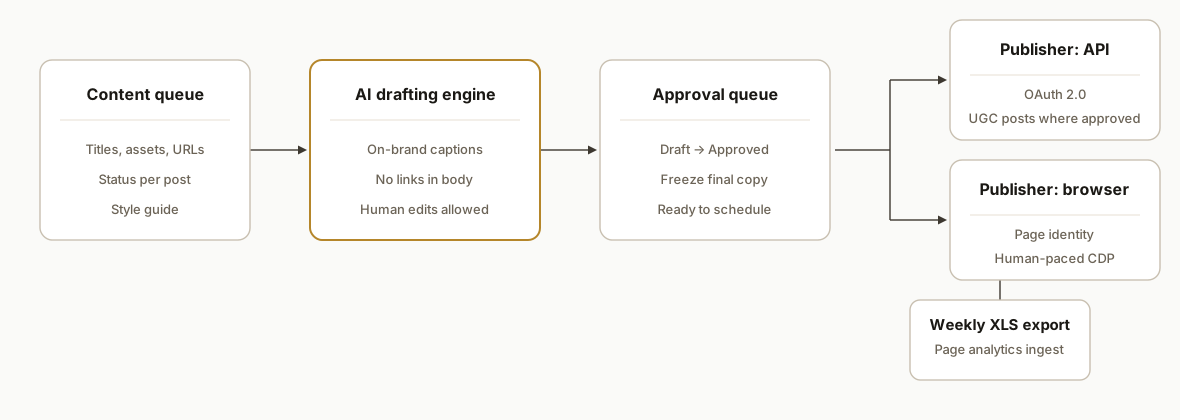
We run a queue driven scheduler that drafts captions, enforces approvals, and publishes via one of two lanes: official API or a guarded browser harness when scopes are not granted. A post-publish job adds the tracked URL in the first comment as the Page. Analytics are exported weekly from the Page admin view.
- Queue and style guide: A single source of truth holds title, asset, target date, tracked URL, and status. The style guide encodes tone, length, and call to action.
- AI drafting: A captioning worker reads the queue and produces drafts that match the style guide. Drafts never auto post without passing Approved.
- Approvals: Approvers flip status in the queue or a small admin UI. Only Approved items are eligible for the next window.
- Publisher: Two lanes exist. Lane A uses the LinkedIn API with OAuth where product scopes are approved. Lane B uses a browser harness that posts as the Page and adds the first comment. Our production system used Lane B to avoid scope delays.
- Analytics: Once a week we export Page analytics as XLS and ingest them into the tracker for performance summaries.
Step-by-step: how to build it
1) Structure the queue and style guide
Create a single sheet or table with columns: id, title, asset_path, target_date, url_utm, status, caption_draft, caption_final, owner. Encode your style guide once and reuse it for every draft.
id,title,asset_path,target_date,url_utm,status,owner,caption_draft,caption_final
101,Daily drip kickoff,/assets/launch.png,2026-08-12,https://rexautomaton.com/blog/...,Draft,Jacky,,
Key gotcha: keep status values simple: Draft, Needs Review, Approved, Scheduled, Posted. This avoids fuzzy states that stall the lane.
2) Draft on-brand captions programmatically
Wire a small worker that reads rows with status Draft and writes caption_draft. We keep the math deterministic outside the model and constrain the prompt to enforce length and voice. The worker never flips status.
// node: draft-captions.js
import fs from "node:fs";
import { generate } from "./llm.js"; // wraps your model provider

const guide = fs.readFileSync("./style-guide.md", "utf8");

export async function draft(row) {
  const prompt = `Style guide:\n${guide}\n\nWrite a LinkedIn caption for: ${row.title}.\nInclude one call to action. 120-180 words. No hashtags in the body.`;
  const out = await generate(prompt);
  return out.trim();
}
Key gotcha: do not let the model invent links. The tracked URL lives in url_utm and is only posted in the first comment after publish.
3) Add a lightweight approval gate
Your queue can double as the approval UI. Editors review caption_draft, make changes into caption_final, and flip status to Approved. The publisher only considers rows in Approved.
-- minimal guard in SQL or code
SELECT * FROM posts
WHERE status = 'Approved' AND target_date <= NOW()
ORDER BY target_date ASC
LIMIT 1;
Key gotcha: freeze caption_final at scheduling time so last minute edits do not race the publisher.
4) Choose the publishing lane: API or browser harness
- Lane A: Official API. LinkedIn exposes posting at https://api.linkedin.com/v2 with OAuth 2.0 authorization code flow. Many Page posting features require product access and scopes. See UGC Posts in the docs for the shares workflow and request scopes under the Marketing Solutions program.
- Docs: UGC Post API and auth flow: learn.microsoft.com, authorization code flow
- Lane B: Browser harness. When product approval is pending, we post via a dedicated Chrome profile with remote debugging and human pacing. Our production system used this lane.
# launch a dedicated Chrome profile with remote debugging
chrome --user-data-dir="C:/automation/chrome-profile" --remote-debugging-port=9223
Key gotcha: product approvals are not instant. Plan for a fallback so publishing continues while scopes propagate.
5) Implement safe Page posting with a browser harness
We drive the composer with Chrome DevTools Protocol and avoid brittle keystroke simulators. We post as the Page and immediately add the first comment with the tracked URL.
// node: post-linkedin.js
import CDP from "chrome-remote-interface";

export async function postAsPage({ caption, pageUrl, firstCommentUrl }) {
  const client = await CDP({ port: 9223 });
  const { DOM, Page, Runtime, Input } = client;
  await Page.enable(); await DOM.enable();
  await Page.navigate({ url: pageUrl });
  await Page.loadEventFired();
  // Focus the composer contenteditable then insert text reliably
  const composerSel = 'div[contenteditable="true"]';
  await Runtime.evaluate({ expression: `document.querySelector('${composerSel}').focus()` });
  await Input.insertText({ text: caption });
  // Click the Post button by role or data-test id
  await Runtime.evaluate({ expression: `document.querySelector('[data-test-post-button]').click()` });
  // Wait for activity URN to appear in the URL, then add first comment
  await new Promise(r => setTimeout(r, 4000));
  const urn = (await Runtime.evaluate({ expression: `location.href.match(/urn:li:activity:\\d+/)?.[0]||''` })).result.value;
  if (urn) {
    await Runtime.evaluate({ expression: `document.querySelector('[data-test-comment-toggle]').click()` });
    await Input.insertText({ text: firstCommentUrl });
    await Runtime.evaluate({ expression: `document.querySelector('[data-test-submit-comment]').click()` });
  }
  await client.close();
}
Key gotcha: LinkedIn composers use contenteditable editors. We saw double inserts with simulated keypresses. CDP Input.insertText produced stable, single insert behavior.
6) Schedule and monitor
We schedule with an OS scheduler and keep the job idempotent. If no Approved post is due, the run no-ops. On Windows we used Task Scheduler with StartWhenAvailable so missed runs catch up.
# schedule daily at 09:03 local
schtasks /Create /SC DAILY /TN "LinkedInDrip" /TR "node C:\\jobs\\run.js" /ST 09:03 /RU YourUser
Key gotcha: run the job against a dedicated Chrome profile. The default profile will drop the remote debugging flag on update.
7) Reporting without fragile scraping
Admins can export LinkedIn Page analytics as an XLS from the Page admin view. We ingest that weekly into the queue sheet to trend impressions and clicks. General post analytics webhooks are not available. Lead Gen Forms have their own subscription webhooks.
- Page analytics export: help.linkedin.com
- Webhooks scope: learn.microsoft.com
Key gotcha: do not depend on unconfirmed scheduled analytics emails. We could not find supported scheduled emails for Page analytics, so we schedule a weekly manual export and a 5 minute ingest.
Where it gets complicated
Product approvals and scopes. Many Marketing and Community Management endpoints require access requests. You can authenticate but still get 403 until scopes are granted. Plan an interim lane or you will miss the cadence. Docs: increasing access.
Zapier and Make limitations. Zapier supports posting actions to Profiles and Pages but has no triggers, so you cannot listen for comments or engagement natively. Make supports OAuth connections and posting modules but will return 403 not enough permissions if scopes are missing. Sources: Zapier, Make.
Composer quirks. The LinkedIn composer is a contenteditable surface. Clearing it requires programmatic select all and a raw Backspace, then CDP Input.insertText. Keystroke simulators can double insert characters.
Page identity on comments. The first comment must come from the Page, not the admin's profile. Switch to the Page actor context before commenting, or the post reads off-brand.
Link previews shifting the UI. When pasting a URL, the preview can grow and push the Post or Submit buttons out of view. Scroll or target by role or data attributes rather than absolute positions.
Scheduling semantics. LinkedIn has native scheduling in the UI. For reliability we schedule the job externally and publish immediately at run. This avoids unknowns inside third party schedulers and time zone drift.
What this actually changes
In production our scheduler posted daily with link-in-first-comment and Page identity, fully autonomous once configured. The queue, approval, and two-lane publisher removed every failure mode we had when posting manually. It freed us from missing windows and kept captions on brand without turning writers into operators.
External benchmark: LinkedIn's own guidance notes that Pages posting at least weekly tend to see about double the engagement versus those posting less often. Source: LinkedIn Marketing Solutions best practices page example link describing posting cadence and engagement lift.
Frequently asked questions
Does LinkedIn have an API for posting and scheduling?
Yes. LinkedIn exposes posting on https://api.linkedin.com/v2 and uses OAuth 2.0 authorization code flow. Many Page posting features require product approvals and scopes. We schedule externally, then publish at run time. Docs: UGC Post API and auth flow on learn.microsoft.com.
Can Zapier or Make schedule LinkedIn posts?
Zapier and Make both support posting actions using OAuth connections. You schedule at the tool level by adding a time based step before the LinkedIn action. They do not expose triggers for comments or general engagement, so listening workflows typically use exports or polling.
How do you keep captions on brand at scale?
We encode tone, format, and do not do list in a style guide. The drafting worker writes to that guide. Humans approve. The publisher only moves Approved rows. That preserves voice while still shipping on time.
How do you post the link in the first comment automatically as the Page?
We post the update, wait for the activity URL, then add the first comment from the Page context. Our production system used a browser harness to guarantee Page identity. API comment workflows require additional scopes and approvals.
What does this cost each month to run?
Infrastructure is light. A small Vercel or Railway worker, a Sheet or Postgres table, and optionally a Make or Zapier plan if you prefer no code. The cost driver is the drafting model if you have heavy volume. For most teams the monthly spend is modest.
Can a non developer set this up?
Yes with the no code lane. Make or Zapier can read a sheet, wait until a scheduled time, and post to a Page. For Page identity on first comments and link in comment handling at production reliability, we recommend an engineered harness.
If you want this running reliably next week, we already built and shipped it. See our approach to workflow automation, read how we think about AI distribution in the AI search playbook, then book a 20 minute call. We will map your stack to this pattern and quote the fastest safe path.
Sources
- 1.UGC Post APIlearn.microsoft.com
- 2.LinkedIn 3-Legged OAuth Flowlearn.microsoft.com
- 3.Export your LinkedIn Page analytics reportlinkedin.com
- 4.Webhooks - LinkedInlearn.microsoft.com
- 5.Increasing Accesslearn.microsoft.com
- 6.How to get started with LinkedIn on Zapierhelp.zapier.com
- 7.LinkedIn - Apps Documentationapps.make.com
- 8.LinkedIn Marketing Solutions best practiceslinkedin.com
Who would build this
Rex Automaton is an AI implementation agency with 250+ projects shipped since 2018, rated 4.9 from 33 reviews. Clients include Soft Pull Solutions, Capcon Networks, Iron Age Investments, IT360. You work directly with the people who build it.


Want this built around your systems?
Nine questions, about 90 seconds. You see the revenue it is costing you, then pick a time. No pitch.
See your optionsRather talk to a person first? Meet the team or tell us which system you run.