
We built a Jackrabbit trial-class follow-up system that pushes new trial signups into your CRM, then runs a short SMS and email sequence that stops the moment a family enrolls. It is for kids activity studios that use trial classes as a conversion path. This guide shows the exact integration pattern we shipped in production, including the Zapier handoff, webhook intake, CRM upsert, and 160 character SMS limits.
Trial-class follow-up automation is a workflow that captures Jackrabbit trial signups, creates or updates a CRM contact, and runs a timed SMS and email sequence that pauses automatically when a student enrolls.
The problem it solves
Studios lose trial families after a great first class because the follow-up is manual. Staff copy contact info, send a one-off message, and forget to nudge again. Jackrabbit can list classes and send report-based emails, but it does not natively push trial signups to your CRM with a sequenced follow-up or stop-on-enrollment logic.
| Step | Manual process | Automated process |
|---|---|---|
| Capture | Staff exports a report or reads a notification | Zapier trigger posts trial to your webhook and CRM |
| First nudge | One text or email if someone remembers | SMS goes out within minutes with 160 char guard |
| Second nudge | Often skipped | Day 2 email answers common questions |
| Enrollment update | Staff must notice the portal change | Stop rule cancels pending messages on enrollment |
| Reporting | Notes scattered in inboxes | Timeline in CRM with message and status history |
What instant follow up on every lead is worth
Move the sliders to your own numbers. The defaults are only an example business, not client data.
Your own estimate. Replies in the first few minutes convert far better than replies the next day.
Revenue from leads you stop losing each year
$144,000
150 a month × 12 × 40% × 10% × $2000
- Extra customers a year
- 72
- 150 × 12 × 40% × 10%
How the automation works
The production flow uses Jackrabbit's official Zapier app to detect new student activity or online registration, posts the payload to our webhook intake, upserts a contact in the CRM, and schedules a short SMS and email sequence. A separate stop signal cancels pending messages once an enrollment is recorded.
- Jackrabbit via Zapier: Jackrabbit Class has an official Zapier app that connects with an API key. We use a new student or similar trigger and send the full payload to our webhook. There is no native webhooks feature in Jackrabbit, so Zapier is the push layer.
- Webhook intake: A lightweight serverless endpoint validates the request, normalizes names and phones, and deduplicates on parent email or phone.
- CRM upsert: We hit a CRM webhook or API to create or update the contact and tag the source as Trial.
- Sequencer engine: A small job runner schedules SMS and email nudges at T0 and T+1 day, each templated with class details and constrained to 160 characters for SMS.
- Stop rules: A second Zapier trigger for enrollment or a daily enrollment check posts to a cancel endpoint that clears pending jobs for that contact.
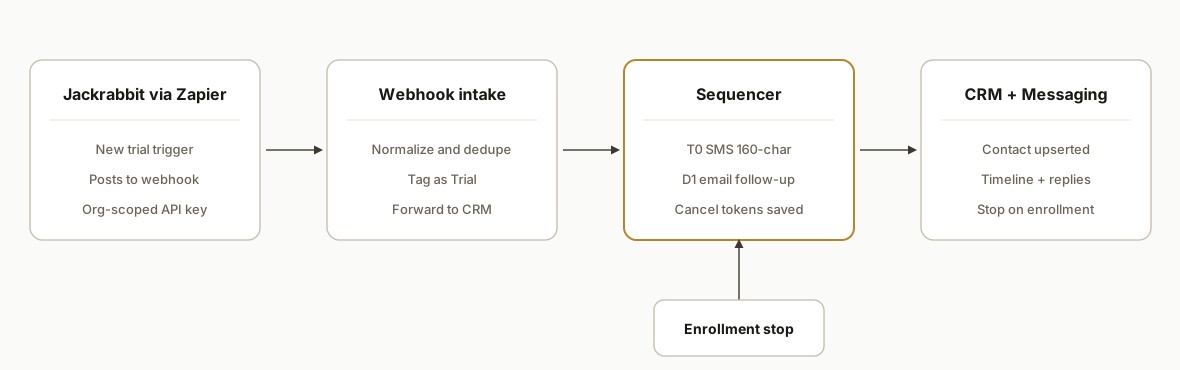
Step-by-step: how to build it
1) Connect Jackrabbit to Zapier and forward to your webhook
Create a Zap with the Jackrabbit Class app as the trigger. Authenticate with the Jackrabbit API key in Zapier. Add a Webhooks by Zapier action to POST the trigger bundle to your endpoint.
{
  "event": "trial_signup",
  "student": {
    "first_name": "Ava",
    "last_name": "Nguyen",
    "class_name": "Intro Gymnastics",
    "class_time": "Tue 4:00 PM",
    "location": "Main"
  },
  "parent": {
    "name": "Linh Nguyen",
    "email": "linh@example.com",
    "phone": "+15551234567"
  },
  "jackrabbit_org": "ORG12345",
  "zap_source": "jackrabbit.zapier"
}
Gotcha: Zapier polling cadence can delay follow-ups on some plans. For time-sensitive T0 nudges, keep your first message evergreen and rely on a second message the next morning for the high-conversion touch.
2) Build a secure webhook intake
We used a small Node handler with a shared secret header from Zapier. It normalizes phones and rejects missing essentials.
// pages/api/jr-intake.js (Next.js API route)
export default async function handler(req, res) {
  if (req.headers["x-intake-token"] !== process.env.INTAKE_TOKEN) {
    return res.status(401).json({ ok: false });
  }
  const body = typeof req.body === "string" ? JSON.parse(req.body) : req.body;
  const p = body.parent || {};
  if (!p.email && !p.phone) return res.status(400).json({ ok: false, error: "contact required" });
  const lead = {
    source: "jackrabbit",
    firstName: body.student?.first_name || "",
    lastName: body.student?.last_name || "",
    parentName: p.name || "",
    email: p.email || "",
    phone: (p.phone || "").replace(/[^+\d]/g, ""),
    className: body.student?.class_name || "",
    classTime: body.student?.class_time || "",
    location: body.student?.location || "",
    extOrg: body.jackrabbit_org || ""
  };
  // enqueue follow-up and return
  await queueFollowups(lead);
  return res.json({ ok: true });
}
Key detail: do not assume every trial has a phone. Template both SMS and email so either channel can carry the first touch.
3) Upsert the contact in your CRM
Most CRMs accept an inbound webhook. We post the normalized record and add a Trial tag. This example shows a generic webhook.
async function upsertInCrm(lead) {
  const url = process.env.CRM_WEBHOOK_URL; // e.g., a CRM's inbound hook
  const payload = {
    contact: {
      first_name: lead.firstName,
      last_name: lead.lastName,
      name: lead.parentName,
      email: lead.email,
      phone: lead.phone,
      tags: ["Jackrabbit", "Trial"],
      custom_fields: {
        class_name: lead.className,
        class_time: lead.classTime,
        location: lead.location
      }
    }
  };
  const r = await fetch(url, {
    method: "POST",
    headers: { "Content-Type": "application/json" },
    body: JSON.stringify(payload)
  });
  if (!r.ok) throw new Error(`CRM write failed: ${r.status}`);
}
Tip: add a deterministic dedupe key like email or E164 phone in the CRM to prevent duplicates from repeat registrations.
4) Schedule the SMS and email sequence
We schedule two touches: T0 SMS and T+1 day email. Use a job queue and store cancel tokens per contact.
import { addHours } from "date-fns";

async function queueFollowups(lead) {
  await upsertInCrm(lead);
  const jobs = [
    {
      run_at: new Date().toISOString(),
      type: "send_sms",
      data: { to: lead.phone, body: smsT0(lead) }
    },
    {
      run_at: addHours(new Date(), 24).toISOString(),
      type: "send_email",
      data: { to: lead.email, subject: emailD1Subject(lead), html: emailD1Html(lead) }
    }
  ];
  await jobStore.put(lead.email || lead.phone, jobs);
}
Design choice: if Zapier's polling delay means T0 is not immediate, keep the first SMS evergreen and rely on the D1 email for the detailed prompt to enroll.
5) Enforce the 160 character SMS limit
Jackrabbit's own texting notes a 160 character limit. Keep your first touch concise and trim programmatically.
function truncate160(s) { return s.length <= 160 ? s : s.slice(0, 157) + "..."; }
function smsT0(lead) {
  const link = process.env.ENROLL_URL;
  const raw = `Thanks for trying ${lead.className} ${lead.classTime}. Ready to save a spot? ${link} Reply Qs.`;
  return truncate160(raw);
}
Guardrails: avoid URL chains that inflate length. Use a single branded link and keep placeholders short.
6) Stop on enrollment
Use a second Zap that fires when a student is enrolled to POST a cancel signal. Clear queued jobs by the dedupe key.
// pages/api/jr-cancel.js
export default async function handler(req, res) {
  if (req.headers["x-intake-token"] !== process.env.INTAKE_TOKEN) return res.status(401).end();
  const body = typeof req.body === "string" ? JSON.parse(req.body) : req.body;
  const key = (body.parent?.email || body.parent?.phone || "").toLowerCase();
  await jobStore.clear(key);
  res.json({ ok: true });
}
If you cannot fire a same-day enrollment trigger, run a nightly enrollment check and post the same cancel signal for anyone who converted.
Where it gets complicated
- Zapier polling delays: Zapier checks triggers on a schedule. Plan T0 content that still works if it lands later, and make D1 the conversion-heavy message.
- No native webhooks in Jackrabbit: There is no built-in webhook feature. The bridge is the official Zapier app or report exports. We use Zapier to POST into our intake.
- SMS length and compliance: The 160 character limit shapes copy. Keep opt-out language in at least one message and honor Stop logic in your CRM.
- Duplicates from re-registrations: Parents sometimes submit forms twice. Deduplicate by email or E164 phone, and ignore events for contacts already tagged Enrolled.
- Class visibility and timing: Only Active or Future classes show in the portal. If a class goes Closed between trial and follow-up, steer the message to a waitlist link.
What this actually changes
For a multi-location studio, this ran without staff intervention: new trials appeared in the CRM with class context, a concise SMS went out automatically, a Day 1 email handled common questions, and all pending touches stopped the minute a student enrolled. The result was a consistent, professional cadence every time without adding front desk workload.
One stat that guided the design: companies that try to contact potential customers within an hour are nearly seven times as likely to qualify the lead compared to waiting longer (Harvard Business Review: The Short Life of Online Sales Leads, https://hbr.org/2011/03/the-short-life-of-online-sales-leads).
Frequently asked questions
Does Jackrabbit have an API or webhooks for this?
Jackrabbit exposes public class listing endpoints and has an official Zapier integration using an API key. There is no native webhooks feature and no Events API. We bridge the gap by having Zapier post trial events to our webhook, which then updates your CRM and starts the sequence.
Can this run in real time?
Zapier triggers poll on a schedule, which can introduce a short delay. We design the first SMS to remain useful even if it lands later, then rely on a Day 1 email for details. If you need a same-day enrollment stop, we add a second Zap for enrollment or a nightly enrollment check that posts a cancel signal.
Which CRM does this work with?
Any CRM that accepts an inbound webhook or API call. We have shipped this pattern with CRMs that offer a simple webhook endpoint for contact upserts and tagging. The intake normalizes fields, and the CRM holds the timeline and stop rules.
How do you prevent duplicate follow-ups?
We compute a dedupe key from email or E164 phone, upsert the contact with a Trial tag, and ignore new trial events for contacts already tagged Enrolled. The job queue stores cancel tokens by that same key so a single enrollment clears all pending messages.
What about SMS limits and compliance?
We enforce a 160 character cap in code and keep at least one message with clear opt-out language. Replies route to a monitored inbox in the CRM, and Stop or Unsubscribe tags halt future sends. Email copies carry your standard footer and from domain.
How long does this take to implement?
A typical production deployment took about a week: Zapier hookup, webhook intake, CRM mapping, two-message sequence, and enrollment stop rules. We test in shadow mode first by logging events and drafts, then flip to live sends.
If you want this wired into your Jackrabbit setup, we have shipped it end to end and can adapt it to your CRM and class naming. See our related deep dive on Jackrabbit Class API to CRM waitlist automation, our broader CRM automation services, and if you want us to scope yours, book a 20 minute call.
Sources
- 1.The Short Life of Online Sales Leadshbr.org
Want us to build this for you?
Nine questions, about 90 seconds. You see the revenue it is costing you, then pick a time. No pitch.
See your options