
A Passare integration works by pulling case, arrangement and payment data out of Passare on a schedule or on an event, normalizing it into a neutral record, and writing it to your accounting system, CRM and family communication tools without anyone re-keying it. This guide is for funeral home groups and mid-size operators who already know they want the sync built and need to understand what Passare actually permits, where the limits are, and what the build looks like. We cover the access model, the adapter pattern we use, the failure modes we design against, and how to scope cost and timeline honestly.
In this post, funeral home software integration means a vendor-held connection to Passare (an API key issued to the vendor, or scheduled export files) that feeds one neutral record, which accounting, CRM and aftercare tools all read from.
The problem it solves
The hard part of a Passare sync is not the code, it is the door. Passare confirms a public API exists, but says access needs a key that goes only to software companies that work with Passare customers. A funeral home cannot simply generate one. Its blog also describes the first rollout as covering website providers, with print and accounting only planned, and we could not confirm accounting has shipped through the API.
So the real question is which access path you can get, and what each one leaves you doing by hand. Passare facts below come from Passare's own materials and third-party listings. Anything we could not verify is marked unconfirmed.
| Option | What is confirmed | What is not | Choose it when |
|---|---|---|---|
| Passare's QuickBooks link | Capterra lists it and a customer testimonial on Passare's site mentions it | Which records move, in which direction, and how refunds are handled | It handles a refund correctly in a test. If it does not, you need a custom accounting writer |
| Public API via a vendor key | It exists. Keys go to software companies, not homes | Base URL, auth type, docs and rate limits. Accounting coverage was only "planned" | Passare agrees to issue a key to your vendor |
| Scheduled export files | Review listings mention data export and customizable reporting | Scheduled delivery and CSV format | The key request stalls. Freshness drops to the export interval |
| Manual export and copy/paste | One funeral home copies exported data into Graystone by hand | Nothing, it works today | Only as a stopgap. No audit trail |
| Zapier or Make | We found no native Passare connector for either | Whether one exists privately | Never as the first reader. Only downstream, if another tool emits events |
| Custom adapter | Our design: one neutral schema over whichever access you get | Depends on Passare's answer | You need accounting, CRM and aftercare fed from one record |
The decision runs in three questions, in this order. Will Passare issue a key to your vendor? If not, will it deliver exports on a schedule? Does its own QuickBooks link survive a refund test? Your answers decide the build before anyone writes a line.
What keeping your systems in sync is worth
Move the sliders to your own numbers. The defaults are only an example business, not client data.
Revenue from deals that stop slipping each year
$100,800
80 a month × 12 × 5% × 70% × $3000
- Deals kept a year
- 34
- 80 × 12 × 5% × 70%
- Staff cost of doing it by hand each year
- $9,100
- 5 hrs a week × $35/hr × 52 weeks
- Hours handed to the system each month
- 22 hrs
- 5 hrs a week × 52 ÷ 12
How the automation works
The architecture is an adapter with a review queue in the middle. Passare is the source of truth for the case. Our adapter reads from it through whatever access Passare grants (API key issued to the vendor, scheduled exports, or both), stores a normalized copy, and pushes changes to the destinations. Anything ambiguous goes to a person instead of the books.
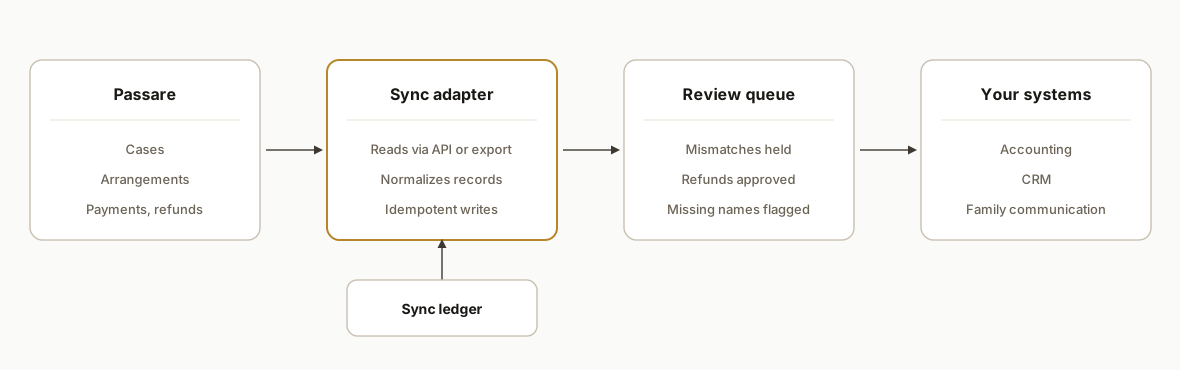
Only one piece of the adapter depends on what Passare says yes to: the source reader. The normalizer, the ledger, the review queue and the destination writers stay the same on every path. What the access answer changes is below.
| Access you get | Source reader | Freshness | What you give up |
|---|---|---|---|
| Vendor API key | Polls the API. Events only if webhooks are confirmed, which they are not yet | Poll interval | Waiting on Passare to issue the key |
| Scheduled exports | Reads delivered files | Export interval | Whether payment ids appear in the file is an open question |
| Manual export | A person drops the file in | Whenever someone remembers | Audit trail and any guarantee of daily reconciliation |
The review queue is the part we refuse to make optional. Nothing touching the books is auto-posted when a rule is unsure.
Step-by-step: how to build it
Step 1: Settle the access path with Passare first
Passare says its public API requires a key, and that keys go to software companies working with Passare customers. So the funeral home asks Passare to issue a key to the vendor building the connection. Passare's own marketing also claims many integrations while third-party directories list far fewer, so ask which are live for your account. We open every engagement with a written access checklist.
access_checklist:
  passare_api_key_issued_to_vendor: pending
  documentation_received: pending
  auth_and_rate_limits_confirmed: pending
  webhooks_available: unconfirmed
  scheduled_export_available: unconfirmed
  accounting_link_scope_confirmed_with_passare: pending
  fallback_if_no_api: scheduled_export_files
The gotcha: never promise a specific sync before this list is green. If the API route stalls, the fallback is exports on a schedule, which changes timeline and freshness but not the design.
Step 2: Define your own neutral schema
We never wire Passare fields straight into the accounting tool. The one schema decision that comes from Passare itself is that a refund is its own record type, linked to the payment it reverses, because Planning Center payments cannot be edited. This is our schema, not Passare's.
payment_record:
  source_payment_id: text
  kind: payment | refund
  reverses_payment_id: text, required when kind is refund
  amount: decimal
  received_on: date
The gotcha: keep family contact first and last name as separate required fields on the case record from day one. Passare's aftercare enrollment needs both, and splitting a single name field later is painful.
Step 3: Make every write idempotent, and treat a changed payment as an alarm
A funeral home cannot tolerate a double-posted payment, so each outbound write is keyed on source id plus destination. Because a Passare payment cannot be edited, the ledger gives us a second check for free: if a payment we already sent comes back with a different payload hash, nothing legitimate changed it. That row goes to the review queue instead of being re-sent.
create table sync_ledger (
  source_id    text not null,
  destination  text not null,
  payload_hash text not null,
  status       text not null,
  primary key (source_id, destination)
);
The gotcha: this only works if each payment carries a stable id. Whether scheduled exports include one is unconfirmed, so we add it to the access questions. If it is missing, the key has to be built from fields we can verify, and that decision gets signed off before launch.
Step 4: Map payments to accounting with a review rule
Passare's own help center says families can pay through the Planning Center, and that those payments can be refunded from the Payments & Adjustments page but not edited. That shapes the accounting design: a payment is immutable, and a correction arrives as a refund. So we treat a refund as its own entry, never as an update to the original.
accounting_rules:
  payment: create_deposit_entry
  refund: create_reversing_entry_linked_to_original
  unmatched_case: send_to_review_queue
  amount_mismatch_over_zero: send_to_review_queue
  auto_post_when: matched_case AND exact_amount
The gotcha: do not let the adapter auto-correct. Unmatched or mismatched items wait for a person.
Step 5: Hand family contacts to your CRM, with a hold on messages
Passare's help center says staff invite families to the Planning Center by text or email, and the basic information they enter flows into the case. That gives you a clean contact to sync outward, keyed on the case id. The part that matters is the hold: no outbound message fires until a person has cleared the case.
crm_upsert:
  external_key: source_case_id
  suppress_if: do_not_contact_flag OR family_message_not_approved
The gotcha: a family in the first days of grief should never receive a message because a rule fired. Family-facing sends sit behind human review, and the suppression flag defaults to on.
Step 6: Connect aftercare without duplicating it
Passare supports enrolling leads into aftercare directly, and its help center notes that Passare Support sets up the Circle of Friends integration and that the Family & Friends page needs first and last names completed. We do not rebuild that. Our adapter checks that the required name fields are present before a case is considered ready, and flags the gaps.
aftercare_readiness_check:
  require: family_contact_first_name, family_contact_last_name
  on_missing: add_to_review_queue_with_case_link
The gotcha: use the vendor's native aftercare path where one exists. Replacing it adds risk without adding value.
Step 7: Reconcile refunds separately from payments
Because Passare payments cannot be edited, the failure we watch for is a correction that was written as an overwrite. A combined total can still match while the books are wrong, so the daily check compares payments and refunds as separate lines, and also looks for ledger rows that never reached a destination.
daily_reconciliation:
  compare: case_count, payment_total, refund_total
  tolerance: 0
  stuck_ledger_rows: status_not_synced_older_than_24h
  refunds_without_linked_original: alert
  alert_to: office_manager
  include_link_to_review_queue: true
The gotcha: a refund that has no linked original entry in the books is the signature of an overwrite, so it alerts instead of passing quietly.
Where it gets complicated
API key gatekeeping. Passare issues keys to software vendors, not to funeral homes directly. If you want a custom connection, you ask Passare to issue a key to the vendor. Budget calendar time for that request, because it is outside anyone's code.
Uneven integration coverage. Passare claims more than 30 integrations on one page and more than 40 on its homepage, while one third-party directory lists only a single one. Treat every claimed integration as unverified until Passare confirms it is live on your account.
Accounting depth is unknown. A QuickBooks integration is listed by Capterra and mentioned in a customer testimonial, but we found no official documentation of what it syncs. Ask Passare which records move, in which direction, and how it handles refunds before you decide whether a custom accounting writer is needed at all.
Webhooks and scheduled exports are unconfirmed. We saw a hint that webhooks were added to the API but could not verify it. Until confirmed, design for polling or scheduled exports and treat events as a later upgrade.
Refunds are not edits. Because payments in the Planning Center can be refunded but not edited, your books must model corrections as reversing entries. A naive sync that overwrites the original will break the audit trail.
What this actually changes
We have not shipped this exact Passare build, so there is no customer outcome to quote and we will not invent one. What the design changes is specific:
- Corrections stop being edits. Every refund lands in the books as a reversing entry linked to its original payment.
- Exceptions replace retyping. The office manager works a review queue of mismatches and missing names instead of re-entering each case.
- Aftercare enrollment stops failing quietly. A case with a missing first or last name is flagged before it reaches Family & Friends.
The same export-driven adapter pattern appears in our write-up on syncing Towbook invoices to QuickBooks, a different industry with a similar shape: a case system of record, an accounting destination and a need for idempotent writes.
We give no timeline or price here because the inputs that set them are unknown until Passare answers: whether a vendor key is issued, whether you get an API or scheduled exports, and what the QuickBooks link already covers. We quote after those three answers, not before.
Frequently asked questions
What do we ask Passare for, and in what order?
Ask for a vendor key first, since only vendors can hold one. In the same request, ask whether scheduled exports exist and whether payments carry a stable id in them. Then ask what the QuickBooks link syncs. The first yes you get sets the build, and the others become your fallbacks.
How do we test Passare's QuickBooks link before paying for a custom accounting writer?
Record a test payment, refund it from the Payments & Adjustments page, and look at the books. A reversing entry linked to the original means the link handles refunds. A netted total, an overwritten entry or a missing refund means you need a custom writer.
Do we need Zapier or Make?
Not as the reader. We found no native Passare connector for either, so they cannot pull case data on their own. They only make sense downstream, if another tool in your stack already emits events.
Why does the sync compare refunds separately from payments?
Because Planning Center payments cannot be edited, a correction that was written as an overwrite can leave combined totals matching while the books are wrong. Separate payment and refund lines expose it, and a refund with no linked original raises an alert.
How long will it take and what will it cost?
We give no number before three answers are in: whether Passare issues your vendor a key, whether you get API access or scheduled exports, and what its QuickBooks link already covers. Those decide scope more than any feature list does, so we quote after confirming them.
If you run Passare and want case, payment and family data to flow into your books and your follow-up tools without re-keying, our workflow automation services cover exactly this kind of adapter build. For a comparable pattern in another industry, see our guide to Towbook to QuickBooks invoicing sync. When you are ready to confirm the access path and scope the sync, book a 20 minute call and we will tell you what Passare's setup allows for your home.
Sources
- 1.accept payments in the planning centersupport.passare.com
- 2.getting started with the planning centersupport.passare.com
- 3.circle of friends integrationsupport.passare.com
- 4.Funeral Service Workers : Occupational Outlook Handbook: : U.S. Bureau of Labor Statisticsbls.gov
Want us to build this for you?
Nine questions, about 90 seconds. You see the revenue it is costing you, then pick a time. No pitch.
See your options