
We built a downstream pipeline that uses the Rent Manager 12 Web API to extract tenants and related operational data, load it into a warehouse, and upsert contacts into a CRM. It runs on token-authenticated REST calls, handles pagination correctly, and falls back to scheduled report emails when API access is not feasible. If you operate on Rent Manager and need BI or CRM sync, this guide shows the exact pattern we ship.
Rent Manager API automation is: using the WAPI12 REST interface and report exports to keep your analytics and CRM in sync without manual exports.
The problem it solves
Operators using Rent Manager often copy data into spreadsheets and CRM tools by hand. Reports get exported, cleaned, and reshaped for owners or for sales follow-ups. The process is brittle: pagination is easy to miss on large lists, and monthly reporting windows turn into scramble weeks.
| Task | Manual workflow | Automated workflow |
|---|---|---|
| Get the latest tenant list | Log in, run a report, export, clean columns | API pull with token header. Normalized and stored nightly |
| Build owner or KPI dashboards | Rebuild the same spreadsheet each week | Warehouse tables feed BI directly, no rebuild |
| Push contacts to CRM | CSV import with duplicate headaches | Deterministic upsert keyed by external IDs |
| Large-result handling | Miss rows past page 1 | Follow Link headers and X-Total-Results reliably |
| When API access is delayed | Email a report and retype it | Parse scheduled report emails as a safe fallback |
How the automation works
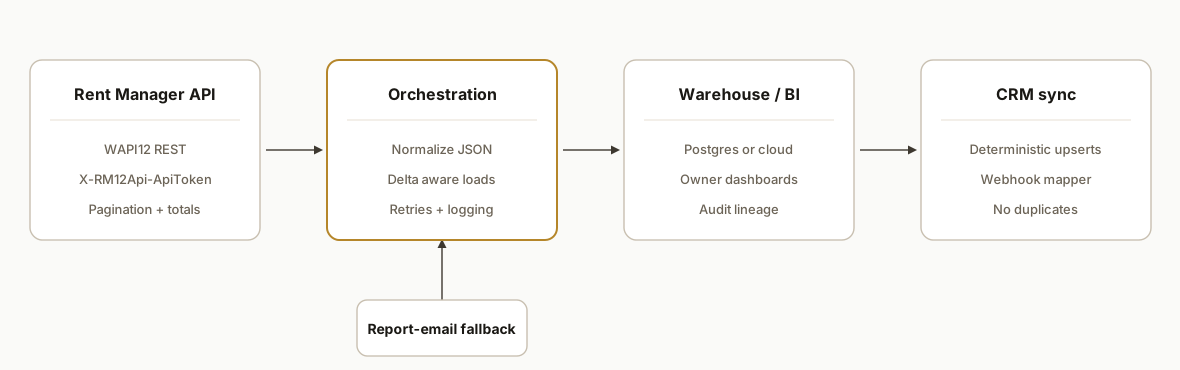
At a high level: the orchestrator calls WAPI12 with a company-specific base URL and an API token header, pages through large collections, normalizes data, then fans it out to a warehouse and a CRM. When API access is not in place, the same model ingests scheduled report emails as a bridge so reporting does not stall.
- Rent Manager WAPI12 data source: RESTful API with a company base URL pattern and a token in the X-RM12Api-ApiToken header over SSL. We pull collections that drive reporting and contact sync.
- Orchestration and normalization: A job runner pages through results using documented headers, maps fields to a warehouse schema, and stamps loads for lineage.
- Warehouse and BI: Postgres or a cloud warehouse stores the normalized tables that feed your dashboards.
- CRM upsert layer: Contacts derived from tenant records are pushed into your CRM via a small mapper. We dedupe on external IDs and email.
- Report Automation fallback: When API access is not feasible, scheduled report emails land in a monitored inbox. We parse attachments to hydrate the same tables.
Step-by-step: how to build it
1) Create an API token and verify connectivity
First confirm your base URL and token header work against a simple collection.
# Replace SAMPLECO with your company code
curl -i \
  -H "X-RM12Api-ApiToken: $RM_API_TOKEN" \
  https://SAMPLECO.api.rentmanager.com/Tenants
Key check: HTTP 200 with JSON in the body. SSL is required, and the token must be sent in the X-RM12Api-ApiToken header.
2) Implement paginated fetches with total-count awareness
Large collections auto-paginate. Follow Link headers and read X-Total-Results so you do not miss rows.
import fetch from "node-fetch";

async function fetchAllTenants(baseUrl, apiToken) {
  let url = `${baseUrl}/Tenants`;
  const out = [];
  while (url) {
    const res = await fetch(url, { headers: { "X-RM12Api-ApiToken": apiToken }});
    if (!res.ok) throw new Error(`HTTP ${res.status}`);
    const page = await res.json();
    out.push(...page);
    // Parse pagination
    const link = res.headers.get("link");
    const next = link && link.split(",").find(p => p.includes("rel=\"next\""));
    url = next ? next.match(/<([^>]+)>/)[1] : null;
    if (res.headers.get("x-total-results")) {
      const total = Number(res.headers.get("x-total-results"));
      if (out.length >= total) url = null;
    }
  }
  return out;
}
Gotcha: do not assume a fixed page size. Always honor the Link header and trust X-Total-Results as your completion guard.
3) Normalize and load into your warehouse
Keep a thin mapping layer and load-id lineage so you can audit what ran.
-- Warehouse DDL example
create table if not exists rm_tenants (
  tenant_id bigint primary key,
  name text,
  email text,
  phone text,
  raw jsonb,
  load_id uuid not null,
  loaded_at timestamptz not null default now()
);
import { Client } from "pg";
async function loadTenantsToPg(client, rows, loadId) {
const q = `insert into rm_tenants (tenant_id, name, email, phone, raw, load_id)
values ($1,$2,$3,$4,$5::jsonb,$6)
on conflict (tenant_id) do update
set name=excluded.name, email=excluded.email, phone=excluded.phone, raw=excluded.raw, load_id=excluded.load_id;`;
for (const r of rows) {
await client.query(q, [r.TenantID, r.Name, r.Email, r.Phone, JSON.stringify(r), loadId]);
}
}Tip: preserve the full raw JSON. It saves you when a downstream calculation needs a field you did not model initially.
4) Upsert contacts into your CRM via a mapper
We map warehouse records to a generic webhook that the CRM or middleware consumes. This avoids hard-coding a vendor in the data pipeline.
async function pushContact(webhookUrl, t) {
  const contact = {
    external_id: `rentmanager:${t.tenant_id}`,
    name: t.name,
    email: t.email,
    phone: t.phone,
    source: "rentmanager"
  };
  const res = await fetch(webhookUrl, {
    method: "POST",
    headers: { "Content-Type": "application/json" },
    body: JSON.stringify(contact)
  });
  if (!res.ok) throw new Error(`CRM push failed: ${res.status}`);
}
Use a deterministic external_id so future runs upsert rather than duplicate.
5) Design for safe updates if you write back to Rent Manager later
If you expand into update operations, concurrency control matters. When concurrency is enabled, updates must include the record's UpdateDate or the request fails. Pattern: read the record, keep its UpdateDate, then include it on your update call to avoid conflicts.
Rule: read current -> capture UpdateDate -> include UpdateDate on update -> handle 409 by re-readingEven if you only extract today, designing with this rule in mind prevents surprises if scope grows.
6) Add a Report Automation fallback path
Rent Manager supports scheduled delivery of report batches via email. When API access is not feasible, have reports delivered to a controlled mailbox and parse attachments into the same tables.
# Simple CSV ingestion sketch
import csv, uuid, psycopg2, json

def ingest_csv(path, conn):
    load_id = str(uuid.uuid4())
    with open(path, newline="") as f, conn, conn.cursor() as cur:
        for row in csv.DictReader(f):
            cur.execute(
                """
                insert into rm_tenants (tenant_id, name, email, phone, raw, load_id)
                values (%s,%s,%s,%s,%s::jsonb,%s)
                on conflict (tenant_id) do update
                set name=excluded.name, email=excluded.email, phone=excluded.phone, raw=excluded.raw, load_id=excluded.load_id
                """,
                [row["TenantID"], row["Name"], row.get("Email"), row.get("Phone"), json.dumps(row), load_id]
            )
Bridge with email while credentials or API approvals are pending, then switch the source to API when ready. The warehouse and CRM layers stay the same.
Rent Manager API: quick start and access checklist
If you are searching for the Rent Manager API or RentManager API and just need to get moving, this is the shortest path we ship in production:
- Confirm your company-specific base URL: https://YOURCODE.api.rentmanager.com.
- Ask an admin to issue a WAPI12 API token. Store it in your secret manager.
- Make a test call to a small collection such as Tenants with the X-RM12Api-ApiToken header over SSL.
- Implement pagination: follow the Link header and stop when X-Total-Results is satisfied.
- Preserve raw JSON in your warehouse and attach a load_id for lineage so audits are trivial.
Related patterns you can copy next:
- If you also run AppFolio, see our AppFolio to Postgres sync pattern.
- Running Buildium too. Our Buildium report automation approach uses the same bridge idea.
- For Yardi, our Yardi reporting integration outlines a similar warehouse-first design.
Connect Rent Manager to Power BI without a connector
We avoid brittle desktop exports. The clean path is: API to warehouse, then Power BI on top of modeled views.
- Land raw JSON and modeled tables in Postgres.
- Create narrow reporting views for analysts. Example:
create or replace view v_rm_contacts as
select
  tenant_id,
  name as contact_name,
  lower(nullif(email, '')) as email,
  regexp_replace(phone, '[^0-9]', '', 'g') as phone_e164ish,
  loaded_at
from rm_tenants;- In Power BI Desktop: Get Data, PostgreSQL database, select views. Publish.
- In Power BI Service: choose either a direct database connection or configure a gateway depending on your network. Schedule refresh to align with your nightly API run.
If you want a deeper walkthrough of the BI side, our playbook for a similar stack is here: AppFolio to Power BI integration pattern.
Do you need a Power BI gateway for Rent Manager data
Short answer: it depends on where your warehouse lives.
- Cloud Postgres with a public endpoint and SSL: connect directly from Power BI Service. No gateway needed. Lock by IP allowlist and strong credentials.
- Private database inside a VPN or VPC: install an on-premises data gateway. Point the gateway at your warehouse. Schedule refresh to match your API job window.
- Mixed environments: start with Desktop for model development, publish, then switch to gateway once networking is approved.
If you are deciding your data-path and tools mix, we break down common options in Tools to connect your apps.
Zapier or Make.com: how to call Rent Manager without a connector
If your team already uses Zapier or Make.com, you can still call WAPI12 reliably with HTTP modules.
- Use the HTTP module. Method: GET. URL: your https://YOURCODE.api.rentmanager.com resource.
- Headers: X-RM12Api-ApiToken with your token. Accept: application/json.
- Pagination: read the Link response header. Loop until no rel="next" and your running count reaches X-Total-Results.
- Map to your sinks: POST normalized records to a webhook that writes to your warehouse or CRM.
We compare glue-tool tradeoffs here: Make vs n8n vs Apps Script. If you want a buyer view on when to pick custom over shelf, see Off the shelf vs custom automation.
Error handling and throttling patterns for WAPI12
Production runs must degrade gracefully. What works for us in live jobs:
- Retry policy: retry on transient 5xx with exponential backoff and jitter. Cap attempts and surface metrics.
- Auth failures: on 401, rotate or reissue the token from your secret store, then retry once.
- Pagination guards: stop when X-Total-Results is satisfied even if the Link header stops early.
- Removals and experiments: treat 410 Gone as a feature removal and disable the call via a flag.
- Idempotent writes: upsert with deterministic external_id in the CRM sink so retries do not duplicate.
Minimal fetch wrapper with backoff:
async function fetchWithRetry(url, opts, max = 5) {
  for (let i = 0; i < max; i++) {
    const res = await fetch(url, opts);
    if (res.ok) return res;
    const retryable = res.status >= 500 && res.status < 600;
    if (!retryable) throw new Error(`HTTP ${res.status}`);
    const wait = Math.min(32000, 1000 * 2 ** i) + Math.floor(Math.random() * 250);
    await new Promise(r => setTimeout(r, wait));
  }
  throw new Error("exhausted retries");
}
Security and data residency: what we do in production
- Secrets: store API tokens in a secret manager, not in environment files. Rotate regularly.
- Least privilege: separate ingestion and analytics roles in the warehouse. Analysts query views, not base tables.
- PII minimization: model only fields you use. Mask or exclude sensitive columns in BI.
- Region choice: host your warehouse in the region required by your compliance policy and client contracts. For a practical overview see AI automation and data residency for Canadian teams and why owning your warehouse improves control in Make better AI decisions by owning your data.
Low code or API: which path should you choose
- Use the API when you need reliable nightly or near real time sync, deterministic upserts, and full lineage.
- Use scheduled report emails as a bridge when API access is delayed. Parse attachments into the same warehouse tables so you can switch sources without breaking BI.
- Use a low-code orchestrator for glue tasks only. When a native connector is missing or limited, the REST API plus a small mapper stays predictable. If you want a comparison of tool tradeoffs, we wrote a practical take in Make vs n8n vs Apps Script.
Where it gets complicated
Pagination on large sets. Collections over 1,000 items auto-paginate. You must follow Link headers and use X-Total-Results to confirm completion. Skipping this silently drops data.
Optimistic concurrency on updates. When concurrency control is enabled, update requests must include UpdateDate. Without it, writes fail. Even if your Phase 1 is extract only, plan for this if you ever write back.
Experimental resources can change. Some resources are marked experimental and may be removed. Removed endpoints can return 410 Gone. Build feature flags and monitor 4xx classes so failures page the right team.
Cross-join tables are partial. Cross-join relationship surfaces have partial support. Expect to perform multiple calls and join locally in your warehouse rather than relying on a heavy server-side cross-join.
Connector expectations. If a native low-code connector is not available or is limited, bridge with the REST API and the report-email fallback. We did not rely on a marketplace connector in this build.
What this actually changes
For a property management team, the change is structural: reporting and CRM sync stop depending on a person running exports. The API path keeps analytics current and contact records aligned, while the report-email fallback protects your timeline during access or approval windows. Better data quality pays for itself: Gartner estimates poor data quality costs organizations an average of 12.9 million dollars per year globally. Source: https://www.gartner.com/en/articles/what-is-data-quality
Frequently asked questions
Does Rent Manager have an official API?
Yes. The Rent Manager 12 Web API is RESTful with a company-specific base URL and token authentication via the X-RM12Api-ApiToken header over SSL. Large collections paginate and expose X-Total-Results for total counts.
How do I get API access in Rent Manager?
Ask an administrator to enable WAPI12 access and generate an API token for your company code. Store the token in your secret manager. Verify with a small GET call, then proceed to pagination and warehousing.
Can this sync to my CRM in real time?
The API supports polling on an interval. We run near real time by scheduling short, safe polls and pushing deltas into the CRM. If your organization later adopts eventing, the same mapper can consume that feed without changing the warehouse schema.
Can I use Power BI or Tableau with this?
Yes. Point BI tools at modeled warehouse views. We favor Postgres views for stability, then schedule refresh in the BI service to match the ingestion cadence. See our Power BI walkthrough above and our Power BI integration pattern.
Is there a native Zapier or Make connector?
We did not rely on a Zapier or Make connector for this build. When a native connector is not available or is limited, the reliable approach is the REST API for primary sync and scheduled report emails as a fallback until API access is finalized.
How do you prevent duplicates in the CRM?
We upsert on a deterministic external_id that carries the source and the primary key, for example rentmanager:12345, and we also check email when present. The warehouse remains the source of truth so contact merges are auditable.
What happens if an endpoint changes or is removed?
Some resources are marked experimental and can change or be removed. We monitor 4xx responses, handle 410 Gone explicitly, and gate experimental calls behind feature flags so a removal degrades gracefully rather than breaking the whole run.
What does this cost monthly?
The recurring cost is primarily your warehouse and job runner, plus minimal API usage and maintenance. There is no separate charge from us per record. Build scope and data volume drive your exact run costs more than the API itself.
If you want this running against your Rent Manager environment, we already ship this pattern in production for property managers. See our broader CRM automation services, and for a similar property stack deep dive read AppFolio API integration guide and limits. When you are ready to scope, book a 20 minute call.
Want us to build this for you?
Nine questions, about 90 seconds. You see the revenue it is costing you, then pick a time. No pitch.
Get your free assessment