
Stripe failed payment retry strategy comes down to two paths: enable Stripe Billing Smart Retries for a set-and-forget baseline, or run custom dunning that listens to invoice.payment_failed and coordinates email or SMS plus timed follow-ups. We have built both patterns in production. This guide shows how we decide, how we implement, and what to watch for.
Definition: Stripe failed payment retry is the set of automated or manual actions you take after an invoice charge fails to recover revenue and reduce involuntary churn.
For deeper dives on specific pieces, see our focused guides on Stripe invoice.payment_failed webhooks, dunning email automation patterns, and a broader Smart Retries vs custom retry logic comparison.
The problem it solves
Missed renewals are rarely a hard no. They are more often card issues that resolve with the right timing and a clean customer prompt. Manually chasing each failure scales poorly and causes overlaps with the next billing cycle if you get the timing wrong.
| Process | Manual handling | Automated handling |
|---|---|---|
| Detect failures | Staff reviews Dashboard each morning | Webhook on invoice.payment_failed fires instantly |
| Retry timing | Calendar reminders and ad hoc attempts | Smart Retries or a scheduler applies planned windows |
| Customer prompts | One-off emails, no links | Branded prompts with secure links, tracked by event |
| 3DS and special cases | Easy to miss action required | Targeted messages that request authentication |
| Stop conditions | Human judgment, error-prone | Idempotent state: stop on payment success or excessive retries |
| Reporting | Manual CSV pulls | Scheduled reports plus event logs consolidated |
What recovering failed payments is worth
Move the sliders to your own numbers. The defaults are only an example business, not client data.
Your own estimate. Card expiries and soft declines are the easiest to win back.
Revenue recovered each year
$9,000
$50000 × 5% failed × 30% recovered × 12 months
- Staff cost of doing it by hand each year
- $3,640
- 2 hrs a week × $35/hr × 52 weeks
- Hours handed to the system each month
- 9 hrs
- 2 hrs a week × 52 ÷ 12
How the automation works
In production we start with Stripe's Smart Retries when a client uses Stripe Billing and needs fast, low-touch recovery. We switch to, or layer in, custom dunning when we need channel control, bespoke timing, CRM coordination, or stricter stop rules. Both depend on Stripe's events and webhooks.
- Smart Retries: Enable in Stripe Billing. Stripe schedules ML-optimized retries and can send hosted emails or links. Note that some failures are not auto-retried. 3D Secure authentication failures require a customer prompt. Also tune retry windows so they do not overlap the next invoice. Excessive retries can be blocked by card networks.
- Custom dunning: Listen to invoice.payment_failed and related events via webhooks. Orchestrate your own outreach cadence across email and optionally SMS, write to your CRM, and schedule optional manual retry attempts. Avoid double retries if Smart Retries is also enabled.
- Events and auth: All API calls go to https://api.stripe.com and authenticate with API keys using HTTP Basic Auth. Webhooks deliver near real time event payloads for failures and recoveries. The Events API lets you review a feed for reconciliation.
- Reporting: Use Stripe's CSV exports or scheduled reports for daily reconciliation. Data Pipeline and the Reports API provide programmatic delivery at scale.
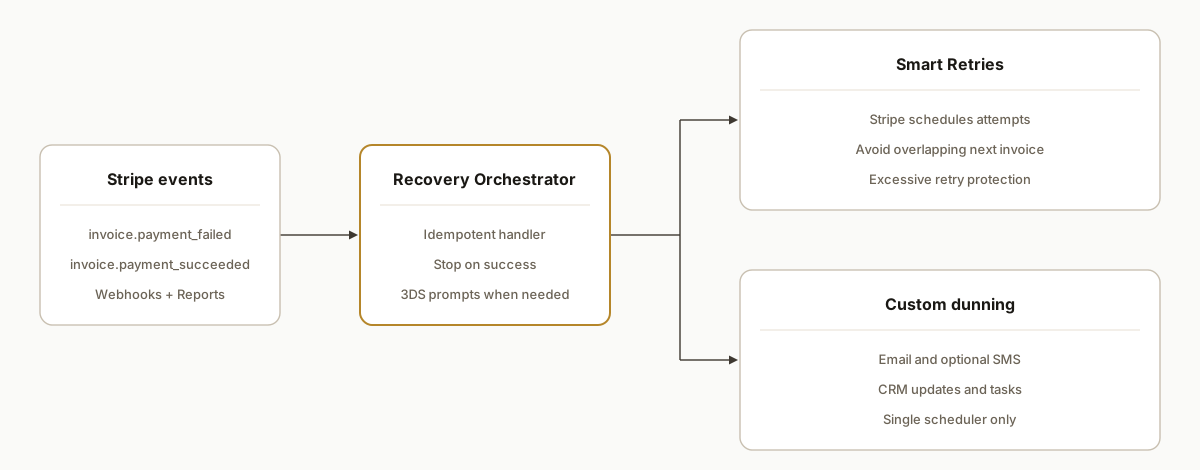
Smart payment retries vs smart dunning: what should you use?
If you want automated payment retries without running your own scheduler, start with Stripe Billing Smart Retries. It handles timing. If you need smart dunning that coordinates email or SMS, routes high value accounts, or pauses before the next bill date, add a custom layer driven by webhooks. The safe coexistence rule: one system controls charge attempts, the other controls messaging.
Buyer checklist:
- You want zero maintenance: enable Smart Retries only.
- You need branded multi-channel prompts: add custom dunning for messaging.
- You must avoid attempts after day X: keep a short custom window and stop on success.
- You are concerned about 3DS: add targeted prompts for authentication flows.
Stripe Billing Smart Retries: limits to know
- Not every failure is retried. Authentication required cases need customer action.
- Timing is optimized by Stripe. You still control the maximum window. Keep it inside your billing period so attempts do not touch the next cycle.
- Respect network protections. Excessive attempts can be blocked by card networks. Pair retries with messaging instead of hammering the card.
- Hosted comms are optional. If you prefer full brand control, use Smart Retries for attempts and run your own prompts.
See our comparison notes in Smart Retries vs custom retry logic for coexistence patterns and handoff rules.
Stripe Smart Retries documentation: what Stripe covers and what you add
Buyers looking for documentation usually need two things: where Smart Retries is configured in Stripe Billing and what is outside those docs that your team must implement.
What Stripe documents and controls:
- Enabling Smart Retries in Billing settings and choosing a maximum retry duration.
- The platform's schedule logic for when to retry a failed invoice charge.
- Optional customer emails hosted by Stripe if you enable them.
What you still need to implement:
- Webhooks that react to invoice.payment_failed to start recovery and invoice.payment_succeeded to stop. See our webhook guide.
- Branded dunning content and multi-channel prompts. Use our dunning email playbook.
- Coexistence rules so your custom flow does not double-attempt while Smart Retries is active. Details in Smart Retries vs custom retry logic.
- Reason-specific handling like 3DS authentication. Our explainer on invoice.payment_failed vs charge failures helps you route edge cases.
If you need an end to end reference build, see our failed payment automation build.
Revenue recovery in Stripe Billing: settings we turn on every time
A practical checklist we apply during setup so revenue recovery is documented and reproducible:
- Enable Smart Retries in Billing and set a finite window that fits within your billing interval.
- Decide on customer email ownership. Enable Stripe-hosted emails or keep them off and send branded emails from your system.
- Create one webhook endpoint that listens to invoice.payment_failed and invoice.payment_succeeded. Make handlers idempotent by event.id.
- Define a final-state policy after the last attempt: cancel, pause, or mark unpaid per your product rules.
- If Smart Retries stays on, your system only handles messaging and CRM tasks. Do not schedule automated charge attempts in your code while Smart Retries is active.
- If Smart Retries is off, your system may schedule one controlled retry after a prompt or send a task for human review.
invoice.payment_failed: practical patterns for automated payment retries
- Pair events: listen to invoice.payment_failed to start recovery and invoice.payment_succeeded to stop. Idempotency: store and ignore repeat event IDs.
- Keep one scheduler. If Smart Retries is on, only send messages from your system. If Smart Retries is off, your system schedules the next attempt or a manual review.
- Keep the window short. Total recovery duration should be shorter than your subscription interval to avoid overlap with the next invoice.
- Failure-aware prompts. Use different copy for insufficient funds versus authentication required. Never include sensitive data in messages.
- Reconcile weekly. Compare recovered invoices against your outreach log to tighten timing and templates. For implementation detail, see our webhook guide and dunning emails playbook.
Configuration checklist: Smart Retries and dunning that do not collide
We ship this as a small, reliable service. The minimum viable configuration we toggle in client accounts:
- Turn on Smart Retries in Stripe Billing. Set a finite retry window that fits inside your billing period. Keep it short for weekly plans and modest for monthly plans.
- Enable customer emails if you want Stripe to send hosted notices. If you prefer brand control, keep emails off and let your custom dunning handle messaging.
- Create a webhook endpoint that listens to invoice.payment_failed and invoice.payment_succeeded. Persist event IDs and cancel outreach on success.
- Choose a final-state policy after the last attempt: cancel, pause, or mark unpaid based on your product rules.
- If Smart Retries stays on: do not schedule your own automated charge attempts. Your system only handles messaging, CRM updates, and optional human tasks.
- If Smart Retries is off: your system may schedule a single controlled manual retry after a prompt or route to a human for review.
Two deeper guides that help with edge cases: the difference between invoice.payment_failed and charge failures and our end to end failed payment automation build.
Step-by-step: how to build it
1) Decide Smart Retries vs custom
If you are on Stripe Billing and you do not need multi-channel control, enable Smart Retries in the Dashboard. If you need channel control or CRM coordination, run a custom flow listening to events and sending your own prompts. Avoid running two independent schedulers at once.
Decision rule:
- Start with Smart Retries when you want ML-optimized timings and Stripe-hosted recovery UX.
- Add custom dunning when you need email or SMS control, custom windows, CRM tasks, or agent routing.
- If both are on, only one component should schedule retries. Outreach can still run in parallel.
2) Create a webhook endpoint for failures and recoveries
Receive events from Stripe and store event IDs so you never process an event twice. Use HTTPS and verify signatures per Stripe docs.
// server.js
import express from "express";
const app = express();
app.use(express.json({ type: "application/json" }));

// naive in-memory store for example only
const seen = new Set();

app.post("/webhooks/stripe", async (req, res) => {
  const evt = req.body; // verify signatures in production
  if (seen.has(evt.id)) return res.status(200).send("dup");
  seen.add(evt.id);

  if (evt.type === "invoice.payment_failed") {
    const invoice = evt.data.object;
    // enqueue outreach job keyed by invoice.id and customer.id
  }
  if (evt.type === "invoice.payment_succeeded") {
    const invoice = evt.data.object;
    // cancel any pending outreach for this invoice/customer
  }
  return res.status(200).send("ok");
});

app.listen(3000);
Key gotcha: retry delivery means your endpoint can receive the same event multiple times. Make your handler idempotent by event.id.
3) Build a recovery scheduler that stays inside the billing period
Set a short, finite window so you do not retry after the next invoice finalizes. Store the plan on first failure and stop on success or manual write-offs.
// recovery-plan.js
const plans = new Map(); // invoiceId -> plan state

export function planOutreach(invoiceId, now = new Date()) {
  if (plans.has(invoiceId)) return plans.get(invoiceId);
  const steps = [
    { t: 0,  kind: "email", template: "failed-1" },
    { t: 24, kind: "email", template: "update-card" },
    { t: 72, kind: "sms",   template: "last-reminder" }
  ];
  const schedule = steps.map(s => ({ ...s, at: new Date(now.getTime() + s.t * 3600_000) }));
  const state = { status: "active", schedule };
  plans.set(invoiceId, state);
  return state;
}

export function stopOutreach(invoiceId) {
  const s = plans.get(invoiceId);
  if (s) s.status = "stopped";
}
Keep the total duration below your billing interval to avoid overlap with the next cycle.
4) Send prompts that match the failure type
3D Secure failures are not automatically retried by settings. You must prompt the customer to authenticate. For generic insufficient funds, a simple reminder may be enough. Use templates keyed by failure reason and do not include sensitive data.
// notifier.js
import nodemailer from "nodemailer";

export async function sendEmail(to, subject, html) {
  const t = nodemailer.createTransport({ sendmail: true });
  await t.sendMail({ to, from: "billing@yourco.com", subject, html });
}

export function template(kind, context) {
  if (kind === "failed-1") return `We could not process your renewal. Please update your card.`;
  if (kind === "update-card") return `Your subscription is on hold. Update payment details to avoid interruption.`;
  if (kind === "3ds") return `Please complete authentication to finish your payment.`;
  return `Please update your payment method.`;
}
5) Coordinate with Smart Retries to avoid double attempts
If Smart Retries is on, let Stripe schedule charge attempts and have your scheduler send prompts only. If you disable Smart Retries, your team can trigger a retry manually or via API when appropriate. Avoid overlapping automated attempts.
Coexistence rule:
- Smart Retries on: your flow sends messages, Stripe schedules attempts.
- Smart Retries off: your flow can schedule a manual attempt after a prompt.
- Never run two automated schedulers that both attempt charges.
6) Reconcile with Stripe reports and the Events API
Use daily CSV exports or scheduled reports from the Dashboard for an accounting view. The Events API lets you page invoice.payment_failed and invoice.payment_succeeded for an operational view. Reconcile outreach jobs to recovered payments for a feedback loop.
# Example: authenticate with HTTP Basic and list events by type (shape simplified)
curl https://api.stripe.com/v1/events \
  -u sk_live_xxx: \
  -G --data-urlencode "type=invoice.payment_failed"
Where it gets complicated
- 3DS action required: Retry settings do not solve 3D Secure authentication failures. You must message the customer to authenticate. If you skip this, the payment will not succeed.
- Overlap with next invoice: Long retry windows can collide with the next billing period. Keep your recovery duration shorter than the subscription interval.
- Excessive retries: Card networks can block after too many attempts. Stripe surfaces protections for excessive retries. Respect those limits.
- Double-retry conflicts: Running Smart Retries and a custom retry scheduler together risks back-to-back attempts. If you keep Smart Retries on, let Stripe handle attempts and keep your system on messaging only.
- Webhook idempotency and reliability: Stripe can deliver the same event more than once. Persist event IDs and make handlers idempotent so you never send two emails for one failure.
What this actually changes
For a B2B subscription product we support, Smart Retries covered the easy wins immediately. We added a custom dunning layer to control channels and timing, route high-value accounts to a human, and stop before the next cycle. That combination reduced back-and-forth in support and made recoveries predictable even during card network outages.
One external benchmark to calibrate expectations: Recurly's Subscription Benchmark Report has reported that dunning and retries can recover roughly a third of failed renewals on average across subscription businesses. Source: https://recurly.com/research/report/subscription-benchmarks/.
If you want to justify the effort, our primer on the numbers is here: automation ROI explained.
Docs map: Smart Retries, dunning, and webhooks
When buyers search for docs, these are the Stripe topics we review and implement against in production:
- Billing: Smart Retries and failed payment settings. What can Stripe schedule, and what is the maximum window you can configure.
- Billing: Customer emails for payment updates. Whether Stripe should send hosted recovery emails or you will send branded emails.
- API: Webhooks fundamentals. Event delivery, signature verification, retries, and idempotency by event.id.
- Events to watch: invoice.payment_failed to start recovery and invoice.payment_succeeded to stop. charge.failed can appear for immediate declines on one-off charges.
If you need a practical build, our detailed patterns are in the webhook guide, the dunning email playbook, and the Smart Retries vs custom logic comparison.
Frequently asked questions
What is smart payment retries vs smart dunning?
Smart payment retries: Stripe Billing Smart Retries that schedule attempts automatically. Smart dunning: your custom outreach that prompts customers and coordinates CRM. Use Smart Retries for timing and add dunning for branded prompts and stop rules.
Where is Smart Retries documented in Stripe Billing?
In Stripe Billing's documentation on failed payment settings and retry rules plus the Dashboard settings. Those docs explain what Stripe schedules and the maximum retry window. This guide fills the gaps for webhooks, messaging, and coexistence with custom dunning.
Should I just enable Smart Retries and call it a day?
If you are on Stripe Billing and do not need channel control, Smart Retries is a strong default. It schedules retries and can handle recovery UX. You still need to cover cases like 3D Secure authentication that require customer action. If you need email or SMS control or CRM tasks, add a custom layer.
Can I run Smart Retries and custom dunning together?
Yes, but you must prevent double attempts. The safe pattern: keep Smart Retries for charge timing and have your custom flow handle messaging and CRM. If you prefer your own attempt timing, disable Smart Retries and keep one scheduler in charge.
How do I avoid retries spilling into the next billing period?
Keep your recovery window shorter than the subscription interval and stop on success. Stripe warns that long retry schedules can overlap the next invoice. Tune durations accordingly and cancel pending outreach when invoice.payment_succeeded arrives.
Do 3D Secure failures get auto retried?
No. 3DS authentication failures require customer action. Your flow should detect the reason and prompt the customer to authenticate. Without that, subsequent attempts will not clear.
Does Smart Retries also send emails automatically?
Stripe can send hosted customer emails if you enable those settings. Many teams prefer full brand control. In that case, keep Smart Retries for attempts and let your custom dunning handle all messaging.
What does a custom dunning setup cost monthly?
Stripe webhooks and reports are included in Stripe. Your costs are the small service that listens to events, email or SMS send costs, and optional automation tooling like Zapier or Make. Build effort is the primary cost. We scope these based on volume and channel needs.
Can a non-developer set this up?
Enabling Smart Retries is a Dashboard setting. Building a reliable webhook-driven flow with idempotency, channel logic, and CRM coordination is development work. We ship this as a small service with clear handoff and runbooks.
If you want a second set of eyes on your recovery flow, we have built both Smart Retries and custom dunning in production. See our related guide on the webhook pattern in Stripe at [/blog/stripe-invoice-payment-failed-webhook-guide]. You can also compare nuanced tradeoffs in [/blog/stripe-smart-retries-vs-custom-retry-logic] and see copy patterns in [/blog/stripe-dunning-emails-automation-guide]. For help implementing, see our workflow automation services, read our end to end failed payment automation build, learn the difference between invoice.payment_failed and charge failures, review the automation ROI primer, consider who can build custom automation, and book a call.
Sources
- 1.Subscription benchmarks report (Recurly)recurly.com
Want us to build this for you?
Nine questions, about 90 seconds. You see the revenue it is costing you, then pick a time. No pitch.
See your options