
Acumatica order sync means pushing sales orders from a storefront or CRM into Acumatica through its contract-based REST API, then sending shipment and status changes back out, ideally triggered by push notifications instead of polling. It is built for distributors and manufacturers whose ERP is the system of record but whose orders originate somewhere else. This guide covers what the API allows, where the limits bite, the integration we would build, and how to scope it.
We write this as practitioners. Nothing here describes a specific customer deployment. It is the pattern we build and the failure modes we design against.
The problem it solves
Order sync is the definition of a job that looks small and is not. A storefront or CRM captures an order. Someone re-keys it into Acumatica, or a half-working connector creates it with the wrong customer, warehouse or tax settings. Later, a shipment is confirmed in the ERP and nobody tells the customer or the sales rep until they ask.
Definition: Acumatica order sync is the automated, two-way movement of sales order and shipment data between Acumatica and an external system, with idempotent writes and status feedback.
Here is how the realistic options compare, based on the verified integration surface.
| Option | What it gives you | Limits | Fit |
|---|---|---|---|
| Manual re-keying | Zero setup | Errors, delay, no status feedback | Under a handful of orders a day |
| Zapier or Make native connector | Fast setup in theory | We found no native Acumatica connector for either; a community thread points to Power Automate instead | Do not plan around it |
| Power Automate connector | Microsoft lists an Acumatica connector | We have not verified its action coverage, so validate against your needed entities | Microsoft-centric shops |
| Generic HTTP calls to the REST API (Make or similar) | Works in principle | You own auth, retries, mapping and error handling | Simple one-way flows |
| Custom integration service | Idempotent orders, shipment feedback, queue-aware throttling | Build cost and ongoing ownership | Real order volume, multi-system sync |
The honest summary: there is an API, there is no obvious off-the-shelf bridge, and the license throttle shapes the design more than any feature gap does.
What keeping your systems in sync is worth
Move the sliders to your own numbers. The defaults are only an example business, not client data.
Revenue from deals that stop slipping each year
$100,800
80 a month × 12 × 5% × 70% × $3000
- Deals kept a year
- 34
- 80 × 12 × 5% × 70%
- Staff cost of doing it by hand each year
- $9,100
- 5 hrs a week × $35/hr × 52 weeks
- Hours handed to the system each month
- 22 hrs
- 5 hrs a week × 52 ÷ 12
How the automation works
The contract-based REST API uses the pattern https://<instance>/entity/<endpoint>/<version>/, for example /entity/Default/24.200.001/SalesOrder. Authentication is either a cookie session (POST to /entity/auth/login) or OAuth 2.0 through a connected application. The Acumatica Integration Development Guide has a section on working with the contract-based REST API and a separate reference. It is an older release, so confirm the details against your own version.
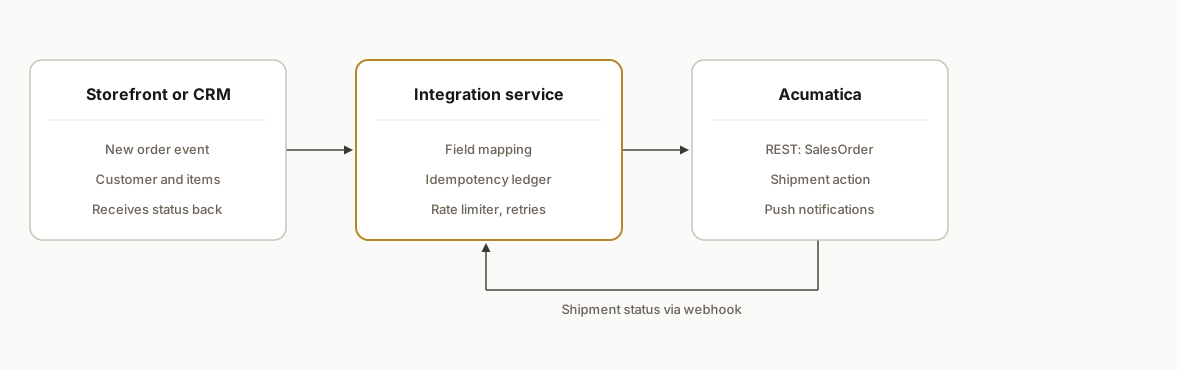
The pieces:
- Source system: the storefront or CRM emits an order event or exposes new orders to read. This is the trigger for the inbound leg.
- Integration service: a small service that maps fields, resolves customers and items, writes to Acumatica, and records an external-ID to Acumatica-order-number ledger so retries never duplicate.
- Acumatica REST API: receives SalesOrder writes and handles shipment actions.
- Push notifications: configured on the Webhooks screen (SM304000), they send changes to an HTTP endpoint so the outbound leg does not rely on polling.
- Status writer: takes the shipment event and updates the storefront order, the CRM deal, or both.
Step-by-step: how to build it
Step 1: Confirm your endpoint and entities
Version and entity names differ by instance, so do not hardcode them. Open the Web Services Endpoint screen (SM2070PL) and record the endpoint name, version, and whether a Shipment entity is exposed. We treat the Shipment URL as something to verify per instance, not assume.
# Discover what your instance exposes
curl -s https://YOUR-INSTANCE/entity/ | head
Step 2: Set up authentication
Use OAuth 2.0 through a connected application for a long-running service. Cookie sessions work but count against API user limits, and you must log out to free the slot.
# Cookie session (simple, but releases a license slot only on logout)
curl -c cj -X POST https://YOUR-INSTANCE/entity/auth/login \
  -H "Content-Type: application/json" \
  -d '{"name":"svc-user","password":"***","company":"YOUR-COMPANY"}'
Gotcha: if you leave sessions open you can exhaust the API user cap fast.
Step 3: Write orders idempotently
Keep a ledger keyed by the source order ID. Check it before every write. Store the Acumatica order number after success.
def push_order(src):
    if ledger.get(src["id"]):
        return ledger[src["id"]]
    body = map_to_sales_order(src)  # customer, lines, warehouse
    r = session.put(f"{BASE}/SalesOrder", json=body)
    r.raise_for_status()
    num = r.json()["OrderNbr"]["value"]
    ledger.set(src["id"], num)
    return num
Gotcha: the response shape wraps values in objects, so parse accordingly and verify field names against your endpoint.
Step 4: Handle shipments
Shipment creation from a sales order is an action on the order. We did not confirm the exact action syntax on an official page, and community threads disagree on PUT versus POST, so test the action on a sandbox tenant and follow the current help page for creating a shipment from a sales order before you build on it.
Step 5: Subscribe to push notifications
On SM304000, define a notification on the entity you care about and point it at your HTTPS endpoint. Your receiver should acknowledge fast and enqueue the work.
@app.post("/acumatica/hook")
def hook(payload: dict):
    queue.enqueue(process_change, payload)
    return {"ok": True}
Step 6: Throttle on purpose
Build a rate limiter below your licensed ceiling and a retry with backoff for declined requests.
limiter = RateLimiter(max_per_minute=40)  # set under your SM604000 value
for job in jobs:
    limiter.wait()
    send(job)
Step 7: Reconcile nightly
Run a read-only comparison of open source orders against Acumatica orders, and report mismatches rather than silently fixing them.
Where it gets complicated
License throttling is the real design constraint. The license caps API users, concurrent requests, and requests per minute. Per the April 2025 Acumatica Licensing Guide, the figures scale by product tier, with Essentials at a queue of 5 and 50 requests per minute up to Enterprise at 40 and 300, at the highest consumption tier. Published numbers conflict across sources, so read your own limits on SM604000 and treat any specific rate as unconfirmed until you do.
Queued requests can be declined. Acumatica's help documentation describes requests being declined when the internal queue is too deep or a request waits too long (see the Concurrent Web Services API Requests help page). Confirm the exact thresholds for your release. Design for retries.
Polling a storefront sync burns your budget. A community user described the per-minute cap as very low for an ecommerce site. Prefer push notifications for the outbound leg and batch inbound writes.
Version drift breaks hardcoded paths. Endpoint version and entity names vary by instance, so read them from configuration.
Exports are not a shortcut. Generic Inquiries can be exposed through OData as read-only, which suits reporting but not writing orders. A native scheduled CSV email of an inquiry is unconfirmed, so do not plan a batch-file integration around it.
Customer and item mapping eats the time. Most failed orders are unknown customers, unmapped SKUs, or warehouse and tax mismatches, not API errors.
What this actually changes
We cannot cite a customer result, so we will keep this qualitative. A correct build removes re-keying, gives sales and customers shipment status without a phone call, and keeps the ERP as the single record. The value is structural: every order that flows without a human touch also flows without a typo.
Scope and timing depend on the number of systems, order complexity (kits, multi-warehouse, tax), and sandbox access. A single storefront to Acumatica order push with status return is typically a few weeks of work. Adding a CRM, returns, or inventory feedback extends that. We quote after seeing your endpoint configuration and license limits.
Frequently asked questions
Does Acumatica have a REST API for sales orders?
Yes. The contract-based REST API exposes entities such as SalesOrder under /entity/<endpoint>/<version>/. Authentication is via cookie session or OAuth 2.0. Exact entity names and versions vary by instance, so check your Web Services Endpoint screen.
Is there a native Zapier or Make connector for Acumatica?
We found none. A community thread about Zapier points toward Power Automate. A Power Automate connector is listed by Microsoft, but we have not verified its coverage. Make's HTTP module could call the REST API, but you would own auth, mapping and retries.
How do I get shipment updates out of Acumatica without polling?
Use push notifications on the Webhooks screen (SM304000) to send changes to an HTTP endpoint. This protects your per-minute request budget and gives near real-time status.
What are Acumatica's API rate limits?
They depend on your license tier and are set per instance. The April 2025 licensing guide lists different queue and per-minute values by product tier, and published numbers conflict, so check SM604000 for your actual values.
Can Acumatica email a scheduled CSV of a report?
A native scheduled CSV email of a Generic Inquiry is unconfirmed. Community workarounds exist, such as converting the inquiry to a report. For integrations, OData read access or push notifications are cleaner.
How long does an Acumatica order sync take to build?
A single source to Acumatica order push with status return is typically a few weeks. Extra systems, complex pricing or kits add time. Sandbox access and clean item and customer mapping are the biggest schedule factors.
If you run Acumatica and orders still get re-keyed, our custom AI integration work covers exactly this pattern. For a similar bridge on a different system, see our write-up on QuickBooks Desktop integration without an API. When you are ready to scope yours, book a 20 minute call.
Sources
Want us to build this for you?
Nine questions, about 90 seconds. You see the revenue it is costing you, then pick a time. No pitch.
See your options